Cross-Platform Database IDEs You Can Buy With a Perpetual Licence
Which database IDEs run on Windows, macOS and Linux and still sell a one-time licence, and what each licence model leaves you once the payments stop.
On this page
DbSchema gives your team one database IDE for Windows, macOS and Linux that you pay for once instead of renting every year. It ships for all three systems, and DbSchema Pro is a perpetual licence for 294 USD. It keeps working after the first year, and updates are optional. That is about a fifth of the one-time price of Navicat Premium.
Short answer
Of the four cross-platform database IDEs below, two still sell a perpetual licence: DbSchema, from 294 USD, and Navicat Premium, from 1,499 USD. DBeaver PRO stopped selling perpetual licences with version 23.3, and DataGrip is a subscription that leaves a fallback version after twelve paid months.
- DbSchema Pro: Windows, macOS and Linux, 294 USD once, 75 USD a year for optional updates.
- Navicat Premium: the same three systems, one-time from 1,499 USD.
- DBeaver PRO and DataGrip run everywhere too, but sell yearly subscriptions.
Licence model and operating systems side by side
Two questions decide the shortlist. Does the IDE run on every system your team uses? And what do you keep when you stop paying? The table answers both from each vendor's own pages, read on 6 November 2026.
| IDE | Windows, macOS, Linux | Licence | When you stop paying |
|---|---|---|---|
| DbSchema Pro | All three | One-time, or monthly | Keeps every version released in your licence year |
| Navicat Premium 18 | All three | One-time, first year of maintenance included | The perpetual licence stays valid |
| DataGrip | All three | Yearly subscription | Keeps a fallback version after 12 paid months |
| DBeaver PRO | All three | Yearly subscription | Access is blocked |
What to see: all four run everywhere, so the licence column is where they differ.
The DbSchema download page has an installer per system: EXE for Windows, DMG for macOS, a shell installer for Linux. Navicat sells Navicat Premium 18 Standard for 1,499 USD and Enterprise for 1,999 USD. Its store says a key can be used on Windows, macOS or Linux. DBeaver "has not provided new perpetual licenses since version 23.3", its licence page says. When a subscription ends, "access to DBeaver will be blocked". JetBrains sells DataGrip by subscription and gives a perpetual fallback licence once you have paid for twelve consecutive months.
What each licence leaves you when the payments stop
"Perpetual" means different things at different vendors, and the difference shows up the day you stop paying.
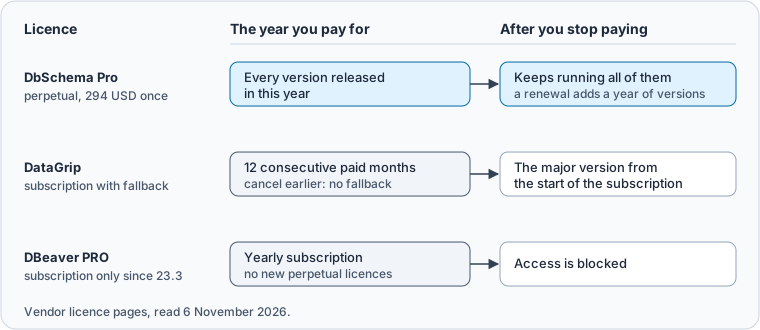
A DbSchema perpetual licence runs every version released within a year of the purchase. It keeps running those versions after the year ends. A renewal adds another year of new versions for 75 USD on Pro and keeps your licence ID. You can skip renewals for a few years and renew when a new version is worth it to you.
DataGrip's fallback works the other way round. JetBrains keeps you on the latest major version that was available when your subscription started. Twelve months of payments buy the version from the start of those months. Cancel or downgrade inside the year and there is no fallback at all.
When is DbSchema's monthly plan the better buy, say for a contractor who needs Pro for a few months? Perpetual or subscription for database tooling works it out.
Several design, compare and management tools still run on Windows only
The cross-platform question matters most for schema design, compare and management tools, because several established ones never left Windows. ER/Studio Data Architect lists Windows 10 and 11 in its technical specifications. Redgate SQL Compare needs Windows 7 or later. And Microsoft says SQL Server Management Studio "is available only for Windows".
On a Mac or a Linux workstation, those tools need a Windows machine or a virtual one. DbSchema runs the same design model on all three systems. A developer on Linux and an architect on Windows open one model file from Git. Database design tools on Linux and SQL and schema tools for macOS go through each platform in detail.
Some query clients also run everywhere and sell one-time licences. They are built to run SQL and browse data, which DbSchema's free Community Edition does as well. DbSchema Pro adds the design work on top. That is the model saved to a file, schema synchronization with migration scripts, HTML5 documentation and the query builder.
One licence follows the developer
A DbSchema licence is per developer and installs on two computers, used one at a time. You register DbSchema with your DbSchema account, so a laptop and a desktop share one seat without a key file passed around.
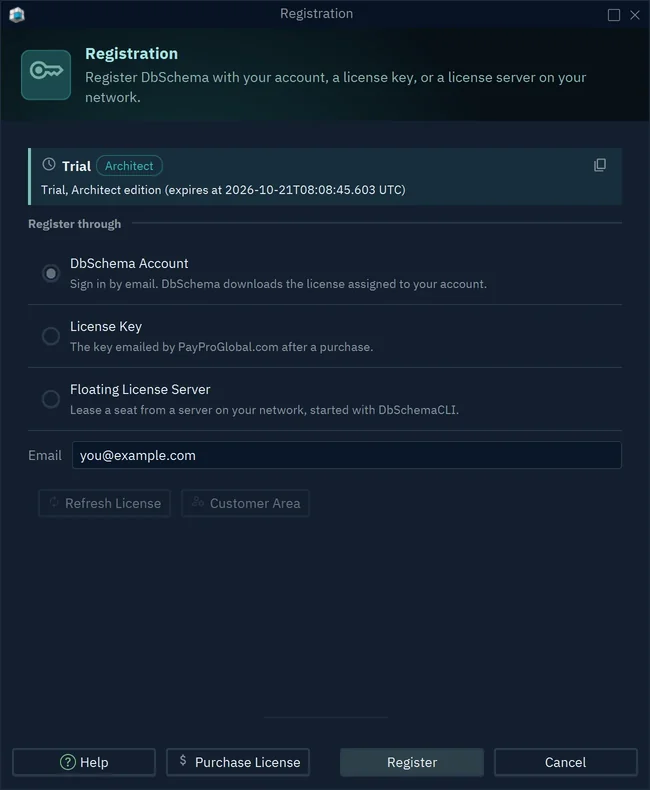
For a team, a floating licence shares a number of seats among everyone on its list. How floating licences work shows when that costs less than one seat each. Personal and educational licences cost less. DbSchema Pro is 196 USD once for personal use and 98 USD for students and teachers.
Download DbSchema for your system and try every feature for 15 days. The design model, schema synchronization, documentation and query builder need DbSchema Pro, which you buy once. Logical and conceptual design needs DbSchema Architect.
Sources
Try DbSchema on Windows, macOS or Linux
Every DbSchema download starts with a 15-day trial of all features. DbSchema Pro is a perpetual licence with optional yearly updates; logical and conceptual design is in DbSchema Architect.