SQL Server MERGE Statement: UPSERT Patterns, WHEN MATCHED, and Safer Alternatives
For a SQL Server developer who loads a staging table from a feed and has to make the target table match it.
On this page
A feed lands in a staging table overnight, and by morning the target table has to match it: changed rows updated, new rows inserted, rows that left the feed deleted. The SQL Server MERGE statement does all three in one statement. It joins the target to the source once, and every row takes the branch that fits how it matched:
MERGE dbo.TargetTable AS T
USING dbo.SourceTable AS S
ON T.BusinessKey = S.BusinessKey
WHEN MATCHED THEN
    UPDATE SET T.ValueCol = S.ValueCol
WHEN NOT MATCHED BY TARGET THEN
    INSERT (BusinessKey, ValueCol)
    VALUES (S.BusinessKey, S.ValueCol)
WHEN NOT MATCHED BY SOURCE THEN
    DELETE;
What MERGE does with each row
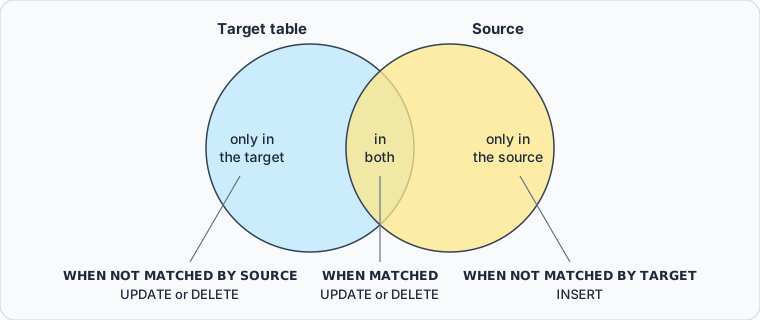
ON pairs each target row with the source row that has the same key. That sorts every row into one of three groups, and each group has a branch of its own:
| Branch | Rows it receives | Actions it allows | Clauses per statement |
|---|---|---|---|
WHEN MATCHED | in both tables | UPDATE or DELETE | up to two |
WHEN NOT MATCHED BY TARGET | only in the source | INSERT | one |
WHEN NOT MATCHED BY SOURCE | only in the target | UPDATE or DELETE | up to two |
The MERGE documentation sets these limits. A statement needs at least one branch, in any order, and WHEN NOT MATCHED on its own means BY TARGET. Where a branch appears twice, the first carries an AND condition, and one of the two updates while the other deletes. Rows whose branch you leave out are left alone: without WHEN NOT MATCHED BY SOURCE, the statement never deletes anything.
Two jobs call for it. A data warehouse load moves rows from an operational database into the warehouse on a schedule, and an incremental update applies a table of changes to the table it describes. MERGE is in every edition of SQL Server 2022, Express included, according to the editions and features list, so a merge job written on a developer machine runs on whichever edition the server has.
Run a MERGE in sqlcmd
sqlcmd runs T-SQL from the command prompt. Connect it to the database you want to change:
sqlcmd -S ServerName -d DatabaseName -U UserName
Leave out -P, and sqlcmd asks for the password instead: the sqlcmd documentation calls a password on the command line insecure. Leave out -U as well, and sqlcmd signs in with your Windows account. If you don't have a server to connect to yet, start with creating a SQL Server database.
Create the two tables:
CREATE TABLE dbo.Products (
    ProductID   int PRIMARY KEY,
    ProductName nvarchar(50) NOT NULL,
    Price       decimal(10,2) NOT NULL
);
CREATE TABLE dbo.UpdatedProducts (
    ProductID   int PRIMARY KEY,
    ProductName nvarchar(50) NOT NULL,
    Price       decimal(10,2) NOT NULL
);
INSERT INTO dbo.Products VALUES
    (1, 'Apple', 1.00),
    (2, 'Banana', 0.50),
    (3, 'Cherry', 2.00);
INSERT INTO dbo.UpdatedProducts VALUES
    (2, 'Banana', 0.60),
    (3, 'Cherry', 2.10),
    (4, 'Durian', 3.00);
GO
sqlcmd sends what you typed to the server when you type GO on a line of its own. UpdatedProducts is the feed: it raised the prices of Banana and Cherry, added Durian, and no longer carries Apple. This MERGE makes Products match it:
MERGE dbo.Products AS T
USING dbo.UpdatedProducts AS S
ON T.ProductID = S.ProductID
WHEN MATCHED THEN
    UPDATE SET T.ProductName = S.ProductName, T.Price = S.Price
WHEN NOT MATCHED BY TARGET THEN
    INSERT (ProductID, ProductName, Price)
    VALUES (S.ProductID, S.ProductName, S.Price)
WHEN NOT MATCHED BY SOURCE THEN
    DELETE;
GO
(4 rows affected)
The count covers the whole statement: Banana and Cherry updated, Apple deleted, Durian inserted.
SELECT ProductID, ProductName, Price FROM dbo.Products ORDER BY ProductID;
| ProductID | ProductName | Price |
|---|---|---|
| 2 | Banana | 0.60 |
| 3 | Cherry | 2.10 |
| 4 | Durian | 3.00 |
Run the same statement twice
Run the same MERGE again, with nothing changed in the feed, and sqlcmd reports (3 rows affected). WHEN MATCHED updates every row that matched, including rows whose values are already equal, and each of those counts as an update. An AND condition on the branch limits it to rows that differ:
MERGE dbo.Products AS T
USING dbo.UpdatedProducts AS S
ON T.ProductID = S.ProductID
WHEN MATCHED AND (T.ProductName <> S.ProductName OR T.Price <> S.Price) THEN
    UPDATE SET T.ProductName = S.ProductName, T.Price = S.Price
WHEN NOT MATCHED BY TARGET THEN
    INSERT (ProductID, ProductName, Price)
    VALUES (S.ProductID, S.ProductName, S.Price)
WHEN NOT MATCHED BY SOURCE THEN
    DELETE;
GO
(0 rows affected)
The comparison works here because both columns are NOT NULL. Where a column allows NULL, <> is never true when either side is NULL, so a value that changed to or from NULL is skipped. AND EXISTS (SELECT S.ProductName, S.Price EXCEPT SELECT T.ProductName, T.Price) catches those changes as well, because EXCEPT treats two NULLs as equal.
Keep the rows the feed doesn't carry
Without the WHEN NOT MATCHED BY SOURCE branch, the first run would have left Apple in place, and the target would only ever grow and change. Write it that way when the feed carries a slice of the table, one supplier's products for example, rather than all of it.
See which row took which action with OUTPUT
(4 rows affected) is one total, and so is @@ROWCOUNT after a MERGE: neither says which row was deleted. The OUTPUT clause returns one row per changed row, and the MERGE documentation calls it "the recommended way to query or count rows affected by a MERGE". Its $action column holds INSERT, UPDATE or DELETE, and the deleted and inserted prefixes give a column's value before and after the change.
The block below puts Products back where it started, then runs the merge with an audit table catching the output:
CREATE TABLE dbo.ProductMergeAudit (
    MergeAction nvarchar(10),
    ProductID   int,
    OldPrice    decimal(10,2) NULL,
    NewPrice    decimal(10,2) NULL
);

DELETE FROM dbo.Products;
INSERT INTO dbo.Products VALUES
    (1, 'Apple', 1.00),
    (2, 'Banana', 0.50),
    (3, 'Cherry', 2.00);

MERGE dbo.Products AS T
USING dbo.UpdatedProducts AS S
ON T.ProductID = S.ProductID
WHEN MATCHED AND (T.ProductName <> S.ProductName OR T.Price <> S.Price) THEN
    UPDATE SET T.ProductName = S.ProductName, T.Price = S.Price
WHEN NOT MATCHED BY TARGET THEN
    INSERT (ProductID, ProductName, Price)
    VALUES (S.ProductID, S.ProductName, S.Price)
WHEN NOT MATCHED BY SOURCE THEN
    DELETE
OUTPUT
    $action,
    COALESCE(inserted.ProductID, deleted.ProductID),
    deleted.Price,
    inserted.Price
INTO dbo.ProductMergeAudit (MergeAction, ProductID, OldPrice, NewPrice);
GO
COALESCE takes the key from whichever side has one, since a deleted row has no inserted values and an inserted row has no deleted ones.
SELECT MergeAction, ProductID, OldPrice, NewPrice
FROM dbo.ProductMergeAudit ORDER BY ProductID;
| MergeAction | ProductID | OldPrice | NewPrice |
|---|---|---|---|
| DELETE | 1 | 1.00 | NULL |
| UPDATE | 2 | 0.50 | 0.60 |
| UPDATE | 3 | 2.00 | 2.10 |
| INSERT | 4 | NULL | 3.00 |
OUTPUT returns its rows in no particular order, which is why the query sorts them. Leave out the INTO line and the same rows come back as a result set, which is handy while you test.
Rules and errors to check before production
A MERGE fails, or does something you didn't mean, when one of these is missed. The error texts are the ones SQL Server 2022 returns.
- A
MERGEhas to end with a semicolon. Without one, SQL Server raises error 10713,A MERGE statement must be terminated by a semi-colon (;). - A target row may match only one source row when its branch updates or deletes it. Two source rows with the same key raise error 8672,
The MERGE statement attempted to UPDATE or DELETE the same row more than once.Group or deduplicate the source first. - The
WHEN NOT MATCHED BY SOURCEbranch can't read source columns, because it has no source row.SET T.Price = S.Pricethere fails with error 4104,The multi-part identifier "S.Price" could not be bound.A bare column name that only the source has fails with error 207 instead. - The statement needs
SELECTpermission on the source andINSERT,UPDATEorDELETEpermission on the target.
Keep ON for the match alone
The documentation warns against narrowing the target rows in ON to make the statement faster, because it "can return unexpected and incorrect results". The example shows how. Say you want to touch only products priced over 1.00, and write that into ON:
MERGE dbo.Products AS T
USING dbo.UpdatedProducts AS S
ON T.ProductID = S.ProductID AND T.Price > 1.00
WHEN MATCHED THEN
    UPDATE SET T.ProductName = S.ProductName, T.Price = S.Price
WHEN NOT MATCHED BY TARGET THEN
    INSERT (ProductID, ProductName, Price)
    VALUES (S.ProductID, S.ProductName, S.Price);
Violation of PRIMARY KEY constraint 'PK__Products__B40CC6EDEDA941D8'. Cannot insert duplicate key in object 'dbo.Products'. The duplicate key value is (2).
Banana costs 0.60, so the filter takes it out of the match. Its source row then counts as not matched by the target, and MERGE tries to insert product 2 a second time:
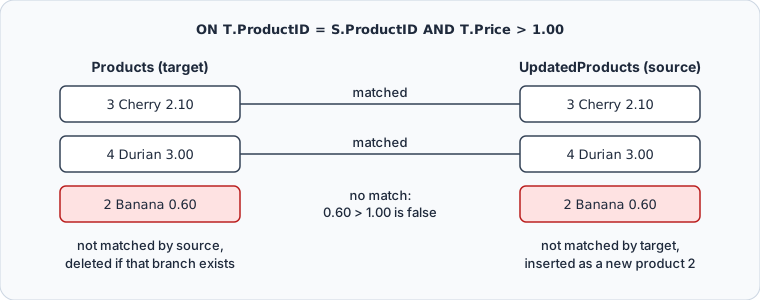
Add a WHEN NOT MATCHED BY SOURCE THEN DELETE branch and the same filter raises no error: MERGE deletes Banana and inserts it again. The table ends up right, while OUTPUT, an audit table and any trigger record a delete and an insert for a product that never left the feed. Put the narrowing condition on the branch instead, as WHEN MATCHED AND T.Price > 1.00.
What MERGE does to triggers
SQL Server fires the AFTER triggers on the target for every insert, update and delete the MERGE performs, and doesn't guarantee which action's triggers fire first. @@ROWCOUNT inside any of them reports the total for the whole statement. An AFTER INSERT trigger that logged @@ROWCOUNT during the first merge above, which inserted only Durian, logged 4. So a trigger that branches on @@ROWCOUNT behaves differently under MERGE than under a plain INSERT. And where the target has an INSTEAD OF trigger for one of the actions in the statement, it needs one for every action the statement specifies.
MERGE or separate statements
The same change can be written three ways:
| Pattern | Statements | Removes rows the source dropped | Fits |
|---|---|---|---|
MERGE | one | yes, with the source branch | staging to target sync |
UPDATE, then INSERT if no row changed | two | no | a single key on a hot path |
separate INSERT, UPDATE and DELETE | three | yes | large batches under heavy concurrency |
MERGE states the join once, the three actions read together, and the delete is a clause rather than a fourth statement to keep in step. The documentation adds that one statement can process the source and target data fewer times than separate statements would, provided the join is indexed: it recommends an index on the join columns of both tables, unique where possible.
The cost is locking. MERGE locks differently from separate statements, and the documentation says that at scale it "might introduce complicated concurrency issues". Where heavy concurrency is expected, separate INSERT, UPDATE and DELETE logic "might perform better, with less blocking". A nightly load that runs while nothing else writes to the table suits MERGE. A table that many sessions write to at once is the case to test under load before it reaches production.
Upsert one row
For a single key, the source can be one row of values rather than a table:
MERGE dbo.CustomerBalances WITH (HOLDLOCK) AS T
USING (VALUES (@CustomerID, @Balance)) AS S (CustomerID, Balance)
ON T.CustomerID = S.CustomerID
WHEN MATCHED THEN
    UPDATE SET T.Balance = S.Balance
WHEN NOT MATCHED THEN
    INSERT (CustomerID, Balance) VALUES (S.CustomerID, S.Balance);
HOLDLOCK matters when many sessions upsert the same keys. It's a synonym for the SERIALIZABLE isolation level, and the documentation names it as the way to prevent unique key violations where the same keys are both inserted and updated concurrently. Without it, two sessions can both find no row for a key and both try to insert it.
The explicit form does the same in two statements that a reviewer can check one at a time, and it names the locks itself:
BEGIN TRANSACTION;

UPDATE dbo.CustomerBalances WITH (UPDLOCK, HOLDLOCK)
SET Balance = @Balance
WHERE CustomerID = @CustomerID;

IF @@ROWCOUNT = 0
BEGIN
    INSERT INTO dbo.CustomerBalances (CustomerID, Balance)
    VALUES (@CustomerID, @Balance);
END;

COMMIT TRANSACTION;
Either way, the first call for a customer inserts the row and every later call updates it. SQL Server Transactions covers the transaction around it, and Use MERGE to Update Tables a MERGE that only updates.
Run and check a MERGE in DbSchema



A merge job touches two or three tables at once, and the statement doesn't show their columns. DbSchema connects to SQL Server, reverse-engineers the schema and draws the tables on a diagram, where you can check that the columns you copy from UpdatedProducts line up with Products before the statement runs.
- On the Welcome Screen, choose Connect to Database, then SQL Server in the Choose Your Database list. DbSchema downloads the SQL Server JDBC driver by itself.
- Fill in the server, the database user and the password in the Connection Dialog, and connect. DbSchema reverse-engineers the tables and lays them out as a diagram.
- Open the SQL Editor from the Editors menu or the toolbar, and write the
MERGE. - Click Execute Query. It runs the statement at the cursor, and the semicolon that
MERGErequires marks where the statement ends. - Check the result with a
SELECT, then click Commit to make the change permanent, or Rollback to undo it.

The SQL History pane records every statement executed in the current session, and clicking an entry loads it back into the editor, so a merge you ran earlier is one click from running again.
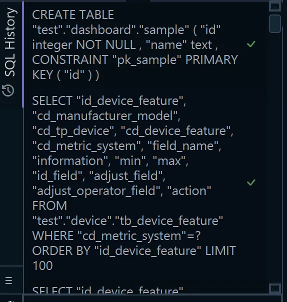
The MERGE changes rows in the live database only. The diagram belongs to DbSchema's design model, which holds the structure and can be saved as a .dbs file, and no data change reaches it. A table you create with SQL, such as the audit table above, reaches the model when you run Schema → Refresh Schema from Database. The other direction, a table you draw in the model, reaches the database through Schema → Synchronize Model with Database, which generates the statements for you to review.
Decide first whether you are reconciling a set or updating a row, then write MERGE or the explicit transaction, and give whichever goes to production an OUTPUT clause. To try the statements above against your own tables, download DbSchema at https://dbschema.com/download.html, connect to your SQL Server database and open the SQL Editor. Connecting, reverse-engineering, the diagrams and the SQL Editor are in the free Community Edition, while saving the design as a .dbs file and schema synchronization are in Pro.









