SQL Server Transactions Guide with COMMIT, ROLLBACK, and SAVEPOINT
For the person running a multi-statement change by hand against SQL Server and needing all of it to land or none of it.
On this page
Two inserts have to land together, and the second one fails. Unless you opened a transaction first, the first insert is already permanent: in autocommit mode, the default, SQL Server commits every statement on its own as soon as it completes. Put the statements between BEGIN TRANSACTION and COMMIT TRANSACTION, undo them with ROLLBACK TRANSACTION, and mark a point to return to with SAVE TRANSACTION, which is how SQL Server spells a savepoint:
| Statement | What it does | @@TRANCOUNT afterwards |
|---|---|---|
BEGIN TRANSACTION | starts a transaction | 1 more |
COMMIT TRANSACTION | makes the changes permanent when @@TRANCOUNT is 1 | 1 less |
ROLLBACK TRANSACTION | undoes every change since the first BEGIN TRANSACTION | 0 |
SAVE TRANSACTION name | marks a savepoint inside the transaction | unchanged |
ROLLBACK TRANSACTION name | undoes the changes made after that savepoint | unchanged |
@@TRANCOUNT counts the BEGIN TRANSACTION statements still open on your connection. T-SQL has no SAVEPOINT or ROLLBACK TO statement: its transaction statements are the ones above, plus COMMIT WORK, ROLLBACK WORK and BEGIN DISTRIBUTED TRANSACTION. The examples follow the SQL Server 2022 documentation.
Run a transaction in sqlcmd
The examples need a SQL Server instance, a database to work in, and the sqlcmd utility. SQL Server: How to create a database covers the installation, the first connection and the database.
-
Connect to the instance and the database. Leave the password out, and sqlcmd asks for it: the sqlcmd documentation calls a password after
-Pinsecure.sqlcmd -S <server_name> -d <database_name> -U <username> -
Type a block of statements, then
GOon a line of its own. sqlcmd sends what you typed to the server only when it readsGO.
Every example uses one table. Create it with three orders, and check what it holds:
CREATE TABLE dbo.Orders (
    OrderID    int  NOT NULL CONSTRAINT PK_Orders PRIMARY KEY,
    CustomerID int  NOT NULL,
    OrderDate  date NOT NULL
);

INSERT INTO dbo.Orders (OrderID, CustomerID, OrderDate)
VALUES (1, 101, '2023-01-01'),
       (2, 102, '2023-01-03'),
       (3, 103, '2023-01-05');

SELECT OrderID, CustomerID, OrderDate FROM dbo.Orders ORDER BY OrderID;
GO
| OrderID | CustomerID | OrderDate |
|---|---|---|
| 1 | 101 | 2023-01-01 |
| 2 | 102 | 2023-01-03 |
| 3 | 103 | 2023-01-05 |
The blocks below build on each other, so run them in order. For the other options a table can have, see SQL Server: How to create a table.
Commit the insert
BEGIN TRANSACTION;
INSERT INTO dbo.Orders (OrderID, CustomerID, OrderDate) VALUES (4, 104, '2023-01-07');
COMMIT TRANSACTION;

SELECT OrderID, CustomerID, OrderDate FROM dbo.Orders ORDER BY OrderID;
GO
| OrderID | CustomerID | OrderDate |
|---|---|---|
| 1 | 101 | 2023-01-01 |
| 2 | 102 | 2023-01-03 |
| 3 | 103 | 2023-01-05 |
| 4 | 104 | 2023-01-07 |
Roll back the insert
BEGIN TRANSACTION;
INSERT INTO dbo.Orders (OrderID, CustomerID, OrderDate) VALUES (5, 105, '2023-01-09');
ROLLBACK TRANSACTION;

SELECT OrderID, CustomerID, OrderDate FROM dbo.Orders ORDER BY OrderID;
GO
Order 5 never reaches the table:
| OrderID | CustomerID | OrderDate |
|---|---|---|
| 1 | 101 | 2023-01-01 |
| 2 | 102 | 2023-01-03 |
| 3 | 103 | 2023-01-05 |
| 4 | 104 | 2023-01-07 |
The INSERT did run. ROLLBACK TRANSACTION erased its row, along with everything else the transaction had done since BEGIN TRANSACTION.
Roll back to a savepoint
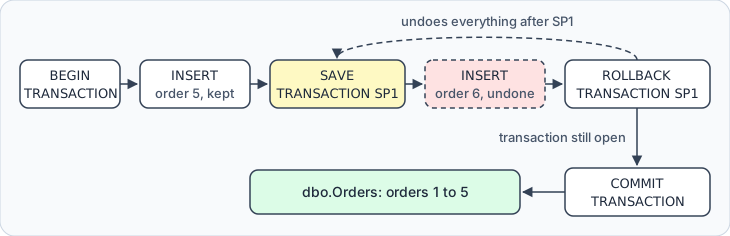
BEGIN TRANSACTION;
INSERT INTO dbo.Orders (OrderID, CustomerID, OrderDate) VALUES (5, 105, '2023-01-09');
SAVE TRANSACTION SP1;
INSERT INTO dbo.Orders (OrderID, CustomerID, OrderDate) VALUES (6, 106, '2023-01-11');
ROLLBACK TRANSACTION SP1;
COMMIT TRANSACTION;

SELECT OrderID, CustomerID, OrderDate FROM dbo.Orders ORDER BY OrderID;
GO
Order 5 is in, and order 6 is not:
| OrderID | CustomerID | OrderDate |
|---|---|---|
| 1 | 101 | 2023-01-01 |
| 2 | 102 | 2023-01-03 |
| 3 | 103 | 2023-01-05 |
| 4 | 104 | 2023-01-07 |
| 5 | 105 | 2023-01-09 |
ROLLBACK TRANSACTION SP1 undid only what came after the savepoint, the insert of order 6. It also left the transaction open, so the COMMIT TRANSACTION after it still had something to commit: order 5.
What a transaction guarantees, and when one starts
Microsoft's transaction guide defines a transaction as a sequence of operations performed as a single logical unit of work, and it qualifies only if it has the four ACID properties:
| Property | What SQL Server guarantees |
|---|---|
| Atomicity | all of the transaction's changes are made, or none of them |
| Consistency | at the end, every rule applied and every index correct |
| Isolation | others see your data before your transaction or after it, never in between |
| Durability | once a fully durable transaction completes, its changes survive a system failure |
"Fully durable" is there because SQL Server also offers delayed durability, where a commit returns before its log record reaches the disk.
A transaction starts in one of three ways, depending on the mode the connection is in:
| Mode | Where a transaction starts | Where it ends |
|---|---|---|
| Autocommit, the default | at every statement | when that statement completes: committed, or rolled back if it fails |
| Explicit | at BEGIN TRANSACTION | at COMMIT TRANSACTION or ROLLBACK TRANSACTION |
Implicit, after SET IMPLICIT_TRANSACTIONS ON | at the first listed statement, such as INSERT, when none is open | at COMMIT TRANSACTION or ROLLBACK TRANSACTION |
When an explicit transaction ends, the connection goes back to the mode it was in before, usually autocommit. Implicit mode is off until something turns it on: SET IMPLICIT_TRANSACTIONS ON, SET ANSI_DEFAULTS ON, or a driver, when the application turns auto-commit off. The DbSchema section below shows what that changes.
When a statement inside the transaction fails
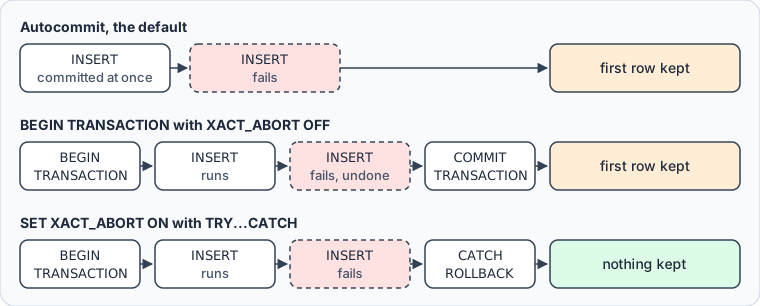
BEGIN TRANSACTION alone doesn't undo the statements around a failed one. With the default setting, SET XACT_ABORT OFF, some errors roll back only the statement that raised them and leave the transaction open, and a duplicate key is one of them. When the block then reaches COMMIT TRANSACTION, the statements that succeeded are committed:
BEGIN TRANSACTION;
INSERT INTO dbo.Orders (OrderID, CustomerID, OrderDate) VALUES (6, 106, '2023-01-11');
INSERT INTO dbo.Orders (OrderID, CustomerID, OrderDate) VALUES (3, 107, '2023-01-13');
COMMIT TRANSACTION;

SELECT OrderID, CustomerID, OrderDate FROM dbo.Orders ORDER BY OrderID;
GO
The second INSERT fails with error 2627:
Violation of PRIMARY KEY constraint 'PK_Orders'. Cannot insert duplicate key in object 'dbo.Orders'. The duplicate key value is (3).
The batch runs on, and COMMIT TRANSACTION keeps order 6:
| OrderID | CustomerID | OrderDate |
|---|---|---|
| 1 | 101 | 2023-01-01 |
| 2 | 102 | 2023-01-03 |
| 3 | 103 | 2023-01-05 |
| 4 | 104 | 2023-01-07 |
| 5 | 105 | 2023-01-09 |
| 6 | 106 | 2023-01-11 |
With XACT_ABORT on, a run-time error rolls back the whole transaction instead. Put the block inside TRY...CATCH as well, so that the error hands control to code you wrote:
SET XACT_ABORT ON;

BEGIN TRY
    BEGIN TRANSACTION;
    INSERT INTO dbo.Orders (OrderID, CustomerID, OrderDate) VALUES (7, 107, '2023-01-13');
    INSERT INTO dbo.Orders (OrderID, CustomerID, OrderDate) VALUES (3, 108, '2023-01-15');
    COMMIT TRANSACTION;
END TRY
BEGIN CATCH
    IF @@TRANCOUNT > 0
        ROLLBACK TRANSACTION;
    THROW;
END CATCH;
GO
The duplicate key sends control to the CATCH block before the COMMIT. ROLLBACK TRANSACTION removes order 7, and THROW raises error 2627 again, so sqlcmd still prints it and the table keeps the six orders it had.
With XACT_ABORT on, the error leaves the transaction uncommittable: the only thing it can still do is roll back. The @@TRANCOUNT check covers an error raised before BEGIN TRANSACTION, where no transaction is open and a ROLLBACK would fail with error 3903. Without THROW, the batch would finish as if it had succeeded; and the statement before THROW has to end with a semicolon. SET XACT_ABORT ON stays in force until the session ends.
What a second BEGIN TRANSACTION does
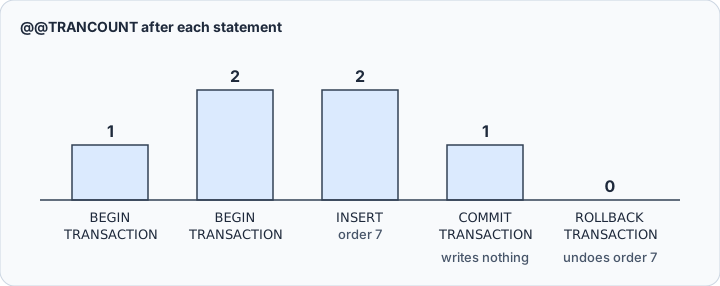
A BEGIN TRANSACTION inside an open transaction doesn't start a transaction of its own. It raises @@TRANCOUNT to 2, and SQL Server still has one transaction:
BEGIN TRANSACTION;
BEGIN TRANSACTION;
INSERT INTO dbo.Orders (OrderID, CustomerID, OrderDate) VALUES (7, 107, '2023-01-13');
COMMIT TRANSACTION;
SELECT @@TRANCOUNT AS open_transactions;
ROLLBACK TRANSACTION;

SELECT OrderID FROM dbo.Orders WHERE OrderID = 7;
GO
The inner COMMIT TRANSACTION only lowered the count:
| open_transactions |
|---|
| 1 |
The ROLLBACK TRANSACTION then undid the insert, and the last SELECT returns no row. Nothing is written until a commit brings @@TRANCOUNT to 0, and a rollback without a savepoint name always goes back to the outermost BEGIN TRANSACTION. Names don't change that: COMMIT TRANSACTION ignores the name you give it, and ROLLBACK TRANSACTION accepts only the name of the outermost transaction or of a savepoint.
So a savepoint is the only way to undo part of a transaction. A SAVE TRANSACTION name follows the rules for identifiers, is limited to 32 characters, and is case sensitive even on an instance that isn't. A name can repeat inside one transaction, and a rollback to it returns to the most recent SAVE TRANSACTION that used it. Rolling back to a savepoint releases the locks taken after it, except escalated and converted locks, which stay as they are.
What an open transaction costs, and what it needs
The cost is the locks. Depending on the isolation level, the rows your statements touched stay locked until the transaction commits or rolls back. On SQL Server the default is READ COMMITTED with the READ_COMMITTED_SNAPSHOT database option off, and there a reader waits for your uncommitted rows. You can watch it with two sqlcmd sessions. In the first, insert a row and leave the transaction open:
BEGIN TRANSACTION;
INSERT INTO dbo.Orders (OrderID, CustomerID, OrderDate) VALUES (7, 107, '2023-01-13');
GO
In the second, read the table:
SELECT OrderID FROM dbo.Orders ORDER BY OrderID;
GO
The second session waits. It returns orders 1 to 6 once the first session runs ROLLBACK TRANSACTION and GO. Azure SQL Database turns READ_COMMITTED_SNAPSHOT on by default, and there the reader gets the committed rows at once.
A transaction left open also holds up transaction log truncation and version store cleanup. Microsoft's advice follows from that: get any input you need from a user before BEGIN TRANSACTION, never while the transaction is open. If the connection breaks with a transaction open, SQL Server rolls it back.
The transaction statements themselves need only membership in the public role, which every database user has. The statements inside need their usual permissions, so the inserts above need INSERT on dbo.Orders. Two restrictions are worth knowing before you rely on a rollback. It doesn't erase changes to local variables or table variables, so a counter kept in a variable keeps its value. And SAVE TRANSACTION is refused in a distributed transaction, as SQL Server distributed transactions shows.
Run the same transaction in DbSchema



DbSchema runs the same statements from its SQL Editor, with a Commit and a Rollback button in the toolbar.
- Start DbSchema, choose Connect to Database, and pick SQL Server. DbSchema opens the Connection Dialog, where you enter the server, the database and your login.
- Open the SQL Editor from the Editors menu.
- Open the Run Script dropdown and clear Auto-Commit, which commits after every statement of the script. Clear Ignore Errors as well, so that the script stops at the first error.
- Type the statements without the
GOline, which is a sqlcmd command rather than T-SQL. - Click Run Script, which executes the whole editor content, rather than Execute Query, which runs only the statement at the cursor.
- Press Commit to make the changes permanent, or Rollback to undo them.
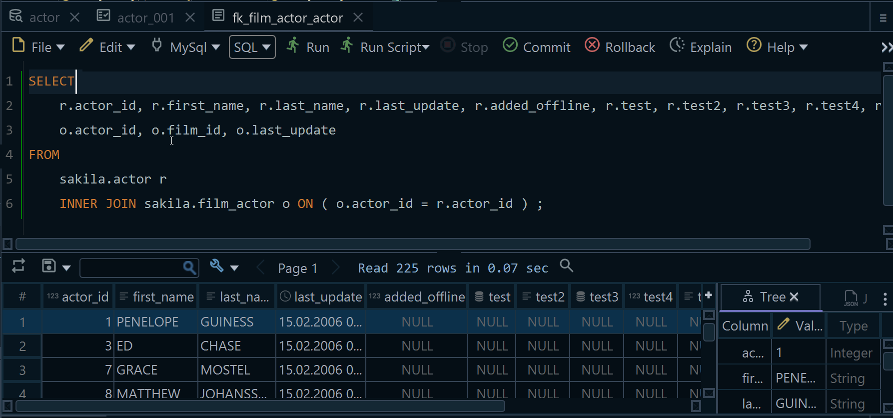
On a SQL Server connection, DbSchema turns the JDBC driver's auto-commit off by default, and the driver then runs the session in implicit transaction mode: the first INSERT, UPDATE or DELETE opens a transaction, and it stays open until you press Commit or Rollback. A script that brings its own BEGIN TRANSACTION and COMMIT TRANSACTION still leaves that outer transaction open for the Commit button. When a statement fails, DbSchema rolls back the open transaction, the statements before the failure included. Before you move on, run SELECT @@TRANCOUNT;: anything above 0 is a transaction that still holds its locks.
The statements change the live database; DbSchema's design model and its diagrams change only when you edit them.
Download DbSchema from https://dbschema.com/download.html, connect to your SQL Server database, and run the blocks above from the SQL Editor with Commit and Rollback at hand. Connecting and the SQL Editor are part of the free Community Edition.
Sources
- Microsoft Learn: BEGIN TRANSACTION
- Microsoft Learn: COMMIT TRANSACTION
- Microsoft Learn: ROLLBACK TRANSACTION
- Microsoft Learn: SAVE TRANSACTION
- Microsoft Learn: @@TRANCOUNT
- Microsoft Learn: Transactions (Transact-SQL)
- Microsoft Learn: SET IMPLICIT_TRANSACTIONS
- Microsoft Learn: SET XACT_ABORT
- Microsoft Learn: TRY...CATCH
- Microsoft Learn: THROW
- Microsoft Learn: Database engine errors 2000 to 2999
- Microsoft Learn: Database engine errors 3000 to 3999
- Microsoft Learn: Transaction locking and row versioning guide
- Microsoft Learn: sqlcmd utility
- Microsoft Learn: SQL Server utilities statements, GO
- DbSchema: Connection Dialog
- DbSchema: SQL Editor









