SQL Server Distributed Transactions Guide with sqlcmd and DbSchema
For SQL Server developers who have to keep two instances in step inside one transaction, and want to know what MS DTC does and what T-SQL refuses.
On this page
A price change has to land in two databases on two SQL Server instances, and half of it landing is worse than none of it landing. BEGIN DISTRIBUTED TRANSACTION starts a transaction that spans instances, and the Microsoft Distributed Transaction Coordinator, MS DTC, commits it on every instance or on none. Put SET XACT_ABORT ON in front of it, or SQL Server refuses to write through the linked server inside the transaction:
SET XACT_ABORT ON;

BEGIN DISTRIBUTED TRANSACTION;
-- statements against local tables
-- statements against linked_server.database.schema.table
COMMIT TRANSACTION;
What makes a transaction distributed
A transaction is distributed when it changes data on more than one instance. It stays one flat transaction however many instances it reaches: every change commits or every change rolls back, so the instances never disagree about whether the price went up.
The instance that runs BEGIN DISTRIBUTED TRANSACTION is the originator, and it controls how the transaction ends. The statement takes an optional name of up to 32 characters, which is how the transaction shows up in the MS DTC utilities. When the session issues COMMIT TRANSACTION, the originator asks MS DTC to finish the job, and MS DTC uses a two-phase commit on every instance involved:
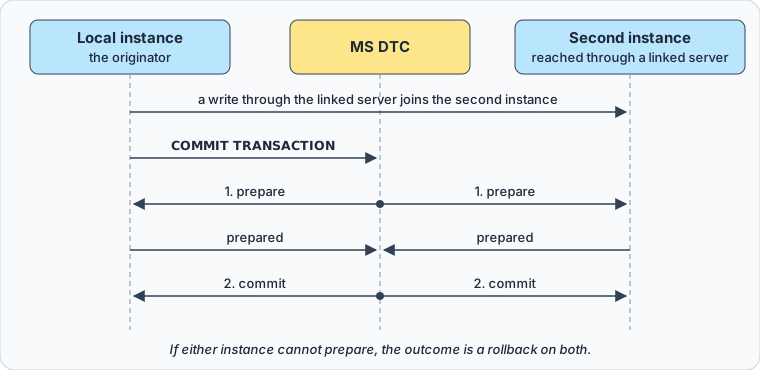
In the first phase each instance says whether it can commit. MS DTC sends the commit only when every instance has prepared; if one can't, the change rolls back everywhere.
Two databases on the same instance need none of this. Names with three parts, database.schema.table, stay on one instance, and the same COMMIT page says that such a transaction commits through the instance's own internal two-phase commit, so a plain BEGIN TRANSACTION covers it. MS DTC comes in when a name gets a fourth part, a linked server, which points at another instance.
A flat transaction across two instances
The examples run on SQL Server 2022. On the local instance, create a linked server for the second instance. From SQL Server 2022 on, sp_addlinkedserver needs a provider name, and MSOLEDBSQL is the recommended one:
EXEC sp_addlinkedserver
    @server     = N'reporting01',
    @srvproduct = N'',
    @provider   = N'MSOLEDBSQL',
    @datasrc    = N'reporting-host';
@datasrc is the network name of the second instance. Each login connects to it with its own credentials, unless sp_addlinkedsrvlogin maps it to another.
Both machines also need MS DTC running with network access enabled, names that resolve in both directions, and the RPC ports open in any firewall between them. When one of those is missing, the transaction stops with error 7391: the provider "was unable to begin a distributed transaction".
The local instance holds a product catalog in a database named catalog:
CREATE DATABASE catalog;
GO
USE catalog;

CREATE TABLE dbo.Products (
    ProductID int PRIMARY KEY,
    Category  nvarchar(30) NOT NULL,
    Price     decimal(10, 2) NOT NULL
);

INSERT INTO dbo.Products VALUES
    (1, 'Electronics', 100.00),
    (2, 'Apparel', 50.00),
    (3, 'Electronics', 200.00);
The second instance holds sales totals in a database named archive:
CREATE DATABASE archive;
GO
USE archive;

CREATE TABLE dbo.Sales (
    SalesID         int PRIMARY KEY,
    ProductCategory nvarchar(30) NOT NULL,
    TotalAmount     decimal(10, 2) NOT NULL
);

INSERT INTO dbo.Sales VALUES
    (1, 'Electronics', 100.00),
    (2, 'Apparel', 50.00),
    (3, 'Electronics', 200.00);
Raising electronics prices by ten percent has to happen in both places or in neither. The second UPDATE uses the four-part name of the remote table, and that distributed query pulls reporting01 into the transaction:
SET XACT_ABORT ON;

BEGIN DISTRIBUTED TRANSACTION;

UPDATE dbo.Products
SET Price = Price * 1.10
WHERE Category = 'Electronics';

UPDATE reporting01.archive.dbo.Sales
SET TotalAmount = TotalAmount * 1.10
WHERE ProductCategory = 'Electronics';

COMMIT TRANSACTION;
After the commit, the catalog reads:
SELECT ProductID, Category, Price FROM dbo.Products ORDER BY ProductID;
| ProductID | Category | Price |
|---|---|---|
| 1 | Electronics | 110.00 |
| 2 | Apparel | 50.00 |
| 3 | Electronics | 220.00 |
The archive on the other instance matches it row for row:
SELECT SalesID, ProductCategory, TotalAmount FROM reporting01.archive.dbo.Sales ORDER BY SalesID;
| SalesID | ProductCategory | TotalAmount |
|---|---|---|
| 1 | Electronics | 110.00 |
| 2 | Apparel | 50.00 |
| 3 | Electronics | 220.00 |
What happens when one side fails
Without SET XACT_ABORT ON, the block never reaches its commit. The first UPDATE runs, and the second stops with error 7395:
Unable to start a nested transaction for OLE DB provider "MSOLEDBSQL" for linked server "reporting01". A nested transaction was required because the XACT_ABORT option was set to OFF.
SQL Server then rolls back the whole transaction, the catalog's change included. The SET XACT_ABORT page gives the rule: the option must be on for data changes in a transaction against most OLE DB providers, SQL Server included.
With the option on, a failure on either instance undoes both. To see it, break the second statement on purpose:
SET XACT_ABORT ON;

BEGIN DISTRIBUTED TRANSACTION;

UPDATE dbo.Products
SET Price = Price * 1.10
WHERE Category = 'Electronics';

UPDATE reporting01.archive.dbo.Sales
SET TotalAmount = TotalAmount / 0
WHERE ProductCategory = 'Electronics';

COMMIT TRANSACTION;
reporting01 answers with error 8134, "Divide by zero error encountered.", and the transaction ends there. The first UPDATE had already raised the catalog's prices, and the raise is gone: Products still holds 110.00, 50.00 and 220.00, and @@TRANCOUNT is 0.
How a second instance joins
The main way in is the one above: a session already inside the distributed transaction runs a distributed query against a linked server. A remote stored procedure call does the same. Enlistment travels, so if the originator calls a procedure on a second server and that procedure queries a third, all three are in the transaction, with the originator in charge. A session has no transaction object to hand to another session, so being the target of a query or a call is the only way in.
A local transaction is promoted to a distributed one at its first write through a linked server, when the provider supports it; otherwise only reads are allowed in that query. The DTC unit of work in sys.dm_tran_active_transactions shows the moment it happens:
SET XACT_ABORT ON;
BEGIN TRANSACTION;

UPDATE dbo.Products SET Price = Price WHERE ProductID = 2;
SELECT transaction_uow FROM sys.dm_tran_active_transactions
WHERE transaction_id = CURRENT_TRANSACTION_ID();

UPDATE reporting01.archive.dbo.Sales SET TotalAmount = TotalAmount WHERE SalesID = 2;
SELECT transaction_uow FROM sys.dm_tran_active_transactions
WHERE transaction_id = CURRENT_TRANSACTION_ID();

COMMIT TRANSACTION;
The first SELECT returns NULL, and the second a GUID such as B011D777-69BF-443C-BBA1-4472806D0EDF: from that write on, MS DTC coordinates the transaction. After BEGIN DISTRIBUTED TRANSACTION the GUID is there at once, and in a transaction that touches two databases on one instance it stays NULL.
Remote procedure calls have their own switch, sp_configure 'remote proc trans' with the session-level SET REMOTE_PROC_TRANSACTIONS. It applies only to remote servers added with sp_addserver, not to linked servers, and the SET option will be removed in a future version, so new code should call the linked server.
What T-SQL refuses inside a distributed transaction
Running the statements takes little: BEGIN DISTRIBUTED TRANSACTION, COMMIT TRANSACTION, ROLLBACK TRANSACTION and SAVE TRANSACTION each require only membership in the public role. The tables need the usual permissions on each instance, and on the second instance for the login that the linked server connects with.
The refusals are what catch scripts. Each row was run on SQL Server 2022 inside a distributed transaction:
| statement or setting | result |
|---|---|
SAVE TRANSACTION sp1 | error 627 |
SET TRANSACTION ISOLATION LEVEL SNAPSHOT, then BEGIN DISTRIBUTED TRANSACTION | error 3996 |
a write through a linked server with XACT_ABORT off | error 7395 |
a second BEGIN DISTRIBUTED TRANSACTION | accepted, @@TRANCOUNT 2 |
BEGIN DISTRIBUTED TRANSACTION in a stored procedure | accepted |
BEGIN DISTRIBUTED TRANSACTION in an AFTER trigger | accepted, @@TRANCOUNT 2 |
Error 627 reads "Cannot use SAVE TRANSACTION within a distributed transaction.", and SAVE TRANSACTION is refused the same way in a local transaction that was promoted. Error 3996 says snapshot isolation "is not supported for distributed transaction", so a workload built on snapshot isolation needs another level for its writes across instances. A loopback linked server, one that points back at its own instance, isn't supported in distributed transactions either.
A trigger already runs inside the transaction of the statement that fired it, which is why its BEGIN counts to 2. Nesting never gives you an inner transaction of your own, because the Database Engine has none: committing an inner transaction only lowers @@TRANCOUNT, and rolling one back rolls back the outer transaction unless the ROLLBACK names a savepoint, which a distributed transaction can't have. To undo part of the work on one instance, write the compensating UPDATE into the transaction before the commit.
Run the block in sqlcmd and in DbSchema
If SQL Server isn't installed yet, or you haven't connected to it before, the SQL Server CREATE DATABASE guide covers both.
In sqlcmd
- Open a command prompt.
- Connect to the originating instance with the command below. Leave
-Pout, and sqlcmd asks for the password. - Paste the whole block, from
SET XACT_ABORT ONtoCOMMIT TRANSACTION. - Type
GOon a line of its own to send it.
sqlcmd -S localhost -d catalog -U sa
Send the block as one batch. The transaction lives in the session, so a batch that ends after the first UPDATE leaves the transaction open and its rows locked until you commit or roll back.
In DbSchema
DbSchema runs the block as a script on the instance you connect to, and the linked server carries the second UPDATE to reporting01.
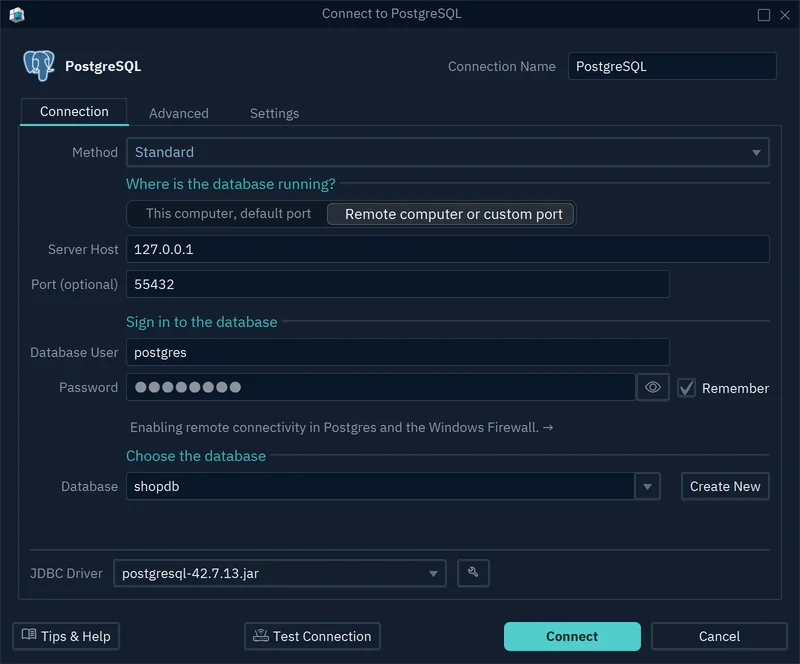
- On the Welcome Screen, choose Connect to Database, then SQL Server under Choose Your Database.
- In the Connection Dialog, enter the host, port, Database User, Password and the
catalogdatabase, and click Connect. DbSchema reverse-engineerscatalogand drawsProductson a diagram. - Open the SQL Editor from the Editors menu and paste the block.
- Run it with Run Script, which executes the whole editor content, not Execute Query, which runs only the statement at the cursor. Leave Ignore Errors off in the Run Script dropdown, so the script stops at the first error instead of walking past a failed
UPDATEinto the commit. - Press Commit in the toolbar, then run
SELECT @@TRANCOUNT;and expect 0.
The SQL Editor holds DML until you press Commit, as the SQL Editor page describes, which is why step 5 comes after the script's own COMMIT TRANSACTION. A 0 from @@TRANCOUNT means nothing is left open on either instance.

The two UPDATE statements change the live databases on both instances. The diagram and the editor belong to DbSchema's design model, which changes only when you edit it there.
Download DbSchema from https://dbschema.com/download.html, connect to the instance that starts your distributed transactions, and run the block from the SQL Editor with Commit at hand. Connecting, reverse-engineering, the diagrams and the SQL Editor are all in the free Community Edition.
Sources
- BEGIN DISTRIBUTED TRANSACTION (Transact-SQL)
- COMMIT TRANSACTION (Transact-SQL)
- sp_addlinkedserver (Transact-SQL)
- MSSQLSERVER_7391
- SET XACT_ABORT (Transact-SQL)
- sys.dm_tran_active_transactions (Transact-SQL)
- SET REMOTE_PROC_TRANSACTIONS (Transact-SQL)
- SAVE TRANSACTION (Transact-SQL)
- Linked servers (Database Engine)
- ROLLBACK TRANSACTION (Transact-SQL)
- sqlcmd utility
- DbSchema SQL Editor









