SQL Server CREATE TABLE: Syntax, Constraints, Temp Tables, and Examples
For anyone creating their first SQL Server tables, in sqlcmd or in DbSchema; every clause, data type and constraint is explained where it appears.
On this page
You have data to store, and in SQL Server that starts with one CREATE TABLE statement: the table's name, then each column with its data type and whether it may be empty, then the rules every row has to follow. This statement creates a table with three columns in the dbo schema of the current database:
CREATE TABLE dbo.Students (
    StudentID   int          NOT NULL PRIMARY KEY,
    StudentName nvarchar(50) NOT NULL,
    StudentAge  int          NULL
);
Run it in sqlcmd, in any SQL editor connected to the database, or let DbSchema write it for you from a diagram. The statements on this page follow the SQL Server 2022 documentation.
How a CREATE TABLE statement is put together
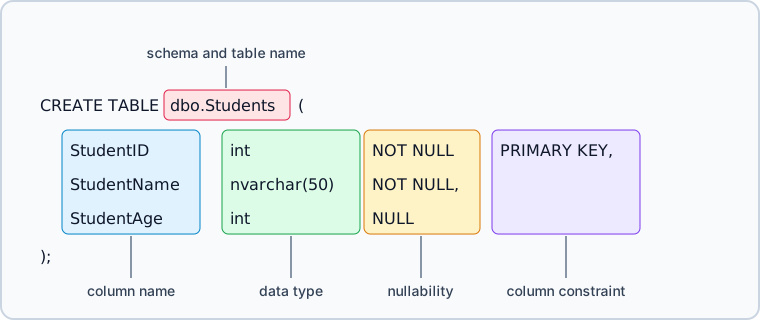
Every line inside the parentheses is either a column or a rule about columns. A column has a name, a data type and a nullability. A rule is a constraint. You write it beside its column when it applies to that column alone, and after the last column when it covers several:
CREATE TABLE [[database_name.]schema_name.]table_name (
    column_name data_type [NULL | NOT NULL] [column_constraint],
    column_name data_type [NULL | NOT NULL] [column_constraint],
    [table_constraint]
);
A name of two parts, such as dbo.Students, is the schema and the table. A three-part name puts the database in front, and SQL Server creates the table in that database instead of the current one. Leave out the schema and the table goes into your default schema. The table name itself can be up to 128 characters long.
Write NULL or NOT NULL on every column. When a column says neither, SQL Server decides from session and database settings such as ANSI_NULL_DFLT_ON, so the same script can create a nullable column on one connection and a required one on another. The CREATE TABLE reference recommends stating it explicitly for that reason.
Name your constraints while you are at it. A constraint without a name gets one that SQL Server generates, and the constraint name is what appears in the error message when a row breaks the rule. A name you chose tells you which rule it was.
Create a table in sqlcmd
sqlcmd is Microsoft's command-line client, and the SQL Server installer includes it from SQL Server 2019 on. Besides sqlcmd, you need a running SQL Server instance and a login that is allowed to create a database.
-
Open a Command Prompt and connect. Without a user name,
sqlcmdsigns in with your Windows account:sqlcmd -S localhostFor a SQL Server login, add
-Uand leave out-P.sqlcmdthen asks for the password, rather than reading it from the command line, which Microsoft calls insecure:sqlcmd -S localhost -U your_login -
Create a database for the table and switch to it.
sqlcmdcollects what you type and sends it to the server only when you enterGOon a line of its own:CREATE DATABASE School; GO USE School; GO -
Type the
CREATE TABLEstatement from the top of this page, thenGO. -
Add two rows and read them back:
INSERT INTO dbo.Students (StudentID, StudentName, StudentAge)
VALUES (1, N'Ada', 21),
       (2, N'Grace', NULL);

SELECT StudentID, StudentName, StudentAge
FROM dbo.Students
ORDER BY StudentID;
GO
Grace has no age, which the
NULLonStudentAgeallows:StudentID StudentName StudentAge 1 Ada 21 2 Grace NULL -
Leave
sqlcmdwithQUIT.
Each column line of dbo.Students makes one promise:
StudentID int NOT NULL PRIMARY KEYholds a whole number, is never empty, and identifies the row, so a second row with the same ID is rejected.StudentName nvarchar(50) NOT NULLholds Unicode text of up to 50 byte-pairs and is never empty.StudentAge int NULLholds a whole number or nothing.
The table still has no answer for where the key comes from or what a valid age is. The constraints further down handle that. SQL Server: How to Create a Database covers the options of CREATE DATABASE.
Choose the data types
The data types page sorts the types into categories. These are the types from each category that a new table uses most:
| Category | Types | Typical use |
|---|---|---|
| Exact numerics | int, bigint, decimal(p,s), bit | IDs, counters, money, yes/no flags |
| Approximate numerics | float, real | measurements where a close approximation is enough |
| Date and time | date, time, datetime2, datetimeoffset | dates, times, timestamps, timestamps with a time zone offset |
| Character strings | char(n), varchar(n), varchar(max) | codes and text in the collation's code page |
| Unicode character strings | nchar(n), nvarchar(n), nvarchar(max) | names and text in any language |
| Binary strings | binary(n), varbinary(n), varbinary(max) | files and other raw bytes |
| Other data types | uniqueidentifier | GUID keys |
For timestamps, use datetime2. The datetime page says to avoid datetime for new work: it rounds fractional seconds to increments of .000, .003 or .007, while datetime2 stores more precision and follows the SQL standard. Use datetimeoffset when the value has to keep its time zone offset.
For money, use decimal. float and real store a close approximation of a number, and the float and real page says not to use them where exact numeric behavior is required, naming financial data, rounding and equality checks.
For large text and files, use the (max) types. The older text, ntext and image types will be removed in a future version, and Microsoft names varchar(max), nvarchar(max) and varbinary(max) as their replacements.
The n in nvarchar(n) is a size in byte-pairs, from 1 to 4,000, and not a number of characters. Ordinary text uses one byte-pair per character, so nvarchar(50) holds 50 of them. A character above U+FFFF, called a supplementary character, uses two, so fewer fit. The nchar and nvarchar page spells this out.
Constraints you will use most often
| Constraint | Example |
|---|---|
PRIMARY KEY | OrderID bigint PRIMARY KEY |
IDENTITY | OrderID bigint IDENTITY(1,1) |
NOT NULL | CustomerID bigint NOT NULL |
UNIQUE | Email nvarchar(255) UNIQUE |
DEFAULT | Status nvarchar(20) DEFAULT 'New' |
CHECK | CHECK (TotalAmount >= 0) |
FOREIGN KEY | FOREIGN KEY (CustomerID) REFERENCES dbo.Customers(CustomerID) |
Each of them has a limit that catches people out, and the CREATE TABLE reference states all of them:
- A table has one
PRIMARY KEY, and SQL Server makes it the clustered index unless you writeNONCLUSTEREDor give aUNIQUEconstraint the clustered index instead. IDENTITYworks on one column per table, of typetinyint,smallint,int,bigint,decimal(p, 0)ornumeric(p, 0). Without arguments, the seed and the increment are both 1.- A column takes one
DEFAULT. It holds a constant, a function orNULL, and it cannot refer to another column, table or view, or sit on anIDENTITYcolumn. - A column can carry several
CHECKconstraints, which SQL Server tests in the order you created them. None of them may refer to another table.
A table with keys, defaults and checks
CREATE TABLE dbo.Customers (
    CustomerID   bigint        IDENTITY(1,1) NOT NULL,
    CustomerName nvarchar(100) NOT NULL,
    CONSTRAINT PK_Customers PRIMARY KEY CLUSTERED (CustomerID)
);

CREATE TABLE dbo.Orders (
    OrderID        bigint        IDENTITY(1,1) NOT NULL,
    CustomerID     bigint        NOT NULL,
    OrderNumber    nvarchar(30)  NOT NULL,
    Status         nvarchar(20)  NOT NULL CONSTRAINT DF_Orders_Status DEFAULT ('New'),
    TotalAmount    decimal(12,2) NOT NULL CONSTRAINT CK_Orders_TotalAmount CHECK (TotalAmount >= 0),
    CreatedAt      datetime2     NOT NULL CONSTRAINT DF_Orders_CreatedAt DEFAULT (sysutcdatetime()),
    LastModifiedAt datetime2     NOT NULL CONSTRAINT DF_Orders_LastModifiedAt DEFAULT (sysutcdatetime()),
    CONSTRAINT PK_Orders PRIMARY KEY CLUSTERED (OrderID),
    CONSTRAINT UQ_Orders_OrderNumber UNIQUE (OrderNumber),
    CONSTRAINT FK_Orders_Customers
        FOREIGN KEY (CustomerID) REFERENCES dbo.Customers(CustomerID)
);
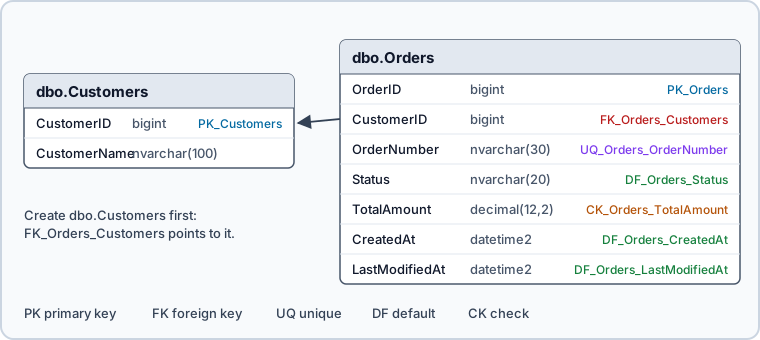
IDENTITY(1,1) moves key generation into the database, so the application never sends an OrderID. The DEFAULT constraints on Status, CreatedAt and LastModifiedAt let an insert leave those columns out and still produce a complete row. UQ_Orders_OrderNumber keeps the business key unique without making it the primary key. FK_Orders_Customers refuses an order whose customer does not exist, which is why dbo.Customers has to be created first.
CK_Orders_TotalAmount rejects a negative total at the moment of the insert, and its name comes back in the error. Try it on the empty tables:
INSERT INTO dbo.Customers (CustomerName) VALUES (N'Ada');

INSERT INTO dbo.Orders (CustomerID, OrderNumber, TotalAmount)
VALUES (1, N'SO-1001', -5.00);
The customer gets CustomerID 1 from IDENTITY. The order is refused with error 547, and the first sentence of its message names the constraint that refused it:
The INSERT statement conflicted with the CHECK constraint "CK_Orders_TotalAmount".
Temporary tables, IF NOT EXISTS and SELECT INTO
Create a temporary table
CREATE TABLE #RecentOrders (
    OrderID   bigint,
    CreatedAt datetime2
);
A name that starts with one number sign makes a local temporary table. Only the session that created it can see it, and SQL Server drops it when that session ends, or when the stored procedure that created it finishes. Two number signs, as in ##RecentOrders, make a global temporary table that every session can see. Temporary tables always go into the dbo schema, whatever schema you write, and the name of a local one can be at most 116 characters.
Create a table only if it does not exist
CREATE TABLE has no IF NOT EXISTS clause, so the test goes in front of the statement:
IF OBJECT_ID('dbo.AuditLog', 'U') IS NULL
BEGIN
    CREATE TABLE dbo.AuditLog (
        AuditID   bigint IDENTITY(1,1) PRIMARY KEY,
        EventName nvarchar(100) NOT NULL,
        CreatedAt datetime2 NOT NULL DEFAULT sysutcdatetime()
    );
END;
The 'U' argument limits the lookup to user tables, so a view or procedure with the same name does not count. The opposite case does have a clause: DROP TABLE IF EXISTS, available since SQL Server 2016, removes a table before you create it again.
Create a table from a query
Other engines call this CREATE TABLE AS SELECT. In SQL Server it is SELECT ... INTO, which creates the table and fills it with the rows of the query:
SELECT CustomerID,
       SUM(TotalAmount) AS LifetimeValue
INTO dbo.CustomerLifetimeValue
FROM dbo.Orders
GROUP BY CustomerID;
Each new column takes its name, data type and nullability from the matching expression in the select list. An IDENTITY column keeps its property too, unless the query joins tables, uses UNION, lists the column twice, puts it in an expression or reads it from a remote data source. The INTO clause page says indexes, constraints and triggers of the source table are not transferred, so add them afterwards to a table that outlives a staging job. The statement also runs in two parts. If the inserts fail, the rows roll back and the empty table stays behind.
To copy only the columns, add a condition that no row meets:
SELECT *
INTO dbo.OrdersArchive
FROM dbo.Orders
WHERE 1 = 0;
dbo.OrdersArchive gets every column of dbo.Orders with its data type and nullability, but none of its keys, defaults or checks. OrderID is still an identity column.
Design for partitioning or compression later
A table headed for hundreds of millions of rows has two later options, partitioning and data compression. Both depend on choices you make in CREATE TABLE: the clustered key and the filegroup.
Check the table you created
sp_help reports on any object in the current database. Given a table, it returns a series of result sets: the table itself, its columns, its identity column, the filegroup its data is on, its indexes, its constraints, and the objects that reference it.
EXEC sp_help 'dbo.Orders';
For one specific answer, query the catalog instead. This lists the columns of the dbo.Orders table created above:
SELECT c.name AS column_name,
       t.name AS data_type,
       c.is_nullable
FROM sys.columns c
JOIN sys.types t ON c.user_type_id = t.user_type_id
WHERE c.object_id = OBJECT_ID('dbo.Orders')
ORDER BY c.column_id;
| column_name | data_type | is_nullable |
|---|---|---|
| OrderID | bigint | 0 |
| CustomerID | bigint | 0 |
| OrderNumber | nvarchar | 0 |
| Status | nvarchar | 0 |
| TotalAmount | decimal | 0 |
| CreatedAt | datetime2 | 0 |
| LastModifiedAt | datetime2 | 0 |
Every column reports is_nullable as 0, which is the NOT NULL list read back from the engine rather than from your script.
Create a table in DbSchema



Writing one table by hand is quick. Keeping thirty of them consistent, with the foreign keys between them in view, is what DbSchema is for. DbSchema shows the tables as a diagram and writes the CREATE TABLE statements for you:
- Connect DbSchema to SQL Server through the SQL Server JDBC driver. DbSchema reverse-engineers the existing schema, or you start from an empty diagram.
- Right-click the canvas, choose

New Table, type the table name and press Enter. The table appears on the canvas and in the tree panel. - Double-click the table header to open the Table Dialog. Its

Columnstab lists each column with its type. - Double-click a column to set its data type,
NOT NULL, a default value or identity. - Mark the primary key in the
Indexestab of the Table Dialog. - Drag a column of the child table onto the target column of the parent table to draw the foreign key.

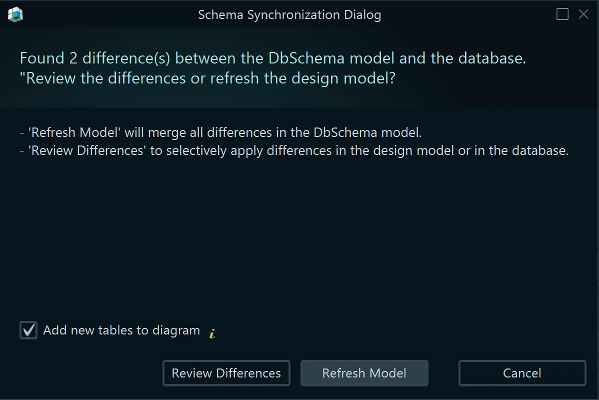
Whether a change reaches SQL Server depends on how you work, as the synchronize with the database page describes. Connected, DbSchema runs each schema change against the database at once and lists it in the SQL History pane. Disconnected, DbSchema writes the changes to the .dbs model file only. When you reconnect, Schema → Compare Model with Database lists the differences, and Schema → Synchronize Model with Database generates the CREATE TABLE and ALTER TABLE statements, which you can edit before you run them.
The SQL Editor in DbSchema runs T-SQL you write yourself against the connected database. Diagram → Export HTML5 or PDF Documentation turns the model, with the description of every table and column, into schema documentation for the people who will query these tables later. When a table change reaches views, triggers or indexes, the DbSchema diagram shows what else is attached to it.
Write the types, the nullability and the constraints into the CREATE TABLE statement, name every constraint, and let the catalog confirm what SQL Server built. To draw the same tables in DbSchema and let it write the DDL, download it at https://dbschema.com/download.html and connect to your SQL Server database. Connecting, the diagram and the SQL Editor are in the free Community edition. Saving the design to a .dbs file, synchronizing it with the database and exporting the HTML5 or PDF documentation are Pro edition features.
FAQ
How do I create an auto-increment column in SQL Server?
Add IDENTITY(seed, increment) to an integer column, for example OrderID bigint IDENTITY(1,1). A table can have only one identity column, and that column cannot also carry a DEFAULT constraint.
Does SQL Server support CREATE TABLE IF NOT EXISTS?
The CREATE TABLE syntax has no IF NOT EXISTS clause. Guard the statement with IF OBJECT_ID('dbo.TableName', 'U') IS NULL, as the section on temporary tables and IF NOT EXISTS shows.
What is the SQL Server equivalent of CREATE TABLE AS SELECT?
SELECT ... INTO creates the table and fills it from a query in one statement. It cannot create a partitioned table, even from a partitioned source: create the partitioned table first and load it with INSERT INTO ... SELECT.
How many columns can a SQL Server table have?
A table can have 1,024 columns. A table with a sparse column set can have up to 30,000, according to the maximum capacity specifications.









