SQL Server CREATE TRIGGER: AFTER, INSTEAD OF, Audit, and DDL Examples
For the person adding a trigger to a SQL Server database that other people's code writes to; the inserted and deleted tables are explained where they appear.
On this page
Support asks who changed an employee's salary and when, and the row holds only its current value. CREATE TRIGGER closes that gap. It attaches a block of T-SQL to a table, and SQL Server runs the block on every INSERT, UPDATE or DELETE you name, in the same transaction, with the old and the new version of each changed row at hand:
CREATE [ OR ALTER ] TRIGGER schema_name.trigger_name
ON { table | view }
{ AFTER | INSTEAD OF } { INSERT | UPDATE | DELETE } [ , ... ]
AS
BEGIN
    -- statements that read the inserted and deleted tables
END;
FOR is another name for AFTER, and one trigger can watch several events, separated by commas. The examples below run on SQL Server 2022.
What a trigger is, and which kind you need
A trigger is a stored procedure that nobody calls. SQL Server runs it when its event happens, and there are three kinds of event:
| Kind | Fires on | Created on | Permission to create it |
|---|---|---|---|
| DML | INSERT, UPDATE, DELETE | a table or a view | ALTER on that table or view |
| DDL, database scope | CREATE, ALTER, DROP and other schema statements | ON DATABASE | ALTER ANY DATABASE DDL TRIGGER |
| DDL, server scope | the same statements, anywhere on the server | ON ALL SERVER | CONTROL SERVER |
| logon | a session being opened | ON ALL SERVER | CONTROL SERVER |
A DML trigger runs once for the whole statement, however many rows the statement changed, and it runs even when it changed none. A MERGE fires the triggers of each action it performs. The permission column is why most application work stays in DML triggers: ALTER on one table is a far narrower grant to ask for than CONTROL SERVER.
Reach for a trigger when a constraint can't state the rule. PRIMARY KEY, UNIQUE, CHECK and FOREIGN KEY come first, because SQL Server enforces them with no code of yours to maintain, and the DML triggers page calls triggers most useful where constraints can't meet the need. That leaves an audit trail of old and new values, a rule that reads another table (a CHECK constraint sees only its own), a reference into another database, where no foreign key reaches, an error message your application understands, and a view that accepts writes.
The price is visibility and time. A trigger's logic isn't in the table definition, so whoever reads the table or the application code doesn't see it. It holds the statement's transaction and its locks until it finishes, so a slow trigger slows every writer, and a trigger that changes another table fires that table's triggers in turn, up to 32 levels deep. Keep each trigger short, with one job.
Create a trigger in sqlcmd, step by step
sqlcmd runs T-SQL from the command line. The trigger below logs every new employee and every salary change.
Step 1: Connect
sqlcmd -S <server_name> -U <login> -I
sqlcmd asks for the password, since the sqlcmd documentation calls a password given with -P insecure. -I sets QUOTED_IDENTIFIER on, which the DDL trigger further down needs; the newer Go version of sqlcmd always has it on. If you don't have a server yet, start with creating a SQL Server database, and see CREATE TABLE for the table definitions.
Step 2: Pick the database
USE <database_name>;
GO
sqlcmd sends what you typed to the server when it reads GO on a line of its own. CREATE TRIGGER has to be the first statement of such a batch, so each trigger below starts after a GO. Otherwise SQL Server stops with error 111, 'CREATE TRIGGER' must be the first statement in a query batch.
Step 3: Create the tables
Create the table the trigger watches and the table it writes to:
CREATE TABLE dbo.Employees (
    EmpID      int           NOT NULL PRIMARY KEY,
    Name       nvarchar(50)  NOT NULL,
    Department nvarchar(20)  NOT NULL,
    Salary     decimal(10,2) NOT NULL
);

INSERT INTO dbo.Employees (EmpID, Name, Department, Salary)
VALUES (1, N'Alice', N'HR', 5000),
       (2, N'Bob',   N'IT', 6000);

CREATE TABLE dbo.LogTable (
    LogID     int IDENTITY(1,1) PRIMARY KEY,
    EmpID     int           NOT NULL,
    LogInfo   nvarchar(10)  NOT NULL,
    OldSalary decimal(10,2) NULL,
    NewSalary decimal(10,2) NULL,
    ChangedBy sysname       NOT NULL DEFAULT SUSER_SNAME(),
    ChangedAt datetime2(0)  NOT NULL DEFAULT SYSUTCDATETIME()
);
GO
Employees is the table to watch, and LogTable gets one row for each change. Its two defaults fill in the login that made the change and the time in UTC, so the trigger doesn't have to.
Step 4: Create the trigger
CREATE OR ALTER TRIGGER dbo.tr_Employees_Log
ON dbo.Employees
AFTER INSERT, UPDATE
AS
BEGIN
    IF (ROWCOUNT_BIG() = 0)
        RETURN;

    SET NOCOUNT ON;

    INSERT INTO dbo.LogTable (EmpID, LogInfo, OldSalary, NewSalary)
    SELECT i.EmpID,
           CASE WHEN d.EmpID IS NULL THEN N'Inserted' ELSE N'Updated' END,
           d.Salary,
           i.Salary
    FROM inserted AS i
    LEFT JOIN deleted AS d ON d.EmpID = i.EmpID;
END;
GO
inserted holds the new version of each changed row and deleted the old one. An INSERT has no old version, so the LEFT JOIN finds no deleted row and LogInfo reads Inserted.
The first two lines leave the trigger at once when the statement changed nothing, which CREATE TRIGGER recommends for every DML trigger, because a trigger holds locks while it runs. Their place matters. SET NOCOUNT ON stops the trigger from sending its own row counts to the application, and like every SET statement it resets the row count to 0, as the @@ROWCOUNT page says. Written above the check, it makes every run return early, and on SQL Server 2022 the trigger then logs nothing at all.
Step 5: Change some rows
INSERT INTO dbo.Employees (EmpID, Name, Department, Salary)
VALUES (3, N'Carol', N'IT', 5500);

UPDATE dbo.Employees
SET Salary = Salary * 1.10
WHERE Department = N'IT';

SELECT EmpID, LogInfo, OldSalary, NewSalary, ChangedBy
FROM dbo.LogTable
ORDER BY EmpID, LogID;
GO
One UPDATE raised two salaries, and the log has a row for each:
| EmpID | LogInfo | OldSalary | NewSalary | ChangedBy |
|---|---|---|---|---|
| 2 | Updated | 6000.00 | 6600.00 | sa |
| 3 | Inserted | NULL | 5500.00 | sa |
| 3 | Updated | 5500.00 | 6050.00 | sa |
ChangedBy holds the login that ran the statements, sa here. If you add DELETE to the trigger, TRUNCATE TABLE is the gap to know: it removes rows without logging each deletion, so it fires no DELETE trigger and leaves no row in LogTable.
What the inserted and deleted tables hold
The UPDATE in step 5 changed Bob and Carol in one statement. While the trigger ran, deleted held both rows as they were, and inserted held both as they became:
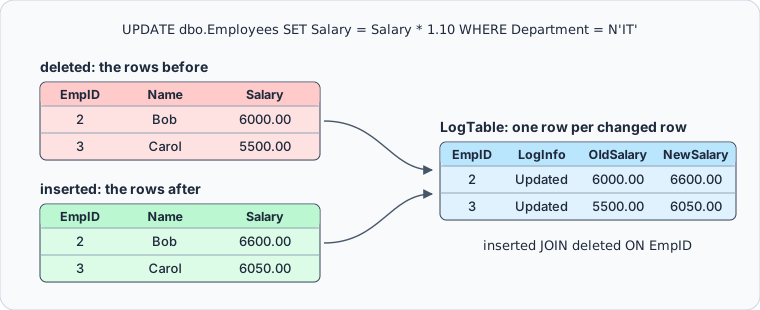
Both tables have the columns of the trigger's table. Which of them has rows depends on the statement:
| Statement | inserted holds | deleted holds |
|---|---|---|
INSERT | the new rows | nothing |
UPDATE | the rows after the change | the rows before it |
DELETE | nothing | the removed rows |
The word to hold on to is rows, plural. The trigger runs once for the whole statement, so its body has to work on the set, as the INSERT ... SELECT in step 4 does. Assigning a column to a variable does the opposite:
DECLARE @EmpID int;
SELECT @EmpID = EmpID FROM inserted;
That takes one row out of inserted, with nothing to say which. A version of the trigger that logged @EmpID wrote one row for an UPDATE that raised both IT salaries, and the other raise went unrecorded. Microsoft's page on triggers that handle multiple rows gives the rule: write rowset-based logic, and no cursors.
AFTER or INSTEAD OF
The two options differ in where the trigger runs against the statement and its constraint checks:
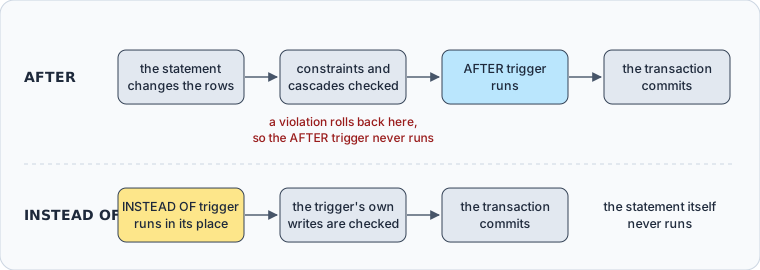
| Option | When it runs | Allowed on | Triggers per action |
|---|---|---|---|
AFTER (or FOR) | after the statement and its constraint checks succeed | tables | several |
INSTEAD OF | in place of the statement | tables and views | one |
An AFTER trigger never sees a statement that broke a constraint. Insert a second employee with key 1, and the statement fails before the trigger runs:
INSERT INTO dbo.Employees (EmpID, Name, Department, Salary)
VALUES (1, N'Dave', N'IT', 4000);
Msg 2627, Level 14, State 1
Violation of PRIMARY KEY constraint 'PK__Employee__AF2DBA7945A0163A'. Cannot insert duplicate key in object 'dbo.Employees'. The duplicate key value is (1).
LogTable keeps its three rows; the constraint name is generated, so yours will differ. An INSTEAD OF trigger runs before the checks, so it can inspect or rewrite a change the constraints would refuse, and the constraints then check whatever it writes.
Two more limits come with the choice. When several AFTER triggers share an action, only the first and the last can be ordered, with sp_settriggerorder, and the rest run in no defined order. And a table whose foreign key has ON DELETE CASCADE can't take an INSTEAD OF DELETE trigger, nor one with ON UPDATE CASCADE an INSTEAD OF UPDATE trigger: SQL Server refuses it with error 2113.
An INSTEAD OF trigger on a view
A view can't take an AFTER trigger at all, and SQL Server refuses one with error 8197, so INSTEAD OF is how a view gets write logic of its own. Take a soft delete, where the application deletes through a view and the row stays in the table, marked as deleted:
CREATE TABLE dbo.Customers (
    CustomerID   int           NOT NULL PRIMARY KEY,
    CustomerName nvarchar(100) NOT NULL,
    IsDeleted    bit           NOT NULL DEFAULT 0
);

INSERT INTO dbo.Customers (CustomerID, CustomerName)
VALUES (1, N'Ada'), (2, N'Grace');
GO

CREATE VIEW dbo.vwActiveCustomers
AS
SELECT CustomerID, CustomerName
FROM dbo.Customers
WHERE IsDeleted = 0;
GO

CREATE OR ALTER TRIGGER dbo.tr_vwActiveCustomers_Delete
ON dbo.vwActiveCustomers
INSTEAD OF DELETE
AS
BEGIN
    SET NOCOUNT ON;

    UPDATE c
    SET IsDeleted = 1
    FROM dbo.Customers AS c
    JOIN deleted AS d ON d.CustomerID = c.CustomerID;
END;
GO
The application deletes Ada through the view:
DELETE FROM dbo.vwActiveCustomers WHERE CustomerID = 1;

SELECT CustomerID, CustomerName, IsDeleted
FROM dbo.Customers;
GO
Ada left the view and stayed in the table:
| CustomerID | CustomerName | IsDeleted |
|---|---|---|
| 1 | Ada | 1 |
| 2 | Grace | 0 |
The view can hold only one INSTEAD OF DELETE trigger (a second fails with error 2111), and a view defined WITH CHECK OPTION takes none until ALTER VIEW removes the option.
Log schema changes with a DDL trigger
A DDL trigger with database scope sees the schema statements run in its database. The EVENTDATA() function returns the event as XML, and the value method reads one element out of it. The trigger below records each CREATE TABLE in a log table:
CREATE TABLE dbo.DDLLogTable (
    EventID     int IDENTITY(1,1) PRIMARY KEY,
    Event       nvarchar(100) NOT NULL,
    CommandText nvarchar(max) NOT NULL,
    ChangedBy   sysname       NOT NULL,
    EventTime   datetime2(0)  NOT NULL DEFAULT SYSUTCDATETIME()
);
GO

CREATE OR ALTER TRIGGER tr_DDL
ON DATABASE
FOR CREATE_TABLE
AS
BEGIN
    SET NOCOUNT ON;

    DECLARE @event xml = EVENTDATA();

    INSERT INTO dbo.DDLLogTable (Event, CommandText, ChangedBy)
    VALUES (@event.value('(/EVENT_INSTANCE/EventType)[1]', 'nvarchar(100)'),
            @event.value('(/EVENT_INSTANCE/TSQLCommand/CommandText)[1]', 'nvarchar(max)'),
            SUSER_SNAME());
END;
GO
Create a table and a temporary table, then read the log:
CREATE TABLE dbo.Projects (ProjectID int PRIMARY KEY);
CREATE TABLE #Scratch (ID int);

SELECT EventID, Event, CommandText, ChangedBy
FROM dbo.DDLLogTable;
GO
The log has the statement as it was typed, and nothing for the temporary table, because temporary tables raise no DDL events:
| EventID | Event | CommandText | ChangedBy |
|---|---|---|---|
| 1 | CREATE_TABLE | CREATE TABLE dbo.Projects (ProjectID int PRIMARY KEY) | sa |
Three details decide whether this trigger works. Its name takes no schema, because DDL triggers don't belong to one: dbo.tr_DDL fails with error 1094. The value method works only when QUOTED_IDENTIFIER was on as the trigger was created, which is what -I did in step 1. A trigger created without it fails with error 1934 on every CREATE TABLE, and since the trigger runs in the same transaction, the table isn't created either. And to log ALTER TABLE and DROP TABLE as well, name the event group DDL_TABLE_EVENTS in place of CREATE_TABLE.
Record logins with a logon trigger
A logon trigger runs on every connection to the server, after the password check and before the session opens. This one logs each login into a table in master:
USE master;
GO

CREATE TABLE dbo.LogonLogTable (
    LogID     int IDENTITY(1,1) PRIMARY KEY,
    LoginName sysname      NOT NULL,
    EventTime datetime2(0) NOT NULL DEFAULT SYSUTCDATETIME()
);

CREATE LOGIN logon_auditor WITH PASSWORD = N'<strong password>';
ALTER LOGIN logon_auditor DISABLE;
CREATE USER logon_auditor FOR LOGIN logon_auditor;
GRANT INSERT ON dbo.LogonLogTable TO logon_auditor;
GO

CREATE OR ALTER TRIGGER tr_Logon
ON ALL SERVER
WITH EXECUTE AS N'logon_auditor'
FOR LOGON
AS
BEGIN
    INSERT INTO master.dbo.LogonLogTable (LoginName)
    VALUES (ORIGINAL_LOGIN());
END;
GO
Without EXECUTE AS, the trigger runs as the connecting login, and a login that may not insert into the table is turned away with Logon failed for login '<login>' due to trigger execution. logon_auditor exists to hold that INSERT, and since it is disabled, nobody can sign in with it; the trigger still runs as it. Inside the trigger SUSER_SNAME() returns logon_auditor, which is why the insert records ORIGINAL_LOGIN(), the login that connected.
That refusal is the risk of every logon trigger: one that fails for everyone locks out every login, sysadmin members included. The logon triggers page names the ways back in, the dedicated administrator connection or starting SQL Server with -f. The trigger's errors and PRINT output go to the SQL Server error log, not to the connection.
List, disable and drop triggers
sys.triggers lists the triggers of the current database, so switch back from master first. DDL triggers show DATABASE in parent_class_desc, and server-scoped triggers such as tr_Logon are in sys.server_triggers.
USE <database_name>;
GO

SELECT name, parent_class_desc, is_disabled, is_instead_of_trigger
FROM sys.triggers;
Disabling keeps a trigger and stops it from firing, and dropping removes it:
DISABLE TRIGGER dbo.tr_Employees_Log ON dbo.Employees;
ENABLE TRIGGER dbo.tr_Employees_Log ON dbo.Employees;

DISABLE TRIGGER tr_DDL ON DATABASE;
DROP TRIGGER tr_DDL ON DATABASE;
DROP TRIGGER tr_Logon ON ALL SERVER;
DROP TRIGGER IF EXISTS dbo.tr_Employees_Log;
After you redeploy a trigger that you had disabled, check is_disabled. The DISABLE TRIGGER page says that ALTER TRIGGER enables it again, but on SQL Server 2022 both ALTER TRIGGER and CREATE OR ALTER left a disabled trigger disabled.
Create and check triggers in DbSchema



A trigger doesn't show in the table it fires on, so a release that renames a column of Employees can break the audit unnoticed. DbSchema reads the triggers, procedures and functions with their source through queries of its own, next to the tables, columns and foreign keys that the JDBC driver supplies, as the database settings page describes. To create a trigger in DbSchema:
- On the Welcome Screen, choose Connect to Database, then SQL Server in the Choose Your Database list. DbSchema downloads the SQL Server JDBC driver itself.
- Fill in the server, the database user and the password in the Connection Dialog, and connect. DbSchema reverse-engineers the schema and draws
EmployeesandLogTableon a diagram. - Open the SQL Editor from the Editors menu, and paste the
CREATE TRIGGERstatement from step 4 without itsGO. - Select the whole statement and click Execute Query, which runs the selected text.
- Click Commit to make the change permanent.
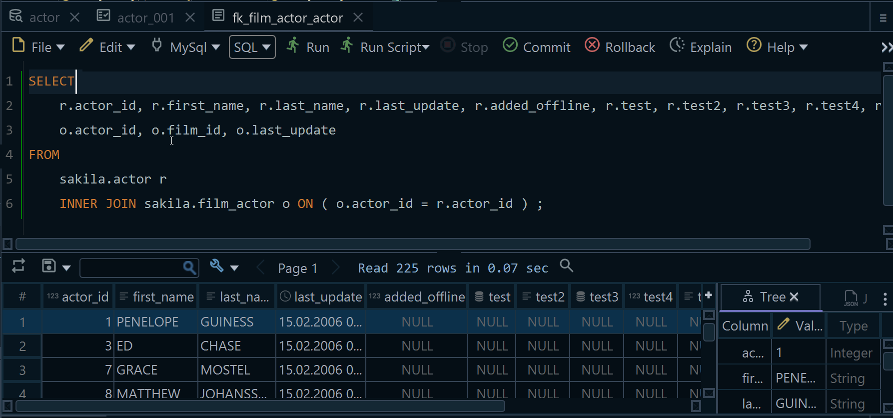
The SQL Editor runs DDL and logon triggers the same way. The trigger now lives in the live database. In DbSchema Pro, the design model, which can be saved as a .dbs file, picks it up when you run Schema, Refresh Schema from Database, as the synchronization page describes.
Choose AFTER or INSTEAD OF by where the constraint checks should fall, write the body against the whole inserted set, and put the row-count check above SET NOCOUNT ON. To see the tables your triggers write to on a diagram and run the next trigger from the SQL Editor, download DbSchema at https://dbschema.com/download.html and connect to your SQL Server database. Connecting, reverse-engineering, the diagrams and the SQL Editor are in the free Community Edition, while saving the model as a .dbs file and refreshing it from the database are in Pro.









