How to Document PostgreSQL Databases Effectively
For a PostgreSQL user at the psql prompt whose database has to make sense to a colleague or an auditor next month.
On this page
Run \d+ in psql and every table comes back with a Description column, empty until somebody writes into it. To document a PostgreSQL database, you fill that column with COMMENT ON, read the text back, and turn it into a document other people can open:
- Write a description for each table and column with
COMMENT ON TABLEandCOMMENT ON COLUMN. - Read the descriptions back with
\d+in psql, or withobj_descriptionandcol_descriptionin a query. - Reverse-engineer the database into a DbSchema diagram and export it as HTML5, PDF or Markdown documentation.
The examples ran on PostgreSQL 17.9.
What database documentation contains
Good documentation is the blueprint of the database: every table, column, index and data type, and what each one is for. Its readers rarely built the schema. A colleague who joins next month, an auditor, or an outside BI consultant with an afternoon to understand your data reads it in place of your code, and whoever maintains the database reads it to see what a change touches.
Finished documentation of a PostgreSQL schema covers five things, and four of them are in the database before anyone writes a word:
| part | where psql shows it |
|---|---|
| table and column descriptions | \d+ and \d+ table_name |
| foreign keys, which connect the tables | \d table_name |
| primary keys and indexes | \d table_name and \di |
| triggers | \d table_name |
| data types and default values | \d table_name |
The descriptions are the part that somebody has to write.
Write descriptions with COMMENT ON
The examples use one table and one index:
CREATE TABLE actor (
  actor_id    serial PRIMARY KEY,
  first_name  varchar(45) NOT NULL,
  last_name   varchar(45) NOT NULL,
  last_update timestamp NOT NULL DEFAULT now()
);
CREATE INDEX idx_actor_last_name ON actor (last_name);
\d+ lists the relations with their size and description. Nothing has written a description yet, so the column is empty:
                                             List of relations
 Schema |        Name        |   Type   |  Owner   | Persistence | Access method |    Size    | Description
--------+--------------------+----------+----------+-------------+---------------+------------+-------------
 public | actor              | table    | postgres | permanent   | heap          | 0 bytes    |
 public | actor_actor_id_seq | sequence | postgres | permanent   |               | 8192 bytes |
(2 rows)
The plain \d prints the same list without the Size and Description columns, so a documented schema can look undocumented there.
COMMENT ON writes the description. It takes the kind of object, the object's name, and the text:
COMMENT ON TABLE actor IS 'One row per actor who appears in a film';
COMMENT ON COLUMN actor.actor_id IS 'Filled from actor_actor_id_seq';
COMMENT ON COLUMN actor.last_update IS 'Set by the application, not by a trigger';
\dt+ lists only the tables, and actor now carries its description:
                                                  List of relations
 Schema | Name  | Type  |  Owner   | Persistence | Access method |  Size   |               Description
--------+-------+-------+----------+-------------+---------------+---------+-----------------------------------------
 public | actor | table | postgres | permanent   | heap          | 0 bytes | One row per actor who appears in a film
(1 row)
Add the table's name, \d+ actor, and psql prints its columns, each with the description written for it:
                                                                                     Table "public.actor"
   Column    |            Type             | Collation | Nullable |                 Default                 | Storage  | Compression | Stats target |               Description
-------------+-----------------------------+-----------+----------+-----------------------------------------+----------+-------------+--------------+------------------------------------------
 actor_id    | integer                     |           | not null | nextval('actor_actor_id_seq'::regclass) | plain    |             |              | Filled from actor_actor_id_seq
 first_name  | character varying(45)       |           | not null |                                         | extended |             |              |
 last_name   | character varying(45)       |           | not null |                                         | extended |             |              |
 last_update | timestamp without time zone |           | not null | now()                                   | plain    |             |              | Set by the application, not by a trigger
Indexes:
    "actor_pkey" PRIMARY KEY, btree (actor_id)
    "idx_actor_last_name" btree (last_name)
Access method: heap
An index takes a comment the same way, and \di+ shows it:
COMMENT ON INDEX idx_actor_last_name IS 'Serves the search by last name';
                                                          List of relations
 Schema |        Name         | Type  |  Owner   | Table | Persistence | Access method |    Size    |          Description
--------+---------------------+-------+----------+-------+-------------+---------------+------------+--------------------------------
 public | actor_pkey          | index | postgres | actor | permanent   | btree         | 8192 bytes |
 public | idx_actor_last_name | index | postgres | actor | permanent   | btree         | 8192 bytes | Serves the search by last name
(2 rows)
COMMENT ON accepts many other kinds of object as well, among them views, functions, schemas, constraints and triggers.
The data dictionary the catalog already holds
The \d commands read the system catalog. COMMENT ON stores its text in the catalog table pg_description, one row per described object, keyed by the object's oid (objoid, drawn here by name) and objsubid. A table's own comment has objsubid 0, and a column's comment has the column's number:
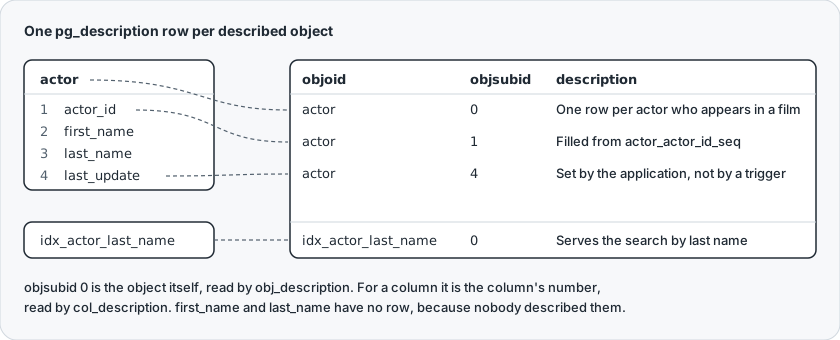
You rarely read pg_description itself. obj_description(oid, 'pg_class') returns the comment of a table or an index, and col_description(table_oid, column_number) returns a column's, as the comment information functions describe. With them, one query returns the data dictionary of a table:
SELECT a.attname AS column_name,
       format_type(a.atttypid, a.atttypmod) AS data_type,
       a.attnotnull AS not_null,
       col_description(a.attrelid, a.attnum) AS description
FROM pg_attribute a
WHERE a.attrelid = 'actor'::regclass
  AND a.attnum > 0
  AND NOT a.attisdropped
ORDER BY a.attnum;
| column_name | data_type | not_null | description |
|---|---|---|---|
| actor_id | integer | t | Filled from actor_actor_id_seq |
| first_name | character varying(45) | t | |
| last_name | character varying(45) | t | |
| last_update | timestamp without time zone | t | Set by the application, not by a trigger |
col_description also finds the gaps. This query lists every column in the public schema that nobody has described:
SELECT c.relname AS table_name, a.attname AS column_name
FROM pg_class c
JOIN pg_namespace n ON n.oid = c.relnamespace
JOIN pg_attribute a ON a.attrelid = c.oid
WHERE n.nspname = 'public'
  AND c.relkind IN ('r', 'p')
  AND a.attnum > 0
  AND NOT a.attisdropped
  AND col_description(c.oid, a.attnum) IS NULL
ORDER BY c.relname, a.attnum;
| table_name | column_name |
|---|---|
| actor | first_name |
| actor | last_name |
The standard information_schema views have no column for comments, so a dictionary with descriptions reads the catalog. What no query gives you is the shape of the schema: which tables reference which. That is a diagram.
What PostgreSQL does with a comment
The COMMENT reference sets out how a comment behaves:
- Each object holds one comment, so a second
COMMENT ONfor the same object replaces the first. IS NULLorIS ''removes the comment.- A comment is dropped together with its object.
- For most kinds of object, only the owner can set the comment, and a superuser can set any.
- Every user connected to the database can read every comment in it, so a comment is the wrong place for anything secret.
- The SQL standard has no
COMMENTcommand, so these statements are PostgreSQL's own.
pg_dump writes the comments into the dump as COMMENT ON statements unless you pass --no-comments, so they travel with a schema backup.
The ownership rule and the reading rule show together on two roles. A role granted every privilege on the table still cannot set its comment:
CREATE ROLE analyst;
GRANT ALL ON actor TO analyst;
SET ROLE analyst;
COMMENT ON TABLE actor IS 'Actors';
ERROR: must be owner of table actor
A role with no privilege on the table reads its comment anyway:
RESET ROLE;
CREATE ROLE outsider;
SET ROLE outsider;
SELECT obj_description('actor'::regclass, 'pg_class');
| obj_description |
|---|
| One row per actor who appears in a film |
Run as that role, SELECT * FROM actor fails with ERROR: permission denied for table actor: the rows are protected, the comment is not.
Document visually with an ER diagram
DbSchema reads the same catalog and draws it. Connect DbSchema to the database and it reverse-engineers the schema: the tables arrive on a diagram with their columns and the foreign keys between them, and every comment written with COMMENT ON comes into the DbSchema model with them. DbSchema downloads the PostgreSQL JDBC driver itself when you create the connection.
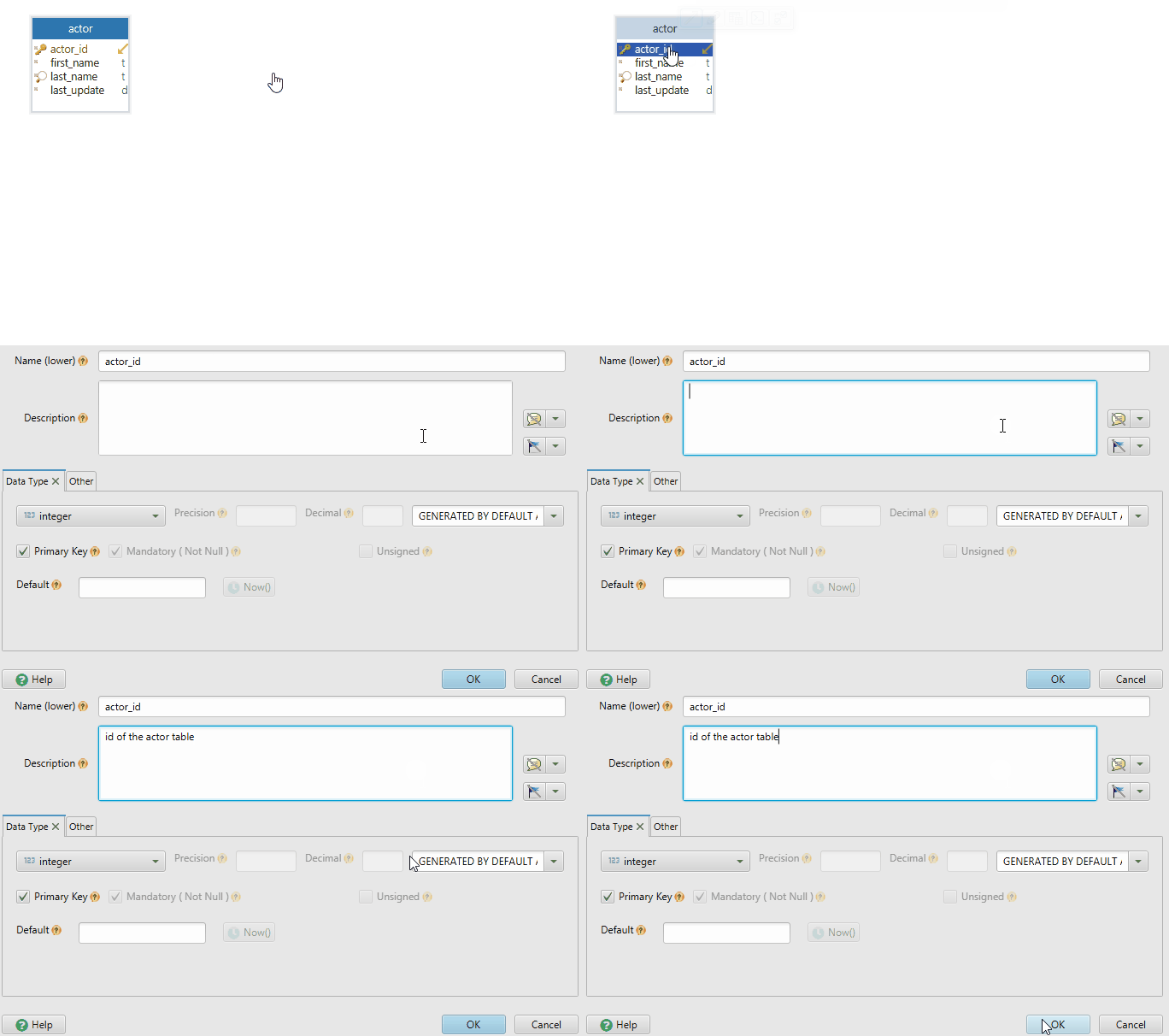
To write a description in DbSchema, double-click a table header on the diagram:

The Table Dialog opens, with a Comment field for the table and a Description column for each of its columns:
What that edit changes depends on whether DbSchema is connected:
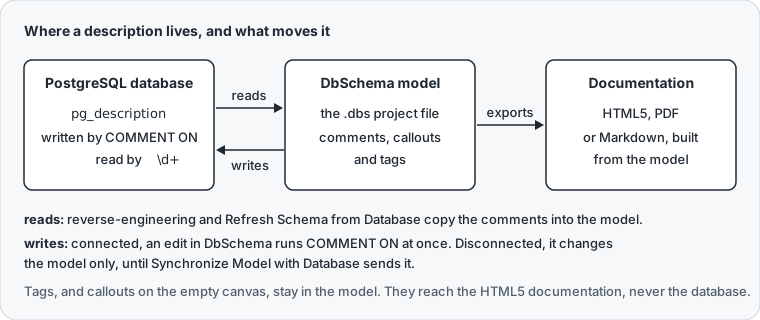
Connected, DbSchema runs the COMMENT ON statement on PostgreSQL when you press OK, as it does for every schema change in online mode. Disconnected, the edit changes only the model, the .dbs project file, until Schema → Synchronize Model with Database generates the statements and you run them.
DbSchema also keeps notes on the diagram. A callout holds plain text and stays where you place it. A callout placed on a table shows that table's comment, so editing the callout edits the comment:
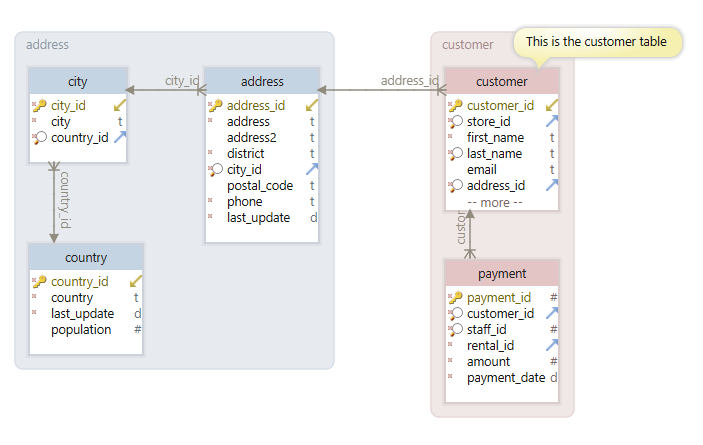
For structured notes, such as the team that owns a table or how sensitive a column is, DbSchema adds tags: key-value pairs defined in the Tag Manager and filled in beside the comment in the table and column dialogs.
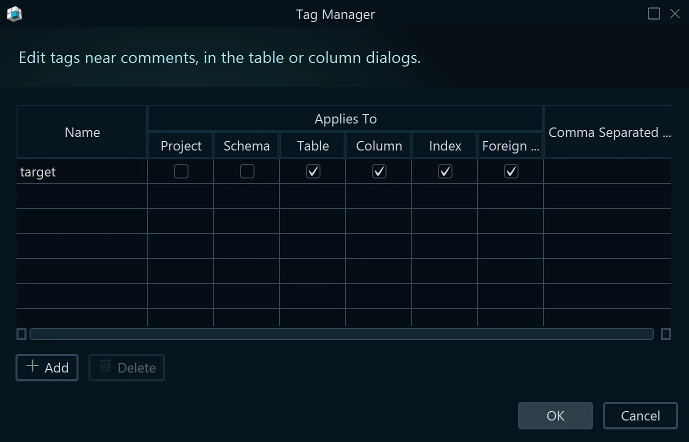
On PostgreSQL, tags and the callouts on the empty canvas stay in the model: they appear in the HTML5 documentation and never reach the database.
Export the diagrams as interactive HTML
A DbSchema project holds as many diagrams as you want, and one table can sit in several of them, so a schema too large for one screen becomes a set of diagrams, one per area such as orders or billing. That set is what you export.

In DbSchema, Diagram → Export HTML5 or PDF Documentation opens the Schema Documentation dialog. It asks for the format (HTML5, PDF or Markdown), the diagrams to include, and the content, such as all columns, indexes, foreign keys and the text documentation:
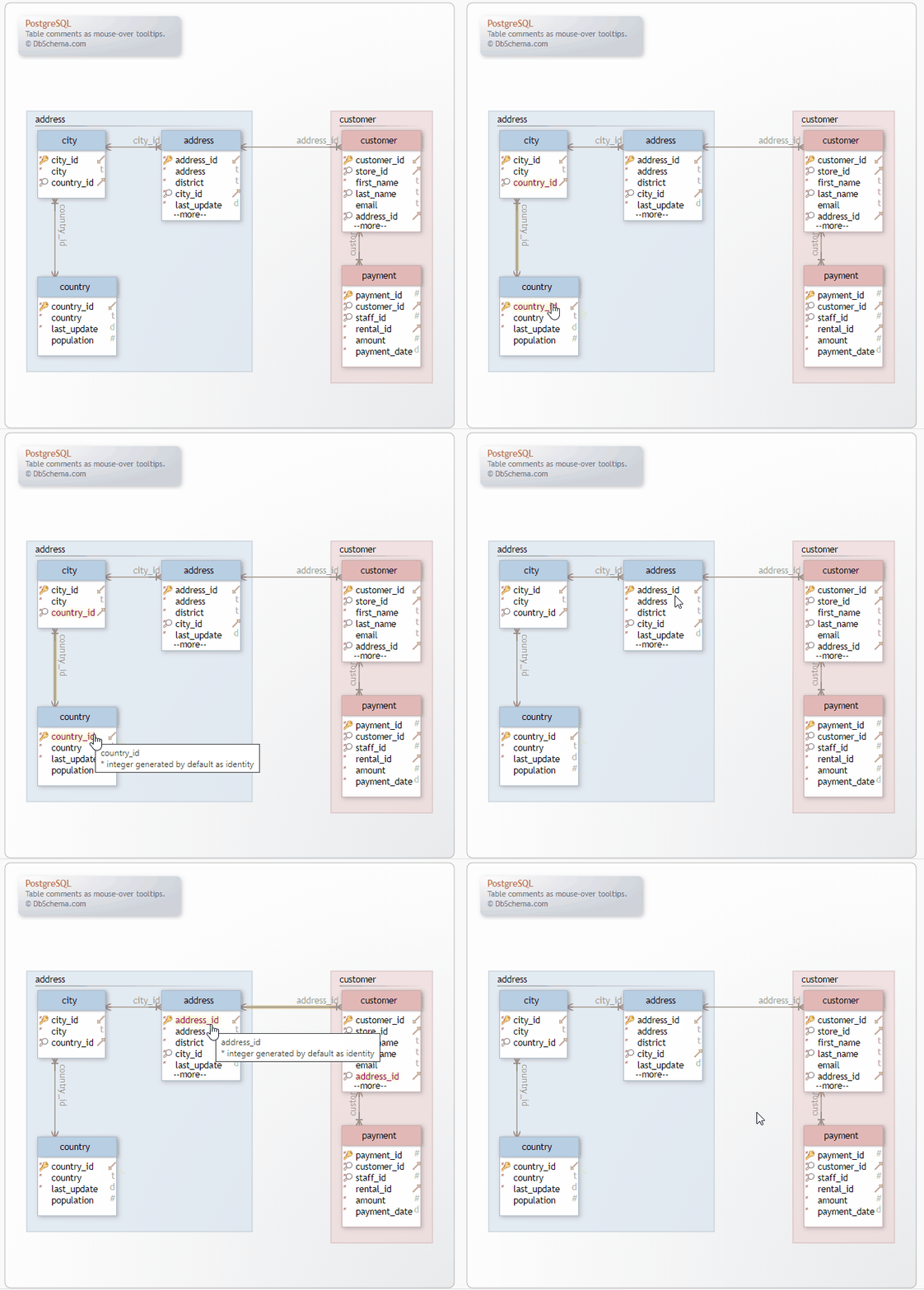
The HTML5 file opens in any browser with no server behind it. Its diagram is a vector image, a click on a table jumps to the table's definition, and hovering a table or a column shows its comment as a tooltip:
The PDF suits a formal review or an audit, and the Markdown file can be committed next to the code. The PostgreSQL documentation walkthrough goes through the rest of the export options.
Keeping documentation in sync after schema changes
Documentation goes stale the first time a column arrives without a description. Write the comment in the same migration as the column, so that neither reaches the database without the other:
BEGIN;
ALTER TABLE actor ADD COLUMN birth_year smallint;
COMMENT ON COLUMN actor.birth_year IS 'Year of birth, where the studio records it';
COMMIT;
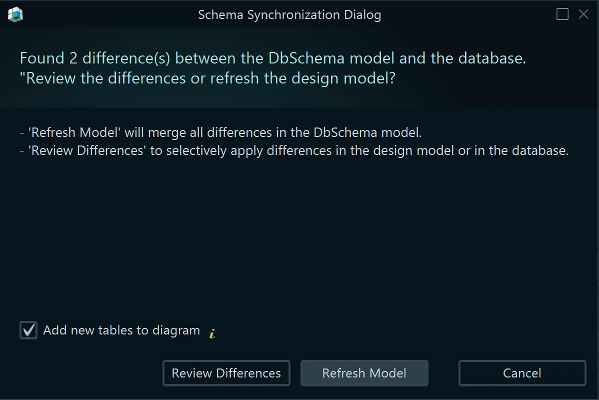
In DbSchema, Schema → Refresh Schema from Database pulls the database's current state into the model. Where the two differ, a comment changed in the database included, DbSchema asks whether to refresh the whole model or to review the differences one by one:
Export again afterwards and the document describes the schema as it is now. To regenerate it on every CI build, put the export in a Groovy automation script, which DbSchema runs without its window: DbSchema.exe -x path/to/script.groovy.
A comment costs one statement, and it sits where every reader of the schema already looks. Write it with COMMENT ON in psql or in the Table Dialog, then generate the document instead of maintaining it by hand. Download DbSchema at https://dbschema.com/download.html and connect it to your PostgreSQL database: the diagram and editing comments are in the free Community Edition, while saving the model, schema synchronization and the HTML5, PDF and Markdown export are in the Pro Edition, which the 15-day Architect trial in the download covers.
Document your PostgreSQL schema visually
DbSchema reverse-engineers your PostgreSQL database into an ER diagram, keeps table and column comments in the model, and exports HTML5, PDF or Markdown documentation. Reverse-engineering and interactive diagrams are in the free Community Edition; the documentation export is Pro.









