A Visual Query Builder for PostgreSQL
For developers and analysts who query PostgreSQL and want to click a join together instead of typing it; recursive queries are explained from the ground up.
On this page
In short
DbSchema's Query Builder turns a PostgreSQL diagram into a SELECT. You tick columns and follow foreign keys, and DbSchema writes the joins and shows the SQL as you click. It needs DbSchema Pro. Recursive queries are written by hand in the SQL Editor, which every edition has.
Key takeaways
- The Query Builder makes the join from the foreign key, so you never type the join condition.
- The join label offers Inner Join, Left Join, Full Join, Exists and Not Exists. There is no right join.
- A self-referencing foreign key shows the hierarchy on the diagram, but the recursive query is written by hand.
- On data with a loop, a recursive query with UNION ALL does not end. The CYCLE clause stops it.
- Tick Read Only Connection before you open a production database.
You need each task with the name of the person who created it. That is a join across two tables, and you don't want to look up the key names first.
DbSchema's Query Builder writes that join for you: you click the tables, tick the columns, and read the SELECT as it grows. It stops at one point, recursive queries, and this article covers that part too.
What the PostgreSQL query builder does
The Query Builder "writes a SELECT query for you while you click tables and columns." You join tables through their foreign keys and tick the columns you want. DbSchema shows the SQL on the right and updates it with every click.
The menus call it the Query Editor. Right-click a table on the diagram and choose Query Editor, or select the table and press Ctrl + B. The builder opens under the diagram, with the table already on the canvas.
The toolbar holds Run, Run as Script, Filter & Order, Group By and Explain. Filter adds a WHERE condition. Group By adds a GROUP BY over the ticked columns when you pick an aggregate such as Count(*). Explain shows the PostgreSQL plan for the query you built.
The Query Builder is part of DbSchema Pro. The free Community Edition connects, draws the diagram and runs SQL, but it has no visual builder.
Building a join on a real schema
Our example uses a real 14-table PostgreSQL schema for a task tracker. Two of its tables are enough here, shown with only the columns this article uses:
CREATE TABLE users (
  id        integer PRIMARY KEY,
  full_name text NOT NULL
);

CREATE TABLE tasks (
  id             integer PRIMARY KEY,
  title          varchar(200) NOT NULL,
  parent_task_id integer REFERENCES tasks(id),
  created_by     integer REFERENCES users(id)
);
Open the Query Builder on tasks. Click the icon next to created_by. DbSchema lists the tables this key leads to and names the key it would use. Pick users, tick title and full_name, and the preview on the right shows a SELECT with an INNER JOIN on created_by.
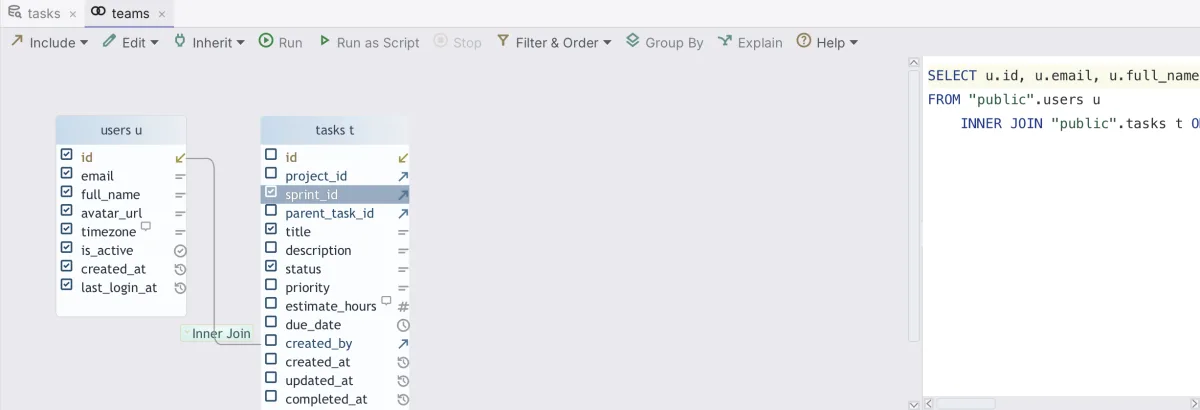
Query Builder on a PostgreSQL schema: users joined to tasks through a foreign key, with the generated INNER JOIN in the preview.
The join is an inner join, so a task with no creator drops out. To keep it, click the join label on the line between the tables. The label offers Left Join, Full Join, Exists and Not Exists.
There is no right join on that label. A right outer join[1] keeps the unmatched rows of the second table. You get the same rows with a left join if you start from the other table. For a longer query built step by step, see building a query across joined tables.
Where the builder stops: recursive queries
Look at parent_task_id in the tables above. It points back at tasks, so a task can have sub-tasks, and those can have their own. DbSchema draws that key on the diagram as a line from tasks to itself.
Reading a whole branch of that tree needs a recursive query. No click in the Query Builder writes one. You write it in the SQL Editor instead. The SQL Editor works in every DbSchema edition, Community included, and it autocompletes table and column names while you type.
The Query Builder still helps with the first step. Build the plain SELECT of the starting rows there and check them. Then copy that SELECT into the SQL Editor as the first half of the recursive query.
Writing the recursive query in the SQL Editor
PostgreSQL defines the shape exactly. A recursive WITH query[2] is "always a non-recursive term, then UNION (or UNION ALL), then a recursive term". Only the recursive term may refer to the query's own output.
This query reads task 19 and every task below it:
WITH RECURSIVE subtree AS (
  SELECT id, parent_task_id, title, 1 AS depth
  FROM tasks
  WHERE id = 19
  UNION ALL
  SELECT t.id, t.parent_task_id, t.title, s.depth + 1
  FROM tasks t
  JOIN subtree s ON t.parent_task_id = s.id
)
SELECT id, parent_task_id, depth, title
FROM subtree
ORDER BY depth, id;
We ran it on PostgreSQL 16.14 on 25 October 2026, against our demo schema with 31 tasks:
| id | parent_task_id | depth | title |
|---|---|---|---|
| 19 | 1 | Form primitives v2: Input, Select, Combobox | |
| 20 | 19 | 2 | Combobox: announce results to screen readers |
| 21 | 19 | 2 | Input: support prefix and suffix slots |
PostgreSQL runs the first term once and puts its rows in a working table. It then runs the second term against that table, again and again, "so long as the working table is not empty". Explain shows this in the plan:
CTE Scan on subtree
  CTE subtree
    ->  Recursive Union
          ->  Seq Scan on tasks
                Filter: (id = 19)
          ->  Hash Join
                Hash Cond: (t.parent_task_id = s.id)
                ->  Seq Scan on tasks t
                ->  Hash
                      ->  WorkTable Scan on subtree s
The WorkTable Scan is the recursive term reading the rows of the previous round.
Stopping a recursive query that never ends
The working table empties only if the tree has no loop. One wrong update is enough to create one. We made task 19 a child of task 20 inside a transaction, ran the same query with a 2-second statement_timeout, and then rolled back:
ERROR: canceling statement due to statement timeout
With UNION ALL, every round found the same tasks again, so the query kept running until the timeout stopped it. The CYCLE clause ends it. PostgreSQL has it since version 14[3]. It names the columns to track, a column that says whether a loop was found, and a column for the path:
WITH RECURSIVE subtree AS (
  SELECT id, parent_task_id, 1 AS depth
  FROM tasks
  WHERE id = 19
  UNION ALL
  SELECT t.id, t.parent_task_id, s.depth + 1
  FROM tasks t
  JOIN subtree s ON t.parent_task_id = s.id
) CYCLE id SET is_cycle USING path
SELECT id, parent_task_id, depth, is_cycle, path
FROM subtree
ORDER BY depth, id;
On the same broken data, the query ended and marked the loop:
| id | parent_task_id | depth | is_cycle | path |
|---|---|---|---|---|
| 19 | 20 | 1 | f | {(19)} |
| 20 | 19 | 2 | f | {(19),(20)} |
| 21 | 19 | 2 | f | {(19),(21)} |
| 19 | 20 | 3 | t | {(19),(20),(19)} |
Add the CYCLE clause to any recursive query on data that people edit by hand. It costs one line and turns a hung query into a row you can find.
Keeping queries in the model
When you close the Query Builder, DbSchema asks whether to save the query to the project. Save and Close keeps it, and Query → Reopen opens it again later. The SQL Editor works the same way, so your recursive query stays next to the join you built.
Both live in the DbSchema model once you save it with File → Save Model to File. Saving the model to a file needs DbSchema Pro. The model is one .dbs file, so you can keep it in Git with File → Git Collaboration. A teammate who pulls the model gets your queries along with the diagram.
Opening a production database safely
The Query Builder only writes SELECT. The rest of DbSchema can write, though. The SQL Editor runs any statement you type. An INSERT, UPDATE or DELETE stays in an open transaction until you press Commit.
In the Data Explorer, "changes you make here run in the database at once." The Data Explorer also follows foreign keys from row to row, and there is no limit to the number of tables you can open.
So protect a production connection before you explore it. On the Access and Model tab of the connection dialog, tick Read Only Connection. DbSchema then refuses to change the schema through that connection and asks the JDBC driver to open it read-only.
In its default mode, the PostgreSQL JDBC driver[4] answers that with BEGIN READ ONLY whenever autocommit is off. In a read-only transaction[5], PostgreSQL refuses INSERT, UPDATE, DELETE and every CREATE, ALTER and DROP. Are visual query builders safe on production goes through the rest of the setup.
Download DbSchema, connect to your PostgreSQL database and open the Query Editor on a table. The Query Builder, the Data Explorer and saving the model are in DbSchema Pro, and every download starts with a 15-day trial of all features. The SQL Editor for your recursive queries stays free in the Community Edition.
Frequently asked questions
Can DbSchema's query builder write a recursive query?
No. It writes SELECT statements with joins taken from foreign keys. Recursive queries go into the SQL Editor, which every DbSchema edition includes.
Why does my recursive query in PostgreSQL never finish?
The data probably has a loop, such as a task that is its own ancestor. With UNION ALL, each round finds the same rows again. Add CYCLE id SET is_cycle USING path, available since PostgreSQL 14, and the query stops and marks the loop.
Which joins does the DbSchema Query Builder offer?
Inner Join by default, plus Left Join, Full Join, Exists and Not Exists on the join label. For a right join, start from the other table and use Left Join.
Is the visual query builder free?
The Query Builder needs DbSchema Pro, which costs $294 one-time or $29.40 per month on the purchase page. The free Community Edition includes the SQL Editor.
Sources
Build the query on the diagram
DbSchema reverse-engineers your PostgreSQL schema, builds SELECTs by following foreign keys, and saves every query and editor inside the model file. Community Edition is free; the visual query builder is Pro, with a 15-day trial.









