Exploring Master-Detail Data Across Foreign Keys
For developers and analysts who browse related rows in a relational database; foreign keys and ON DELETE actions are explained where they appear.
On this page
In short
Master-detail data is one parent row with many child rows that point back to it through a foreign key. You browse it by filtering the child table on the selected parent's key. Check the foreign key's ON DELETE action first: it decides whether deleting the parent also deletes the children.
Key takeaways
- A foreign key from the child table to the parent table is what makes rows master and detail.
- In SQL, browsing means one join or one filter per level of the hierarchy.
- ON DELETE CASCADE makes the details part of the master: one delete removes them all.
- ON DELETE SET NULL turns the link into a lookup: the details stay when the parent goes.
- DbSchema's Data Explorer follows the foreign keys for you. Its edits run in the database at once, so browse production with a SELECT-only login.
You select a project and want to see its tasks, then the comments on one of those tasks. That is master-detail data: one parent row, many child rows, linked by a foreign key. To browse it, filter each child table on the key of the row you selected. Before you edit anything, check what the foreign key does when the parent row is deleted.
What master-detail means in a database
A master row is the parent, such as a project. Its detail rows are the children, such as the project's tasks. Each detail row stores the parent's key in a column, and a foreign key constraint makes the database check that the parent exists. A master-detail form or report simply shows this pair on one screen: the parent on top, its children below.
You can list every master-detail pair in a PostgreSQL database from the catalog. We ran this on PostgreSQL 16.14 against our 14-table demo schema:
SELECT confrelid::regclass AS parent_table,
       conrelid::regclass  AS child_table,
       conname             AS constraint_name,
       confdeltype         AS on_delete
FROM pg_constraint
WHERE contype = 'f';
The query returned 23 foreign keys. These five carry the examples in this article:
| parent_table | child_table | constraint_name | on_delete |
|---|---|---|---|
| projects | tasks | tasks_project_id_fkey | c |
| tasks | comments | comments_task_id_fkey | c |
| projects | sprints | sprints_project_id_fkey | c |
| projects | labels | labels_project_id_fkey | c |
| sprints | tasks | tasks_sprint_id_fkey | n |
The code c means ON DELETE CASCADE and n means ON DELETE SET NULL. Every table in the chain can be a master and a detail at once: tasks are details of a project and masters of their comments.
Browsing master-detail rows with SQL
In SQL, each level of the hierarchy is one more join. This query shows the tasks of project 2 and counts the comments of each task:
SELECT p.name AS project,
       t.id   AS task_id,
       t.title,
       count(c.id) AS comments
FROM projects p
JOIN tasks t         ON t.project_id = p.id
LEFT JOIN comments c ON c.task_id = t.id
WHERE p.id = 2
GROUP BY p.name, t.id, t.title
ORDER BY t.id;
The project has six tasks, and only one of them has a comment:
| project | task_id | title | comments |
|---|---|---|---|
| Public API | 9 | Cursor pagination for /v2/orders | 0 |
| Public API | 10 | Cursor pagination for /v2/customers | 0 |
| Public API | 11 | Webhook retry with exponential backoff | 0 |
| Public API | 12 | Sign webhook payloads with HMAC-SHA256 | 1 |
| Public API | 13 | Deprecate /v1 endpoints | 0 |
| Public API | 14 | OpenAPI spec drifts from the implementation | 0 |
The LEFT JOIN keeps tasks without comments. A plain JOIN would drop five of the six rows. To read the comments of task 12, you write a second query with WHERE task_id = 12, and so on for every row you click.
Browsing stays fast when the child's key column has an index. PostgreSQL does not add one for you: the documentation on foreign keys[1] says a foreign key "does not automatically create an index on the referencing columns". Our demo has idx_comments_task on comments (task_id, created_at DESC) and idx_tasks_project_status on tasks (project_id, status) for exactly these filters.
The foreign key also guards new detail rows. A task for a project that doesn't exist is refused:
INSERT INTO tasks (project_id, title) VALUES (99, 'Orphan task');
ERROR:  insert or update on table "tasks" violates foreign key constraint "tasks_project_id_fkey"
DETAIL:  Key (project_id)=(99) is not present in table "projects".
What happens to the detail rows when the master is deleted
The ON DELETE action of the foreign key decides this. PostgreSQL 16 offers five actions, described in the constraints chapter[1]:
| ON DELETE | What happens to the detail rows |
|---|---|
| NO ACTION | The delete fails while detail rows exist. This is the default. |
| RESTRICT | The delete fails, and the check cannot be deferred. |
| CASCADE | The detail rows are deleted too. |
| SET NULL | The key column of the detail rows is set to NULL. |
| SET DEFAULT | The key column is set to its default value. |
CASCADE reaches further than it looks. On a copy of our demo database, we counted the rows, deleted one project and counted again:
DELETE FROM projects WHERE id = 1;
| tasks | comments | sprints | labels | |
|---|---|---|---|---|
| Before | 31 | 12 | 7 | 11 |
| After | 23 | 7 | 4 | 7 |
The single statement reported DELETE 1, yet it removed 8 tasks, 5 comments, 3 sprints and 4 labels. The comments went because they cascade from the tasks, which cascade from the project. PostgreSQL gave no warning.
That is the right behaviour when the details cannot exist on their own. The PostgreSQL documentation puts it this way: when the child "is a component of what is represented by the referenced table and cannot exist independently, then CASCADE could be appropriate". Before you delete a master row, follow each CASCADE key down the chain and count what goes with it.
Turning a master-detail link into a lookup
A lookup is the opposite case. The child only refers to the parent, and it should survive when the parent goes. In the demo, a task refers to its sprint this way, with ON DELETE SET NULL. Sprint 4 holds three tasks:
SELECT id, title, sprint_id FROM tasks WHERE sprint_id = 4 ORDER BY id;
DELETE FROM sprints WHERE id = 4;
After the delete, all 31 tasks are still there. Tasks 9, 10 and 14 now have an empty sprint_id, and the number of tasks without a sprint went from 14 to 17. The sprint is gone, but its tasks are not.
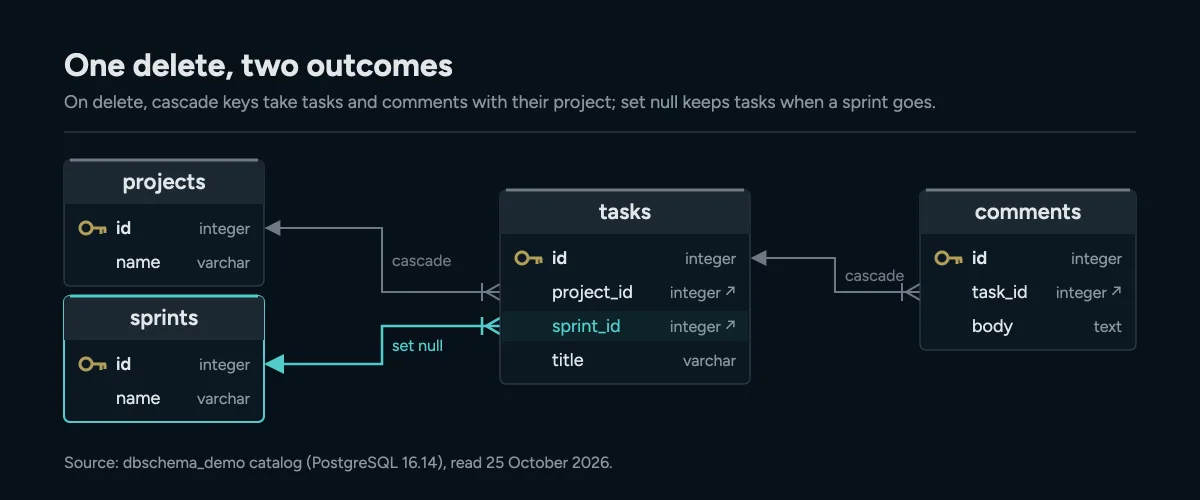
Same tasks table, two kinds of link: deleting a project takes its tasks and their comments, deleting a sprint only empties sprint_id.
To turn a master-detail link into a lookup, you change two things: the key column must accept NULL, and the foreign key needs ON DELETE SET NULL. We did this for tasks.project_id on a fresh copy of the demo database:
ALTER TABLE tasks ALTER COLUMN project_id DROP NOT NULL;
ALTER TABLE tasks DROP CONSTRAINT tasks_project_id_fkey;
ALTER TABLE tasks ADD CONSTRAINT tasks_project_id_fkey
  FOREIGN KEY (project_id) REFERENCES projects (id) ON DELETE SET NULL;
DELETE FROM projects WHERE id = 3;
All 31 tasks survived the delete, and the 4 tasks of project 3 now have no project. The ALTER TABLE reference[2] describes DROP NOT NULL and the constraint forms. Run the change in a migration and check your application first: code that expects every task to have a project now gets NULL.
Browsing master-detail data in DbSchema
The SQL above needs a new query for every row you select. DbSchema's Data Explorer follows the foreign keys instead. It shows the rows of a table and of the tables linked to it, side by side.
- Right-click a table on the diagram, such as
projects, and choose Data Explorer. - Click a row, then the arrow button next to the table name.
- Choose the linked table, for example "Cascade tasks via tasks_project_id_fkey".
- From the tasks table, follow the next foreign key the same way, to
comments.
When you click another project, the tasks table reloads with that project's tasks. Each table also has a filter box for an SQL condition, such as status = 'done', which adds to the foreign key link. If the database has no foreign keys, the Data Explorer follows virtual foreign keys. Those exist only in the DbSchema model file and are never created in the database. Following foreign keys needs DbSchema Pro.
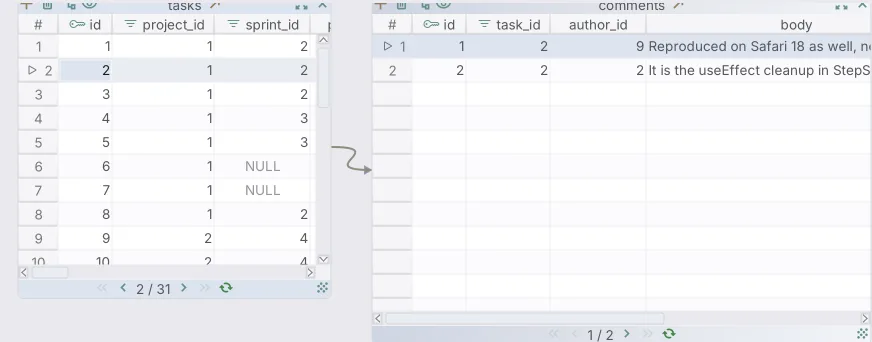
In the Data Explorer, selecting a task lists only its comments. Following foreign keys needs DbSchema Pro.
Keep one difference in mind. The Data Explorer is not only a viewer: changes you make there run in the database at once. DbSchema asks you to confirm an update before it saves it. To browse production without that risk, connect with a login that has SELECT rights only. We tried this on PostgreSQL 16.14 with a role granted SELECT on all tables. It read the six tasks of project 2, and an update was refused:
ERROR: permission denied for table tasks
The PostgreSQL privileges chapter[3] explains the SELECT and UPDATE privileges behind this.
To keep a join as a query, use the Query Builder, which also needs Pro. It builds the join from the same foreign keys. When you close it, DbSchema asks whether to save the query to the project, and Query → Reopen opens it again. For a step-by-step join, see building a query across joined tables visually. For keys the database lacks, see foreign keys and virtual keys.
Download DbSchema, connect it to your own database and open the Data Explorer on the table you look at most. The Data Explorer and the Query Builder are part of DbSchema Pro. The free Community Edition connects, reverse-engineers the schema and draws the diagram, so you can see every master-detail pair before you browse it.
Frequently asked questions
What is the difference between master-detail and lookup?
In master-detail, the child cannot exist without the parent, so ON DELETE CASCADE removes it with the parent. In a lookup, the child only refers to the parent, and ON DELETE SET NULL keeps it when the parent is deleted.
How do I list the foreign keys of a PostgreSQL database?
Query pg_constraint with contype = 'f'. The confrelid and conrelid columns give the parent and child table, and confdeltype gives the ON DELETE action.
Does a foreign key make browsing slower?
Not by itself, but PostgreSQL does not index the referencing column for you. Add an index on the child's key column, because every master-detail filter uses it.
Can I browse master-detail data without foreign keys?
Yes. In DbSchema you can draw virtual foreign keys in the model. The Data Explorer and the Query Builder follow them like real ones, and the database never sees them.
Sources
Follow the foreign keys instead of writing the joins
DbSchema reverse-engineers your database, then lets the Relational Data Editor walk parent and child tables side by side, and saves the browsing session in the model file. The Relational Data Editor and the Query Builder are Pro features.









