Migrating a Relational Schema to MongoDB
Move a MySQL or PostgreSQL schema to MongoDB: map tables to collections, embed or reference each relationship, and turn constraints into validation rules.
On this page
For developers moving an application from a relational database such as MySQL or PostgreSQL to MongoDB, who already know their tables, foreign keys and constraints and need a plan for turning them into a document model.
What changes when tables become collections
When tables become collections, the foreign keys, the column definitions and the CREATE TABLE step all disappear, and each has to be replaced by a decision. Moving a schema to MongoDB is not a copy operation: you decide which tables become collections, which relationships get embedded and which stay referenced, and which column constraints survive as validation rules. This guide shows how to turn a relational schema into a MongoDB model one relationship at a time and how to check both sides as diagrams in the free DbSchema Community Edition.
MongoDB's SQL to MongoDB mapping[1] chart gives you the vocabulary once, and the rest of the article uses it:
| Relational | MongoDB |
|---|---|
| table | collection |
| row | document (a BSON document) |
| column | field |
| table joins | $lookup or embedded documents |
| primary key | the _id field, added automatically |
The worked example throughout is a course platform. Its relational schema has five tables, and the foreign keys are the relationships every later section decides about:
CREATE TABLE instructors (
 instructor_id int PRIMARY KEY,
 name text NOT NULL
);

CREATE TABLE courses (
 course_id int PRIMARY KEY,
 instructor_id int NOT NULL REFERENCES instructors,
 title text NOT NULL,
 status text NOT NULL CHECK (status IN ('draft', 'published'))
);

CREATE TABLE lessons (
 lesson_id int PRIMARY KEY,
 course_id int NOT NULL REFERENCES courses,
 title text NOT NULL,
 position int NOT NULL
);

CREATE TABLE students (
 student_id int PRIMARY KEY,
 email text NOT NULL UNIQUE
);

CREATE TABLE enrollments (
 student_id int NOT NULL REFERENCES students,
 course_id int NOT NULL REFERENCES courses,
 enrolled_at date NOT NULL,
 PRIMARY KEY (student_id, course_id)
);
The mapping chart stops where the real work starts. MongoDB creates a collection implicitly on first insert[1], so nothing like CREATE TABLE has to run first. It declares no foreign keys, so the database records no relationship between collections. And its schema model is flexible by default: documents in one collection need no shared fields or types unless you add schema validation rules[2]. Those three gaps are what the rest of the plan fills. If you are still weighing the two data models themselves, the MySQL and MongoDB data models compared article covers that decision separately.
How to map the relational model and its read paths
Mapping the relational model starts from one rule: model for how the application reads the data, not for how the tables were normalized. MongoDB's data modeling guide[3] asks you to plan the schema before the database runs at production scale, and its best-practices page[4] decides embed or reference by how the application queries and updates related data. A normalized schema is shaped around avoiding duplicate data; a document model is shaped around the reads you actually run.
So before touching MongoDB, write down the main read paths of the course platform and which tables each one touches:
- Course page: one course, its lessons in order, the instructor's name. Touches courses, lessons, instructors.
- Student dashboard: a student's enrollments with course titles and dates. Touches students, enrollments, courses.
- Instructor course list: the courses one instructor teaches, with a lesson count per course. Touches instructors, courses, lessons.
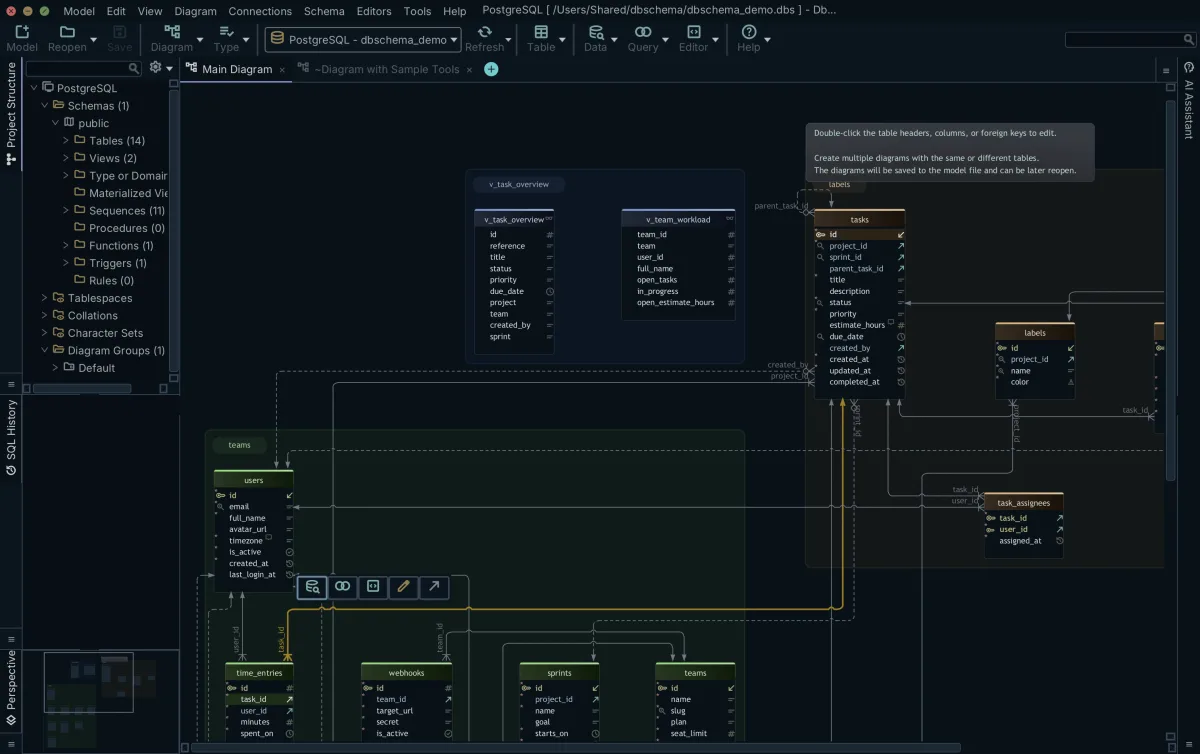
DbSchema reverse-engineers the relational database, MySQL or PostgreSQL alike, into an interactive diagram with its foreign keys drawn as connector lines, and does so in the free Community Edition. That diagram is the map for the embed-or-reference decisions: each connector line is one relationship the next section decides.
A real schema hands you more decisions than five tables suggest: an information_schema query we ran on 10 October 2026 over a 14-table PostgreSQL 16 demo schema returned 23 foreign keys, 17 with ON DELETE CASCADE and 6 with SET NULL. MongoDB runs neither rule, so each one becomes application code, or an embedded array that is deleted together with its parent document.
Embed or reference: one relationship at a time
Embed or reference is decided per relationship: embed related data inside the parent document when the application reads and updates it together, and reference it by an id stored in another collection when the child side has high cardinality (many children per parent), grows without bounds, or can exist without the parent. That is the checklist of MongoDB's best-practices table[4]. The longer comparison is in embedding versus referencing in MongoDB; here, each relationship of the example gets a decision and a reason.
| Relationship | Decision | Reason |
|---|---|---|
| instructor to course | Reference | An instructor exists without any course and is edited separately from the courses |
| course to lessons | Embed at first, reference as lessons grow | MongoDB's own example starts with lessons embedded in the course document and moves them to a separate collection once videos, quizzes and assignments make the document too complex |
| student to course (enrollments) | Reference through an enrollments collection | Many-to-many, and the enrollment carries its own data (enrolled_at), so it is a document in its own right |
Embedding has a cost, and it is paid in two places. First, duplicated data: when you copy the instructor's name into a course document, the application, not the database, keeps the copies consistent. That is denormalization[5], which trades write work for read performance, and MongoDB's duplicate data guidance[4] says to weigh how often the duplicated data needs updating before you duplicate it. Second, size: the maximum BSON document size[6] is 16 MiB, so a child list that grows without bound, such as every enrollment of a popular course, belongs in its own referenced collection rather than in an array inside the course. The limit is enforced on the server: a 16.2 MiB insert in our run failed with "BSONObj size: 16982154 (0x103208A) is invalid".
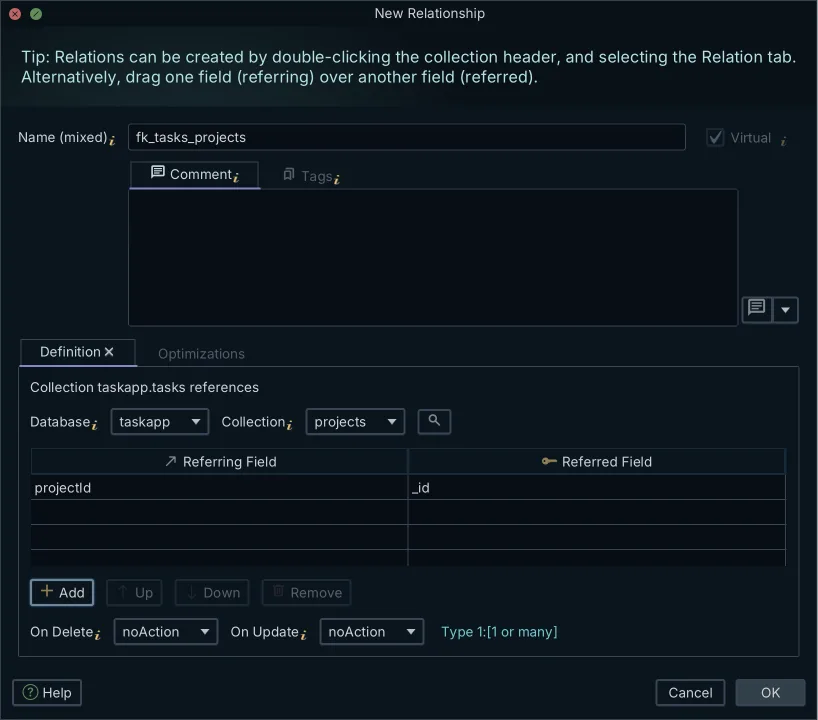
References between collections exist only as stored ids, because MongoDB declares no foreign keys and records nothing about where an id points. DbSchema keeps that record as a virtual relation in its model: it draws one where a field holds an ObjectId that matches the _id of a document in another collection, and you add the rest by dragging one field onto the field it refers to. A reference stored as a string or a number gets no automatic line. That matters after a migration that kept the old integer keys, so draw those relations by hand. MongoDB neither declares nor enforces these relations. They are saved in the model file (saving the model to a file is in Pro), so they become the record of your embed-or-reference decisions, as the MongoDB features documentation describes.
How column constraints become MongoDB validation rules
Column constraints become MongoDB schema validation[2] rules: NOT NULL, column types and CHECK value lists cannot stay column definitions, because a collection has no columns, so they move into a $jsonSchema validator on the collection. A validator names required fields, restricts fields to BSON types, and limits values to an allowed set:
{
  "$jsonSchema": {
    "bsonType": "object",
    "required": [
      "title",
      "status"
    ],
    "properties": {
      "title": {
        "bsonType": "string"
      },
      "status": {
        "enum": [
          "draft",
          "published"
        ]
      }
    }
  }
}
The title and status columns of the courses table became a required-fields list and an enum. Once the rule is on the collection, MongoDB by default rejects any insert or update[2] that would produce an invalid document. The rules do not have to cover every field, so you can validate the fields that matter and leave the flexible ones alone.
One constraint class has no validator equivalent: the foreign key. A foreign key is a promise between collections, and MongoDB checks nothing about it: the application stores the referenced document's _id and maintains the consistency itself. Say so in the plan, because that is where the old database handed a job to the application code. UNIQUE is the other exception: a column such as students.email becomes a unique index[7] on the collection, not part of the validator. A duplicate email then fails with E11000 duplicate key error on index email_1, as it did in our MongoDB 7.0.39 run.
Creating or editing a collection in DbSchema writes its validator to MongoDB while you are connected, and where a collection already has a $jsonSchema validator, its fields are read from that rule instead of being inferred from sampled documents. The step-by-step version is in generating MongoDB validation rules from a design.
How to load the data and replace the joins
Loading the data takes one of two routes. The first is per table: export each table, then load each export into its collection with mongoimport[8], which imports Extended JSON, CSV or TSV from the system command line, not from the mongo shell. References survive as id values, so this route fits the relationships you decided to reference. If you write the old primary key into _id, MongoDB keeps it instead of adding its own _id[1], and every stored reference still points at the right document. The second route is an application script that reads several tables and writes the assembled document, which is how a course row and its lesson rows become one document with an embedded lessons array. Where a read still has to combine referenced collections at query time, joining collections with $lookup covers the syntax.
We ran the per-table route on 10 October 2026 against PostgreSQL 16.14 and MongoDB 7.0.39 with mongoimport 100.17.0. Exporting the users table as one JSON document per row, id written into _id, mongoimport reported "10 document(s) imported successfully. 0 document(s) failed to import.", the same count SELECT count(*) returns in PostgreSQL. Running the same import again without --drop failed on every row with E11000 duplicate key error on index _id_, so a repeated load cannot double the data.
- Export each table you are keeping as a collection (a database dump to JSON or CSV).
- Import each export into its collection, for example: mongoimport --db courseplatform --collection courses --file courses.json
- Run the script that assembles embedded documents from several tables, for the relationships you decided to embed.
Validators and loaded data need an order. MongoDB's guide to handling invalid documents[9] names a data migration with documents from before a schema existed as the case for validationAction warn, which lets the operation proceed and records the violation in the log instead of rejecting it. The validation level decides how a new rule treats documents that are already in the collection, so load first, add the rule, and then look for the documents that break it.
In our run, collMod added the courses validator to a collection holding two invalid documents and returned { ok: 1 }; only find({ $nor: [{ $jsonSchema: schema }] }) listed them. A new insert with status 'archived' was then rejected with this error:
MongoServerError: Document failed validation   (code 121)
operatorName: 'enum', reason: 'value was not found in enum', consideredValue: 'archived'
Transactions come up in the enrollments case, because creating an enrollment touches the students side and the courses side. MongoDB supports multi-document ACID transactions[10] across operations, collections, databases, documents and shards, so the old transactional code has a direct equivalent. Its documentation is blunt about the price, though: in most cases a distributed transaction incurs a greater performance cost than single-document writes, and the availability of transactions should not be a replacement for effective schema design. A model that keeps related writes in one document removes the need, which is the argument for the embedding decisions above. On a standalone MongoDB 7.0.39 container, our first insert inside a transaction failed with "Transaction numbers are only allowed on a replica set member or mongos", so a test migration that exercises transactional code needs a replica set.
DbSchema's part in this step is the design before the load and the check after it, described in the last section.
Why a table-per-collection copy goes wrong
A table-per-collection copy goes wrong because it skips the decisions: every table becomes its own collection, unchanged, and every join the database used to do lands back in the application. No single collection is broken, yet the model keeps the relational shape while giving up both the joins and the constraints.
- Every read that used a join now needs $lookup, so aggregation pipelines multiply across the codebase.
- No validator replaces the dropped NOT NULL and CHECK constraints unless you write one, so documents of different shapes collect in the same collection.
- The overcorrection fails too: embedding every child table into its parent pushes documents toward the 16 MiB limit and duplicates fields that then drift out of sync.
The plan from the earlier sections avoids both mistakes, because each relationship was decided on its read path: lessons embedded for the course page, enrollments referenced for the dashboards, duplication limited to fields that rarely change. MongoDB's own course-and-lessons example[4] is the pattern to copy, including the move from embedded to referenced once lessons gain videos, quizzes and assignments.
How to check the new MongoDB database against the plan
Checking the new MongoDB database means reading a test migration back and comparing it with the plan. Connect DbSchema to the test database through its own open-source MongoDB JDBC driver (version 10.5.2 downloaded jdbc-driver-mongodb-2026.08.18.1, built on the MongoDB Java driver 5.5.1, checked on 10 October 2026). It infers each collection's structure from a sample of documents, by default 100 from the start and 100 from the end of each collection, and lists field names, BSON types, nested objects and arrays. The Schema Scan Depth setting raises the sample to 300 documents from each end, or to every document. The result is an approximation of what the documents contain, not a schema MongoDB enforces, so a field that appears only in unsampled documents can be missing. A collection with a validator is the exception: its fields are read from the $jsonSchema rule instead of the sample, as the schema discovery documentation explains.
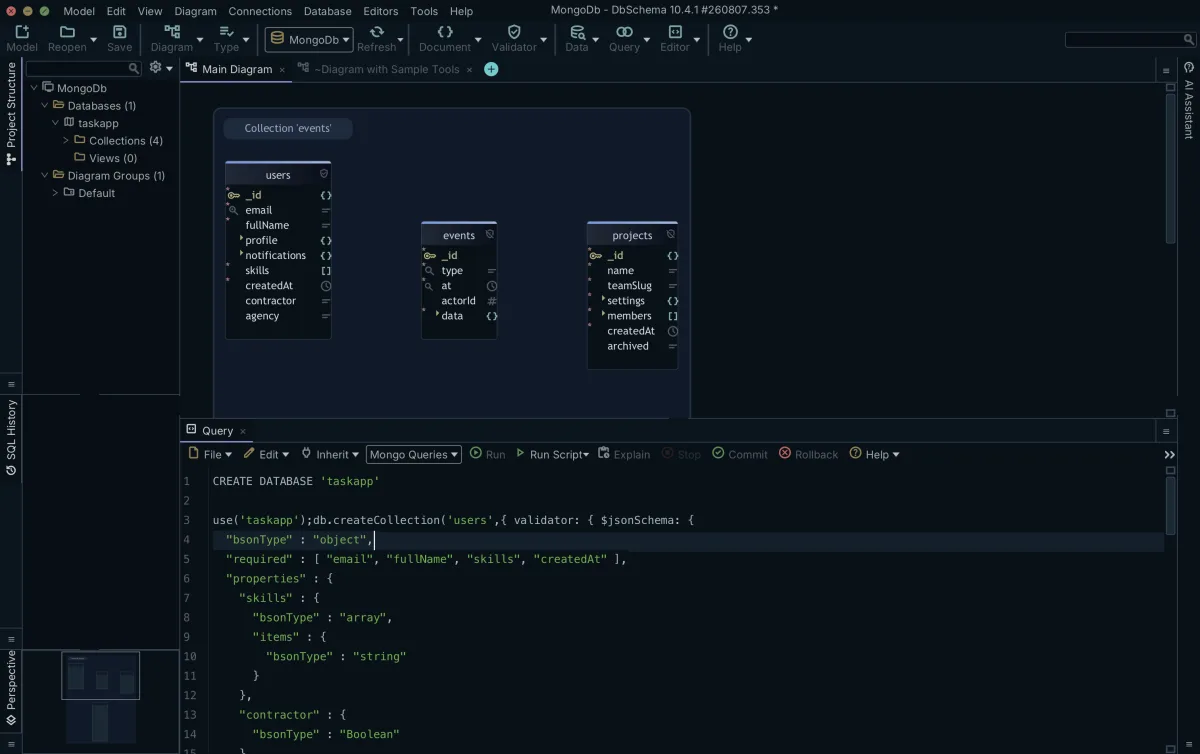
With both sides as diagrams, the check against the plan is direct. These steps are in the Pro edition:
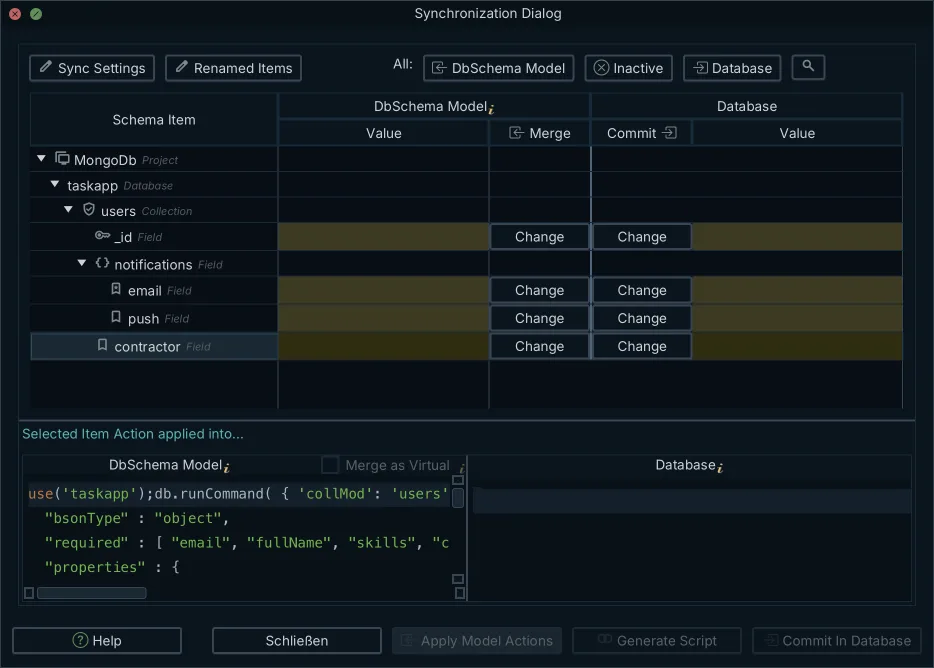
- Compare the test database with the design model: schema synchronization lists every difference between model and database, and you decide for each difference which side wins. The validators in the model can be deployed to each environment, so dev, test and production get the same rules.
- Open parent and child collections side by side in the Data Explorer over the virtual relations: selecting a parent document filters the child collection to the matching documents, and you can follow the next relation from there, level by level.
- Export interactive HTML5 documentation with a vector diagram, where collection and field comments show as mouse-over tooltips.
What to do next in DbSchema
Download DbSchema, reverse-engineer the relational database you are leaving and the MongoDB database you are building, and read both as diagrams in the free Community Edition. Saving the models to files, comparing a second MongoDB database against the model and browsing documents across collections are in Pro.
Frequently asked questions
Can I convert a SQL schema to MongoDB automatically?
Not as a design. An import can copy each table into a collection, but a straight copy keeps every join in the application and gives up the reason to use documents. The useful conversion is a sequence of decisions: map the terms, decide embed or reference per relationship from the read paths, and rewrite column constraints as validation rules.
Should every table become a MongoDB collection?
No. Some tables become embedded arrays or subdocuments inside another collection, the way lessons can sit inside a course document until they grow. Join tables behind many-to-many relationships may become a small linking collection or reference fields. Decide per relationship, using how the application reads the data, not the shape of the old tables.
What happens to foreign keys when you move to MongoDB?
MongoDB neither declares nor enforces references between collections, so the application stores the referenced document's _id and keeps the references consistent itself. DbSchema can record them as virtual relations, drawn as connector lines and saved in the model file, but MongoDB does not enforce them.
Does MongoDB support transactions across collections?
Yes. Multi-document ACID transactions work across operations, collections, databases and shards. MongoDB's documentation states that a distributed transaction incurs a greater performance cost than single-document writes and that transactions should not replace effective schema design: for many scenarios, modeling the data appropriately minimizes the need for them.
Sources
Read both sides of the migration as diagrams
DbSchema reverse-engineers the relational database you are leaving and the MongoDB database you are building into interactive diagrams, with collection structure inferred from sampled documents. Connecting, reverse-engineering and the diagrams are in the free Community Edition.









