MySQL vs MongoDB: Key Differences, Decision Table and Data Models
For the developer or architect picking the database for a new service, who writes SQL and has read a document model without having designed one.
On this page
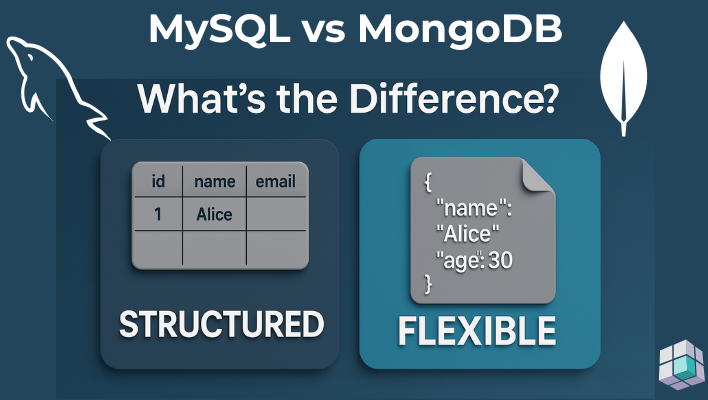
The service you are about to write stores one kind of thing, and the open question is whether that thing gets a table or a document. Choose MySQL when more than one entity has to stay consistent inside a single write, because InnoDB does that work for you. Choose MongoDB when the application almost always reads one parent together with its children, because the join then disappears into a single document read.
Both products have moved a long way past the stock comparison that still circulates, so this one is version-qualified. It is checked against the MySQL 9.7 LTS reference manual and the MongoDB 8.3 Database Manual. MongoDB has had multi-document transactions since 4.0, and MySQL adds and drops columns instantly.
DbSchema is not a database. It connects to your MySQL or MongoDB server and reverse-engineers what is actually there: tables, columns and foreign keys on the relational side, collections and inferred fields on the document side. You then work on a diagram instead of a shell transcript.
Key differences between MySQL tables and MongoDB documents
The difference that produces all the others is the unit of storage. MySQL stores a row in a table whose columns are fixed in advance, so the column names and types are written once, in the table, and every row inherits them. MongoDB stores a document in a collection, and each document carries its own field names and types with it, so two documents in one collection can hold different fields.
That is why the same change lands differently on each side. Adding a field in MongoDB means writing it on the next insert, and the documents already stored keep the old shape until something rewrites them. Adding a column in MySQL means an ALTER TABLE that applies to every existing row at once, and the server then refuses any write that does not match.
| Feature | MySQL | MongoDB |
|---|---|---|
| Data format | Tables of rows and columns | Documents in BSON, JSON-like |
| Schema | Fixed by DDL, enforced on write | Flexible by default, validators optional |
| Relationships | Foreign keys | Embedded subdocuments or references |
| Query language | SQL | MongoDB Query API and the aggregation pipeline |
| Best for | A stable shape and cross-entity integrity | One aggregate whose shape keeps moving |
The MySQL and MongoDB decision table
Every row below is taken from the current MySQL and MongoDB reference manuals rather than from a general impression, and most of them have a job for which each answer is the right one.
| Criterion | MySQL 9.7 | MongoDB 8.3 |
|---|---|---|
| Schema enforcement | Fixed by DDL, rejected on write | Optional validator per collection |
| Cross-entity join | Native SQL JOIN | $lookup, one database only |
| One-to-one | Child table plus a UNIQUE foreign key | Embedded subdocument |
| One-to-many | Foreign key column in the child table | Embedded array, or a reference |
| Multi-entity transaction | InnoDB, on any deployment | Replica set or sharded cluster only |
| Adding a field | ALTER TABLE, applied to every row | Written on the next insert |
| Reading one aggregate | Joined at read time | One document read |
| Limit to watch | 255 instant row versions per table | 16 MiB per document, 100 nesting levels |
Four of those rows need their fine print. On schema enforcement, MySQL puts STRICT_TRANS_TABLES in the default sql_mode, so an invalid or missing value aborts the statement and rolls it back; MongoDB has no schema until you add a $jsonSchema validator to a collection, and then validationAction defaults to error, so a violating write is rejected. On joins, SQL joins any tables the query names, while $lookup performs a left outer join inside an aggregation pipeline, to a collection in the same database.
On transactions, InnoDB adheres closely to the ACID model, with COMMIT and ROLLBACK for atomicity, the doublewrite buffer for consistency and redo logs for durability. In MongoDB a write to a single document is atomic on its own, and a multi-document transaction needs a replica set or a sharded cluster, never a standalone deployment. On schema evolution, ADD COLUMN and DROP COLUMN default to ALGORITHM=INSTANT and are capped at 255 row versions per table, while changing a column's data type still copies the whole table.
Two rows decide most projects, and they are the two that cannot be worked around cheaply later. If more than one entity has to stay consistent inside a single write, take MySQL. If the application almost always reads one parent with its children, take MongoDB and let the join disappear.
Relational modeling with a MySQL example
MySQL wants the structure first. Define the sql table, its columns and its types, then insert rows that match. Relationships are declared with foreign keys and the server enforces them: foreign_key_checks is enabled by default and rejects a child row whose parent does not exist.
Schema design for countries and cities
CREATE TABLE Countries (
    id         INT PRIMARY KEY,
    name       VARCHAR(200),
    population INT
);

CREATE TABLE Cities (
    id         INT PRIMARY KEY,
    name       VARCHAR(200),
    population INT,
    country_id INT,
    FOREIGN KEY (country_id) REFERENCES Countries(id)
);
The worked example uses the same two entities in both databases. A country is one row with a primary key. A city is one row that names its country through the country_id foreign key, which is the column MySQL checks on every insert.
That structure lets you normalize your data, link each city to its country, and have InnoDB reject a city whose country_id points at nothing. MySQL also creates the index the foreign key needs if one is not there already, so the join back to Countries is indexed as a side effect.
The catch is visibility. A CREATE TABLE script tells you nothing about a schema you did not write yourself, and a shell client shows data rather than design, so a hundred-table database stays a list of names until something draws it.
Document modeling with a MongoDB example
MongoDB stores collections of documents, BSON objects that can nest other objects and arrays. You insert a document that already contains its data, and the shape of that document is the structure. Modeling countries and cities gives you two options, and the choice between them is the main design decision on this side.
Embedded documents
Embedded documents put the cities inside the country document, as an array field.
db.countries.insertOne({
  "_id": 1,
  "name": "France",
  "population": 67000000,
  "cities": [
    { "name": "Paris", "population": 2148000 },
    { "name": "Lyon",  "population": 515695 }
  ]
})
Embedding fits three situations, and all three are about how the cities are read. Cities are only ever read together with their country. You never query cities on their own. The array has a ceiling you control, so the document cannot grow without bounds.
Referenced collections
Referenced collections keep countries and cities apart, and each city carries a country_id pointing back at its country. Reading both then costs a second query, or a $lookup stage.
db.countries.insertOne({
  "_id": 1,
  "name": "France",
  "population": 67000000
})

db.cities.insertOne({
  "_id": 101,
  "name": "Paris",
  "population": 2148000,
  "country_id": 1
})
Referencing fits the opposite case. The child side has high cardinality, so the embedded array would never stop growing. Cities are written on their own hot path, at different times from countries. Cities are queried and managed independently of any country.
Embed or reference a one-to-one relationship
One-to-one is the case where the answer is nearly always embed. A country has one capital city, an order has one shipping address, a user has one profile. Embed the child in the parent unless the child is read without the parent, written on its own hot path, or big enough to threaten the document size limit.
The reasoning is the read pattern rather than the cardinality. When the application mostly reads the parent, embedding turns two round trips into one. MongoDB states the rule plainly: structure your schema so the application receives all of its required information in a single read operation. A reference costs a second query or a $lookup, and $lookup runs inside an aggregation pipeline against one database, which is harder to cache and harder to shard.
// One-to-one: the capital lives inside the country document
db.countries.insertOne({
  "_id": 1,
  "name": "France",
  "population": 67000000,
  "capital": {
    "name": "Paris",
    "population": 2148000,
    "area_km2": 105
  }
})
One read then returns the country together with its capital:
db.countries.findOne({ "_id": 1 })
{
  "_id": 1,
  "name": "France",
  "population": 67000000,
  "capital": {
    "name": "Paris",
    "population": 2148000,
    "area_km2": 105
  }
}
Three things break the rule, and all three are about the child document rather than about the relationship. The child is read on its own, so a profile screen that never loads the parent user makes a second collection worth the extra query. The child is written far more often than the parent, and separate documents keep a hot counter from rewriting a cold parent on every update. The child is large, and a document cannot exceed 16 mebibytes or nest deeper than 100 levels, so a blob-shaped child belongs in its own collection or in GridFS.
MySQL expresses the same one-to-one differently: a child table, a FOREIGN KEY back to the parent, and a UNIQUE index on the referencing column, which is the part that turns one-to-many into one-to-one. The read then costs a join every time, and that is the price of having the server enforce the relationship instead of the application.
MongoDB's own design process starts from the operations the application runs most often, which is the same instruction read from the other end: decide the reads first, and the document shape follows.
Both models side by side in DbSchema
DbSchema draws the relational model and the document model in the same application, which is what makes this comparison concrete rather than theoretical. Open the MySQL connection in one model and the MongoDB connection in another, and both diagrams come out of the same layout engine, and you browse and export them the same way.
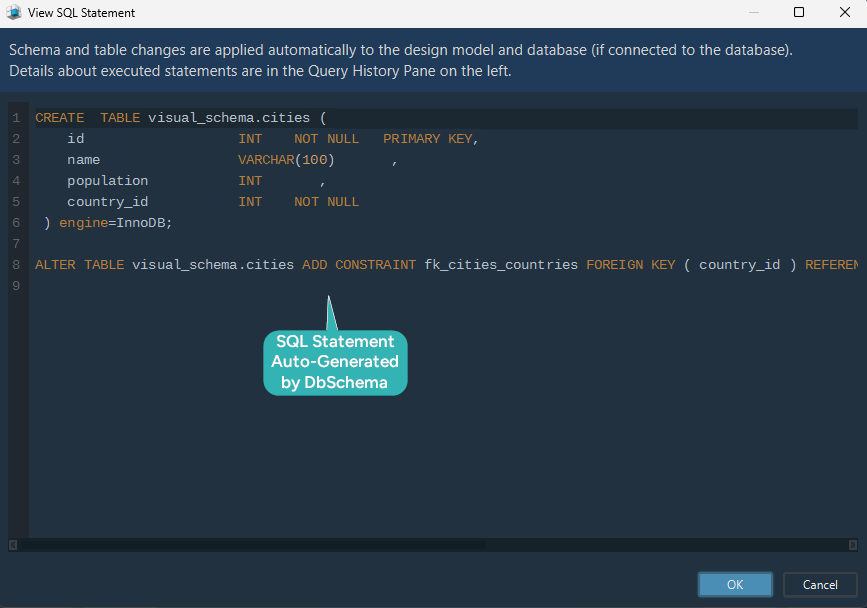
The MySQL model in the SQL Editor or on the diagram
Two routes lead to the same MySQL diagram. Write the CREATE TABLE statements in the SQL Editor and run them, and the diagram redraws with the new tables and the foreign key line between them. Or add both tables on the canvas, pick the column types from the dropdowns, and drag a line from Cities.country_id to Countries.id, in which case DbSchema generates the SQL script and can deploy it to the database.
The difference between the two matters for what gets written where. The first route changes the database immediately and DbSchema updates the model to match. The second changes only the design model DbSchema keeps in its file, until you deploy the generated script. Both end in the same place: an ER diagram you can lay out by hand, and a MySQL model you can also reverse-engineer out of a database somebody else built.
The MongoDB model in the Query Editor or on the diagram
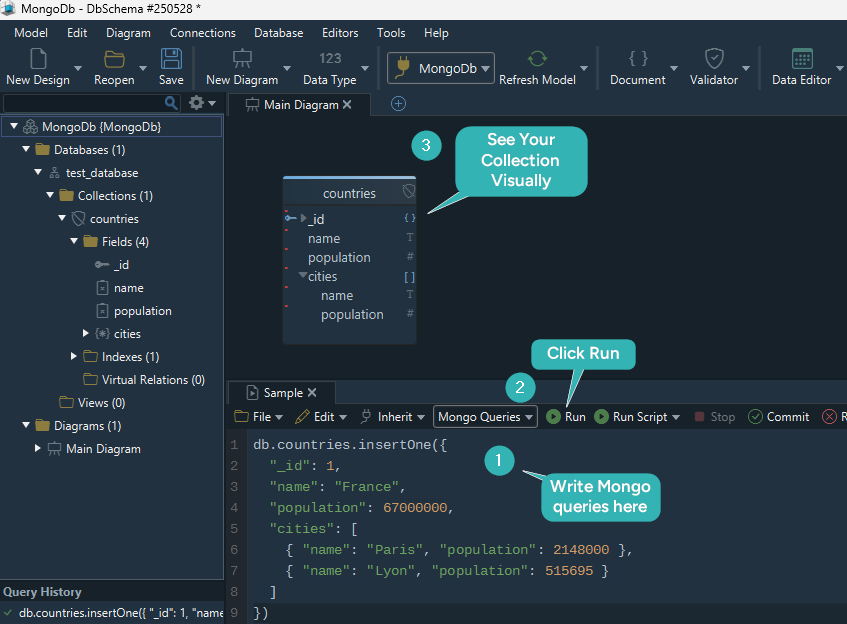
MongoDB declares no schema, so DbSchema builds one. It introspects a configurable sample of documents per collection and infers field names, BSON types, nested objects and arrays. The result is an approximation of what the documents actually contain, and it is not a schema MongoDB itself enforces.
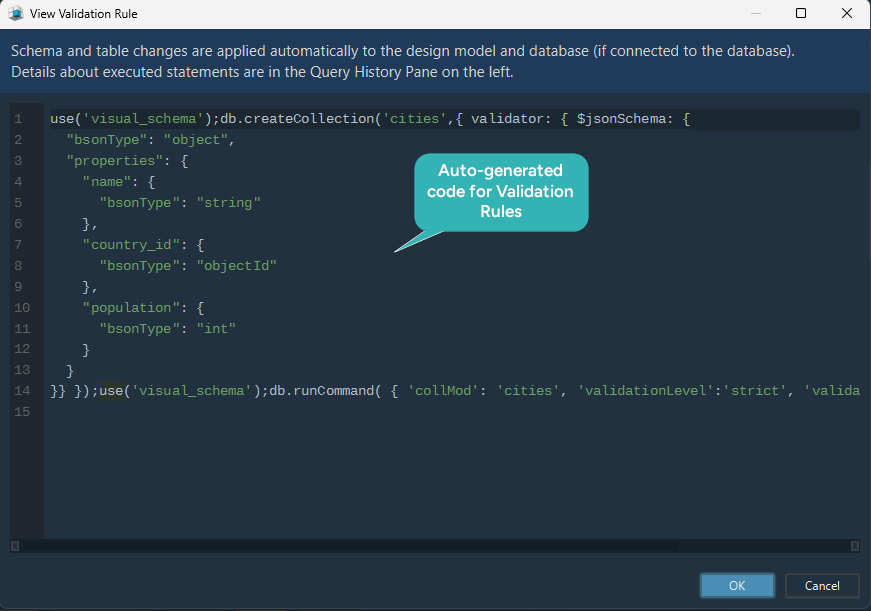
Where a collection carries a validation rule, that rule wins. DbSchema reverse-engineers the rule as the authoritative structure instead of the sampled approximation. Create or edit a collection in DbSchema and it writes the validation rule back to both the database and the local model file, which is the one case on this side where a diagram edit reaches the server.
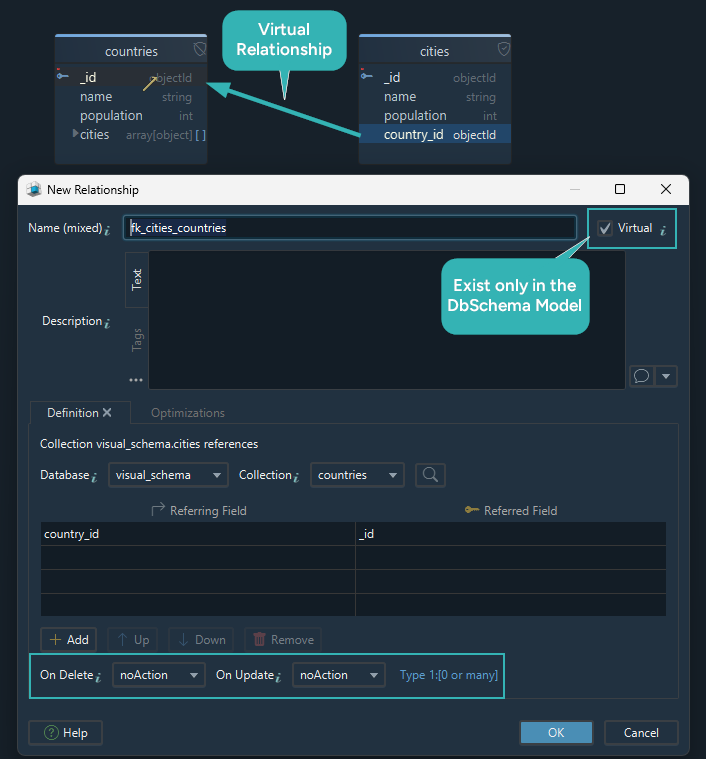
MongoDB neither declares nor enforces a foreign key between countries and cities, so DbSchema adds a virtual relation instead. Drag cities.country_id onto countries._id and the link is drawn as a connector on the diagram and saved in the model file. It is a DbSchema-side link, and the database is not checking it.
Those virtual relations are what makes the data browsable. The Relational Data Editor opens several collections side by side over them, and selecting a country in the parent pane refilters every child pane to the documents whose field values match, cascading as many levels deep as you need.
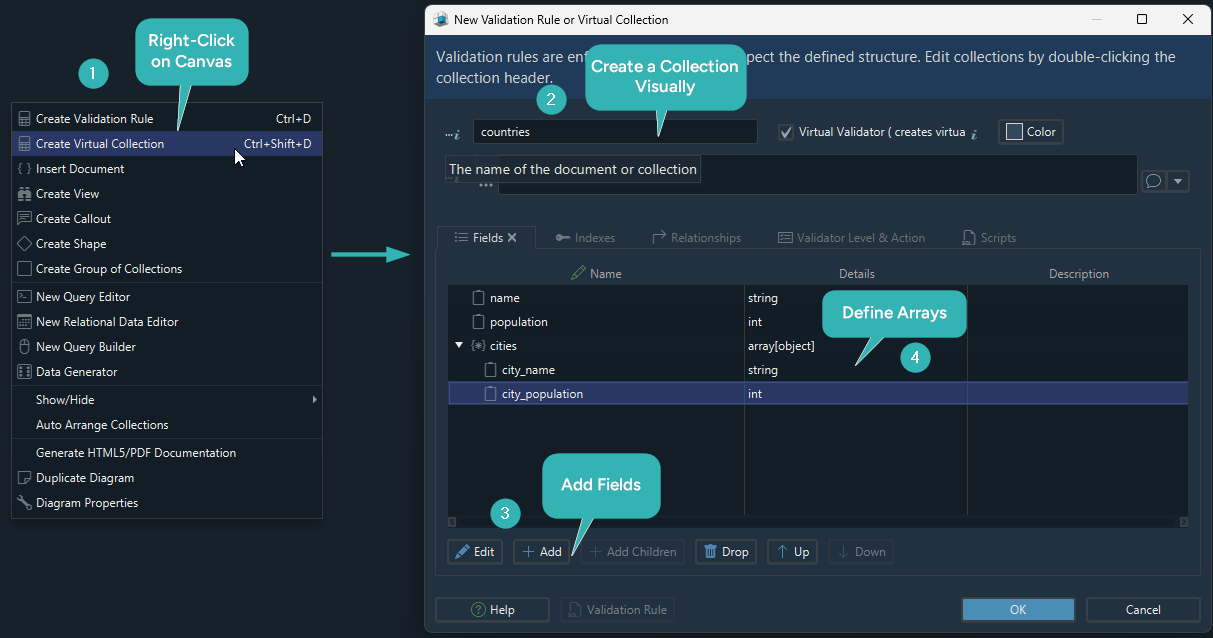
Two routes lead to the MongoDB diagram as well. Run the insertOne code in the Query Editor and the collection appears on the canvas. Or build it on the diagram: create Countries, add fields, choose whether cities is an embedded array or its own collection, and set validation rules without writing a line of JSON.
What DbSchema shows that neither database does

Neither database shows you its own shape. MySQL gives you SHOW CREATE TABLE, one table at a time. MongoDB gives you a sample document and leaves the rest to you. DbSchema turns both into a diagram you can read, including the virtual relations MongoDB never declares. Other tools cover parts of that chain, and it is the combination of the inferred schema, the validation rules, the virtual relations, the multi-collection browsing and the HTML5 documentation that is worth having in one place.
Designing on the canvas works the same way for both: create tables or collections by clicking and dragging, and DbSchema writes the SQL or the JSON, so the time goes into the model rather than into the syntax. The model file itself is XML and reviews cleanly in a Git pull request, which is how a schema change gets read by somebody before it is deployed. The exported interactive HTML5 documentation carries a vector diagram image in which collection and field comments are readable as mouse-over tooltips, which is the version you hand to people who will never open a database client.
The difference between the two engines is where the shape lives: in MySQL it lives in the schema and the server enforces it on every write, and in MongoDB it lives in the documents and the application owns it. Most real systems end up running both, which is the reason to model them in one place instead of two.
Download DbSchema and point it at your own MySQL or MongoDB instance. Connecting, reverse-engineering and the interactive diagrams are in the free Community Edition. Saving the model to a file, schema synchronization, the Relational Data Editor and the HTML5 documentation export are in Pro.
Sources
- MySQL 9.7 Reference Manual: Preface and Legal Notices
- MySQL 9.7 Reference Manual: Server SQL Modes
- MySQL 9.7 Reference Manual: Online DDL Operations
- MySQL 9.7 Reference Manual: FOREIGN KEY Constraints
- MySQL 9.7 Reference Manual: InnoDB and the ACID Model
- MongoDB 8.3 Database Manual: Schema Validation
- MongoDB 8.3 Database Manual: Handle Invalid Documents
- MongoDB 8.3 Database Manual: Transactions
- MongoDB 8.3 Database Manual: $lookup
- MongoDB 8.3 Database Manual: Model One-to-One Relationships with Embedded Documents
- MongoDB 8.3 Database Manual: Embedding vs. References
- MongoDB 8.3 Database Manual: Designing Your Schema
- MongoDB 8.3 Database Manual: Limits and Thresholds
Model MySQL and MongoDB side by side
DbSchema connects to both, reverse-engineers what is there, infers collection structure from sampled MongoDB documents, and draws the virtual relations the server never declares. Community covers connecting, reverse-engineering and the interactive diagrams.









