MongoDB User Collection: Schema Design Best Practices
For the backend developer laying out the user collection of an application on MongoDB; embedding, referencing and JSON Schema validation are explained where they appear.
On this page
The users collection started as an email address, a password hash, and a display name. Then came roles, notification settings, saved delivery addresses, second-factor devices, and a login history that never stops growing. Keep inside the user document whatever is bounded and read together with the user, put whatever grows without a limit in its own collection, and write the result down as a $jsonSchema validator so the database refuses documents that break it.
Does MongoDB use collections?
MongoDB stores documents in collections, and a collection puts no fixed field list on the documents inside it. Two user documents in the same collection can carry different fields, and one can hold a nested object where the other holds nothing at all. Nothing in the database says which of the two shapes was intended, and supplying that answer is the design work.
Documents are stored as BSON, a binary form of JSON with types JSON lacks: ObjectId, Date, 64-bit integer, Decimal128, and raw binary. A user document can therefore keep a signup timestamp as a real date instead of a string, and an account balance as Decimal128 instead of a floating-point number, so a query sorts and compares on them without converting first.
Indexes belong to the collection, and one can target a top-level field or a path inside a nested object, so an embedded subdocument stays searchable rather than becoming an opaque blob. The collection is also the unit MongoDB uses for access control, for sharding, and as the starting point of an aggregation pipeline.
What the user document has to hold
A user profile is rarely just credentials. The record ends up carrying roles, security settings, profile metadata, second-factor devices, notification preferences, billing addresses, and an activity trail that grows for as long as the account exists. Two mistakes pull in opposite directions: splitting every attribute into its own collection, the way a relational schema would, or dropping every historical event into one array on the user document.
A document that keeps the first group and references the second looks like this:
{
  _id: ObjectId("6512a1f0c2e4b81a3f0d9a11"),
  email: "[email protected]",
  passwordHash: "2b12ZK9uQ0rTn8xV4wYc1e",
  createdAt: ISODate("2026-01-14T09:12:00Z"),
  preferences: { locale: "en-GB", theme: "dark", emailDigest: true },
  mfa: [ { method: "totp", addedAt: ISODate("2026-02-02T10:00:00Z") } ],
  addresses: [
    { label: "home", city: "Cambridge", postcode: "CB1 2AB", isDefault: true }
  ],
  lastLoginAt: ISODate("2026-09-01T07:40:11Z")
}
The login history is not in there. Each login event is a document in its own collection carrying the user's _id in a userId field, which is the reference MongoDB stores and never checks.
| Part of the user record | Cardinality | Where it goes | Read on |
|---|---|---|---|
| Email and password hash | 1:1 | Top-level fields | Every login |
| Second-factor methods | 1 to 5 | Embedded array | Login only |
| Preferences and interface settings | 1:1 | Embedded object | Every session |
| Saved shipping and billing addresses | 1 to 10 | Embedded array | Checkout |
| Activity and audit log | Unbounded | Separate collection | Admin audit |
One BSON document is capped at 16 MB, so an array that gains an entry on every login eventually breaks the write that appends to it. The ceiling is not what you hit first, though. Collection data in the WiredTiger internal cache is uncompressed, and that cache defaults to 50% of (RAM minus 1 GB), or to 256 MB, whichever is larger[1]. On a machine with 4 GB of RAM that comes to 1.5 GB. Every megabyte of history embedded in a user document is a megabyte the rest of the working set does not get. A read of one user's credentials pulls the whole document unless the query projects the fields it wants, history included.
How does MongoDB handle relationships between data in collections?
MongoDB gives you two mechanisms: embedded documents, which denormalize, and references between collections, which normalize. Which one fits depends on the cardinality, on how the data is read, and on whether it is updated with the parent or on its own, a choice covered more widely in MongoDB schema design.
When to embed related data
Embedding places the child objects inside the parent document, as a nested object or an array. It fits a bounded 1:1 or 1-to-few relationship to the parent. The case for it is child data that is read whenever the parent is read, and that is rarely written on its own.
Settings, notification rules, and the address list are read on the same request that reads the user, so embedding them returns the whole user state in one query with no join. MongoDB writes atomically at the document level, so changing two embedded fields at once needs no multi-document transaction.
When to reference related data
Referencing keeps the related entity in its own collection and links it by identifier, usually the parent's ObjectId. It fits an unbounded 1-to-many or many-to-many relationship, child documents that are large, and records that other services query without ever touching the user.
Activity logs, payment history, and uploaded media belong in their own collections for that reason. The user document holds nothing about them, and the read side joins with a $lookup stage or a second query when it needs both.
| Design criterion | Embedding | Referencing |
|---|---|---|
| Cardinality | 1:1 or 1 to few | 1 to many, or many to many |
| Document growth | Bounded, under 16 MB | Grows in a separate collection |
| Read cost | One read, no join | A $lookup or a second query |
| Write concurrency | Atomic within the document | Independent writes |
| Working set | Compact while the payload is lean | Cold history stays out of cache |
How to connect two collections in MongoDB?
MongoDB declares no foreign keys and enforces none. An ObjectId stored in one collection that points at a document in another is a convention your application keeps. Nothing in MongoDB rejects a write that breaks that convention, and nothing cascades a delete along it. DbSchema draws those links anyway, which is what makes a MongoDB diagram design readable.
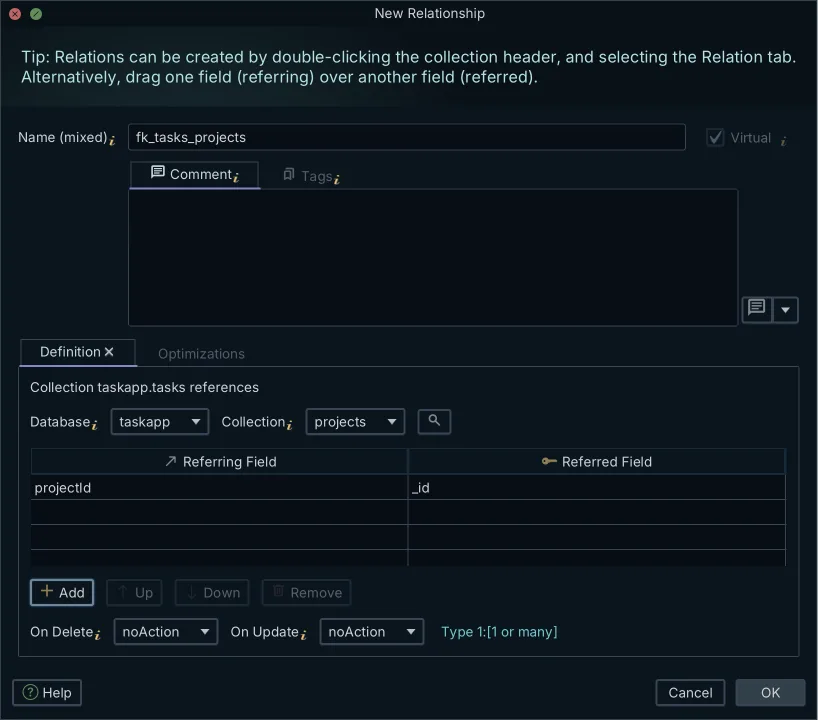
DbSchema connects to MongoDB and introspects a configurable sample of documents per collection, inferring the field names, the BSON types, the nested objects and the arrays it finds there. What you get is an approximation of what the sampled documents contain, never a structure MongoDB enforces, and a field that only a few documents carry appears only if the sample reaches one of them. Where a collection carries a validation rule, DbSchema reverse-engineers that rule instead and treats it as the authoritative structure.
A relationship between two collections is a virtual foreign key: you drag the field of one collection onto the field it points at in another, DbSchema draws the connector line on the diagram, and the definition is written to the model file rather than to the database. The collections themselves are untouched, so a virtual relation costs the running application nothing.
Those relations are what the Relational Data Editor reads. It opens several collections side by side, and selecting one user refilters every child pane to the documents whose field values match, cascading as many levels deep as the relations go. The orders and the sessions of that user end up on screen next to the user. Exporting the model as interactive HTML5 documentation carries the same diagram as a vector image, with the collection and field comments readable as mouse-over tooltips. Five things form one chain: a schema inferred from the documents, the validation rule where one exists, the virtual relations, the browsing across them, and the interactive HTML5 documentation. Other tools cover parts of it; the combination is what describes a MongoDB database well enough to hand to someone else.
One collection can sit in several diagrams of the same model file, so the user collection appears in an authentication diagram, an order diagram, and an analytics overview without being defined three times. Saving models to files, the Relational Data Editor, and the HTML5 documentation are Pro edition features.
Who is MongoDB's biggest competitor?
Amazon DocumentDB is the managed document database that answers the same drivers. It is MongoDB-compatible rather than MongoDB itself, and the AWS documentation lists compatibility with MongoDB 3.6, 4.0, 5.0 and 8.0[2], so application code written against those versions connects to it.
The architecture underneath is different. An Amazon DocumentDB cluster separates the instances that process queries from a cluster volume that replicates the data six ways across three Availability Zones, and compute scales independently of storage[2]. Billing follows that split, charging separately for instances, storage, I/O, backups, and data transfer[2]. Writes are settled for you too: the service ignores the write concern a driver asks for, acknowledging a write only once a majority of nodes hold it durably, and that level cannot be lowered[2].
Writing the design down as a validation rule
The shape you settled on lives in your head and in the application code until you give it to the database. MongoDB validates documents against JSON Schema, so the required fields and their BSON types become a rule the collection applies to every insert and update:
db.createCollection("users", {
  validator: {
    $jsonSchema: {
      bsonType: "object",
      required: [ "email", "passwordHash", "createdAt" ],
      properties: {
        email: { bsonType: "string", description: "email is required and must be a string" },
        passwordHash: { bsonType: "string", description: "passwordHash is required and must be a string" },
        createdAt: { bsonType: "date", description: "createdAt is required and must be a date" },
        preferences: { bsonType: "object" }
      }
    }
  }
})
An insert that omits one of the required fields is rejected, and the error carries the description you wrote for the rule it broke[3], so a description that names the field pays for itself the first time a write fails.
DbSchema reads that rule as the collection's structure instead of guessing from a sample, and the diagram then shows what the database actually enforces. Double-click a collection header in DbSchema to edit its validation rule, or create a collection there, and the rule is written to the live database and to the design model file together. Drawing a virtual relation changes only the model file; editing a collection changes both.
Three checks are worth running once the validator is in place. Put a unique index on the field you use to look up accounts, so two registrations racing each other cannot both win:
db.users.createIndex({ email: 1 }, { unique: true })
Ask the collection for its storage statistics, and read avgObjectSize in the answer to see what a user document weighs on average:
db.users.aggregate([ { $collStats: { storageStats: {} } } ])
Give the short-lived collections a TTL index, so MongoDB expires the password reset tokens and the session records instead of your cleanup job:
db.sessions.createIndex({ createdAt: 1 }, { expireAfterSeconds: 3600 })
Is MongoDB still relevant in 2026?
For a user record, the document model still answers what a table struggles with: a profile whose optional parts differ between accounts, and a set of preferences that gains a field with every release, without a migration adding a column that most rows leave null. The parts of the record that behave like a ledger, the logins and the payments, go in their own collections. The discipline that used to come from the table definition now comes from the validation rule.
Drawing the model before deploying is what keeps that discipline visible, and logical database design in DbSchema goes one step further by separating the concepts from the collections that carry them. Logical and conceptual design is in the Architect edition.
Download DbSchema at https://dbschema.com/download.html and open a model against your own MongoDB instance: reverse-engineer the collections, drag the fields that point at each other into virtual relations, and read the result as a diagram. Reverse-engineering and interactive diagrams are in the free Community Edition. Saving the model to a file, the HTML5 documentation, the Relational Data Editor, and schema synchronization are Pro.
Frequently asked questions
Does MongoDB use collections like SQL uses tables?
A collection holds BSON documents the way a table holds rows, and it is the unit for indexes, access control, and sharding. The difference is that the documents in one collection need not share a field list or field types, unless a validation rule on the collection requires it.
How do I enforce a schema in a MongoDB collection?
Attach a $jsonSchema validator to the collection, listing the required fields and their BSON types, and MongoDB rejects the inserts and updates that break it. DbSchema reverse-engineers an existing validation rule as the collection's structure, and writes the rule back to both the database and the model file when you create or edit a collection.
How does DbSchema visualize relationships if MongoDB lacks foreign keys?
DbSchema uses virtual foreign keys, created by dragging one field onto the field it points at and saved in the model file, not in the database. The Relational Data Editor reads them to open parent and child collections side by side, so selecting a user shows that user's orders and sessions in the neighboring panes.
Sources
Model your MongoDB collections in DbSchema
DbSchema samples your documents, infers the collection structure, and records the virtual relations MongoDB never declares. Reverse-engineering and interactive diagrams are in the free Community Edition.









