MongoDB Diagram Design and Visualization with DbSchema
For a developer or architect who has inherited a MongoDB database and has to work out what its collections hold before changing anything.
On this page
MongoDB imposes no structure on the documents in a collection, which is what makes it quick to write to and slow to understand. Two documents side by side can carry different fields, different types and different references, and no table definition anywhere says which of them was intended. The structure is still there, though, in the documents, and reading enough of them is how DbSchema draws a MongoDB database as a diagram.
Where the diagram comes from when MongoDB has no schema
Ask a collection for one of its documents and you see the shape the application writes:
db.persons.findOne()
{
  "first_name": "John",
  "last_name": "Leaf",
  "address": [
    {
      "city_id": 3,
      "street": "Seaseme St",
      "number": 12,
      "zip": 123555
    }
  ]
}
DbSchema does that at scale. It introspects a configurable sample of documents per collection and infers the field names, the BSON types, the nested objects and the arrays it finds, so the collection above becomes a node on the diagram carrying first_name, last_name and the embedded address object with its own four fields. The _id that MongoDB generates for every document is there too. The diagram therefore approximates what the sampled documents contain, and is never a structure MongoDB enforces.
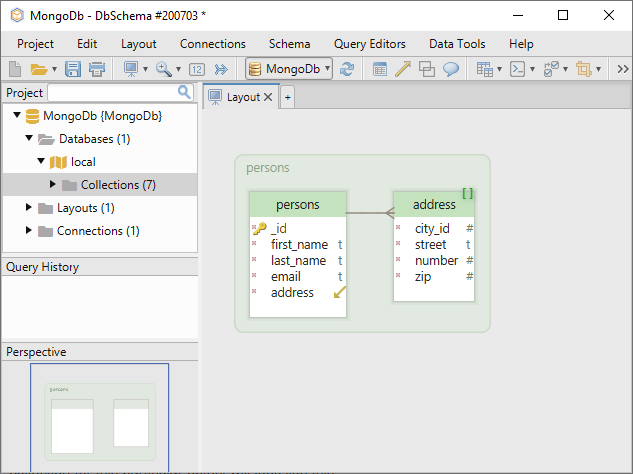
Where a collection carries a validation rule, that changes. DbSchema reverse-engineers the rule as the collection's structure instead of guessing from a sample, so the diagram then shows what MongoDB actually enforces. Creating or editing a collection in DbSchema writes the validation rule back to the database and to the local model file together.
Several diagrams over one model file, shared with the team
The model DbSchema builds is not tied to a single picture. One collection can appear in as many diagrams as you like, each with its own layout, so a large database splits into views that a person can hold in their head: one diagram for the people and their addresses, one for the products, one for the countries.
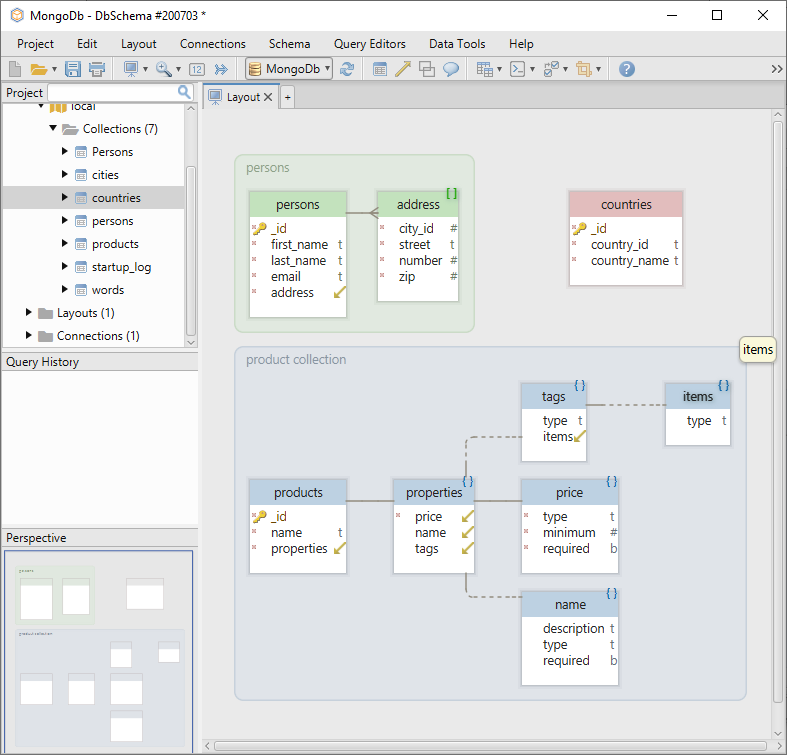
Editing happens by clicking rather than by typing queries: double-click a collection header to change the fields and the types on its validation rule, and the rule goes to the database and to the model file. Moving a collection on the canvas, grouping it or putting it in a second diagram changes the model file alone, so a rearrangement is never a database change.
That model file is what a team shares. It is a file on disk, so it goes in the same Git repository as the application code, and a colleague opens it without a connection to the database at all. DbSchema also compares two versions of the same model, or a model against a live database, and lists the differences before anything is written. Saving the model to a file and comparing it are Pro edition features; connecting, reverse-engineering and the diagrams themselves are in the free Community Edition.
Comments, callouts and the exported documentation
Documentation starts as annotation on the diagram. Double-click a collection or a field and write a description of it; add a floating note or callout from the Insert menu for anything that belongs to the diagram as a whole rather than to one collection.
DbSchema exports the result through Diagram then Export HTML5 or PDF Documentation, in three formats. The HTML5 output opens in any browser with no server behind it, carries the diagram as a vector image, and shows the collection and field descriptions as mouse-over tooltips, which is the form in which a reader who has never opened DbSchema can still read your model. PDF is the one to print or attach to a review. Markdown writes each collection as a section of a text file, which is what you commit next to the application code so the structure and the code change in the same pull request. The descriptions you typed on the diagram appear in all three. The documentation export is Pro.
Virtual relations and the tools that follow them

MongoDB declares no foreign keys, so a reference from one collection to another is a convention your application keeps. In DbSchema you draw it: drag the field of one collection onto the field it points at in another, and the virtual relation appears as a connector line on the diagram and is saved in the model file. The database is not touched and the running application pays nothing for it.
The Relational Data Editor reads those relations to open several collections side by side. Select one person and the neighboring panes refilter to that person's documents, cascading as many levels deep as the relations go. For reading and writing data there are two more routes: the Query Builder, which composes a query with the mouse, and the Query Editor, which takes native MongoDB syntax and runs it against the connected database. The Relational Data Editor and the Query Builder are Pro.
The chain is what makes a MongoDB database legible: a structure inferred from the documents, the validation rule where one exists, the virtual relations you draw, the browsing that follows them, and an HTML5 export somebody else can read. Download DbSchema at https://dbschema.com/download.html, connect to your MongoDB database and let the free Community Edition draw the first diagram; the Architect trial covers the model file, the documentation and the data tools.









