Database Design Best Practices: Principles, Normalization and Keys
For developers and architects who design relational schemas; every practice is shown in SQL on one small orders schema.
On this page
A customer moves, you update her address, and two of her orders still show the old city. A table without a key holds the same row twice. These practices prevent both, and the database enforces most of them on every write:
- Plan the entities and the queries before you create a table.
- Normalize to third normal form, and denormalize only for a query that you measured as too slow.
- Give every table a primary key.
- Declare every relationship as a foreign key.
- Choose data types and constraints that reject invalid values.
- Index each foreign key and the columns your queries filter on.
- Name tables and columns by one convention, and avoid reserved words.
Start with a list of orders kept like a spreadsheet, with no keys:
CREATE TABLE order_sheet (
  order_id int,
  customer varchar(50),
  city     varchar(50),
  products varchar(200)
);

INSERT INTO order_sheet VALUES
  (101, 'Anna', 'Berlin',  'Laptop, Mouse'),
  (102, 'Ben',  'Hamburg', 'Keyboard'),
  (103, 'Anna', 'Berlin',  'Monitor');
Every statement was run on PostgreSQL 18 and SQLite 3.50. The query on PostgreSQL's list of indexes ran on PostgreSQL only. Where the two engines differ, both answers are shown.
The first version of this page was an English adaptation of Dr. Veikko Krypczyk's German article for PHP Magazin.
Plan the design before the tables
Plan the schema on paper first. A schema is easier to change there than after it holds data. Work in four steps, and check each step before you start the next:
| Step | What it produces | In the orders example |
|---|---|---|
| Requirements | the data to store and the questions it must answer | customers, orders, products; "what did Anna order?" |
| Conceptual model | the entities and how they relate | a customer places many orders, an order has many lines |
| Logical model | tables, columns, primary and foreign keys | orders.customer_id refers to customers |
| Physical model | the DDL of one engine, with data types and indexes | an index on orders.customer_id |
People outside the database team can read and correct the conceptual model. You normalize in the logical model, before you choose any data type. The checks between the steps are in the full design procedure.
Two tests catch planning mistakes early. First, each table holds one kind of thing, which you can name in a few words, such as "customers" or "order lines". Second, a new product category, status or country is a new row, not a new column or table.
Normalize to third normal form
Normalization splits a table until each fact is stored in one place. A fact stored twice can change in one copy and stay old in the other. For example, Anna moves to Munich, and you update only her order 103:
UPDATE order_sheet SET city = 'Munich' WHERE order_id = 103;

SELECT order_id, customer, city
FROM order_sheet
WHERE customer = 'Anna'
ORDER BY order_id;
| order_id | customer | city |
|---|---|---|
| 101 | Anna | Berlin |
| 103 | Anna | Munich |
The database can't tell which city is right, because both rows are valid on their own. Three normal forms remove such copies, one step at a time. In the tables below, Anna is in Berlin again.
First normal form (1NF)
A table is in 1NF when each cell holds one value. Order 101 holds two products in one cell. A query for the orders with a mouse then has to search inside the text. Give each product its own row:
| order_id | product | customer | city |
|---|---|---|---|
| 101 | Laptop | Anna | Berlin |
| 101 | Mouse | Anna | Berlin |
| 102 | Keyboard | Ben | Hamburg |
| 103 | Monitor | Anna | Berlin |
Now order_id and product together identify a row, so the pair is the key. The split adds a copy, though: Anna and Berlin now appear on three rows instead of two.
Second normal form (2NF)
A table is in 2NF when it is in 1NF and every column outside the key depends on the whole key. Customer and city depend on order_id alone, which is only part of the key (order_id, product). Move customer and city to a table of orders, and keep the products in a table of order lines:
| order_id | customer | city |
|---|---|---|
| 101 | Anna | Berlin |
| 102 | Ben | Hamburg |
| 103 | Anna | Berlin |
The order lines keep order_id and product. A table with a one-column key can't break 2NF. So 2NF matters only for a composite key, a key made of several columns.
Third normal form (3NF)
A table is in 3NF when it is in 2NF and no column outside the key depends on another column outside the key. The city depends on the customer, not on the order. So Anna's city is still stored once for each of her orders. Move the city to a table of customers. Give each customer a key, and store that key in each order in place of the name and city.
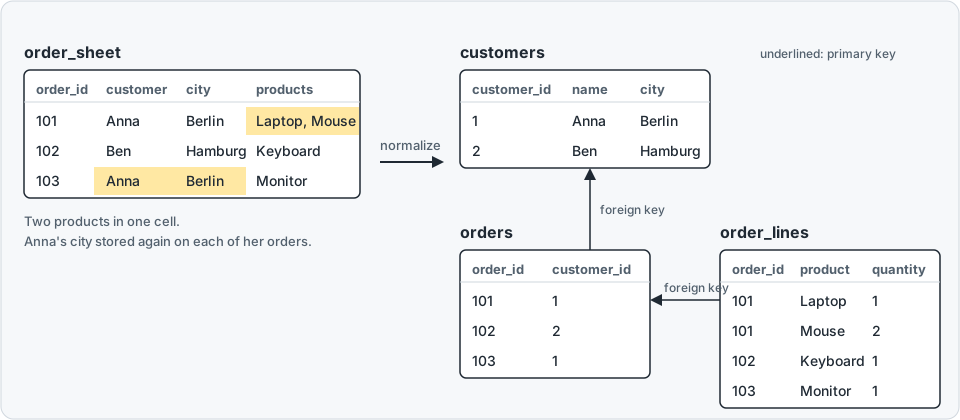
Create the three tables and fill them:
CREATE TABLE customers (
  customer_id int PRIMARY KEY,
  name        varchar(50) NOT NULL,
  city        varchar(50) NOT NULL
);

CREATE TABLE orders (
  order_id    int PRIMARY KEY,
  customer_id int NOT NULL,
  FOREIGN KEY (customer_id) REFERENCES customers (customer_id)
);

CREATE TABLE order_lines (
  order_id int NOT NULL,
  product  varchar(50) NOT NULL,
  quantity int NOT NULL CHECK (quantity > 0),
  PRIMARY KEY (order_id, product),
  FOREIGN KEY (order_id) REFERENCES orders (order_id)
);

INSERT INTO customers VALUES (1, 'Anna', 'Berlin'), (2, 'Ben', 'Hamburg');
INSERT INTO orders VALUES (101, 1), (102, 2), (103, 1);
INSERT INTO order_lines VALUES
  (101, 'Laptop', 1), (101, 'Mouse', 2), (102, 'Keyboard', 1), (103, 'Monitor', 1);
The order lines also get a quantity column. Anna's city is now one value in one row, and a join brings the city back to every order. Boyce-Codd normal form (BCNF) comes after 3NF and closes a rarer gap. Database normalization in SQL Server explains it.
When to denormalize
Denormalizing copies a value back into a table to save a join. For example, you can copy the customer's city onto each order. Denormalize only for a query that you measured as too slow. Every copy can disagree with the original value, as Anna's cities did. So for each copy, decide how it stays equal to the original, and write that rule into the design.
Give every table a primary key
A primary key is the column, or the set of columns, that identifies each row. The database refuses a second row with the same key. For example, insert a second customer with customer_id 1:
INSERT INTO customers VALUES (1, 'Carla', 'Bremen');
PostgreSQL 18 rejects it:
ERROR:  duplicate key value violates unique constraint "customers_pkey"
DETAIL:  Key (customer_id)=(1) already exists.
SQLite reports UNIQUE constraint failed: customers.customer_id. Without the key, both rows would go in, and an order for customer 1 could mean Anna or Carla.
Choose a key whose value never changes. An email address identifies a customer, but customers change their address. If the email address were the key, every order that holds the old address would have to change too.
A number that the database generates carries no meaning, so nothing ever makes it change. PostgreSQL generates such a number with an identity column, MySQL with an AUTO_INCREMENT column. Keep the natural value too, such as the email address, in a column with a UNIQUE constraint. The syntax on each engine is in the primary key reference.
Declare every relationship as a foreign key
A foreign key makes the database check that a referenced row exists. Without a foreign key, an order can name a customer who was deleted or never created. For example, insert an order for customer 7, who doesn't exist:
INSERT INTO orders VALUES (104, 7);
PostgreSQL 18 rejects the order:
ERROR:  insert or update on table "orders" violates foreign key constraint "orders_customer_id_fkey"
DETAIL:  Key (customer_id)=(7) is not present in table "customers".
SQLite accepts the same INSERT, because SQLite checks foreign keys only after PRAGMA foreign_keys = ON. Run that PRAGMA each time you connect, because it holds for one connection only. With it on, SQLite reports FOREIGN KEY constraint failed.
The foreign key also guards deletes. Deleting customer 1, Anna, fails while orders 101 and 103 refer to her. If you want her orders deleted with her, add ON DELETE CASCADE to the foreign key. The other options are listed on the PostgreSQL constraints page.
Choose data types and constraints that reject bad values
The data type is the first check on a value. Store a date as date, an amount of money as numeric, and an identifier made of digits as text. The postal code 01067 of Dresden shows why digits belong in text:
SELECT CAST('01067' AS integer) AS postal_code;
| postal_code |
|---|
| 1067 |
The leading zero is gone, and no query can bring it back. Store money in numeric rather than float. Float stores an approximation, and PostgreSQL recommends numeric where amounts must be exact.
Constraints cover the rules that a type can't express. NOT NULL makes a value required, UNIQUE forbids a repeat, and CHECK tests a condition. For example, the CHECK on order_lines requires a positive quantity. Insert a line with quantity 0:
INSERT INTO order_lines VALUES (102, 'Mouse', 0);
PostgreSQL 18 rejects the line:
ERROR:  new row for relation "order_lines" violates check constraint "order_lines_quantity_check"
DETAIL:  Failing row contains (102, Mouse, 0).
SQLite reports CHECK constraint failed: quantity > 0. A rule in the schema holds for every program that writes to the table, including a script someone runs by hand.
Index each foreign key and the columns you filter on
A foreign key doesn't create an index in PostgreSQL. The orders table has only the index of its primary key:
SELECT indexname FROM pg_indexes WHERE tablename = 'orders';
| indexname |
|---|
| orders_pkey |
Without an index on orders.customer_id, a query for one customer's orders reads the whole table. So does deleting a customer, because the database has to look for orders that refer to her. PostgreSQL's documentation leaves the index to you.
SQLite doesn't create this index either. MySQL creates the index itself when the table has no suitable index. On PostgreSQL and SQLite, create the index yourself:
CREATE INDEX orders_customer_id_idx ON orders (customer_id);
An index on a column that isn't the primary key is also called a secondary key. Add one for each column that your frequent queries filter, join or sort on, and no more.
Read the query plan to confirm that the database uses each index. Drop the indexes that the database never uses. Every index adds work to each write on its table. That trade-off is worked through table by table in indexes and foreign keys.
Name tables and columns by one convention
When names follow one convention, you can tell what a table or column holds without reading its definition. These conventions avoid the common naming problems:
- Write names in lower case, with underscores between words:
order_lines,customer_id. - Use the same name for a key and the columns that refer to it, so
orders.customer_idjoinscustomers.customer_id. - Choose plural or singular table names, and use that choice everywhere.
- Avoid reserved words as names.
Lower case matters most on PostgreSQL, which converts names without quotes to lower case. So a table created as "OrderLines", in quotes, needs the quotes in every query. A reserved word is a word of SQL itself, such as ORDER. ORDER as a table name without quotes fails:
CREATE TABLE order (order_id int);
PostgreSQL 18 answers ERROR: syntax error at or near "order", and SQLite answers near "order": syntax error. That error is why the sample table is named orders.
Check and document a schema in DbSchema
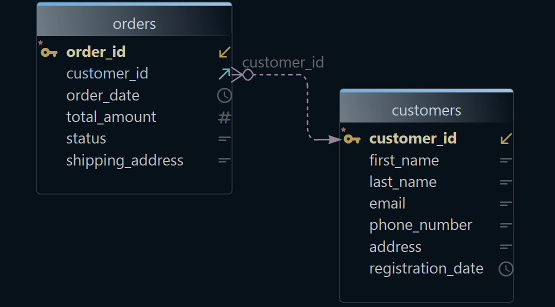
Practices like these are easy to check on three tables and hard on three hundred. DbSchema connects to the database and reverse-engineers it: DbSchema reads the tables and draws them as a diagram. Each foreign key is a line between two tables. Connecting and reverse-engineering only read from the database.
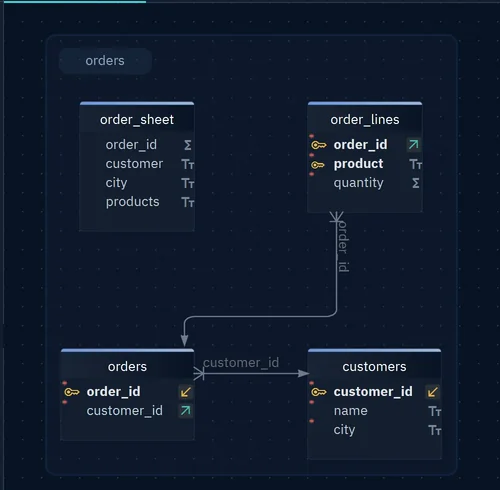
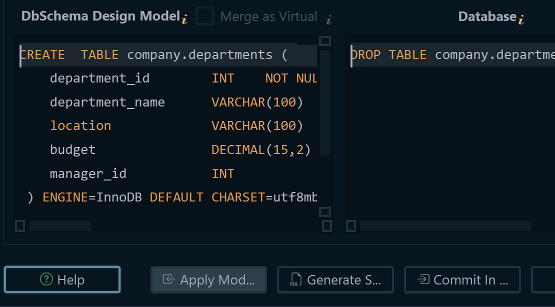
DbSchema then checks the model, DbSchema's copy of the schema, against rules like the ones above. A warning sign at the right of the toolbar shows how many findings there are. Click the sign to open the Model checks window, which lists each finding, such as a table with no primary key or a name that is a reserved word. Another check finds a foreign key with no index. That check is switched off by default.
The model validation page shows how to switch a check off and how to write your own check, such as one that requires a comment on every table.
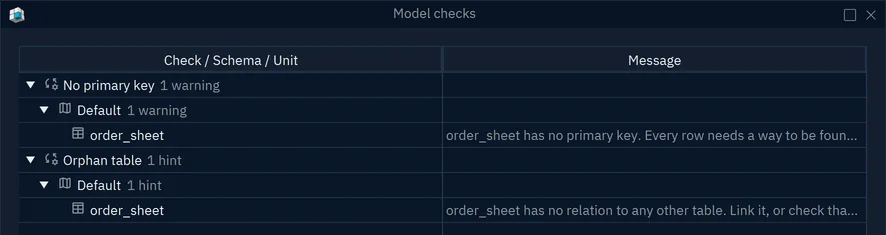
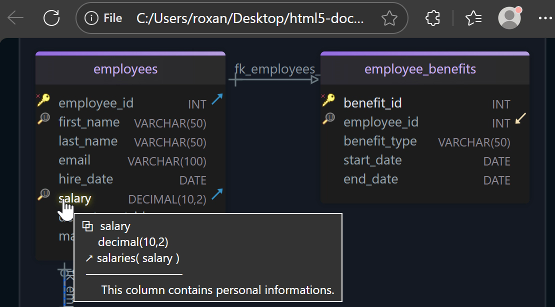
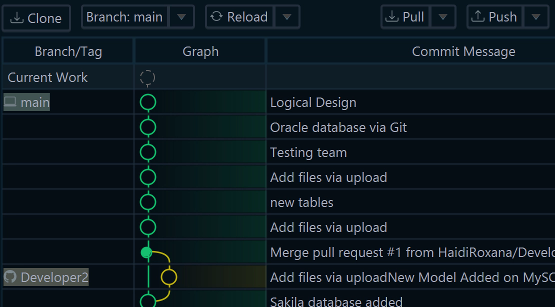
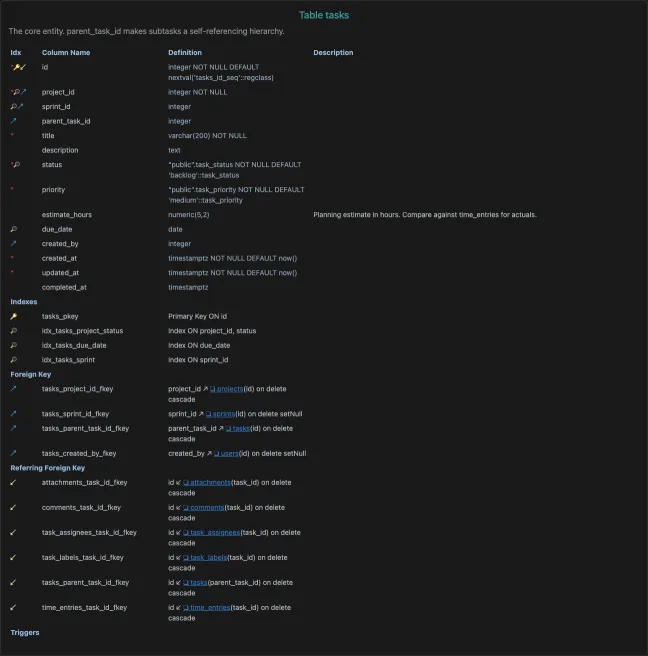
In DbSchema Pro, you can save the design as a model file and commit the file to Git. A schema change is then reviewed like code. Changes that you make without a connection stay in the model until you synchronize the model with the database. For people who don't run DbSchema, DbSchema exports HTML5 documentation with the diagram and every table's columns, comments, indexes and foreign keys. The page below comes from the documentation of another schema, and shows its tasks table.
Download DbSchema at https://dbschema.com/download.html, connect it to your database, and open the Model checks window to see where the schema departs from these practices. Connecting, reverse-engineering, the diagram and the built-in checks are in the free Community Edition. Saving the model to a file, schema synchronization, your own validation rules and documentation of a diagram of any size are in DbSchema Pro.
Sources
See your own schema as an ER diagram
DbSchema reverse-engineers a live database into an interactive diagram, keeps the design in a versionable .dbs model file, and generates the migration script from the difference. Connecting, reverse-engineering, interactive diagrams and the SQL editor are in the free Community Edition; saving the model to a file, HTML5 documentation and schema synchronization are Pro.