Can AI Design Your Database Schema?
What a language model gets right when it designs a schema, where it breaks, and which decisions stay with you.
On this page
You have a wide table, or a feature to model, and an AI assistant that writes CREATE TABLE statements in seconds. Whether you can hand it the design depends on one thing more than on the model: whether the business rules behind the data are written down where it can read them.
Short answer
Only in part. A model splits a table well when it knows which facts depend on which keys, and it guesses those dependencies from sample rows when nobody tells it. The guess can be wrong in a way the data does not show yet. Use AI for the draft, and keep the rules, the keys and the final decision in DbSchema, where you can see and check them.
- With the rules written down, our model split a wide table and lost no rows.
- Given only sample rows, two of three answers tied the instructor to the course.
- Benchmarks find the weak spots in foreign keys and in knowing when not to split.
What a model gets right when the rules are clear
We started with the kind of table AI is usually asked to fix: enrolment_flat, ten columns and eight rows mixing students, courses, instructors and grades. The prompt gave the table, five sample rows and four business rules in plain words: a student has one name and one email, a course always has the same title and instructor, an instructor has one office, and a student gets one grade per course per term. Then it asked for third normal form, as one PostgreSQL script that also moves the data.
The model returned four tables, each describing one thing, with primary keys, foreign keys and INSERT ... SELECT DISTINCT statements for the data:
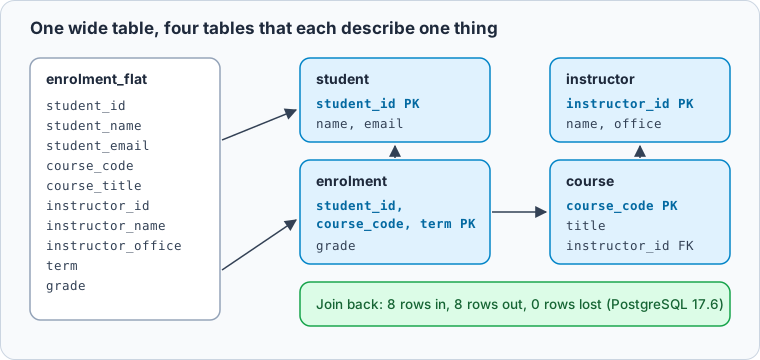
A split is only correct if joining the pieces gives back exactly the rows you started with. That is a check you can run, so we ran it on PostgreSQL 17.6:
SELECT student_id, student_name, student_email, course_code, course_title,
       instructor_id, instructor_name, instructor_office, term, grade
FROM enrolment_flat
EXCEPT
SELECT e.student_id, s.student_name, s.student_email, e.course_code, c.course_title,
       c.instructor_id, i.instructor_name, i.instructor_office, e.term, e.grade
FROM enrolment e
JOIN student s USING (student_id)
JOIN course c USING (course_code)
JOIN instructor i USING (instructor_id);
Result · PostgreSQL 17.6
| check | rows |
|---|---|
| rows in enrolment_flat | 8 |
| rows rebuilt by the join | 8 |
| rows returned by EXCEPT | 0 |
Eight rows went in and the same eight came back, with nothing missing. For a textbook table with its rules spelled out, the model we tried did the mechanical part of normalization well. That matches the research below, where spotting what is wrong with a table was the easier part.
The rules decide the design, and sample rows hide them
Next we changed one rule. In many schools a course is taught by different people in different terms, so the rule became: each term one instructor teaches a course, and the instructor can change from one term to the next. The four sample rows in the prompt stayed the same, and in them every course happens to have one instructor.
We asked three times with the rule written down, and three times with the same rows and no rules at all.
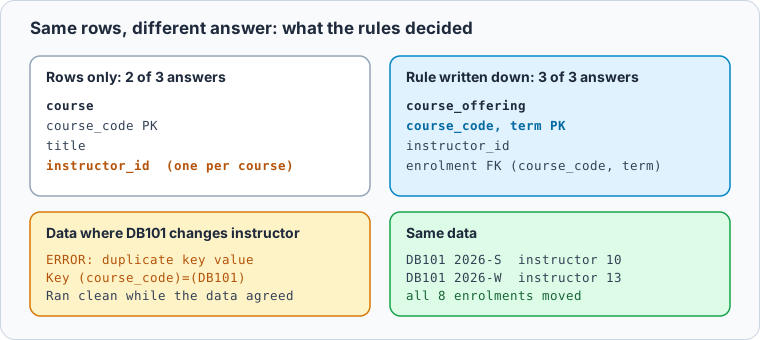
With the rule, all three answers created a course_offering table keyed by course and term, holding the instructor, and pointed enrolment at it. Without the rule, two of the three answers did what the sample rows suggested and put instructor_id on course. We then ran one of those scripts on data where DB101 has a different instructor in the winter term:
ERROR:  duplicate key value violates unique constraint "courses_pkey"
DETAIL:  Key (course_code)=(DB101) already exists.
ERROR:  insert or update on table "enrolments" violates foreign key constraint "enrolments_course_code_fkey"
DETAIL:  Key (course_code)=(DB101) is not present in table "courses".
That is the pattern to expect. A model cannot know a rule that the rows do not show and nobody wrote down, so it designs for the data you happened to paste. The script that loads cleanly today breaks the term the first instructor changes, long after anyone reviewed it.
What the benchmarks find at scale
Our runs are a handful of answers from one model on one schema, so they show a mechanism, not a rate. DNBench measures the rate. It is a benchmark of 3,275 normalization tasks from 1NF to BCNF, built on real schemas from the Spider and BIRD datasets and audited by three database experts (DNBench).
Its findings line up with what we saw:
- Dependencies are the bottleneck. The average score fell from 0.341 when the functional dependencies were given to 0.205 when the models had to infer them from sample rows and business rules.
- Keeping columns is easy, rebuilding keys is not. Column F1 averaged 0.92 and violation detection reached up to 0.684, but foreign key scores ranged only from 0.10 to 0.25.
- Knowing when not to split is hard. Given schemas that were already normalized, the single-prompt baseline still decomposed 57.0% of them.
The paper tested four open-weight models, such as Llama 3.3 70B and Qwen3 30B, so newer commercial models may score higher. In our own three tries, the model returned an already normalized schema unchanged every time. But the paper's conclusion does not depend on the model: it recommends pairing automated normalization with deterministic verification and human review before deployment, because a generated schema can silently lose information. Its multi-agent fix shows the same tension from the other side: it almost stopped over-splitting (4.7%), and in exchange left 37.1% of tables that did need a split unchanged.
Write the rules where the AI reads them
If the rules decide the design, the practical question is where they live. Keep them in the model of your database, as comments on the tables and columns they govern, and a well-written comment then becomes part of every question you ask.
In DbSchema, the AI Assistant works from the CREATE TABLE statements of the tables you attach, never from the rows, and the attached DDL carries the comments as COMMENT ON statements, the same comments DbSchema keeps on tables and columns. A rule written on a column reaches the model without anyone retyping it:
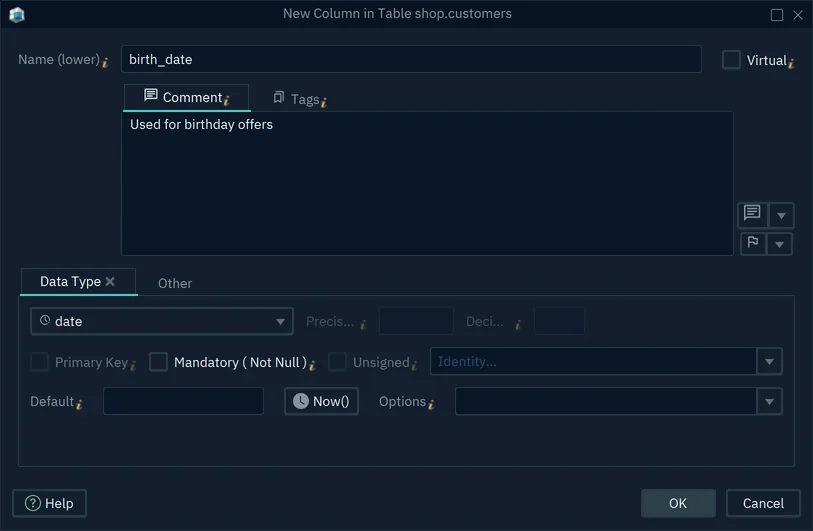
- 1Write the business rule here, in one sentence
-
Write each rule as a comment Community
Open the table or column and type the rule in the Comment tab, for example "One instructor per course per term; can change between terms." If you are connected, DbSchema writes it to the database as a
COMMENT ONstatement. -
Attach the tables and ask for a review Community
Select the tables on the diagram, right-click and choose Attach to AI. In the AI Assistant, ask for the design you need, or start from the suggestion Review my schema for normalization issues. The AI credits work in every edition.
-
Preview the draft, then merge what you agree with Community
Under a generated
CREATE TABLE, Preview shows it on a diagram before anything changes, and Merge adds it to the model. Saving the model to a file, so the design and its comments are kept and versioned, needs DbSchema Pro.
Rules that apply to every question, such as "do not split a table unless a stated rule requires it" or your naming convention, belong in the System Message under Edit → Settings → AI Assistant. That one line asks for what DNBench found missing: a reason before a split.
Check the keys before you accept a draft
When DNBench withheld the dependencies, foreign keys scored lowest of every part of the answer it measured, for all four models, and they are also what a diagram shows best. Before you merge an AI draft, look at its lines: every child table should point at its parent, and a composite key such as course and term should be referenced as a pair, with one foreign key over both columns (PostgreSQL constraints), not column by column.
DbSchema checks the model after every change and counts what it finds in the toolbar. A table with no relation to any other table appears as an orphan table hint, which is what a dropped foreign key usually looks like:
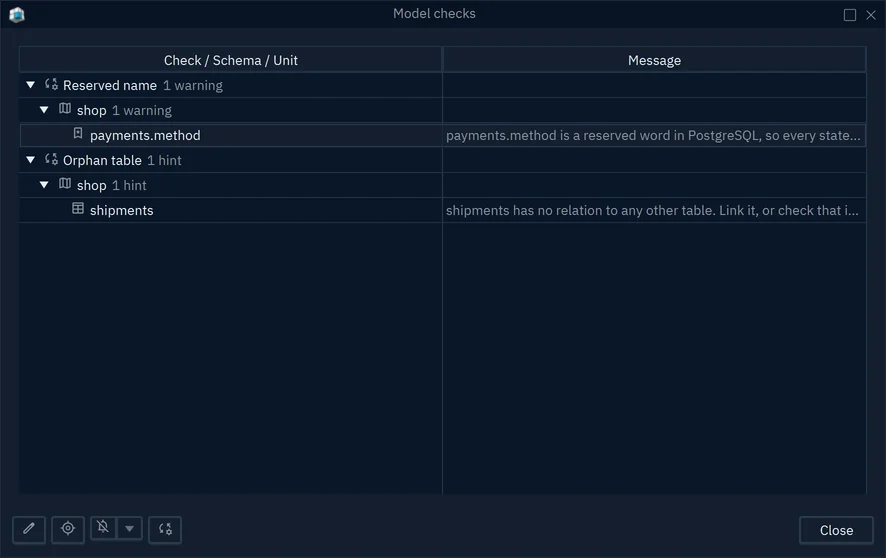
The built-in checks run while you edit; writing your own rules, such as "every table has a comment", needs DbSchema Pro (Model Validation). Where the data links two tables that have no foreign key in the database, a virtual foreign key keeps that relationship in the model, so the next question to the AI sees it too.
Then run the join back query from the first section against a copy of your real data, not the sample. If EXCEPT returns rows, or a load fails on a duplicate key, the draft's dependencies do not match your data. Applying a draft that passes is a separate step, covered in reviewing an AI-proposed schema change.
Which part of schema design stays yours
You decide in DbSchema design
- The business rules, written as comments
- Which key each fact depends on
- Whether a table needs a split at all
- Which draft reaches the model
AI drafts first version
- The split once the rules are clear
- CREATE TABLE and migration statements
- A list of likely normal form problems
- Names and comments to refine
AI is good at the part of normalization that follows from stated facts, and weak at the part that is a decision about your business. The normal forms article shows how to read a wide table yourself, when not to normalise covers the cases where the wide table is right, and does AI replace database design tools looks at the same question for queries and production changes.
Download DbSchema, write the rules of one table as comments, attach it to the AI Assistant and compare the draft with what you expected, all in the free Community Edition. Saving the model with its comments to a file, designing offline and your own validation rules are in DbSchema Pro.
Sources
- Can LLMs Normalize Databases? A Benchmark and Multi-Agent Framework for Schema Normalization (DNBench, arXiv 2609.11141)
- PostgreSQL 17 documentation: COMMENT
- PostgreSQL 17 documentation: Constraints
- DbSchema documentation: AI Assistant
- DbSchema documentation: Tables and columns
- DbSchema documentation: Model Validation
- DbSchema documentation: Foreign Keys









