Normal Forms Without the Theory
For anyone with a wide table in front of them who has to decide where to split it. The normal forms are named where they apply, and none of them are proved.
On this page
A table reaches you with one row per student: their name, the courses they signed up for, and the office of the person advising them. Normalizing it means moving each fact into the table it belongs to, so that it is stored once and changed in one place. You find the splits by looking at which values repeat down the table, not by working through the definitions.
The examples run on PostgreSQL 16.3:
CREATE TABLE registrations (
  student_id     int,
  student_name   text,
  courses        text,
  advisor_name   text,
  advisor_office text
);

INSERT INTO registrations VALUES
  (101, 'Alice Martin', 'CS101,MATH201',  'Stone', 'Hall 204'),
  (102, 'Bob Davis',    'CS101',          'Vance', 'Hall 310'),
  (103, 'Clara Wilson', 'MATH201,CS1010', 'Stone', 'Hall 204');
| student_id | student_name | courses | advisor_name | advisor_office |
|---|---|---|---|---|
| 101 | Alice Martin | CS101,MATH201 | Stone | Hall 204 |
| 102 | Bob Davis | CS101 | Vance | Hall 310 |
| 103 | Clara Wilson | MATH201,CS1010 | Stone | Hall 204 |
Three separate things are recorded here: who a student is, which courses a student takes, and where an advisor sits. Stone's office is already written twice, and CS101 already appears inside two different strings. Each example below starts from the table as inserted.
What the wide table costs you
Stone moves to Hall 400. The office is stored on every row that mentions Stone, so one office change is a multi-row write:
UPDATE registrations SET advisor_office = 'Hall 400' WHERE advisor_name = 'Stone';
Postgres reports UPDATE 2 on these three rows, and would report several thousand on a real intake. Any row the WHERE clause fails to match keeps Hall 204, and the table then gives two answers to the question of where Stone sits. Nothing in the table says which answer is right, because nothing in the table says the office belongs to the advisor rather than to the registration.
Deleting has the same shape. Bob is the only student recorded against Vance, so his row is the only place that says Vance sits in Hall 310:
DELETE FROM registrations WHERE student_id = 102;
| student_id | student_name | courses | advisor_name | advisor_office |
|---|---|---|---|---|
| 101 | Alice Martin | CS101,MATH201 | Stone | Hall 400 |
| 103 | Clara Wilson | MATH201,CS1010 | Stone | Hall 400 |
Vance and Hall 310 left the database with him, removed by a statement that was about a student.
Inserting fails from the other side. An advisor who has not been given a student yet has no row to live in, so you either wait for a registration or store a row whose student columns are empty, which every later count of students has to exclude by hand.
A column that holds a list
The courses column holds a list, and the database sees one string. Ask it which students take CS101 and it compares the whole value:
SELECT student_id, student_name FROM registrations WHERE courses = 'CS101';
| student_id | student_name |
|---|---|
| 102 | Bob Davis |
Alice takes CS101 and is missing from the result, because her value is the string CS101,MATH201. The usual repair is a pattern match:
SELECT student_id, student_name, courses FROM registrations WHERE courses LIKE '%CS101%';
| student_id | student_name | courses |
|---|---|---|
| 101 | Alice Martin | CS101,MATH201 |
| 102 | Bob Davis | CS101 |
| 103 | Clara Wilson | MATH201,CS1010 |
Clara is in the result and Clara is not in CS101. Her CS1010 contains CS101 as a prefix, and the pattern cannot tell a course code from the start of a longer one. The two queries are wrong in opposite directions, which is what a list in a column costs you: a foreign key cannot point inside a string, so nothing rejects a course code that does not exist, and a b-tree index on the column orders whole strings, so it does not answer a question about one course inside them. Numbered columns (course_1, course_2, course_3) fail the same way, and they add a ceiling on how many courses a student may take.
One value per column means one row per student and course:
CREATE TABLE registrations_1nf (
  student_id     int,
  course_code    text,
  student_name   text,
  advisor_name   text,
  advisor_office text,
  PRIMARY KEY (student_id, course_code)
);
| student_id | course_code | student_name | advisor_name | advisor_office |
|---|---|---|---|---|
| 101 | CS101 | Alice Martin | Stone | Hall 204 |
| 101 | MATH201 | Alice Martin | Stone | Hall 204 |
| 102 | CS101 | Bob Davis | Vance | Hall 310 |
| 103 | CS1010 | Clara Wilson | Stone | Hall 204 |
| 103 | MATH201 | Clara Wilson | Stone | Hall 204 |
An equality search now finds a course, and the primary key stops the same student being registered twice for the same one. That is first normal form, and it moved the repetition rather than removing it: the student name and the advisor columns are written once per enrollment instead of once per student.
The columns that describe something other than the key
The key of that table is the pair (student_id, course_code), and none of the other columns needs both halves of it. Alice's name repeats on both of her rows, and it would be the same name whatever course sat beside it, because the name is a fact about the student alone. A column that depends on part of a composite key is a partial dependency, and moving it out is second normal form.
The advisor columns break a different rule. The office is not decided by the student and not decided by the course: it is decided by advisor_name, which is no part of the key at all. A non-key column decided by another non-key column is a transitive dependency, and moving both of them out is third normal form.
| What you see in the data | What it is | The form it breaks | Where the columns go |
|---|---|---|---|
| A column that repeats whenever one part of a composite key repeats | Partial dependency | Second normal form | A table keyed by that part of the key |
| A column whose value is decided by another non-key column | Transitive dependency | Third normal form | A table keyed by the deciding column |
Both tests ask the same question twice: what does this column describe? When the answer is anything other than the whole key, the column belongs in a table keyed by that thing, and the table you started from keeps a reference to it.
The split, and what the database enforces afterwards
Four things were mixed together, so four tables come out of it. Every column sits with the key that decides it, and the values that used to repeat become foreign keys:
CREATE TABLE advisors (
  advisor_id int PRIMARY KEY,
  name       text NOT NULL,
  office     text NOT NULL
);

CREATE TABLE students (
  student_id int PRIMARY KEY,
  name       text NOT NULL,
  advisor_id int NOT NULL REFERENCES advisors
);

CREATE TABLE courses (
  course_code text PRIMARY KEY,
  title       text NOT NULL
);

CREATE TABLE enrollments (
  student_id  int  REFERENCES students,
  course_code text REFERENCES courses,
  PRIMARY KEY (student_id, course_code)
);
Stone's office is one row in one table now, so the move that was a multi-row write becomes a single-row write:
UPDATE advisors SET office = 'Hall 400' WHERE name = 'Stone';
Postgres reports UPDATE 1, and no second copy is left to disagree with it. The foreign keys turn the rest of the rules into something the database refuses to break: a value in the referencing column has to match a row in the referenced table[1], so an enrollment in a course that does not exist is rejected instead of stored.
INSERT INTO enrollments VALUES (101, 'CS999');
ERROR:  insert or update on table "enrollments" violates foreign key constraint "enrollments_course_code_fkey"
DETAIL:  Key (course_code)=(CS999) is not present in table "courses".
The question that the list column answered wrongly twice is a join on indexed columns:
SELECT s.name
FROM enrollments e JOIN students s USING (student_id)
WHERE e.course_code = 'CS101';
| name |
|---|
| Alice Martin |
| Bob Davis |
The three failures from the first section went with the wide table. A new advisor is one insert into advisors, deleting an enrollment leaves the course and the advisor where they are, and an office change writes one row, because each fact has exactly one row that owns it. The same reasoning applied to a schema from scratch is worked through in the guide on designing a relational schema.
Where to stop
Third normal form is where the splitting normally ends. It removes the multi-valued columns, the partial dependencies and the transitive dependencies, which are the three sources of the anomalies above, and it gets there without cutting the tables so fine that an ordinary query needs eight joins. Boyce-Codd normal form goes one step further and asks that every column deciding another column is itself a candidate key. It differs from third normal form only when a table has more than one candidate key and those keys share a column, so it is worth checking when two natural keys compete on the same table and not otherwise.
Splitting stops paying when the read side starts paying for it. Joining seven tables for a query that runs on every page view can cost more than the redundancy would, and that is the case for storing a value twice on purpose. Check first whether an index answers the query, or a materialized view, which stores the result of a query and is refreshed on demand rather than by itself[2], leaving the staleness for you to schedule. Once you do duplicate a value, something has to keep the copies equal: a trigger, or the single piece of application code that owns the write. The alternatives worth trying first are covered in when not to normalise, and there is a Microsoft SQL Server walkthrough with engine-specific scripts in SQL Server normalization.
Four checks, in this order, find most of what is wrong with a table you have designed:
- Look for a column holding more than one value, either as a delimited list or as numbered columns.
- With a composite primary key, look for a column that repeats every time one part of that key repeats.
- Look for a column whose value is decided by a non-key column rather than by the key.
- Where two natural keys compete on the same table, check that each column deciding another is a candidate key.
Checking the split on a diagram
Four CREATE TABLE statements are easy to read one at a time and hard to judge together, which is what a diagram is for. DbSchema connects to the database, reverse-engineers the schema into an interactive diagram, and draws every foreign key as a line between the two tables it links. Selecting one highlights the relationship end to end, so you can follow which column points where without reading the DDL.
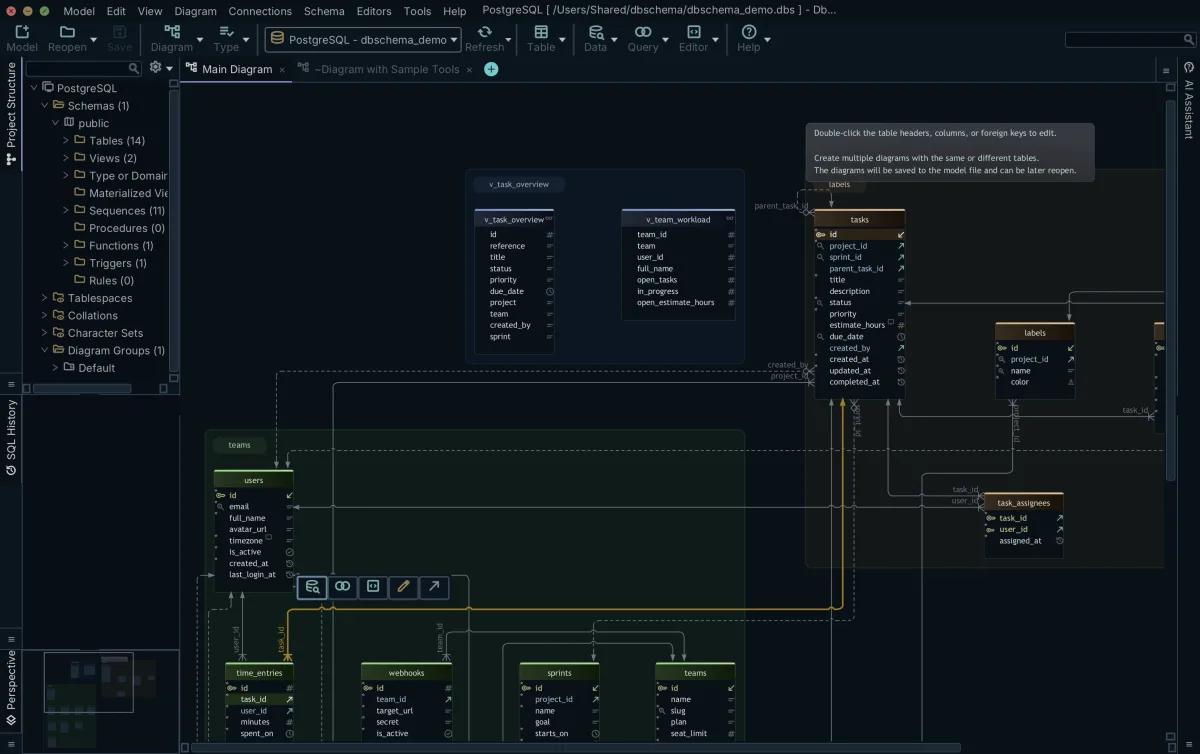
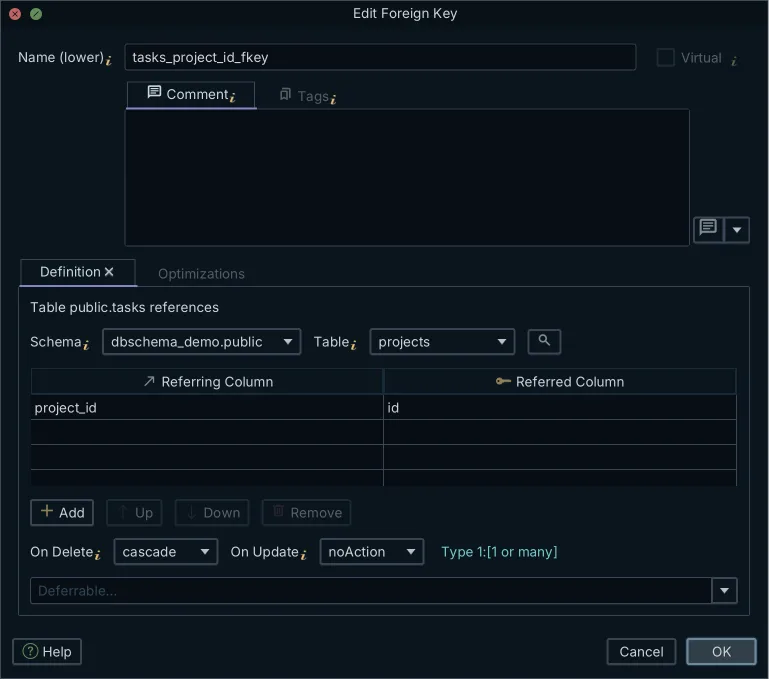
You create a foreign key on the diagram by dragging from a column in the child table onto the column it references, and DbSchema draws the line as soon as you drop it. Double-clicking a line opens the Foreign Key Editor, where the referring and referred columns are paired and the delete and update actions are set to NO ACTION, CASCADE, SET NULL or SET DEFAULT.
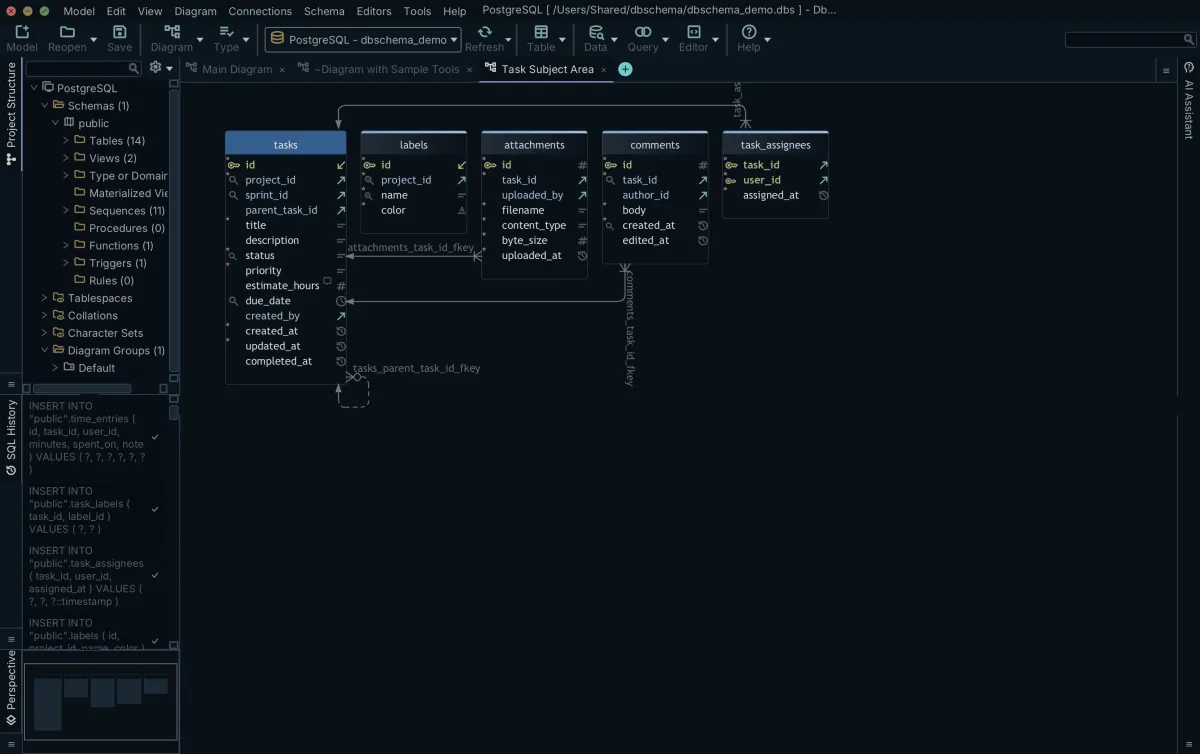
Which of those edits reaches the database depends on how you are connected. Online, DbSchema executes a schema change you make on the diagram against the live database as you make it, and writes the statement to the SQL History pane. Disconnected, the same edits change only the design model, and DbSchema collects the differences for you to review when you reconnect. The second mode is the one that suits a split: draw the four tables, look at them, and decide afterwards what to apply.
A schema big enough to need splitting is also too big to read on one canvas. A DbSchema project can hold several diagrams over the same schema, added from the Diagram menu or the plus tab, and a table may appear on more than one of them. Putting the tables of one split on their own diagram is how you check the result by eye while the full model stays where it is.
Reverse-engineering, the interactive diagram, creating tables and columns, and the SQL editor are in the free Community Edition. Designing while disconnected, saving the project to a file, and the schema synchronization that generates the migration script are in Pro. Download DbSchema at https://dbschema.com/download.html, connect to the database that holds the wide table, and read its columns off the diagram before you decide where the split goes.
Frequently asked questions
What is database normalization in simple terms?
Normalization is splitting a table so that every fact is stored in exactly one place, with keys linking the pieces back together. A fact about an advisor then lives in a row about that advisor, instead of being repeated on every student registration that mentions them.
What are the 4 stages of normalization?
First normal form gives every column a single value, second normal form removes the columns that depend on part of a composite key, third normal form removes the columns decided by another non-key column, and Boyce-Codd normal form requires every deciding column to be a candidate key.
What is the 3NF rule?
A table is in third normal form when it is in second normal form and no non-key column is decided by another non-key column. An office decided by an advisor name, in a table keyed by student and course, breaks it.
What are the 5 rules of data normalization?
The first five normal forms remove, in order, multi-valued columns, partial dependencies, transitive dependencies, independent multi-valued facts kept in one table, and join dependencies that a further split would remove. Fourth and fifth normal form apply to a narrow set of tables, which is why most schemas are designed to third normal form.
Sources
See the split on the diagram
DbSchema reverse-engineers your database into an interactive ER diagram, where you create the new tables and drag one column onto another to draw the foreign key. Reverse engineering, interactive diagrams, creating tables and the SQL editor are included in the free Community Edition.









