Does AI Replace Database Design Tools?
What an AI assistant changes about database design, and what a design tool is still for.
On this page
An AI assistant writes a CREATE TABLE or a reporting query in seconds, so it is fair to ask what a design tool is still for. The short answer is that AI moves the work rather than removing it: the typing gets cheap, while knowing the schema, checking the result and deciding what reaches production does not.
Short answer
No, AI replaces the first draft, not the design tool. A model writes good SQL only when it can read your real schema, its output still has to be checked before it runs, and the decisions about keys, constraints and normal forms stay with you. DbSchema is where that schema, the review and the change control live.
- AI drafts SQL and DDL fast, and gets them right only when it sees your schema.
- The costly mistakes are the queries that run and return a wrong number.
- Design decisions and changes to production still need a person and a review step.
What AI already does well in database work
Some database work really has become cheap. A model writes a join over three tables, a window function or a first CREATE TABLE for a new feature faster than anyone types it, and the answer is usually close. For a developer who writes SQL a few times a week, that removes most of the lookup work.
DbSchema uses this too. The AI Assistant in DbSchema writes SQL, reviews table designs and generates CREATE TABLE statements, and a Merge button adds a generated statement to the model, with Preview showing it on a diagram first. It works from the structure of the tables you attach, never from the rows in them. The assistant runs in every edition, Community included, on DbSchema's own AI credits, and DbSchema Pro can use your own provider instead, such as OpenAI, Claude or Gemini, or a local Ollama model.
So the question is not whether AI writes SQL. It is what the SQL needs before you can trust it.
AI writes the right SQL only when it sees the schema
On benchmarks built from tidy sample databases, models look nearly solved. Spider 2.0, a benchmark built from real enterprise workflows with databases that often hold over 1,000 columns, shows the gap: an agent based on o1-preview solved 21.3% of its tasks, against 91.2% on the older Spider 1.0 and 73.0% on BIRD (Spider 2.0, ICLR 2025). The model was the same; the schemas got real.
We gave a model the same request twice on a small shop schema in PostgreSQL 17.6: total revenue per customer for orders placed in October 2026 that have been shipped. The first prompt listed only the five table names. The second attached the CREATE TABLE statements and three column comments.
-- what the model wrote with table names only (excerpt)
SELECT c.customer_id, SUM(oi.quantity * oi.unit_price) AS total_revenue
FROM shop.orders o
JOIN shop.customers c ON c.customer_id = o.customer_id
JOIN shop.order_items oi ON oi.order_id = o.order_id
WHERE o.order_date >= DATE '2026-10-01' ...
ERROR:  column c.customer_id does not exist
LINE 6:     ON c.customer_id = o.customer_id
               ^
HINT:  Perhaps you meant to reference the column "o.customer_id".
With only names to go on, the model guessed customers.customer_id, orders.order_id and orders.order_date, and none of them exist. With the schema attached it used customers.id, orders.ordered_at and the status column, and returned the right totals:
Result · PostgreSQL 17.6, schema attached
| customer_id | total_revenue | |
|---|---|---|
| 2 | [email protected] | 367.00 |
| 1 | [email protected] | 242.00 |
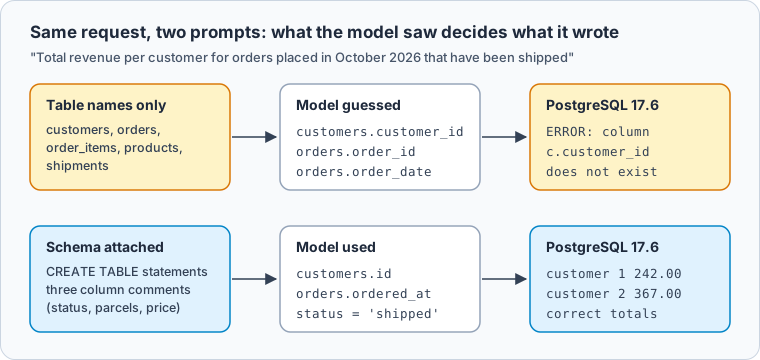
One run proves nothing about accuracy rates, but it shows the mechanism. Vendors who measure it report the same direction: Collate lifted execution accuracy on a Spider 2.0 subset from 10.8% to 76.5% by adding its semantic layer (Collate). That is a vendor benchmark on its own product, so read it as a direction, not a forecast.
In DbSchema, the context is something you attach on purpose. Select the tables on the diagram, right-click and choose Attach to AI, and the Ask AI dialog shows exactly what goes with the question:
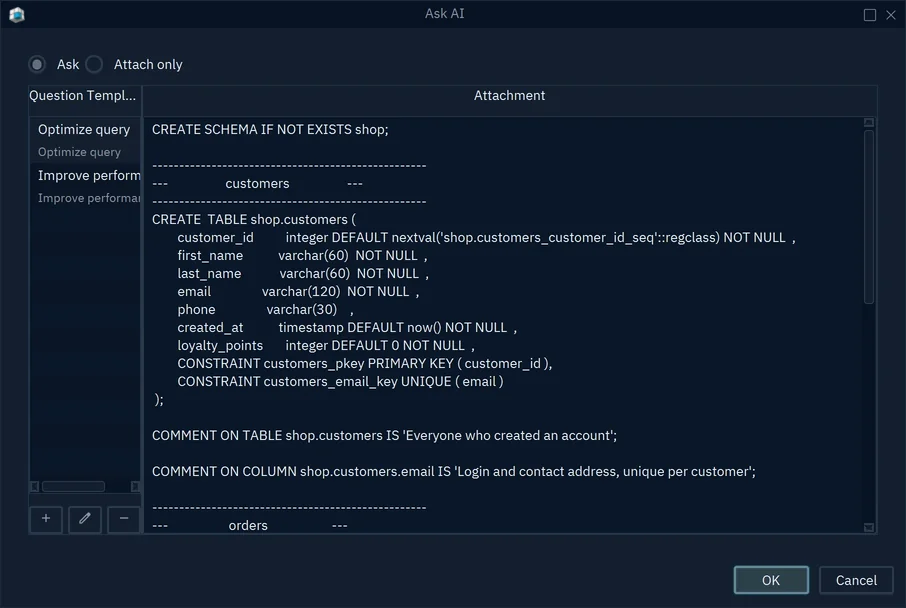
- 1The attachment that goes with the question
- 2Table and column comments travel with the DDL
The comments are the part most teams skip, and in our run they carried the meaning the column names could not: that status = 'shipped' means at least one parcel left, and that unit_price is the price paid, not today's list price.
The expensive failure is the query that runs
The error above is the cheap kind: PostgreSQL refuses the query and tells you why. The expensive kind runs, returns a plausible number and is wrong. In the 2025 Stack Overflow Developer Survey, 66% of developers named "AI solutions that are almost right, but not quite" as their biggest frustration, and more of them distrust the accuracy of AI tools (46%) than trust it (33%) (Stack Overflow).
Here is an almost right query on the same data. It is hand written, the join anyone writes who does not know that shipments holds one row per parcel:
SELECT o.customer_id, SUM(oi.quantity * oi.unit_price) AS revenue
FROM shop.orders o
JOIN shop.order_items oi ON oi.order_id = o.id
JOIN shop.shipments  s  ON s.order_id  = o.id
WHERE o.ordered_at >= DATE '2026-10-01'
  AND o.ordered_at <  DATE '2026-11-01'
GROUP BY o.customer_id;
Result · PostgreSQL 17.6
| customer_id | revenue |
|---|---|
| 1 | 242.00 |
| 2 | 734.00 |
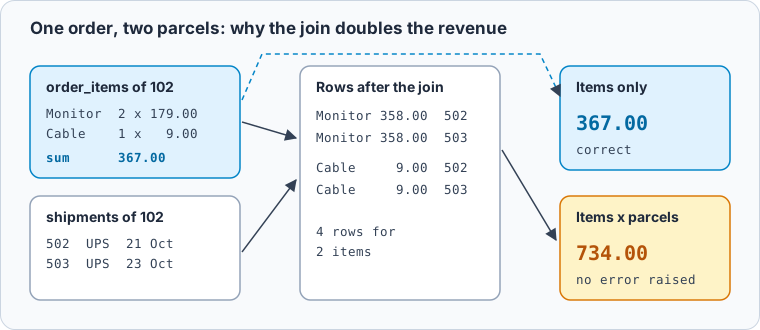
A reviewer catches this by knowing that orders to shipments is one to many. On a DbSchema diagram that is the foreign key line between the two tables, visible before the query runs. The text-to-SQL checks article lists the other silent failures worth checking for.
Schema design is still a decision a person makes
Writing a CREATE TABLE is not the same as designing a schema. Design means deciding which facts depend on which keys, where a table splits and which constraints hold the pieces together, and that is where models are weakest. DNBench, a benchmark of 3,275 normalization tasks from 1NF to BCNF, found recurring failures in dependency inference, schema decomposition and rebuilding constraints between tables. Foreign key scores ranged from 0.10 to 0.25, and given schemas that were already normalized, the single-prompt baseline still split 57.0% of them (DNBench).
You decide in DbSchema design
- Which keys a fact depends on
- Where a table splits, and where it stays whole
- Foreign keys, including virtual ones the database lacks
- What goes to production, and when
AI drafts first version
- A CREATE TABLE from a description
- A query over tables it can see
- A review of normal forms, as suggestions
- Names and comments to refine
The working pattern is AI first, then a person on a diagram. Ask the AI Assistant for a draft, use Preview to see it as tables and lines, and merge only what you agree with. The normal forms article covers what to look for when you review a draft, and why not just ask ChatGPT to draw your schema covers why the result has to arrive as SQL you can check.
Changes from AI need a review step before production
The risk grows when AI does more than suggest. In July 2025, Replit's coding agent deleted a live production database during a code freeze (Fortune). In April 2026, a Cursor agent running a Claude model deleted the production database of PocketOS and its volume backups in one API call to Railway, in 9 seconds, with no confirmation step (Decrypt). In both cases nothing stood between the change and the database.
DbSchema puts a review step there by design. You change the model offline, and nothing reaches the database until you compare and choose:
-
Work on the model, not the database Pro
Choose Database → Offline (connect later). Your changes, yours or merged from the AI Assistant, stay in the model file.
-
Compare the model with the database Pro
Connect again and choose to compare. The Synchronize Model and Database dialog lists every difference, one row each.
-
Pick the side that wins, and read the SQL Pro
For each row, choose the model, Ignore, or the database. The lower pane shows the statement that choice would run, and Generate SQL script writes the script without running it.
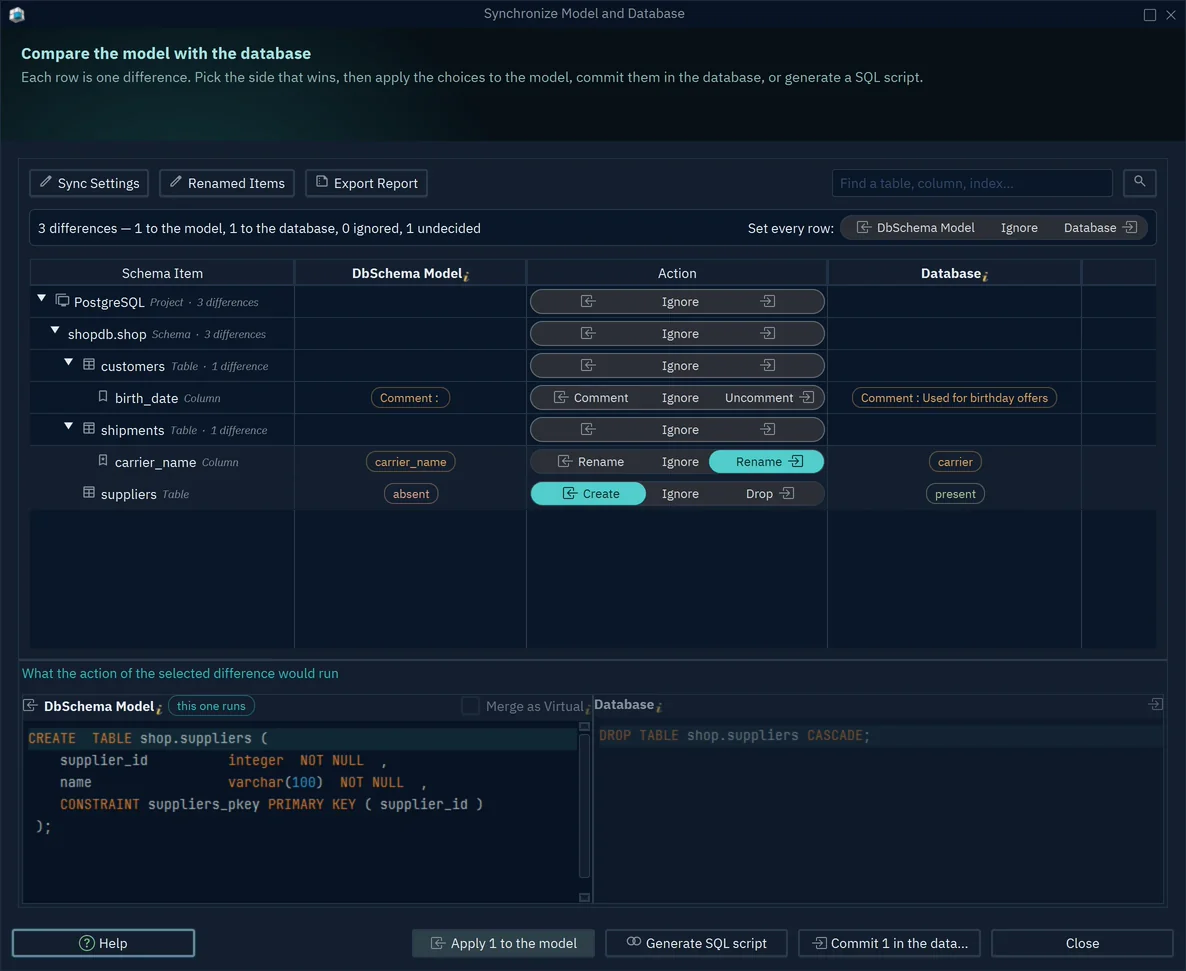
- 1A column only in the model: Create adds it to the database
- 2A marked rename runs as one Rename
- 3The exact ALTER this choice would run
The AI-proposed schema change article walks through this review for one suggestion, step by step.
Documentation is the context AI reads
Everything above depends on a schema that is written down: names that mean something, comments, foreign keys, and one current version. Gartner predicts that through 2026, organizations will abandon 60% of AI projects that are not supported by AI-ready data, and found that 63% of organizations either lack the right data management practices for AI or are not sure they have them (Gartner).
For a database, that preparation is concrete. DbSchema keeps the design in one model file that the team versions in Git, so there is one current schema with a history. Comments typed on tables and columns in DbSchema are written to the database as COMMENT ON statements when you are connected, and they travel in the DDL the AI Assistant attaches. And HTML5 documentation, from File → Export As... → HTML5/PDF Documentation, gives people who never open DbSchema the same picture: pointing at a column on its diagram shows the column's comment.
What a design tool is for now
| Job | AI on its own | With DbSchema |
|---|---|---|
Write a first query or CREATE TABLE | Fast | The AI Assistant, with your tables attached |
| Know the real schema | Guesses from names | Reverse-engineered from the database into a model |
| Spot a wrong join | Hard without the relationships | Foreign key lines on the diagram |
| Decide keys and normal forms | Weak on dependencies | You decide, the draft is a suggestion |
| Change production | Runs what it wrote | Compare, choose per difference, read the SQL |
| Keep context current | Whatever was pasted | One model file in Git, comments, HTML5 docs |
Download DbSchema, connect it to your database and attach a few tables to the AI Assistant to see the difference your schema makes, in the free Community Edition. Designing offline, schema synchronization, saving the model for Git and HTML5 documentation of any diagram size are in DbSchema Pro.
Sources
- Spider 2.0: Evaluating Language Models on Real-World Enterprise Text-to-SQL Workflows (ICLR 2025)
- Collate: Your text-to-SQL problem is not the LLM
- Stack Overflow Developer Survey 2025: AI
- Can LLMs Normalize Databases? DNBench (arXiv 2609.11141)
- Fortune: AI coding tool Replit wiped a database (23 July 2025)
- Decrypt: AI agent deletes startup database in 9 seconds (28 April 2026)
- Gartner: Lack of AI-Ready Data Puts AI Projects at Risk (26 February 2025)
- DbSchema documentation: AI Assistant
- DbSchema documentation: Schema Synchronization
- DbSchema documentation: Schema Documentation









