SQL Joins Explained – INNER, LEFT, RIGHT, and FULL JOIN Diagrams | DbSchema
Table of Contents
- What SQL JOINs do
- Sample tables used in the examples
- JOIN diagram cheat sheet
- INNER JOIN
- LEFT JOIN
- RIGHT JOIN
- FULL JOIN
- CROSS JOIN and SELF JOIN
- How to choose the right JOIN
- Common mistakes and database differences
- Build JOIN queries visually in DbSchema
- FAQ
- Conclusion
SQL JOINs combine rows from two or more tables based on a related column. They are at the center of reporting queries, dashboards, APIs, and data cleanup tasks because real data is rarely stored in one table only.
This guide explains the most-used join types with visual comparisons, result tables, and practical examples. If you are learning SQL on a live schema, DbSchema is especially useful because you can inspect the table relationships first, then build and run the JOIN visually in the Query Builder.
What SQL JOINs do
Imagine you have one table with employees and another with departments. The employee table stores department_id, while the department table stores the department name. A JOIN connects those rows so one query can answer questions such as:
- which employees belong to which department
- which employees do not have a department yet
- which departments have no employees assigned
- which rows match across both tables
If you want a refresher on the full query structure around joins, read SQL SELECT, SQL WHERE Clause, and What Is a Foreign Key?.
Sample tables used in the examples
We will use these two tables throughout the article:
Employees
| employee_id | name | department_id |
|---|---|---|
| 1 | Sarah James | 10 |
| 2 | Mark White | 20 |
| 3 | Olivia Reed | NULL |
Departments
| department_id | department_name |
|---|---|
| 10 | Engineering |
| 20 | Sales |
| 30 | HR |
JOIN diagram cheat sheet
Top-ranking JOIN tutorials usually show diagrams because they help readers decide faster. Use this quick comparison before reading the detailed examples:
| JOIN type | Matching rows | Unmatched left rows | Unmatched right rows | Best for |
|---|---|---|---|---|
INNER JOIN | kept | excluded | excluded | only matched data |
LEFT JOIN | kept | kept | excluded | all rows from the first table |
RIGHT JOIN | kept | excluded | kept | all rows from the second table |
FULL JOIN | kept | kept | kept | full comparison between both tables |
CROSS JOIN | every left row pairs with every right row | not applicable | not applicable | all combinations |
SELF JOIN | depends on the condition | depends on the condition | depends on the condition | comparing rows within the same table |
INNER JOIN = overlap only
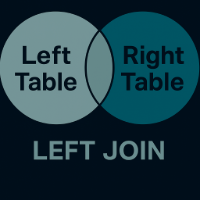
LEFT JOIN  = all left rows + matches from right
RIGHT JOIN = all right rows + matches from left
FULL JOIN  = all rows from both sides, matched where possible
INNER JOIN
INNER JOIN returns only rows that match in both tables.

SELECT e.name, d.department_name
FROM Employees e
INNER JOIN Departments d
  ON e.department_id = d.department_id;
| name | department_name |
|---|---|
| Sarah James | Engineering |
| Mark White | Sales |
Use INNER JOIN when missing matches should be ignored. This is the most common join in transactional reporting because it returns only complete pairs of related data.
LEFT JOIN
LEFT JOIN returns every row from the left table, plus any matching rows from the right table.
SELECT e.name, d.department_name
FROM Employees e
LEFT JOIN Departments d
  ON e.department_id = d.department_id;
| name | department_name |
|---|---|
| Sarah James | Engineering |
| Mark White | Sales |
| Olivia Reed | NULL |
This is the right choice when the left table is the main subject of the query and you still want rows that do not match. A common example is listing all customers, even those who have never placed an order.
RIGHT JOIN
RIGHT JOIN is the mirror image of LEFT JOIN: it returns every row from the right table and any matching rows from the left table.
SELECT e.name, d.department_name
FROM Employees e
RIGHT JOIN Departments d
  ON e.department_id = d.department_id;
| name | department_name |
|---|---|
| Sarah James | Engineering |
| Mark White | Sales |
| NULL | HR |
Use RIGHT JOIN when the table on the right is the one you want to preserve completely. In practice, many teams rewrite a RIGHT JOIN as a LEFT JOIN by swapping table order because it is easier to read and works in more databases.
FULL JOIN
FULL JOIN returns all rows from both tables. When a row does not match, the missing side is filled with NULL.
SELECT e.name, d.department_name
FROM Employees e
FULL OUTER JOIN Departments d
  ON e.department_id = d.department_id;
| name | department_name |
|---|---|
| Sarah James | Engineering |
| Mark White | Sales |
| Olivia Reed | NULL |
| NULL | HR |
This join is useful for reconciliation work such as:
- finding customers that exist in one system but not another
- comparing imported data with production data
- spotting orphan rows on both sides of a relationship
FULL JOIN workaround for MySQL and SQLite
Some databases do not support FULL OUTER JOIN directly. A common workaround is to combine a LEFT JOIN with a reversed LEFT JOIN and UNION the results:
SELECT e.name, d.department_name
FROM Employees e
LEFT JOIN Departments d
  ON e.department_id = d.department_id

UNION

SELECT e.name, d.department_name
FROM Departments d
LEFT JOIN Employees e
  ON e.department_id = d.department_id;
If you want to understand that set-operation pattern better, read SQL UNION Operator.
CROSS JOIN and SELF JOIN
Competitor pages often include these join types too, because users search for them together with the four classic joins.
CROSS JOIN
CROSS JOIN produces every possible combination of rows from both tables.
SELECT c.color_name, s.size_name
FROM Colors c
CROSS JOIN Sizes s;
If Colors has 3 rows and Sizes has 4 rows, the result has 12 rows.
Use it for generating combinations, matrix reports, calendars, or test data. Avoid it accidentally: a missing ON clause in an older implicit join can create a huge Cartesian product.
SELF JOIN
A SELF JOIN joins a table to itself. It is useful for hierarchical or comparison queries.
SELECT e.employee_name,
       m.employee_name AS manager_name
FROM Employees e
LEFT JOIN Employees m
  ON e.manager_id = m.employee_id;
This pattern is common for employee-manager relationships, category trees, and version comparisons.
How to choose the right JOIN
| If you need... | Use this JOIN |
|---|---|
| only rows that match in both tables | INNER JOIN |
| every row from the first table, matched where possible | LEFT JOIN |
| every row from the second table, matched where possible | RIGHT JOIN |
| every row from both tables | FULL JOIN |
| every possible row combination | CROSS JOIN |
| relationships within one table | SELF JOIN |
As a rule, start by asking which table is the one you cannot afford to lose from the result. That answer usually tells you whether you need INNER, LEFT, RIGHT, or FULL.
Common mistakes and database differences
1. Duplicates after a JOIN
Duplicates usually mean the relationship is one-to-many or many-to-many, not that the JOIN is broken.
SELECT c.customer_id, o.order_id
FROM Customers c
INNER JOIN Orders o
  ON c.customer_id = o.customer_id;
A customer with 5 orders appears 5 times. That is correct behavior. If you want one row per customer, use DISTINCT, aggregation, or an EXISTS pattern instead.
2. Filtering away outer-join rows by mistake
This query looks like a LEFT JOIN, but the WHERE clause turns it into an inner join for unmatched rows:
SELECT e.name, d.department_name
FROM Employees e
LEFT JOIN Departments d
  ON e.department_id = d.department_id
WHERE d.department_name = 'Sales';
To keep unmatched rows, move the condition into the ON clause:
SELECT e.name, d.department_name
FROM Employees e
LEFT JOIN Departments d
  ON e.department_id = d.department_id
 AND d.department_name = 'Sales';
3. Database support differs
| Database | INNER | LEFT | RIGHT | FULL OUTER |
|---|---|---|---|---|
| PostgreSQL | ✔ | ✔ | ✔ | ✔ |
| MySQL | ✔ | ✔ | ✔ | ✗ |
| SQL Server | ✔ | ✔ | ✔ | ✔ |
| SQLite | ✔ | ✔ | ✗ | ✗ |
SQLite users usually rewrite RIGHT JOIN as a swapped LEFT JOIN, and emulate FULL OUTER JOIN with UNION.
4. Joining on the wrong key
Before writing the query, inspect the relationship in an ER diagram. DbSchema helps here because its diagram view and foreign key documentation make it easier to spot the correct join columns before you run the query.
Build JOIN queries visually in DbSchema
DbSchema is a natural fit for JOIN-heavy work because you can see the relationships and the SQL side by side.
- Connect through the PostgreSQL JDBC driver, MySQL JDBC driver, or SQL Server JDBC driver.
- Reverse-engineer the schema and review the linked tables in the diagram.
- Open the Query Builder and add the related tables.
- Choose the join type from the relationship line.
- Preview the generated SQL, then run it in the SQL editor.
- Inspect matching and unmatched rows in the Relational Data Explorer.
DbSchema is especially helpful when the query joins three or more tables, because you can validate the relationship path visually instead of memorizing every foreign-key column. It also helps document complex schemas for teammates in the exported schema documentation.
FAQ
What is the difference between INNER JOIN and LEFT JOIN?
INNER JOIN returns only matching rows from both tables. LEFT JOIN returns all rows from the left table, even when no match exists on the right.
When should I use LEFT JOIN instead of RIGHT JOIN?
Usually when the left table is your main dataset. Many teams prefer LEFT JOIN because it reads more naturally and is easier to rewrite across databases.
Why does my JOIN return more rows than expected?
Because one row on one side may match many rows on the other side. That is normal in one-to-many joins. Use aggregation, DISTINCT, or EXISTS if you need a different shape.
Can I JOIN more than two tables? Yes. You can chain joins:
SELECT o.order_id, c.customer_name, p.product_name
FROM Orders o
INNER JOIN Customers c ON o.customer_id = c.customer_id
INNER JOIN Products p ON o.product_id = p.product_id;
Does SQLite support RIGHT JOIN or FULL OUTER JOIN?
No. SQLite supports INNER JOIN and LEFT JOIN, but not RIGHT JOIN or FULL OUTER JOIN. Use a swapped LEFT JOIN or a UNION workaround.
Conclusion
SQL JOINs are easier to master when you think in terms of preserved rows: overlap only, all left rows, all right rows, or all rows from both sides. Pair that mindset with diagrams, a few predictable examples, and a visual tool such as DbSchema, and join queries become much easier to debug and explain.
For next steps, continue with SQL SELECT, SQL UNION Operator, and What Is an Entity Relationship Diagram?.






