SQL INSERT INTO Statement Explained with Examples
For someone writing their first INSERT statements; each form is shown with the table it leaves behind.
On this page
You've created a table and it's empty. INSERT INTO adds rows to it: you name the table, list the columns you're filling, and give the values in the same order.
INSERT INTO table_name (column1, column2, column3)
VALUES (value1, value2, value3);
Every statement below ran on PostgreSQL 17.9, MySQL 9.1.0 and SQLite 3.50.4, and the results and errors are copied from those runs.
Insert a row with a column list
The examples use one table, with a default on age:
CREATE TABLE users (
    user_id    INT PRIMARY KEY,
    first_name VARCHAR(30) NOT NULL,
    last_name  VARCHAR(30),
    age        INT DEFAULT 18
);

INSERT INTO users (user_id, first_name, last_name, age)
VALUES (1, 'John', 'Doe', 25);
| user_id | first_name | last_name | age |
|---|---|---|---|
| 1 | John | Doe | 25 |
The database pairs the two lists by position: the first value goes into the first column you named, the second into the second. So the lists must be the same length, and the order of the column list is yours to choose, as long as the values follow it.
Practice this: Lesson 13 of the SQL tutorial runs INSERT, UPDATE and DELETE on a shop database in your browser, with checked exercises.
Insert several rows in one statement
Put several value lists after VALUES, separated by commas:
INSERT INTO users (user_id, first_name, last_name, age)
VALUES (2, 'Jane', 'Smith', 30),
       (3, 'Emily', 'Adams', 27);
| user_id | first_name | last_name | age |
|---|---|---|---|
| 1 | John | Doe | 25 |
| 2 | Jane | Smith | 30 |
| 3 | Emily | Adams | 27 |
The statement succeeds or fails as a whole. When one row breaks a rule, such as a user_id that already exists, all three engines reject the statement and insert none of its rows.
What a column you leave out gets
A column missing from the column list still gets a value:
INSERT INTO users (user_id, first_name)
VALUES (4, 'Mike');
| user_id | first_name | last_name | age |
|---|---|---|---|
| 4 | Mike | NULL | 18 |
age took its declared default, 18, and last_name, which has no default, took NULL, as PostgreSQL's INSERT page describes. A column that refuses NULL and has no default can't be left out:
INSERT INTO users (user_id, last_name)
VALUES (5, 'Rogers');
All three engines refuse it, naming first_name; the messages are in the errors table.
PostgreSQL and MySQL also accept the keyword DEFAULT in place of a value, as in VALUES (5, 'Lucy', 'Gray', DEFAULT). SQLite answers near "DEFAULT": syntax error, so leave the column out there. INSERT INTO users DEFAULT VALUES; (in MySQL, INSERT INTO users () VALUES ();) fills every column with its default, so it fails on users, where user_id and first_name have no default and refuse NULL.
Inserting without a column list
Leave the column list out, and the values pair with the table's columns in the order the CREATE TABLE declared them:
INSERT INTO users
VALUES (6, 'Tom', 'Rogers', 45);
That works until the table changes. Add a column and run the same kind of statement:
ALTER TABLE users ADD COLUMN email VARCHAR(100);

INSERT INTO users
VALUES (7, 'Nina', 'Fox', 22);
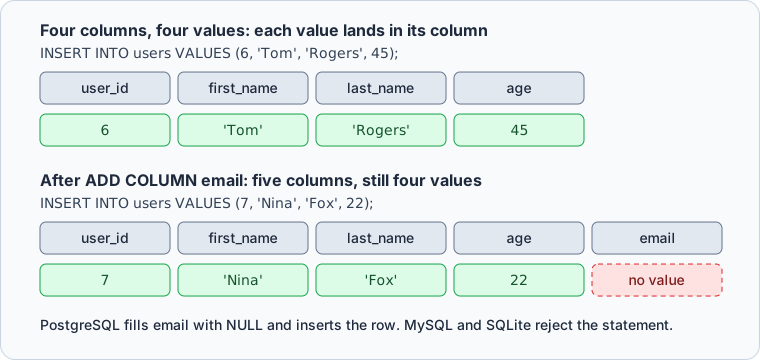
MySQL rejects Nina's row with ERROR 1136 (21S01): Column count doesn't match value count at row 1, and SQLite with table users has 5 columns but 4 values were supplied. PostgreSQL inserts it and leaves email NULL, because it fills the first N columns when you give N values. That silent success is the bigger risk: the row goes in with email empty, and nothing tells you the statement is out of date. To see the declared order, run DESCRIBE users; in MySQL, PRAGMA table_info(users); in SQLite, or \d users in PostgreSQL's psql client.
How to write strings, numbers and dates
| Data type | How the value is written | Example |
|---|---|---|
| VARCHAR, CHAR, TEXT | single quotes | 'John' |
| INT, DECIMAL | no quotes | 25 |
| DATE, TIMESTAMP | single quotes, year first | '2026-10-17 12:45:00' |
| BOOLEAN | keyword, no quotes | TRUE |
An apostrophe ends a string early, so 'O'Brien' is a syntax error on all three engines. Write the apostrophe twice, as PostgreSQL's lexical structure page shows:
INSERT INTO users (user_id, first_name, last_name)
VALUES (8, 'Sean', 'O''Brien');
last_name now holds O'Brien. Keep text in single quotes even where double quotes seem to work: MySQL and SQLite store "Sean" as text, but PostgreSQL reads it as a column name and answers column "Sean" does not exist.
Copy rows from another table with INSERT INTO SELECT
Replace the VALUES list with a SELECT, and every row it returns is inserted. Here the rows go into an empty archive table:
CREATE TABLE archived_users (
    user_id    INT PRIMARY KEY,
    first_name VARCHAR(30) NOT NULL,
    last_name  VARCHAR(30),
    age        INT
);

INSERT INTO archived_users (user_id, first_name, last_name, age)
SELECT user_id, first_name, last_name, age
FROM users
WHERE age > 25;
| user_id | first_name | last_name | age |
|---|---|---|---|
| 2 | Jane | Smith | 30 |
| 3 | Emily | Adams | 27 |
| 6 | Tom | Rogers | 45 |
The columns pair by position between the two lists, so their names don't have to match. The INSERT INTO SELECT tutorial covers the variations, and SELECT INTO creates the target table during the copy.



Run and check INSERT statements in DbSchema
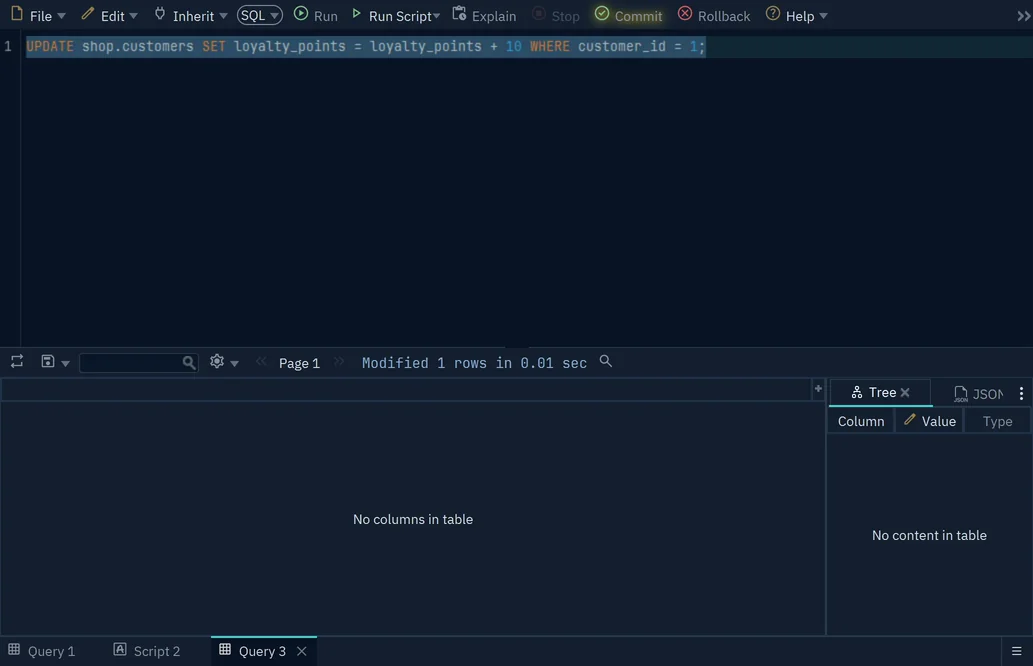
DbSchema connects to your database and opens a SQL Editor on it: choose Editor → SQL Editor, or press Ctrl+E. Type the INSERT and press Run, or Ctrl+Enter. DbSchema runs it against the live database, not the model file, and keeps it in an open transaction until you press Commit to keep the rows or Rollback to undo the insert. Until then, the Commit button blinks and other users don't see the new rows.
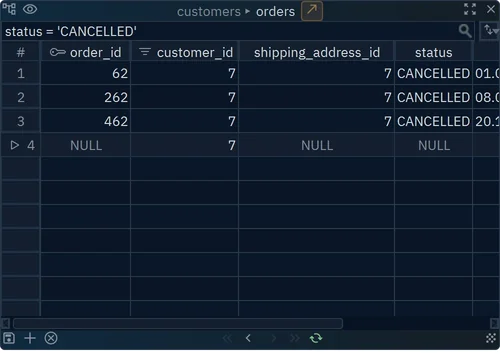
To add a row without SQL, right-click the table on the diagram, choose Data Explorer, press + at the bottom, fill in the values, and press the save button next to +. The Data Explorer writes the row at once, and in a table opened from a linked row, DbSchema fills in the foreign key:
For rows in a CSV, Excel, XML or JSON file, choose Database → Data Importer instead.
Errors you will see, and what causes them
Each of these fails on at least one engine:
INSERT INTO users (user_id, first_name) VALUES (10, 'Ann', 'Lee');
INSERT INTO users (user_id, first_name) VALUES (1, 'Ann');
INSERT INTO users (user_id, first_name, age) VALUES (10, 'Ann', 'abc');
With the Rogers insert from earlier, they return:
| Mistake | PostgreSQL 17.9 | MySQL 9.1.0 | SQLite 3.50.4 |
|---|---|---|---|
| more values than columns | INSERT has more expressions than target columns | ERROR 1136 (21S01): Column count doesn't match value count at row 1 | 3 values for 2 columns |
| duplicate primary key | duplicate key value violates unique constraint "users_pkey" | ERROR 1062 (23000): Duplicate entry '1' for key 'users.PRIMARY' | UNIQUE constraint failed: users.user_id |
| NOT NULL column left out | null value in column "first_name" of relation "users" violates not-null constraint | ERROR 1364 (HY000): Field 'first_name' doesn't have a default value | NOT NULL constraint failed: users.first_name |
| text in an integer column | invalid input syntax for type integer: "abc" | ERROR 1366 (HY000): Incorrect integer value: 'abc' for column 'age' at row 1 | no error, 'abc' is stored |
SQLite stores the text because its columns accept any type unless the table is declared STRICT. MySQL rejects it because its default SQL mode is strict; with strict mode off, it stores an adjusted value with a warning.
Values in the wrong order whose types still fit return no error anywhere: swap the two names, and Doe John goes in quietly.
Practice questions
- Insert Lena Park, aged 33, with
user_id20, listing the columns aslast_name,first_name,age,user_id. - Insert Omar with
user_id21 and nothing else, and say whatlast_nameandagehold. - Copy every user under 25 into
archived_users.
Write the column list in every statement you keep. To run these statements against your own database, download DbSchema, connect, and open a SQL Editor; connecting, the diagram and the SQL Editor are in the free Community Edition. The Data Importer, and following foreign keys in the Data Explorer, need DbSchema Pro.
Frequently asked questions
How do I get back the row I just inserted?
PostgreSQL, and SQLite since 3.35, return it with RETURNING, including the values that defaults filled in:
INSERT INTO users (user_id, first_name)
VALUES (11, 'Kim')
RETURNING user_id, age;
| user_id | age |
|---|---|
| 11 | 18 |
MySQL has no RETURNING; after an insert into an AUTO_INCREMENT column, SELECT LAST_INSERT_ID(); returns the generated value.
How do I insert a row, or update it if it already exists?
PostgreSQL and SQLite use ON CONFLICT, where excluded is the row you tried to insert. MySQL uses ON DUPLICATE KEY UPDATE with a row alias:
-- PostgreSQL, SQLite
INSERT INTO users (user_id, first_name) VALUES (1, 'Johnny')
ON CONFLICT (user_id) DO UPDATE SET first_name = excluded.first_name;

-- MySQL
INSERT INTO users (user_id, first_name) VALUES (1, 'Johnny') AS new
ON DUPLICATE KEY UPDATE first_name = new.first_name;
Either way, user 1 becomes Johnny Doe.
Run your INSERT statements against a real schema
DbSchema connects to your database, reverse-engineers the tables into an interactive diagram, and runs INSERT statements in the SQL Editor. Connecting, the diagram and the SQL Editor are in the free Community Edition.









