SQL SELECT INTO Statement Explained with Examples
For SQL beginners copying a query result into a new table; the statement is shown on each engine that has it, and the replacement on the engines that do not.
On this page
You want the rows a query returns kept as a table of their own: a snapshot before a bulk update, or a small copy of a large table to test against. SELECT INTO does that in one statement, creating the table and filling it with the query's rows. SQL Server and PostgreSQL run it as written. MySQL, Oracle AI Database and SQLite use CREATE TABLE AS SELECT instead.
SELECT column1, column2, ...
INTO new_table
FROM source_table
WHERE condition;
What the SQL SELECT INTO statement does
SELECT INTO works in two steps. It creates a table from the select list, then inserts the rows that the query returns. On SQL Server, each new column takes the name, data type and nullability of the expression it came from[1]. Nothing comes back as a result set, so to see what you got, query the new table.
Because the statement creates the table, the name has to be free. A SELECT INTO aimed at a table that already exists fails instead of adding rows to it. Adding rows to an existing table is what INSERT INTO SELECT does.
The copy serves three purposes: a backup of a table before you change it, a copy of real data to test a query against, and a copy in another database. On SQL Server, a three-part name, database.schema.table, creates the new table in another database on the same instance[1].
Copy an entire table into a new one
Every example below runs against one table of three students:
CREATE TABLE Students (
    ID   INT PRIMARY KEY,
    Name VARCHAR(50),
    Age  INT
);

INSERT INTO Students VALUES
    (1, 'Alice',   20),
    (2, 'Bob',     22),
    (3, 'Charlie', 21);
A full copy selects every column with no filter:
SELECT *
INTO Backup_Students
FROM Students;

SELECT * FROM Backup_Students ORDER BY ID;
| ID | Name | Age |
|---|---|---|
| 1 | Alice | 20 |
| 2 | Bob | 22 |
| 3 | Charlie | 21 |
From here on the copy lives its own life: a later change to Students does not reach Backup_Students.
To copy only some columns, list them. An alias written with AS renames the column in the new table:
SELECT ID, Name AS Student_Name
INTO Student_Names
FROM Students;

SELECT * FROM Student_Names ORDER BY ID;
| ID | Student_Name |
|---|---|
| 1 | Alice |
| 2 | Bob |
| 3 | Charlie |
SELECT INTO with a WHERE condition
A WHERE clause decides which rows get copied:
SELECT *
INTO Older_Students
FROM Students
WHERE Age > 21;

SELECT * FROM Older_Students;
| ID | Name | Age |
|---|---|---|
| 2 | Bob | 22 |
A condition that is never true copies no rows, and leaves you an empty table with the source's columns. Use it when you need the shape of a table without its data:
SELECT *
INTO Empty_Students
FROM Students
WHERE 1 = 0;
Empty_Students has the columns ID, Name and Age, and SELECT COUNT(*) FROM Empty_Students returns 0.
SELECT INTO from multiple joined tables
The query behind INTO is an ordinary query, so any join the engine accepts works inside it. A second table records one course per student, keyed by the student's ID:
CREATE TABLE Courses (
    ID         INT PRIMARY KEY,
    CourseName VARCHAR(50)
);

INSERT INTO Courses VALUES
    (1, 'Math'),
    (2, 'History');
Joining the two and writing the result into a new table:
SELECT Students.ID, Students.Name, Courses.CourseName
INTO StudentCourses
FROM Students
INNER JOIN Courses ON Students.ID = Courses.ID;

SELECT * FROM StudentCourses ORDER BY ID;
| ID | Name | CourseName |
|---|---|---|
| 1 | Alice | Math |
| 2 | Bob | History |
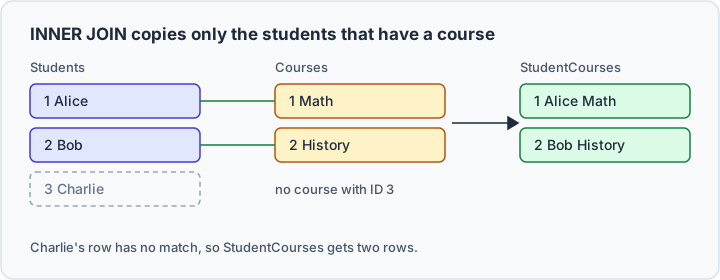
Charlie is missing because an INNER JOIN keeps only the rows that match on both sides, and no course carries his ID. The older join syntax, FROM Students, Courses WHERE Students.ID = Courses.ID, copies the same two rows.
What the new table keeps, and what it leaves behind
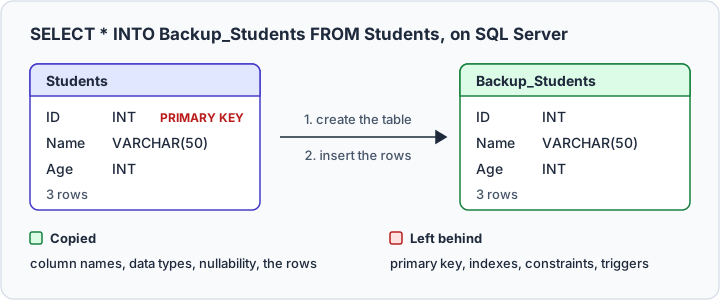
SELECT INTO copies the column definitions and the rows. On SQL Server, the rest of the source table stays behind[1]:
| Part of the source table | Copied on SQL Server |
|---|---|
| Column names and data types | Yes |
| NULL or NOT NULL on each column | Yes |
| IDENTITY property | Yes, with the exceptions below |
| Primary key, foreign keys, other constraints | No |
| Indexes and triggers | No |
| Computed columns | Only their current values |
The IDENTITY property is lost when the query joins tables, combines queries with UNION, lists the identity column twice, uses it in an expression, or reads it from a remote source. The column is then created NOT NULL instead.
Other engines differ. PostgreSQL documents only that the columns take the names and data types of the query's output[10], and NOT NULL does not carry over. MySQL's CREATE TABLE ... SELECT keeps NULL, NOT NULL and DEFAULT, but creates no indexes and drops AUTO_INCREMENT[6]. SQLite's CREATE TABLE AS keeps no primary key and no constraints of any kind, NOT NULL included[5].
Add what the copy needs once it exists. On SQL Server, this puts the primary key back, under a name that the system generates because none is given[7]:
ALTER TABLE Backup_Students ADD PRIMARY KEY (ID);
SELECT INTO vs SELECT vs INSERT INTO SELECT
| Statement | Creates the target table | Where the rows go |
|---|---|---|
| SELECT | No | Back to the caller |
| SELECT INTO | Yes, and fails if it exists | Into the new table |
| INSERT INTO SELECT | No, the table must exist | Into the existing table |
A plain SELECT statement only hands the rows back. To add rows to a table that is already there, use the INSERT INTO SELECT statement. This one adds Charlie to the existing Older_Students:
INSERT INTO Older_Students
SELECT * FROM Students
WHERE Age = 21;

SELECT * FROM Older_Students ORDER BY ID;
| ID | Name | Age |
|---|---|---|
| 2 | Bob | 22 |
| 3 | Charlie | 21 |
Column order matters here: the query's values fill the target's columns left to right, so SELECT * puts each value in the right column only when both tables list their columns in the same order[8]. SELECT INTO never has that problem, since the new table takes its columns from the query. To add single rows by hand, use the plain INSERT INTO statement.
Syntax and which engines support it
| Engine | SELECT INTO creates a table | Statement that creates a table from a query |
|---|---|---|
| SQL Server | Yes | SELECT ... INTO |
| PostgreSQL | Yes | CREATE TABLE ... AS SELECT |
| MySQL | No | CREATE TABLE ... SELECT |
| Oracle AI Database 26ai | No | CREATE TABLE ... AS SELECT |
| SQLite | No | CREATE TABLE ... AS SELECT |
MySQL and Oracle AI Database need care: both have a SELECT INTO of their own, and neither creates a table. SQLite has no SELECT INTO at all. PostgreSQL runs SELECT INTO but recommends CREATE TABLE AS, because SELECT INTO is unavailable in ECPG and PL/pgSQL, which read the INTO clause differently[2]. In MySQL, SELECT ... INTO stores column values in variables, or writes rows to a file with INTO OUTFILE or INTO DUMPFILE[3]. In Oracle AI Database 26ai it is a PL/SQL statement that stores values in variables, and it raises NO_DATA_FOUND when the query returns no rows[4].
On PostgreSQL, Oracle AI Database and SQLite, the full copy of Students is written with CREATE TABLE AS. MySQL accepts the same statement, with AS optional[6]:
CREATE TABLE Backup_Students AS
SELECT * FROM Students;
Common mistakes and how to avoid them
Reusing a table name is the loudest mistake: the statement fails, and nothing in the existing table changes. Pick a free name, or drop the old copy on purpose.
Leaving out the WHERE clause is the quiet one: the copy gets every row of the source, so decide what the copy is for and filter to that.
An expression needs a name. The new table takes its column names from the select list, and on SQL Server an expression such as Age + 1 has none until you give it an alias. PostgreSQL makes up a generic name instead[11], while SQL Server refuses the statement with error 1038, "An object or column name is missing or empty. For SELECT INTO statements, verify each column has a name."[9] Write Age + 1 AS Next_Age and the copy gets a readable column.
A failed copy can leave an empty table behind. SQL Server creates the table first and inserts the rows second, so when the inserts fail, they roll back and the empty table remains[1]. The next attempt then fails on the name. Drop the empty table, or run the statement inside an explicit transaction so that it succeeds or fails as a whole.
An ORDER BY on the copy does not guarantee the order in which the rows are inserted[1]. Put the ORDER BY on the query that reads the copy back, as the examples above do.



Validate SELECT INTO results in DbSchema
A SELECT INTO that copies the wrong rows shows it only once the table exists, so run the query without its INTO line first. DbSchema's SQL Editor runs the bare SELECT, and the result pane shows the rows and the column names that the new table would take.
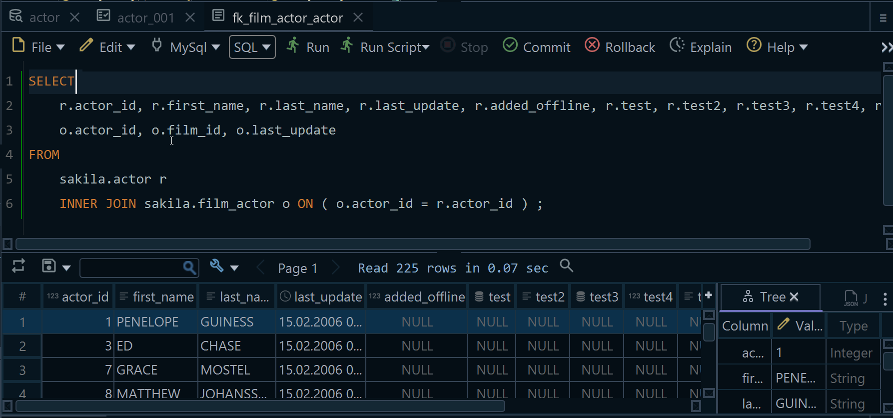
Once both are right, add the INTO line and run it again. The statement runs against the connected database, so the copy now exists in the database while the DbSchema diagram still shows the schema as it was read. Connect and reverse-engineer the schema again, and DbSchema draws the new table in the diagram.
Practice questions
- Copy the students named Alice into a new table.
- Copy every student with their course into a new table, keeping Charlie with an empty course.
- Copy Students into a new table whose third column, Age_Next_Year, holds each age plus one.
To try it against your own schema, download DbSchema at https://dbschema.com/download.html, connect it to your database and run the query in the SQL Editor. Connecting, reverse-engineering and the SQL Editor are in the free Community Edition.
Sources
- SELECT - INTO Clause (Transact-SQL)
- PostgreSQL: SELECT INTO
- MySQL: SELECT ... INTO Statement
- Oracle PL/SQL: SELECT INTO Statement
- SQLite: CREATE TABLE
- MySQL 8.4 Reference Manual: CREATE TABLE ... SELECT Statement
- table_constraint (Transact-SQL)
- PostgreSQL: INSERT
- Database Engine events and errors (1000 to 1999)
- PostgreSQL: CREATE TABLE AS
- PostgreSQL: Select Lists, Column Labels
Run your SELECT INTO against a real schema
DbSchema reverse-engineers your database into an interactive diagram and runs SQL against it. The SQL editor is in the free Community Edition.









