Paid Database Visualization Tools for PostgreSQL, MySQL and SQL Server: What They Cost
What a paid tool that diagrams PostgreSQL, MySQL and SQL Server costs, what the free edition already covers, and how the price adds up over three years.
On this page
DbSchema shows PostgreSQL, MySQL and SQL Server in the same diagrams with one licence. You pay once, not per database. DbSchema Pro costs 294 USD once per user, or 29.40 USD a month. The free Community Edition already connects to all three and draws their diagrams. Over three years, Pro costs 444 USD if you also take the two optional update years.
Short answer
DbSchema Pro costs 294 USD once per user, or 29.40 USD a month, for every database DbSchema supports. The perpetual licence includes a year of updates, and each further year costs 75 USD if you want it.
- One DbSchema licence covers PostgreSQL, MySQL, SQL Server and 100+ other databases.
- Community is free and draws the diagrams; Pro keeps, documents and queries them.
- Pro bought once costs 444 USD over three years with updates.
One licence covers all three databases
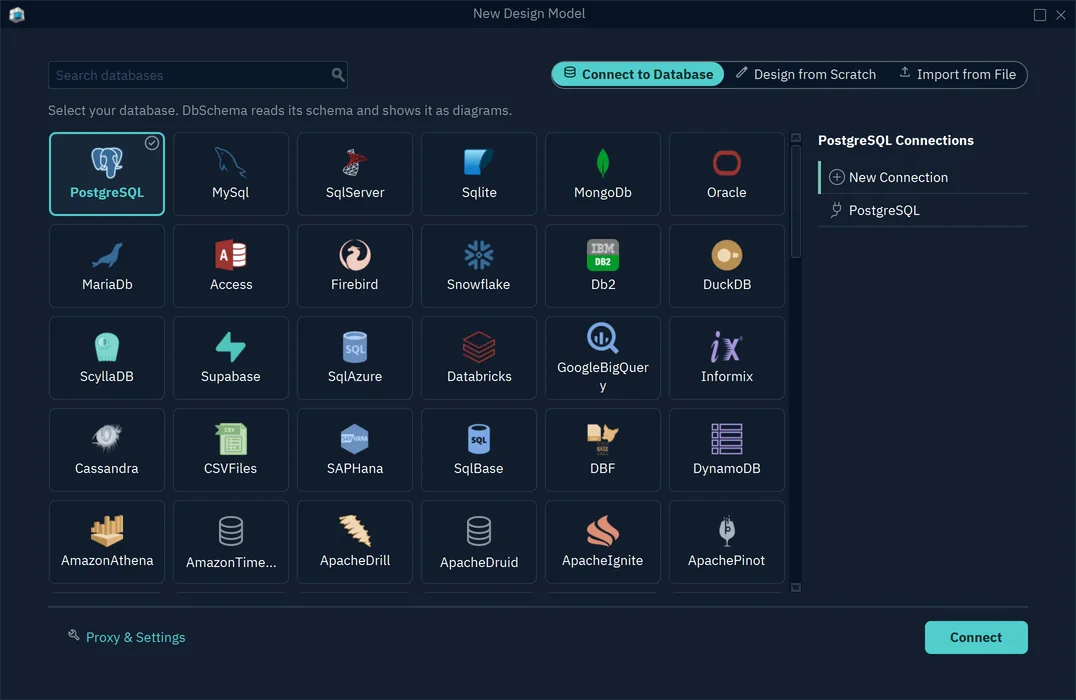
DbSchema sells one product for every database it supports. You pick PostgreSQL, MySQL or SQL Server in the same window. Every edition, the free one included, connects to all of them. Say your application runs on PostgreSQL, a legacy system on MySQL and reporting on SQL Server. Your team still buys one licence per person.
Check this point on every quote you get. Some vendors sell a separate product per database. Navicat, for example, sells Navicat for MySQL, Navicat for PostgreSQL and Navicat for SQL Server. Its Navicat Premium product connects to several databases. That is how its products page listed them on 6 November 2026.
What the free edition shows and what Pro adds
You don't need to pay to see a structure. The Community Edition is free for any use. It connects, reverse-engineers the schema and draws interactive diagrams. You pay for what you do with the diagram afterwards:
| What you do | Community (free) | Pro |
|---|---|---|
| Connect and reverse-engineer PostgreSQL, MySQL, SQL Server | yes | yes |
| See the schema as interactive diagrams | yes | yes |
| Save the model to a file, with virtual foreign keys | no | yes |
| HTML5, PDF and Markdown documentation | up to 12 tables, watermarked | yes |
| Visual query builder and browsing related rows | no | yes |
What to see: the free edition answers "what is in this database?", and Pro is for keeping the answer and sharing it. The rows come from the edition comparison and the documentation page.
Which database visualization tool to buy explains why reading the structure from the database beats drawing it by hand.
What three years cost
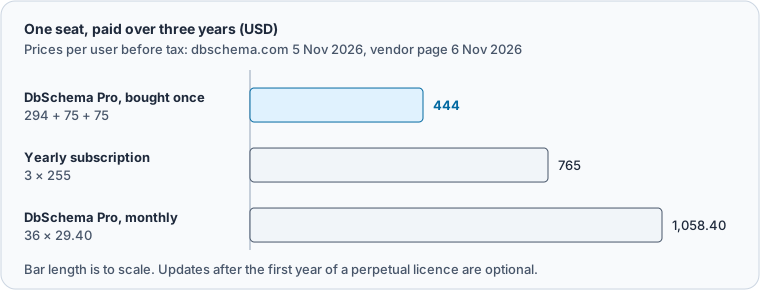
Compare the cost over the time you'll use the tool, not the first invoice. DbSchema sells Pro as a perpetual licence or by the month. DBeaver Enterprise, a database client that also draws ER diagrams, is sold as an annual subscription. dbeaver.com listed it at 255 USD a year on 6 November 2026.
| Licence | Paid over three years | What the payment buys |
|---|---|---|
| DbSchema Pro, perpetual | 444 USD (294 + 75 + 75) | the version you bought, with a year of releases |
| DbSchema Pro, monthly | 1,058.40 USD (36 × 29.40) | all updates; cancel at any time |
| DBeaver Enterprise | 765 USD (3 × 255) | product use, version updates and support for one year at a time |
What to see: the perpetual DbSchema licence is the lowest three-year total, and the monthly plan suits a short project.
If you stop paying for updates, a perpetual DbSchema licence keeps working on the version you own. Perpetual or subscription for database tooling works through the break-even month by month.
MySQL can hide foreign keys from any tool
A paid tool reads the same catalog as a free one, so it can only draw the foreign keys the database stored. PostgreSQL keeps every declared foreign key in its pg_constraint catalog. In MySQL, the 8.4 reference manual names only InnoDB and NDB as the storage engines whose tables support foreign key checking. This table uses the older MyISAM storage engine:
CREATE TABLE order_notes (
  id INT PRIMARY KEY,
  order_id INT,
  FOREIGN KEY (order_id) REFERENCES orders (id)
) ENGINE=MyISAM;
MySQL created the table without an error or a warning. Asking the catalog for the foreign keys of the schema returns only the one on orders, which is an InnoDB table:
SELECT table_name, referenced_table_name, constraint_name
FROM information_schema.referential_constraints
WHERE constraint_schema = 'shop'
ORDER BY table_name;
Result · MySQL 8.4.11
| TABLE_NAME | REFERENCED_TABLE_NAME | CONSTRAINT_NAME |
|---|---|---|
| orders | customers | orders_ibfk_1 |
No tool can draw a line from order_notes to orders, because the database never stored it. In DbSchema you add it as a virtual foreign key, which lives in the model and never in the database. Keeping it means saving the model, which needs DbSchema Pro.
Pick the licence type that fits who pays
DbSchema lists three prices for the same Pro features, by who buys it:
| Licence | Pro, perpetual | Pro, monthly |
|---|---|---|
| Business | 294 USD | 29.40 USD |
| Personal | 196 USD | 19.60 USD |
| Education | 98 USD | 9.80 USD |
What to see: a company buys business licences, and the other two are for personal use and education. Prices are per developer: one person installs DbSchema on two computers and uses one at a time. For people who need Pro only now and then, a team can share seats with a floating licence.
Download DbSchema, connect to your PostgreSQL, MySQL or SQL Server database and look at the diagram in the free Community Edition. When you want to save the model, document it or query it visually, DbSchema Pro covers all three databases with one licence.
Sources
See PostgreSQL, MySQL and SQL Server with one licence
The DbSchema Community Edition connects to all three databases and draws their diagrams for free. Saving the model, documentation and the visual query builder are in DbSchema Pro.