ERDPlus Alternatives for Students Learning Database Design
What ERDPlus does for a database course, where it stops, and which free tools let you test your design on a real database.
On this page
Switch from ERDPlus to DbSchema when your course reaches real tables. ERDPlus draws your diagram in the browser and exports it as SQL. But it never connects to a database, so you never see whether the design works.
The free DbSchema Community Edition connects to PostgreSQL, MySQL and other databases. It draws the schema, the tables and the links between them, and runs each change you confirm in the database. Every download starts with a 15-day trial of all features, with no registration.
Short answer
The best ERDPlus alternative for a student is DbSchema Community. It is free and designs on a real database, so a wrong link between tables shows up as an error. When a project needs a saved model file or documentation, DbSchema Pro Educational costs 98 USD once.
- Learn on a tool that connects to a database, so the database checks your design.
- DbSchema Community is free forever, for coursework and any other use.
- DbSchema Pro costs 98 USD once on the educational licence, Architect 156.80 USD.
A course project fails when the design looks right but the tables don't hold. DbSchema lets the database check your design while you draw it.
What DbSchema adds for a database course
- The database checks your design. DbSchema Community connects to a real database. While you're connected, each table you confirm with OK is created in the database at once (Tables, Columns and Indexes).
- Free for coursework, and after it. The Community Edition stays free forever, for any use (purchase page). You don't lose the tool when the semester ends.
- Links drawn by dragging. A foreign key is a column that must point to a row in another table. Drag one column onto another, and DbSchema creates the foreign key and draws it as a line (Foreign Keys).
- The ER step before the tables. DbSchema Architect lets you draw entities and their relations first, without a database (logical design). It then generates the tables for the database you pick.
- A project you can hand in. DbSchema Pro saves the model as a
.dbsfile you can commit to Git. It also writes HTML5, PDF or Markdown documentation of the schema.
The steps are under Build the enrollment design in DbSchema.
What ERDPlus does, and where it stops
ERDPlus is a free web tool for ER diagrams. An ER diagram shows a database's entities, such as students and courses, and the relationships between them. ERDPlus also draws relational schemas, the same design as tables and columns.
Cardinality says how many rows on one side match a row on the other. One student, for example, takes many courses. ERDPlus draws every kind of cardinality.
You can draw in Chen notation, with diamonds for relationships, or in crow's foot notation. Crow's foot marks the "many" side with a three-pronged line.
One click converts an ER diagram into a relational schema. ERDPlus exports it as SQL, the language databases understand, or as a PNG image (vendor page checked on 15 November 2026).
The SQL export is where ERDPlus stops. You run the script on a database yourself, and nothing tells you what the database does with it.
Here is the design most courses teach first: students enrolled in courses. It is a many-to-many relationship, because a student takes many courses and a course has many students. A third table, enrollments, links the two.
CREATE TABLE students (
  student_id integer PRIMARY KEY,
  name       text NOT NULL
);

CREATE TABLE courses (
  course_id integer PRIMARY KEY,
  title     text NOT NULL
);

CREATE TABLE enrollments (
  student_id integer REFERENCES students,
  course_id  integer REFERENCES courses,
  PRIMARY KEY (student_id, course_id)
);

INSERT INTO students VALUES (1, 'Ana'), (2, 'Ben');
INSERT INTO courses VALUES (10, 'Databases');
INSERT INTO enrollments VALUES (1, 10), (2, 10);
A primary key is the column, or columns, that identify each row. No two rows may share it. REFERENCES makes a foreign key: a column that must point to an existing row in another table.
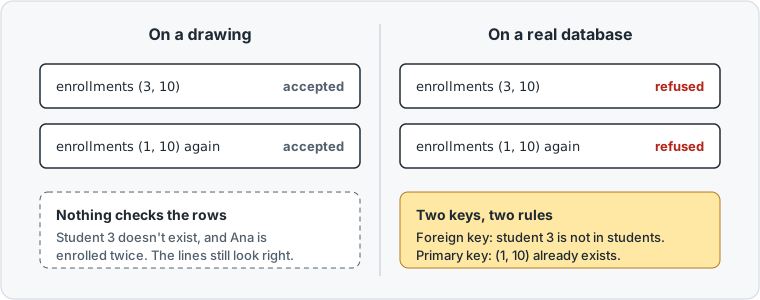
Now enroll a student who doesn't exist, and enroll Ana in the same course a second time:
INSERT INTO enrollments VALUES (3, 10);
INSERT INTO enrollments VALUES (1, 10);
PostgreSQL refuses both rows:
ERROR:  insert or update on table "enrollments" violates foreign key constraint "enrollments_student_id_fkey"
DETAIL:  Key (student_id)=(3) is not present in table "students".
ERROR:  duplicate key value violates unique constraint "enrollments_pkey"
DETAIL:  Key (student_id, course_id)=(1, 10) already exists.
A composite key is a primary key made of two columns, here student_id and course_id. The crow's foot became the foreign key rule, and the composite key became the no-duplicates rule. A drawing has the same lines, but nothing on it stops a bad row.
The alternatives compared
The vendor pages were checked on 15 November 2026.
| Tool | How you design | Connects to a database | Cost for a student |
|---|---|---|---|
| DbSchema Community | On a diagram of a live database | Yes, PostgreSQL, MySQL and many more | Free forever; Pro Educational 98 USD once |
| dbdiagram.io | DBML text | No; the db2dbml command reads a database into DBML | Personal Pro free for 12 months (education) |
| Lucidchart | Shapes on a canvas | No; you run its query and upload the result | Free Education account (education) |
| MySQL Workbench | Desktop app for MySQL | Yes, MySQL only | Free (download) |
| ERDPlus | Chen or crow's foot diagram | No | Free |
DBML is a short text format for describing tables. dbdiagram.io's education plan lasts 12 months, and you can renew it while you study.
DbSchema connects to more than 100 SQL and NoSQL databases and runs on Windows, macOS and Linux. A course that uses PostgreSQL this term and MongoDB next term keeps the same DbSchema.
Build the enrollment design in DbSchema
Install PostgreSQL or MySQL on your laptop first. DbSchema Community connects to it for free and downloads the driver it needs.
- Choose File → New Model, keep Connect to Database selected, and click PostgreSQL.
- Choose New Connection, press Connect to PostgreSQL, fill in the dialog and press Connect.
- Click an empty spot on the diagram and choose Table → Create Table.
- Type
studentsin Table Name. In the Columns tab, press Add for each column, then press OK. - Create
coursesandenrollmentsthe same way. - Drag
student_idinenrollmentsontostudent_idinstudents. The New Foreign Key dialog opens, filled in, and you press OK. - Do the same for
course_id.
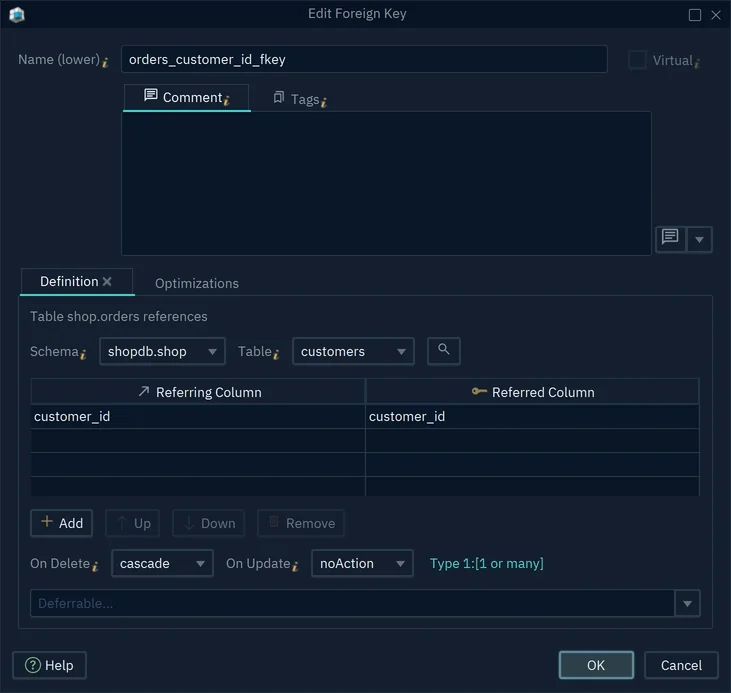
Each OK runs in the database, so a wrong key fails at once. Then open Query → SQL Editor and try the two bad inserts above.
Learn the ER concepts in DbSchema Architect
ERDPlus covers the step before the tables: entities, relationships and cardinality. DbSchema Architect covers that step with logical design.
A logical model holds entities, attributes and relations. An attribute is a property of an entity, such as a student's name. A logical model connects to no database.
In a relation, the parent is the entity pointed to, such as Course, and the child points to it. Mandatory means every child needs a parent; Optional means it may have none. Then you set the cardinality: Zero or More, One or More, Zero or One, or One.
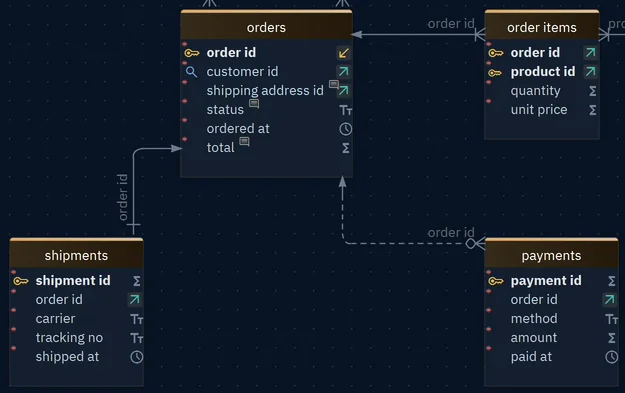
The conversion you know from ERDPlus has a counterpart here. Model → Generate Physical Model turns the logical design into tables for the database you pick.
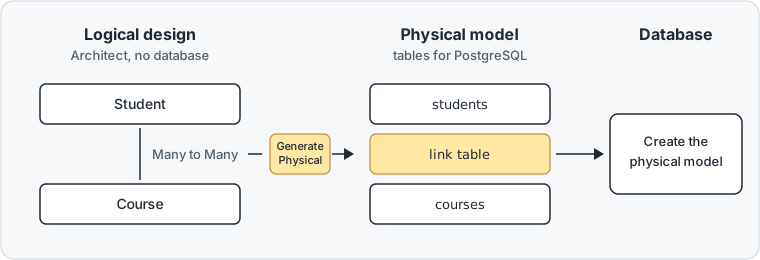
The physical model is the version with real tables and data types for one database. A Many to Many relation becomes a table between the two, named after both. Generating changes nothing in a database until you create the physical model there.
What each DbSchema edition costs a student
DbSchema Community stays free for coursework and any other use. Pro adds what a semester project runs into.
It saves the model to a file you can commit to Git, the version history most developers use. It writes documentation to hand in. It also runs schema synchronization, which compares the saved model with the database and writes the SQL for each difference.
Architect adds logical and conceptual design. On the educational licence, Pro costs 98 USD and Architect 156.80 USD.
Both are perpetual licences: you pay once and keep the version you bought. It covers one person on two computers (purchase page).
A teacher can ask for a free class licence that covers every student of the course (licensing). Licensing a database design tool for a university course covers the instructor's side.
Choose DbSchema Pro Educational when you need to save and document the model. Download DbSchema and try all features free for 15 days, including Architect's logical design. Then keep the Community Edition and build your next assignment as real tables.
Sources
Design your next assignment on a real database
DbSchema Community connects to your database and draws the schema for free. Saving the model and documentation are in DbSchema Pro, logical design in Architect. Try all features free for 15 days.