CSV Editor for Mac: Open CSV Files Too Large for Excel
How DbSchema opens, fixes and queries a CSV file too large for Excel, on any Mac.
On this page
Words in this article
Words in this article
- CSV file
- Plain text with one record per line and the values separated by commas.
- Header
- The first line of a CSV file, with the column names.
- Delimiter
- The character between the values, such as a comma or a semicolon.
- Quote character
- The character that wraps a value containing the delimiter.
- Charset
- The text encoding of a file, such as UTF-8.
- Terminal
- The Mac's command-line app, in Applications, Utilities.
- -Xmx
- The Java option that sets the most memory DbSchema may use.
- SQL
- The language for asking a database questions.
- Table
- Where a database keeps rows of the same kind.
- Schema
- The part of a database that holds your tables.
The short answer
You open a large CSV export in Excel on your Mac, and rows are missing. Excel stops at row 1,048,576, and saving the file then loses the rest. The DbSchema CSV Editor opens the whole file:
Rows missing in Excel?
The DbSchema CSV Editor opens every row of the file.
Values to fix
Edit cells, filter and sort, then save the file back.
Totals instead of rows: DbSchema Pro
The Data Importer loads the file into a database table, so SQL answers questions like totals per country.
Try every feature first
Each download starts with 15 days of all features, without registration. Afterwards the Community Edition, CSV Editor included, stays free.
What DbSchema adds for large CSV files on a Mac
Why DbSchema
A CSV file is plain text: one record per line, with the values separated by commas. Apple Silicon means the M-series chips in Apple's newer Macs. SQL is the language for asking a database questions, such as "how many orders per country?". A table is where a database keeps rows of the same kind. Loading a CSV file into a table lets you run SQL on it.
No fixed row limit
The CSV Editor reads every row into memory, so the file size it opens depends on the memory DbSchema may use, not on a row count.
A Mac app for both kinds of chip
DbSchema installs from a
.dmgfile and runs on Intel Macs and on Apple Silicon Macs. It is a desktop CSV editor, not an online CSV editor: it reads the file from your disk and uploads nothing.Fix the file where it is
Change values in the grid and write them back to the same file, without a database.
Turn the file into a table
In DbSchema Pro, the Data Importer loads the rows into a database table.
Ask questions with SQL
The SQL Editor counts and groups the imported rows. It works in every edition.
Then, in DbSchema:CSV EditorData ImporterSQL Editor
Key takeaways
- Memory, not a row count, sets how large a file the CSV Editor opens, and you can raise it.
wc -lin Terminal tells you in a second whether a file fits in Excel.- Loaded into a table with DbSchema Pro, a million rows become a five-line answer in the SQL Editor.
Why Excel for Mac drops rows
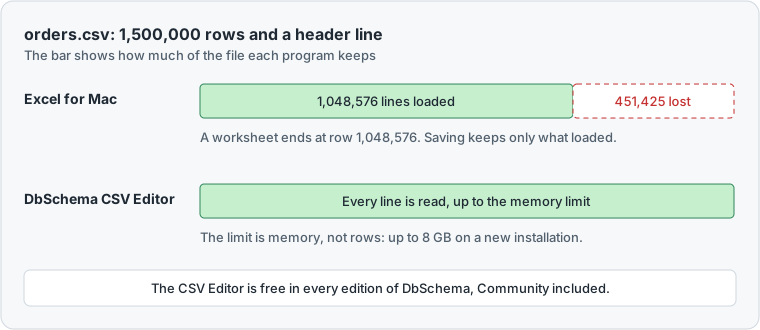
Microsoft's support page sets an Excel worksheet at 1,048,576 rows at most, and lists Excel for Microsoft 365 for Mac among the versions this applies to.
When a file has more lines, Excel loads what fits. It warns: "This data set is too large for the Excel grid. If you save this workbook, you'll lose data that wasn't loaded." Microsoft's workaround for loading the full data set is described for Excel on a PC only.
So on a Mac, saving the file in Excel after this warning cuts it short. Close the file without saving, and open it in the DbSchema CSV Editor.
Check a CSV file in Terminal first
Terminal is the Mac's command-line app, in Applications → Utilities. It answers two questions before you open anything: how many lines, and how large.
We ran this on macOS 27.2.1 with a test file of 1,500,000 generated orders:
head -3 orders.csv
wc -l orders.csv
du -h orders.csv
order_id,customer,country,amount,ordered_on
1,Lea Lopez,JP,327.21,2025-01-02
2,Jonas Brown,FR,293.48,2025-01-03
 1500001 orders.csv
 59M	orders.csv
head shows the first lines, so you see the delimiter and the header. The delimiter is the character between the values, here a comma. The header is the first line, with the column names. wc -l counts the lines: 1,500,001 is the header plus 1,500,000 rows. Excel for Mac would leave out the last 451,425 lines. du -h shows the size on disk.
The Mac's split command cuts a file into parts. We ran it with one million lines per part:
split -l 1000000 orders.csv part_
wc -l part_*
 1000000 part_aa
  500001 part_ab
 1500001 total
Only part_aa starts with the header. The second part starts straight with data, so a spreadsheet reads its first order as column names. Splitting also leaves you with two files to fix instead of one. Open the whole file instead.
Open a large CSV file on a Mac in DbSchema
-
Install DbSchema Community
Download DbSchema for macOS. Open the
.dmgfile, start the DbSchema installer inside it and follow its steps. Start DbSchema from the Applications folder. DbSchema comes with its own Java, so you install nothing else. -
Check the memory Community
DbSchema first opens the Welcome Screen, which does not have the Help and Query menus. Open the sample project there, or start a new model. DbSchema then opens a project window with the menu bar. Choose Help → About DbSchema and read the Memory line. It shows the most memory DbSchema may use. That limit is set by
-Xmx, a Java option in a small settings file. A new installation writes-Xmx8G, which means 8 GB. An installation updated from an older version keeps its old value. -
Raise the limit if the file is huge Community
Close DbSchema. In Finder, right-click DbSchema.app and choose Show Package Contents. Open the folder Contents and the file
vmoptions.txtin a text editor. Its full path inside the app isContents/vmoptions.txtunderDbSchema.app. Change the line that starts with-Xmx, for example to-Xmx16G, and start DbSchema again. Keep the value below your Mac's memory. -
Open the file Community
Choose Query → CSV Editor and press Choose. Check the Charset, the text encoding of the file, such as UTF-8. Check the Delimiter and the Record Separator, the character that ends each line. Check the Quote Character, which wraps a value that contains the delimiter itself. Tick First Row is Header, then press Open.
01 CSV EditorThe file opens as a tab of its own. Double-click the tab to give it the whole window.
02 Filter & SortFilter hides the rows you don't need. Sort orders them by a column.
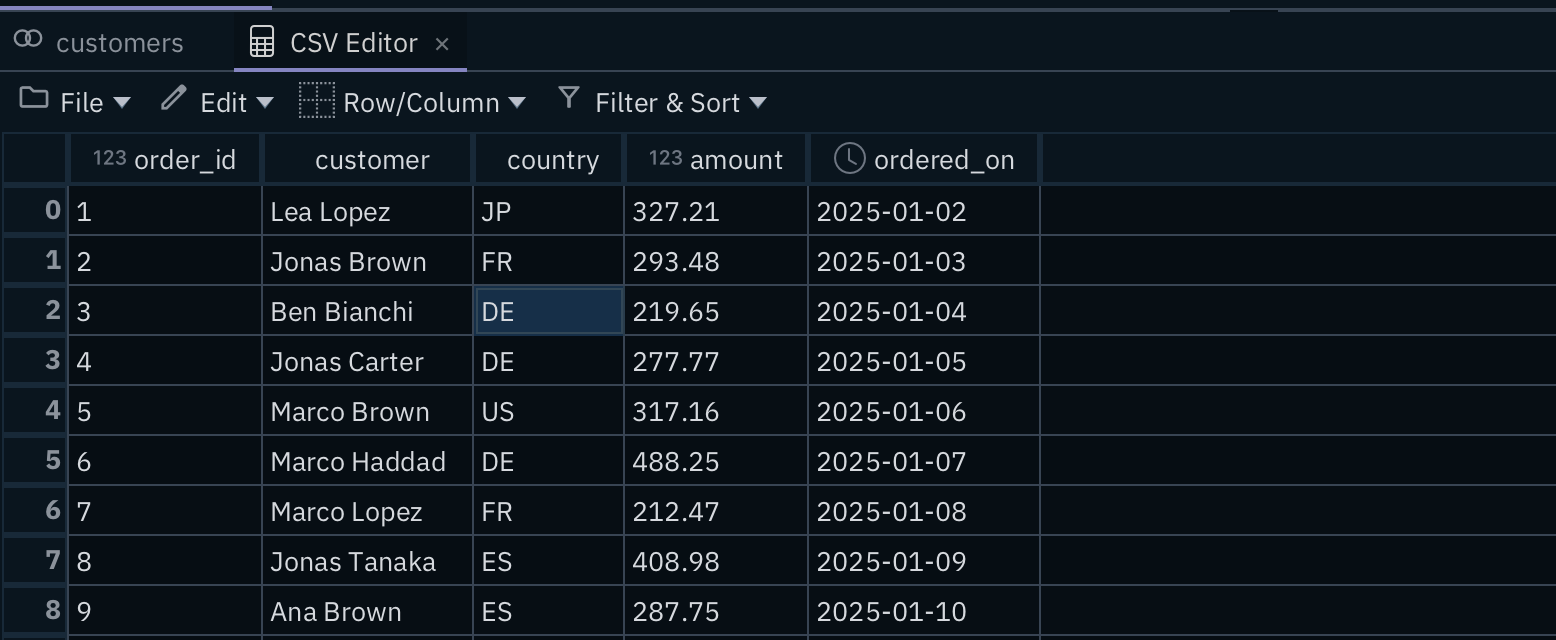
03 FileFile → Save writes your changes back to the CSV file on your disk.
04 amount, ordered_onThe editor reads each column's type: 123 marks numbers, the clock marks dates.
Editing works as in a spreadsheet: double-click a cell, type and press Enter. Our guide to the free CSV editor for large files covers editing, filters and saving in detail.
What users say
DbSchema Pro is an excellent tool for the price. It is attractive, intuitive, and includes the features that are most important to me …
Import the CSV file into a PostgreSQL table and query it
A grid answers "what is in row 812,004?". It does not answer "what is the total per country?". For that, load the rows into a database and use SQL.
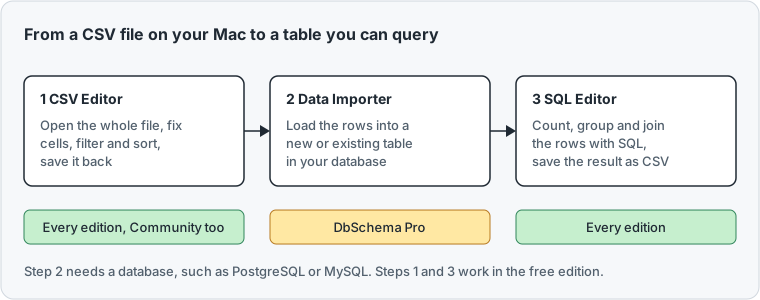
You need DbSchema Pro and a database. With Docker installed on your Mac, one command starts a local PostgreSQL database: docker run -d -e POSTGRES_PASSWORD=secret -p 5432:5432 postgres:17.6. Then connect DbSchema to it (Connect to Database).
The feature is called Data Importer in the menu, and its dialog is titled Data Loader.
- Choose Database → Data Importer.
- Press Choose and pick the CSV file.
- Choose the Schema, the part of the database that holds your tables. Choose New Table Name and type a name such as
orders. - Press Next and check the column types. A type that does not fit the data makes rows fail.
- Press Load. DbSchema opens a synchronization window, because the new table must exist in the database first.
- In that window, press Database next to Set every row, so the table's action is Create.
- Press Commit in the database. A window shows the
CREATE TABLEstatement. Press Execute All, then Close. - Press Start Loading Data and confirm with OK. DbSchema says how many rows it inserted.
Then open the SQL Editor and ask your question. To check that our test file is complete and loads cleanly into a table, we loaded it into PostgreSQL 17.6 with PostgreSQL's own COPY command, not with DbSchema. Then we ran the kind of query you would run in the SQL Editor. GROUP BY makes one result row per country, and ORDER BY sorts the rows:
SELECT country, SUM(amount) FROM orders GROUP BY country ORDER BY country;
 country |     sum
---------+-------------
 DE      | 75877286.44
 ES      | 75807504.97
 FR      | 75832604.06
 JP      | 75763220.99
 US      | 75880751.83
(5 rows)
All 1,500,000 rows went in, and the answer is five lines. In the SQL Editor, open the menu of the save button in the toolbar of the result grid. Choose Save as Comma Separated File to keep such an answer as a new, small CSV file.
Which DbSchema edition fits you
DbSchema Pro fits you if CSV exports land on your desk every week and you need totals, counts or joins with other data. Its Data Importer turns the file into a table, and SQL answers in seconds what scrolling through a million rows never could. Pro also brings the visual query builder, which builds a query while you tick tables and columns, so analysts who rarely write SQL get their answers too. The pricing page lists the editions and their prices.
Download DbSchema and open your CSV file. To load it into a table and query it, choose DbSchema Pro.
Sources
- Microsoft Support, What to do if a data set is too large for the Excel grid (support.microsoft.com), read 19 November 2026.
- Microsoft Support, Excel specifications and limits (support.microsoft.com), read 19 November 2026.
- DbSchema, CSV Editor, Install DbSchema, Memory and Java Options, Data Importer, SQL Editor.
- DbSchema, pricing.
Turn a large CSV file into answers with DbSchema Pro
The DbSchema CSV Editor opens files too large for Excel. DbSchema Pro adds the Data Importer, which loads the rows into a database table you query with SQL. Try all features for 15 days.