SQL Server CREATE INDEX Guide with Types and Examples
For a developer adding the first indexes to a SQL Server table who writes SELECT and JOIN daily.
On this page
A search screen filters people by first and last name, and every search reads the whole table. CREATE INDEX fixes that. It keeps the columns you name in sorted order, each value with a pointer to its row, so SQL Server can go straight to the matching rows. The statement, with its main clauses:
CREATE [UNIQUE] [CLUSTERED | NONCLUSTERED] INDEX index_name
ON schema_name.table_name (column1 [ASC | DESC], column2 [ASC | DESC])
[INCLUDE (column3, column4)]
[WHERE filter_predicate];
Without CLUSTERED, SQL Server creates a nonclustered index, and each column is sorted ascending unless you write DESC.
What an index gives you and what it costs
An index in SQL Server works like the index at the back of a book. The book's index lists terms in alphabetical order with the page each one is on, so you look a term up instead of reading every page. A nonclustered index in SQL Server lists the values of its key columns in sorted order, each with a pointer to the row that holds it, while a clustered index stores the rows themselves in that order. Rowstore indexes keep that list in a B+ tree: a few levels of pages lead from the top of the tree down to the leaf pages, so reaching one value takes a handful of page reads.
Without an index on the columns a query filters on, SQL Server reads every row of the table and keeps the ones that match. That is a table scan. With an index, it can seek instead: it searches the index keys, finds where the matching rows are stored, and reads only those. The sorted order helps joins on the key columns in the same way. When the key columns match a query's ORDER BY, the plan also needs no sort step, because the rows already come out in that order.
The cost lands on writes and on disk. Every INSERT, UPDATE, DELETE and MERGE has to change each index that holds a changed column, as well as the table itself, and every index takes storage of its own. Microsoft's index architecture and design guide calls index design "a complex balancing act between query speed, index update cost, and storage cost". Its advice follows from that. Keep the indexes on heavily updated tables few and narrow. Index the columns your queries use in predicates and joins. Don't add indexes speculatively, and drop the ones your workload never uses.
Two cases gain little. On a small table, reading through the index can take SQL Server longer than scanning the table, so the index may never be used while every change to the table still updates it. On a column with few distinct values, the guide notes, an index might not make a query faster even when the optimizer uses it.
Create an index in sqlcmd, step by step
The steps need a running SQL Server, the sqlcmd utility, and a login that may change the table. CREATE INDEX requires ALTER permission on the table or view, or membership in the db_ddladmin fixed database role. To install SQL Server, connect for the first time and create the TestDB database used below, see SQL Server: How to create a database.
Step 1: Connect
sqlcmd -S your-server-name -U your-login -I
sqlcmd then asks for the password. Typing it after -P instead would leave it in the shell history, and the sqlcmd documentation calls that insecure. Leave out -U to sign in with Windows authentication. The -I switch turns on QUOTED_IDENTIFIER, which the ODBC version of sqlcmd leaves off, and which the filtered index later in this article needs. The Go version of sqlcmd always has it on.
Step 2: Create the table
USE TestDB;
GO

CREATE TABLE dbo.Employees (
    EmployeeID int          NOT NULL CONSTRAINT PK_Employees PRIMARY KEY CLUSTERED,
    FirstName  nvarchar(50) NOT NULL,
    LastName   nvarchar(50) NOT NULL,
    Department nvarchar(50) NOT NULL
);

INSERT INTO dbo.Employees VALUES
    (1, 'John', 'Doe',   'IT'),
    (2, 'Jane', 'Doe',   'HR'),
    (3, 'Mike', 'Smith', 'Sales');
GO
sqlcmd sends what you typed when you enter GO on a line of its own. For the other options a table can have, see SQL Server: How to create a table.
Step 3: Create the index
The search screen filters on first and last name, so those two columns become the index key:
CREATE INDEX idx_employee_name
ON dbo.Employees (FirstName, LastName);
GO
Step 4: Check the index in sys.indexes
The catalog view sys.indexes holds a row for each index of a table:
SELECT name AS IndexName, type_desc AS IndexType
FROM sys.indexes
WHERE object_id = OBJECT_ID('dbo.Employees')
  AND index_id > 0
ORDER BY index_id;
GO
The table now has two indexes:
| IndexName | IndexType |
|---|---|
| PK_Employees | CLUSTERED |
| idx_employee_name | NONCLUSTERED |
PK_Employees is there because a clustered primary key is itself an index, named after its constraint, with index_id 1. The filter index_id > 0 leaves out the row that a table without a clustered index, a heap, has in its place.
How SQL Server finds a row through the index
The new index is a structure of its own, beside the table. It holds the key columns sorted by FirstName, then by LastName within each first name. Next to each key it stores the row's EmployeeID, which leads to the full row in PK_Employees:
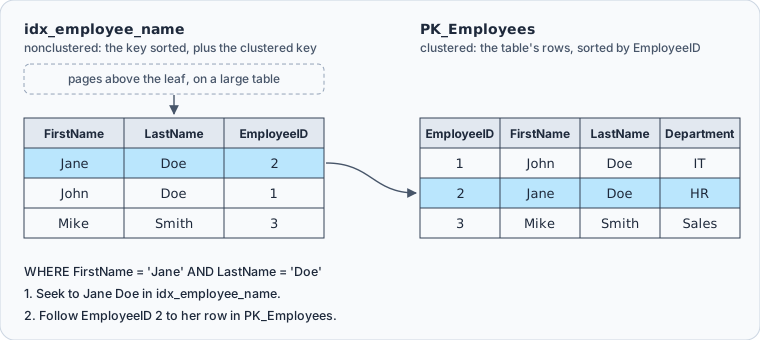
A clustered index is the table itself, its rows stored in key order, so a table can have only one. A nonclustered index is separate, and a table can have up to 999 of them. The pointer from a nonclustered index to a row is called the row locator. On a table with a clustered index it is the clustered key, as here. On a heap it points at the row's location.
The column order decides which searches can seek into the index. A search on FirstName and LastName can, and so can a search on FirstName alone, because both start with the first key column. A search on LastName alone can't:
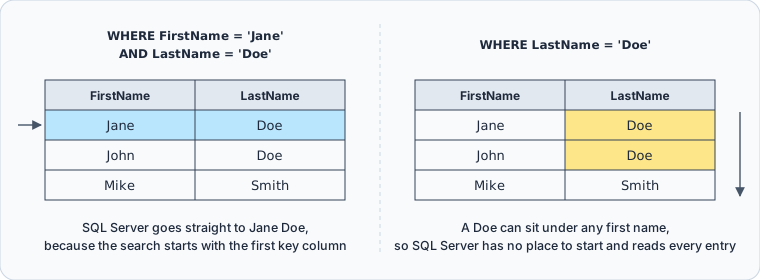
The design guide gives the rule for the order. The column that the query compares with =, >, < or BETWEEN, or that takes part in a join, goes first. The columns after it run from the most distinct to the least distinct. If the search screen always sends a last name and only sometimes a first name, the key should be (LastName, FirstName) instead.
Types of indexes
| Type | Created with | What it stores | Where it fits |
|---|---|---|---|
| Clustered | CREATE CLUSTERED INDEX, or a primary key | the table's rows, sorted by the key | ranges read in key order |
| Nonclustered | CREATE INDEX | the key columns and a row locator | filters and joins on other columns |
| Unique | CREATE UNIQUE INDEX, or a UNIQUE constraint | either kind, with duplicate keys rejected | values that must not repeat |
| Filtered | CREATE INDEX ... WHERE | a nonclustered index over some rows | a column with many NULLs or a few categories |
| Columnstore | CREATE COLUMNSTORE INDEX | the data column by column | analytics over large fact tables |
| Full-text | CREATE FULLTEXT INDEX | the words in text columns | word searches with CONTAINS and FREETEXT |
| Spatial | CREATE SPATIAL INDEX | a grid over geometry or geography values | searches on shapes and locations |
The first four are all CREATE INDEX with different options, and the next section runs the unique and filtered ones on the example table. The last three are statements of their own, each with its own options and documentation.
SQL Server also creates indexes for you. A PRIMARY KEY constraint creates a unique clustered index, unless the table already has a clustered index or you ask for a nonclustered one. A UNIQUE constraint creates a unique nonclustered index by default.
Unique, filtered and covering indexes
A unique index rejects a second row with the same key. Give the employees an email column and try to make it unique:
ALTER TABLE dbo.Employees ADD Email nvarchar(100) NULL;
GO

CREATE UNIQUE INDEX ux_employees_email
ON dbo.Employees (Email);
GO
The index isn't created. SQL Server stops with error 1505, "The CREATE UNIQUE INDEX statement terminated because a duplicate key was found", because all three employees have no email yet. A unique index treats NULLs as equal, so a single column can hold NULL in one row at most.
A filtered index solves that. It covers only the rows that its WHERE clause selects, and a unique filtered index requires unique values in those rows only:
CREATE UNIQUE INDEX ux_employees_email
ON dbo.Employees (Email)
WHERE Email IS NOT NULL;
GO
Any number of employees can now have no email, and no two can share one. Creating this index, and every later insert, update or delete that changes its rows, needs QUOTED_IDENTIFIER on. That is the reason for -I in step 1. Without it, ODBC sqlcmd fails the statement with error 1934, which names QUOTED_IDENTIFIER as a SET option with an incorrect setting.
SQL Server checks every insert and update against a unique index, and rolls back the whole statement if even one row would duplicate a key. This update gives two employees the same address, so it changes neither of them:
UPDATE dbo.Employees
SET Email = '[email protected]'
WHERE LastName = 'Doe';
GO
The error names ux_employees_email and the duplicate value.
An index covers a query when it holds every column the query reads. A search screen that also shows the department reads a column idx_employee_name doesn't have, so SQL Server goes back to PK_Employees for each match. INCLUDE adds the column to the leaf level of the index without making it part of the key, and DROP_EXISTING = ON rebuilds the index under the same name:
CREATE INDEX idx_employee_name
ON dbo.Employees (FirstName, LastName)
INCLUDE (Department)
WITH (DROP_EXISTING = ON);
GO

SELECT EmployeeID, FirstName, LastName, Department
FROM dbo.Employees
WHERE FirstName = 'Jane' AND LastName = 'Doe';
GO
SQL Server can now answer that query from the index alone. INCLUDE doesn't need to list EmployeeID, because a nonclustered index always carries the clustered key:
| EmployeeID | FirstName | LastName | Department |
|---|---|---|---|
| 2 | Jane | Doe | HR |
Restrictions on using indexes
The CREATE INDEX reference sets these limits:
| Limit | Value |
|---|---|
| Columns in one index key | 32, all from the same table or view |
| Key size of a clustered index | 900 bytes |
| Key size of a nonclustered index | 1,700 bytes |
| Clustered indexes per table | 1 |
| Nonclustered indexes per table | 999 |
| Types that can't be key columns | text, ntext, image, xml and the (max) types |
| Types that can't be included columns | text, ntext, image |
The key size is checked against the data, not the column definitions. An index on varchar columns wider than the limit can be created while the stored values fit, and a later insert or update that makes a key too long fails. Included columns don't count toward the key size, which is how INCLUDE carries wide columns that couldn't be in the key.
A computed column can be indexed when it is deterministic and precise. Marking it PERSISTED also allows expressions that are deterministic but imprecise, and functions that you marked deterministic. The index can make an insert fail that used to work. With c AS a/b, inserting b = 0 succeeds on the table alone, and fails once c is indexed, because the index needs the value of c and the division by zero raises an error.
Creating a rowstore index also creates statistics on its key columns, under the index's name, and none on its included columns. A filtered index goes on a table, not a view, and its filter can't refer to a computed column.
Adding an index in DbSchema



DbSchema connects to SQL Server, reverse-engineers the schema and draws its tables on a diagram, where you can add an index without writing the statement. To add idx_employee_name in DbSchema:
- On the Welcome Screen, choose Connect to Database, then SQL Server in the Choose Your Database list. DbSchema downloads the SQL Server JDBC driver itself.
- Fill in the server, the login and the password in the Connection Dialog, and connect. DbSchema draws
Employeeson a diagram. - Double-click the header of
Employeesto open the Table Dialog. - On the Indexes tab, add an index of the type Normal on
FirstNameandLastName. Unique and Primary Key are the other two types, as the Tables, Columns and Indexes page lists.


While DbSchema is connected, it runs the change against the live database and logs the statement in the SQL History pane. Working offline, you change only the design model, which DbSchema saves as a .dbs file. Once you reconnect, run the schema synchronization that the synchronization page describes. DbSchema lists the differences, the new index among them, and generates the SQL, which you review before it runs.
The statements in this article also run in the DbSchema SQL Editor, where Execute Query shows the sys.indexes result as a table.
Index the columns your queries filter and join on, put the column that every search supplies first, keep the key narrow and move the columns you only display into INCLUDE. Then check sys.indexes rather than assuming the statement did what you meant. To design the indexes on a diagram of your own tables, download DbSchema at https://dbschema.com/download.html and connect it to your SQL Server database. Connecting, reverse-engineering, the diagrams and the SQL Editor are in the free Community Edition, while saving the model to a .dbs file and schema synchronization are in Pro.
Sources
- CREATE INDEX (Transact-SQL)
- Index architecture and design guide
- Clustered and nonclustered indexes described
- Create unique indexes
- Create filtered indexes
- sys.indexes (Transact-SQL)
- sqlcmd utility
- DbSchema documentation: Tables, Columns and Indexes
- DbSchema documentation: Synchronize with the Database









