Create Table in PostgreSQL: Syntax, Data Types, Constraints, and Examples
For developers creating their first PostgreSQL tables, in psql or in DbSchema; every data type and constraint in the examples is explained where it appears.
On this page
You have a database, and you know what the new table should hold: which columns, and what kind of value goes in each. PostgreSQL won't store a single row until a CREATE TABLE statement has named those columns, given each one a data type and said which values it refuses. Here is a first table, as you would type it in psql on PostgreSQL 18:
CREATE TABLE public.students (
    id integer PRIMARY KEY,
    name varchar(100) NOT NULL,
    age integer NOT NULL,
    grade char(2)
);
How a CREATE TABLE statement is built
CREATE TABLE adds a table to a schema and fixes what a row in it looks like. Each column gets a name and a data type, and a constraint after the type says which values PostgreSQL turns away:
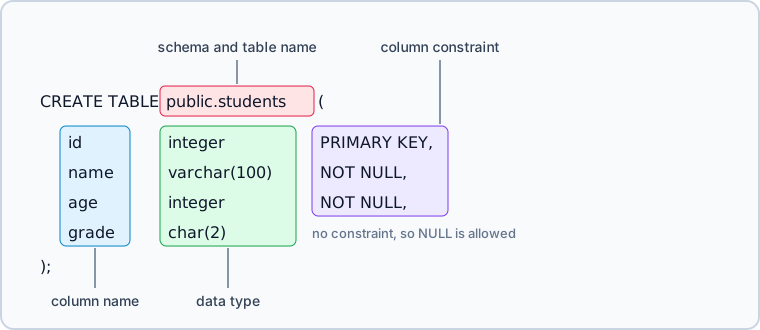
The constraints you will meet first:
NOT NULLrefuses a row that leaves the column empty.PRIMARY KEYmarks the column that identifies the row, so it refuses a repeated value and an empty one.UNIQUErefuses a value that another row already has.CHECK (expression)refuses a row for which the expression is false.REFERENCES other_tablerefuses a value that doesn't exist in the other table.
DEFAULT sits in the same place but refuses nothing: it fills the column when an insert leaves it out.
The syntax
CREATE TABLE [IF NOT EXISTS] [schema_name.]table_name (
    column_name data_type [column_constraint],
    column_name data_type [column_constraint],
    table_constraint
);
A column constraint follows the type of one column. A table constraint stands on its own line and can name several columns, which is how you write a composite primary key or a unique rule that spans two columns.
Leave the schema name out and the table goes into the first schema of the search path, "$user", public by default. The PostgreSQL 18 schema documentation says of the schema named after the current user that "if no such schema exists, the entry is ignored", which leaves public. A name written as public.students lands in public whatever the session's search path.
Create the table in psql
The steps need a running PostgreSQL server, the psql command-line client that comes with it, and a database to hold the table. If the database is still missing, How to Create a Database in PostgreSQL comes first.
-
Open a terminal, or the Command Prompt on Windows, and log in to PostgreSQL:
psql -U postgresReplace
postgreswith your database user; psql asks for its password when the server requires one. -
Switch to the database that will hold the table:
\c schoolReplace
schoolwith the name of your database. psql confirms the switch:You are now connected to database "school" as user "postgres". -
Paste the
CREATE TABLEstatement from the top of this page and press Enter. psql answers with the command tag:CREATE TABLE -
List the tables with
\dtto see the new one:\dtList of relations Schema | Name | Type | Owner --------+----------+-------+---------- public | students | table | postgres (1 row)
Show Tables in PostgreSQL gives the SQL equivalent for clients without psql meta-commands.
What the new table accepts and refuses
\d followed by a table name shows what the statement built:
\d students
                     Table "public.students"
 Column |          Type          | Collation | Nullable | Default
--------+------------------------+-----------+----------+---------
 id     | integer                |           | not null |
 name   | character varying(100) |           | not null |
 age    | integer                |           | not null |
 grade  | character(2)           |           |          |
Indexes:
    "students_pkey" PRIMARY KEY, btree (id)
Read it column by column:
idis the primary key: every student gets an id, and no two students share one. PostgreSQL enforces that with a unique index it created and namedstudents_pkey.nameholds up to 100 characters and is required.ageholds a whole number and is required.gradeholds two characters and may be left out. A value that is left out is stored as NULL, which means "not known yet".
Describe Table in PostgreSQL goes through that output field by field. Two students fit those rules, the second one without a grade:
INSERT INTO public.students (id, name, age, grade) VALUES (1, 'Ana', 16, 'A');
INSERT INTO public.students (id, name, age) VALUES (2, 'Ben', 17);
Ana's id a second time is refused, and the error names the key's index:
INSERT INTO public.students (id, name, age, grade) VALUES (1, 'Carla', 16, 'B');
ERROR:  duplicate key value violates unique constraint "students_pkey"
DETAIL:  Key (id)=(1) already exists.
A row without a name breaks NOT NULL:
INSERT INTO public.students (id, age) VALUES (3, 15);
ERROR:  null value in column "name" of relation "students" violates not-null constraint
DETAIL:  Failing row contains (3, null, 15, null).
A grade longer than the type allows is refused by the type itself:
INSERT INTO public.students (id, name, age, grade) VALUES (4, 'Dan', 15, 'ABC');
ERROR: value too long for type character(2)
Choose the data types
| Data type | Typical use |
|---|---|
integer / bigint | Whole numbers, IDs, counters |
numeric(p,s) / decimal(p,s) | Money and exact decimal values |
real / double precision | Approximate measurements |
text | Variable-length strings |
varchar(n) | Length-limited strings |
char(n) | Fixed-length codes |
boolean | True/false flags |
date | Calendar dates |
timestamp / timestamptz | Date and time values |
jsonb | Semi-structured JSON documents |
uuid | Globally unique identifiers |
decimal is another name for numeric, and float written without a precision means double precision. Money belongs in numeric, whose arithmetic is exact. real and double precision store a binary approximation, and the difference shows in the first sum you try:
SELECT 0.1::double precision + 0.2::double precision AS float_sum,
       0.1::numeric + 0.2::numeric AS numeric_sum;
| float_sum | numeric_sum |
|---|---|
| 0.30000000000000004 | 0.3 |
Store times you compare across machines in timestamptz, which fixes an absolute point in time; timestamp keeps the date and time as written, without a zone. For a JSON document, jsonb parses the value into a decomposed binary form that PostgreSQL can index, while json keeps the text exactly as it arrived and reparses it on every read.
Between text and varchar(n), the difference is the length limit and nothing else, so pick varchar(n) when a value longer than n is a bug you want the database to catch. char(n) pads a shorter value with spaces, so Ana's grade is stored as A followed by a space. The PostgreSQL 18 character types page calls char(n) "usually the slowest of the three" string types and recommends text or varchar in most situations. The example keeps char(2) for the padding; varchar(2) holds the same grades without it.
Which syntax needs which PostgreSQL version
| Syntax | First version |
|---|---|
GENERATED ... AS IDENTITY | 10 |
GENERATED ALWAYS AS (...) STORED | 12 |
UNIQUE NULLS NOT DISTINCT | 15 |
GENERATED ALWAYS AS (...) without STORED, virtual | 18 |
The PostgreSQL 10 release notes describe identity columns as "similar to SERIAL columns, but are SQL standard compliant".
A generated column computes its value from other columns of the same row. PostgreSQL 18 changed what an unqualified one means: its release notes put it as "Virtual generated columns generate their values when the columns are read, not written", and virtual is now the default. PostgreSQL 12 through 17 accept only the STORED spelling, and answer GENERATED ALWAYS AS (quantity * unit_price) with a syntax error. Write STORED when the value should be computed once and kept on disk, and the same statement runs on every version from 12 on.
Create a table with constraints and defaults
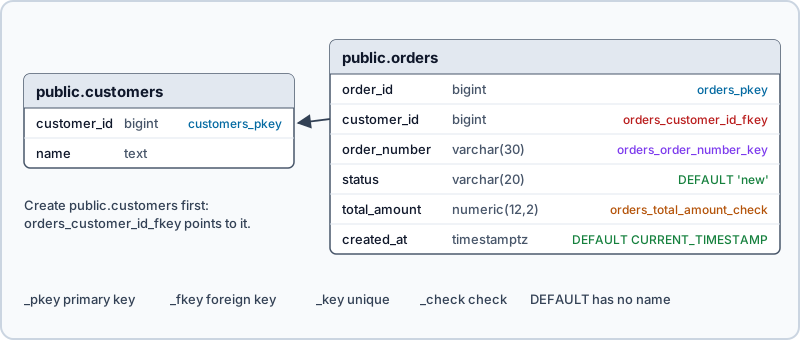
A foreign key needs a table to point at, so this example creates two:
CREATE TABLE public.customers (
    customer_id bigint GENERATED ALWAYS AS IDENTITY PRIMARY KEY,
    name text NOT NULL
);

CREATE TABLE public.orders (
    order_id bigint GENERATED ALWAYS AS IDENTITY PRIMARY KEY,
    customer_id bigint NOT NULL,
    order_number varchar(30) NOT NULL UNIQUE,
    status varchar(20) NOT NULL DEFAULT 'new',
    total_amount numeric(12,2) NOT NULL
        CONSTRAINT orders_total_amount_check CHECK (total_amount >= 0),
    created_at timestamptz NOT NULL DEFAULT CURRENT_TIMESTAMP,
    CONSTRAINT orders_customer_id_fkey
        FOREIGN KEY (customer_id)
        REFERENCES public.customers(customer_id)
);
Two customers and three orders, with the defaults left out of the insert:
INSERT INTO public.customers (name) VALUES ('Ada'), ('Grace');

INSERT INTO public.orders (customer_id, order_number, total_amount)
VALUES (1, 'ORD-1', 40.00),
       (1, 'ORD-2', 12.50),
       (2, 'ORD-3', 99.90);
The identity column numbered the rows and the defaults filled the rest:
SELECT order_id, customer_id, order_number, status, total_amount
FROM public.orders
ORDER BY order_id;
| order_id | customer_id | order_number | status | total_amount |
|---|---|---|---|---|
| 1 | 1 | ORD-1 | new | 40.00 |
| 2 | 1 | ORD-2 | new | 12.50 |
| 3 | 2 | ORD-3 | new | 99.90 |
The statement named the check and the foreign key. PostgreSQL named the primary key after the table, orders_pkey, and the UNIQUE constraint after the table and its column, orders_order_number_key. An error message quotes that name, so name a constraint yourself when you want to choose the text your application logs. UNIQUE and PRIMARY KEY each come with a unique btree index under the constraint's name; indexes you add yourself are covered in Create Index in PostgreSQL.
What each constraint refuses
Each error names the rule that refused the row. A negative total breaks the check:
INSERT INTO public.orders (customer_id, order_number, total_amount)
VALUES (2, 'ORD-4', -5.00);
ERROR: new row for relation "orders" violates check constraint "orders_total_amount_check"
A customer who doesn't exist breaks the foreign key:
INSERT INTO public.orders (customer_id, order_number, total_amount)
VALUES (7, 'ORD-5', 10.00);
ERROR:  insert or update on table "orders" violates foreign key constraint "orders_customer_id_fkey"
DETAIL:  Key (customer_id)=(7) is not present in table "customers".
An order number that is already taken breaks UNIQUE with the duplicate key value error shown for students. An id you pick yourself breaks the identity column, because GENERATED ALWAYS hands out every value:
INSERT INTO public.orders (order_id, customer_id, order_number, total_amount)
VALUES (10, 2, 'ORD-6', 10.00);
ERROR:  cannot insert a non-DEFAULT value into column "order_id"
DETAIL:  Column "order_id" is an identity column defined as GENERATED ALWAYS.
HINT:  Use OVERRIDING SYSTEM VALUE to override.
NULL gets through two of these rules. A CHECK passes when its expression evaluates to NULL rather than false, so pair it with NOT NULL when an empty value is as wrong as a negative one. A UNIQUE column that accepts NULL takes any number of NULLs, because null values are not considered equal unless the constraint says NULLS NOT DISTINCT.
Writing REFERENCES public.customers without a column list points at the primary key of that table, which is the same thing with less typing. Foreign Keys in PostgreSQL covers the delete and update actions that go with it.
Useful CREATE TABLE variants
Create the table only if it does not already exist
CREATE TABLE IF NOT EXISTS public.audit_log (
    id bigint GENERATED BY DEFAULT AS IDENTITY PRIMARY KEY,
    event_name text NOT NULL,
    created_at timestamptz NOT NULL DEFAULT CURRENT_TIMESTAMP
);
Run it a second time and PostgreSQL skips it instead of failing:
NOTICE: relation "audit_log" already exists, skipping
The documentation adds the warning that matters for a deployment script: "there is no guarantee that the existing relation is anything like the one that would have been created". A table of the same name with the wrong columns satisfies IF NOT EXISTS just as well as the right one.
Create a temporary table
CREATE TEMP TABLE recent_orders (
    order_id bigint,
    created_at timestamptz
);
A temporary table is dropped at the end of the session, or at the end of the transaction when you add ON COMMIT DROP. It lives in a schema of its own, so CREATE TEMP TABLE public.recent_orders fails:
ERROR: cannot create temporary relation in non-temporary schema
Create an unlogged table for write-heavy staging
CREATE UNLOGGED TABLE staging_import (
    id bigint,
    payload jsonb
);
Rows written to an unlogged table skip the write-ahead log, "which makes them considerably faster than ordinary tables". But "they are not crash-safe: an unlogged table is automatically truncated after a crash or unclean shutdown", and the contents never reach a standby server. Load data you can reload into one of these, and keep anything you would have to recover in a regular table.
Create a table from a query result
CREATE TABLE public.top_customers AS
SELECT customer_id,
       SUM(total_amount) AS revenue
FROM public.orders
GROUP BY customer_id;
The new table holds the answer as it stood when the query ran:
SELECT customer_id, revenue FROM public.top_customers ORDER BY customer_id;
| customer_id | revenue |
|---|---|
| 1 | 52.50 |
| 2 | 99.90 |
Its columns take "the names and data types associated with the output columns of the SELECT", so revenue is numeric. Add WITH NO DATA to the end to create the structure and leave it empty.
Create a new table based on an existing one
CREATE TABLE public.archived_orders (
    LIKE public.orders INCLUDING ALL
);
What a copy carries over depends on how you make it:
| Carried over | AS SELECT | LIKE | LIKE ... INCLUDING ALL |
|---|---|---|---|
| Column names and types | yes | yes | yes |
| Rows | yes | no | no |
NOT NULL | no | yes | yes |
| Defaults and identity | no | no | yes |
CHECK constraints | no | no | yes |
Primary key and UNIQUE | no | no | yes, renamed |
| Foreign keys | no | no | no |
INCLUDING ALL also brings comments, compression, storage settings and extended statistics. The renaming catches scripts out: "names for the new indexes and constraints are chosen according to the default rules, regardless of how the originals were named", so the copy's key is archived_orders_pkey, and a script that drops an index by its old name won't find it.
Create the table in DbSchema



DbSchema builds the same students table from a diagram and writes the CREATE TABLE for you:
- Start DbSchema and click Connect to Database. Pick PostgreSQL in Choose Your Database, then enter the host, port, database user and password in the Connection Dialog. DbSchema downloads the PostgreSQL JDBC driver for you.
- Right-click the diagram canvas, choose New Table, type

studentsand press Enter. - Double-click the table header to open the Table Dialog. In the Columns tab, add
idasinteger,nameasvarchar(100),ageasintegerandgradeaschar(2), and mark the first three NOT NULL. - In the Indexes tab, flag
idas the primary key.

Double-click a column to open the column dialog, where it gets its data type, NOT NULL and a default value:
The new table appears on the canvas and in the tree panel. Whether it also exists in PostgreSQL depends on whether DbSchema is connected, as the synchronization documentation explains:
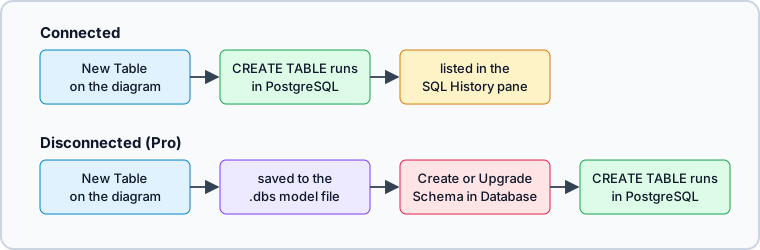

Connected, DbSchema runs each change against PostgreSQL as you make it and lists the statement in the SQL History pane. A later change, such as a new column, runs as an ALTER TABLE the same way.
Disconnected, the same steps change only the design model, saved in the .dbs file, and PostgreSQL is untouched. Schema → Create or Upgrade Schema in Database later shows the DDL, which you can read before you click Execute.
Both paths end in the same CREATE TABLE. In psql you write it; in DbSchema you draw the table and DbSchema writes the statement, which pays off once a change touches several tables and the foreign keys between them. Download DbSchema at https://dbschema.com/download.html, connect to the PostgreSQL database you are building, and draw the table you were about to type. Connecting, reverse-engineering, creating and editing tables on the diagram, and the SQL Editor are in the free Community Edition; designing disconnected, saving the design to a .dbs file and the schema synchronization that deploys it are in Pro.
FAQ
Should I use SERIAL or IDENTITY in PostgreSQL?
Use an identity column in a new table: it is the SQL standard form, added in PostgreSQL 10. Pick GENERATED BY DEFAULT AS IDENTITY when your own inserts sometimes supply the id, because it lets your value win. SERIAL still works, so an older schema has no reason to be rewritten.
How do I add a foreign key to a table that already exists?
The constraint goes on afterwards with ALTER TABLE public.orders ADD CONSTRAINT orders_customer_id_fkey FOREIGN KEY (customer_id) REFERENCES public.customers(customer_id);. PostgreSQL checks the rows already in the table and rejects the statement if any of them point at a customer that is missing.
Does PostgreSQL have CREATE OR REPLACE TABLE?
No, PostgreSQL answers CREATE OR REPLACE TABLE with a syntax error. Use CREATE TABLE IF NOT EXISTS to skip a table that is already there, or DROP TABLE IF EXISTS followed by CREATE TABLE to rebuild one, which deletes its rows.









