MySQL Connector/J: mysql-connector-j vs mysql-connector-java
mysql-connector-j vs mysql-connector-java: why the Maven coordinates changed in 8.0.31, which Connector/J version fits your MySQL server, and the dependency.
On this page
MySQL Connector/J is the JDBC driver for MySQL, and since release 8.0.31 its Maven coordinates are com.mysql:mysql-connector-j. The old mysql:mysql-connector-java coordinates stop at 8.0.33, so every 8.1, 9.x and 26.x release exists only under the new name. This guide maps the versions, gives the Maven and Gradle dependency, and shows how the free DbSchema Community Edition handles the driver for you.
mysql-connector-j vs mysql-connector-java: what changed in 8.0.31
For enterprise integration engineers who wire Java services to MySQL through JDBC and manage the driver as a build dependency. This guide sorts out the Connector/J names and versions, gives the Maven and Gradle coordinates, and shows how to get a working connection without handling the driver jar yourself.
mysql-connector-j and mysql-connector-java are the same driver, MySQL Connector/J, under its current and its former Maven name; the rename came with 8.0.31. Since Connector/J 8.0.31, the Maven artifact is com.mysql:mysql-connector-j. The old mysql:mysql-connector-java coordinates were relocated to the new ones, and they stop at 8.0.33 on Maven Central[1], so every 8.1 and later release exists only under com.mysql:mysql-connector-j. A build that still points at the old coordinates can never resolve anything newer than 8.0.33, which was published in April 2023.
Oracle's 8.0.31 release notes[2] give the reason as compliance with proper naming guidelines: the groupId became com.mysql and the artifactId mysql-connector-j. The jar was renamed too, to mysql-connector-j-x.y.z, for every channel through which Oracle distributes it, not only the Maven repository. The old groupId and artifactId still link the library, but only through a Maven relocation POM: a placeholder POM that holds no jar and tells Maven to fetch the artifact under its new coordinates instead. The release notes warn that the old coordinates could be discontinued anytime without notice.
Oracle kept the old coordinates alive for three releases. On Maven Central, the last version published under mysql:mysql-connector-java is 8.0.33, and its POM contains nothing but the relocation to com.mysql:mysql-connector-j with the message that the artifacts moved to reverse-DNS compliant Maven 2+ coordinates. The 8.0.31 and 8.0.32 POMs under the old name carry the same relocation; 8.0.30 is the last real jar under it.[1]
- mysql:mysql-connector-java, versions up to 8.0.30: real driver jars under the old coordinates.
- mysql:mysql-connector-java, versions 8.0.31 to 8.0.33: relocation POMs only, redirecting to the new coordinates.
- com.mysql:mysql-connector-j, versions 8.0.31 and later: the only coordinates that carry every current release, including 9.x and 26.x.
The relocation means an old dependency block still resolves, but only to 8.0.33. A team that wants a current driver has to change the groupId and artifactId, not just bump the version number. Which version to move to depends on the MySQL Server version, as the next two sections show.
We resolved both coordinates with Maven 3.9.9 on 11 October 2026. A pom that asks for mysql:mysql-connector-java:8.0.33 prints "[WARNING] The artifact mysql:mysql-connector-java:jar:8.0.33 has been relocated to com.mysql:mysql-connector-j:jar:8.0.33", and the jar it downloads is already named mysql-connector-j-8.0.33.jar. Bumping only the version in the same pom to 9.0.0 fails the build with "Could not find artifact mysql:mysql-connector-java:jar:9.0.0 in central". With com.mysql:mysql-connector-j:26.7.0, the dependency tree shows protobuf-java 4.31.1 as the one transitive dependency.
Connector/J versions: 5.1, 8.x, 9.x and 26.x
MySQL Connector/J has one active release line, and it takes the latest version number. The 8.0.x releases ended at 8.0.33, 8.1 to 8.4 followed, then 9.0 to 9.7, and 26.7.0 superseded 9.7[3] as a GA (generally available) release on 29 July 2026; there are no Connector/J releases numbered 10 to 25. When a major version line advances, the connector follows the new major version while continuing to support the then-current Innovation and LTS releases of MySQL Server.
The jump from 9.x to 26.x comes from how the whole MySQL portfolio is versioned. MySQL Server has two release tracks, LTS (Long-Term Support) and Innovation. LTS releases carry a stable feature set with a long support period, Innovation releases carry the newest features and are supported until the next Innovation release. Both are production-grade, according to the MySQL Reference Manual's page on Innovation and LTS releases[4].
Those two tracks belong to MySQL Server and MySQL NDB Cluster. The connectors, MySQL Shell, MySQL Router and the Kubernetes operator have one release using the latest version number but remain compatible with all supported MySQL Server versions. The Reference Manual gives MySQL Connector/Python 9.7.0 as the example: compatible with supported MySQL Server 8.0, 8.4 and 9.x releases. So there is no Connector/J LTS track to subscribe to and no Connector/J Innovation track to avoid: you pick a release, and its compatibility statement tells you which servers it works against.[4]
Connector/J 5.1 is the legacy line, and it used the driver class com.mysql.jdbc.Driver. Oracle's 5.1 upgrade guide[5] says that moving an application from 5.1 to 8.0 and beyond might require changes to its code or to the environment it runs in. It lists changes in connection properties, in the API, in exceptions and in build properties. A 5.1 jar in a dependency tree therefore means a real upgrade, covered in its own section below.
Which Connector/J version works with your MySQL server and Java version
Connector/J 26.7 supports MySQL 8.4 and higher, supports JRE 8 or higher, and implements JDBC 4.2, according to the Connector/J compatibility page[6]. The same page notes that while 26.7 works with libraries of higher JDBC versions, it returns a SQLFeatureNotSupportedException for any call of methods supported only by JDBC 4.3 and higher. This section quotes the sources rather than extending them, because compatibility is where extrapolation goes wrong.
| Connector/J release | MySQL Server versions, as stated | Where it is stated |
|---|---|---|
| 26.7 | MySQL 8.4 and higher | Connector/J compatibility page; 26.7.0 release notes |
| 9.7.0 | MySQL Server version 8.0 and later | 9.7.0 release notes |
| 9.0.0 | MySQL Server version 8.0 and later | 9.0.0 release notes |
| 8.4.0 | MySQL Server version 8.0 and later | 8.4.0 release notes |
The release notes of the older GA releases carry their own statements, and they differ from 26.7's. The 9.7.0 release notes[7] say that release can be used against MySQL Server version 8.0 and later, supports the JDBC 4.2 API and implements the X DevAPI; the 9.0.0 and 8.4.0 release notes say the same about theirs. The 26.7.0 release notes, like the compatibility page, name MySQL Server 8.4 and later.
For an integration project that means: on MySQL 8.4 or later, 26.7 is the release whose compatibility statement covers you, and it runs on JRE 8 or higher. On MySQL 8.0, the 26.7 compatibility page does not list your server, and 9.7.0 is the newest release whose notes say MySQL Server version 8.0 and later. Do not extend any of these statements to versions they do not mention; check the release notes for the exact version you pin.
Maven and Gradle dependency for MySQL Connector/J
The Maven dependency for MySQL Connector/J is com.mysql:mysql-connector-j. The Connector/J Maven guide[8] publishes exactly these coordinates, groupId com.mysql and artifactId mysql-connector-j. Replace x.y.z with the version your project standardises on; the versions tab of the artifact on Maven Central's artifact page[9] lists every published release.
<dependency>
    <groupId>com.mysql</groupId>
    <artifactId>mysql-connector-j</artifactId>
    <version>x.y.z</version>
</dependency>
For Gradle, the same coordinates in Groovy DSL syntax:
implementation 'com.mysql:mysql-connector-j:x.y.z'
The driver pulls in protobuf-java as a transitive dependency, which the Maven guide says is resolved by dependency transitivity. If a project does not use the X DevAPI, the second API Connector/J supports besides JDBC, the guide shows how to add an exclusion for com.google.protobuf:protobuf-java to avoid linking the unneeded sub-library.[8]
Remove the old mysql:mysql-connector-java block entirely rather than leaving it beside the new one. Two Connector/J jars on one classpath is a conflict you do not want to debug during an integration. Delete the old block, add the new one, and let the dependency tree confirm the result.
How to check which Connector/J version is loaded
Three checks show which Connector/J version a project or tool actually loads, because the build file can say one thing and the jar on the classpath another. Each takes about a minute.
- Ask the build tool. In Maven, mvn dependency:tree lists every resolved artifact; look for mysql-connector and confirm the groupId is com.mysql. In Gradle, gradle dependencies or gradle dependencyInsight --dependency mysql-connector-j shows the resolved version and, with dependencyInsight, which rule selected it.
- Read the jar manifest. Open the jar on the classpath and look inside META-INF/MANIFEST.MF; the Implementation-Version line records the driver version. The file name, mysql-connector-j-x.y.z.jar, tells you the version too.
- Ask the driver itself. The JDBC DriverManager reports every registered driver at runtime, and DatabaseMetaData.getDriverVersion() returns the version of the driver behind an open connection:
Enumeration<Driver> drivers = DriverManager.getDrivers();
while (drivers.hasMoreElements()) {
    Driver d = drivers.nextElement();
    if (d.getClass().getName().startsWith("com.mysql")) {
        System.out.println(d.getClass().getName() + " " + d.getMajorVersion() + "." + d.getMinorVersion());
    }
}
The output names the registered driver class and the version it reports. com.mysql.cj.jdbc.Driver is the class name since Connector/J 8.0; com.mysql.jdbc.Driver is the 5.1-era name. If the reported version is not the one the build file declares, another jar on the classpath won, and the old dependency block is the first place to look.
Checked on macOS 26.6.2 (Apple Silicon) with Java 25 against MySQL 8.4.11 in Docker on 11 October 2026: the manifest of the jar that version 10.5.2 of the app had downloaded reads "Implementation-Version: 26.7.0", and getDriverVersion() on an open connection returned "mysql-connector-j-26.7.0 (Revision: 559f62df01d4f618440da174ff45ba87f7b3b2a8)". The 8.0.33 jar that the old coordinates resolve to returned "mysql-connector-j-8.0.33" and connected to the same server in that one test. Both jars name com.mysql.cj.jdbc.Driver in META-INF/services/java.sql.Driver.
How to upgrade from Connector/J 5.1
Upgrading from Connector/J 5.1 to a current release touches three things: the artifact, the class name, and the behaviour the new driver defaults to.
- Replace the dependency. Drop mysql:mysql-connector-java and add com.mysql:mysql-connector-j at the version whose compatibility statement covers your servers, as set out above.
- Update the driver class name where it is hardcoded. The 5.1 class com.mysql.jdbc.Driver is superseded by com.mysql.cj.jdbc.Driver, the class listed on the MySQL JDBC driver download page. Connection pools, JNDI datasource definitions and Spring datasource configurations often carry the old class name in a property.
- Run the integration's existing queries against the new driver before deploying. Point a test environment at the same server version, execute the queries the integration actually issues, and compare results and errors with what 5.1 produced. Authentication needs checking on MySQL 8; the guide to Public Key Retrieval errors covers the 'Public Key Retrieval is not allowed' error, and the current connection properties are explained in MySQL JDBC URL parameters.
Test against a staging server that mirrors production rather than trusting a unit test with a mocked connection. The failure modes that matter, authentication negotiation and TLS handshake behaviour, only show up against a real server; a MySQL server in Docker is enough for a first run. Once the test environment connects and the query results match, the same artifact and configuration move to production unchanged.
How DbSchema downloads the MySQL JDBC driver for you
DbSchema downloads MySQL Connector/J from dbschema.com on the first connection, so you get a working connection without handling the jar. In version 10.5.2, File → New Model opens the model wizard; choose MySql and press New Connection, and the Connect to MySQL dialog shows the driver being fetched on first use and fills the JDBC Driver field. The download brings the mysql-connector-j jar together with the protobuf-java library it depends on. This works in the free Community Edition, which connects and reverse-engineers, draws diagrams and runs SQL at no cost. After Connect, the Reverse Engineer the Database dialog turns the schema into a diagram, which is how an integration engineer gets to see a schema nobody documented. On a MySQL 8.0 server, where you may prefer a release whose notes name 8.0, upload that jar through the JDBC Drivers Manager described below.
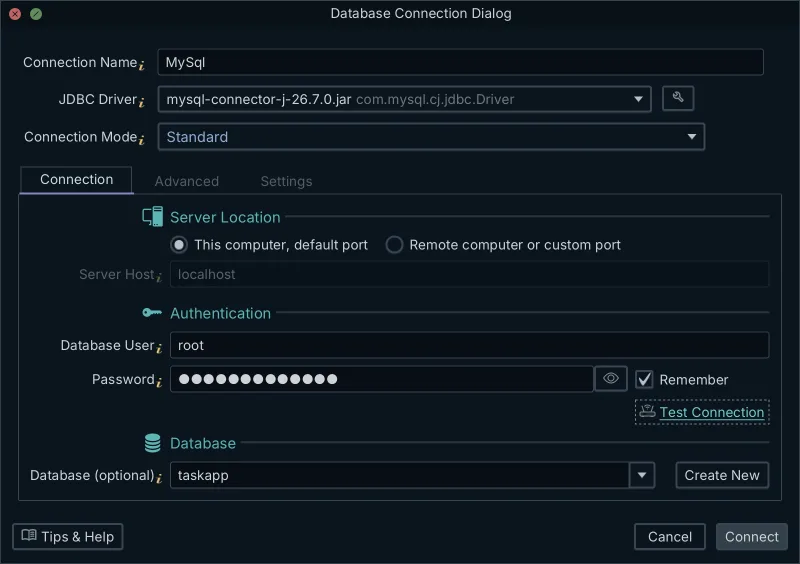
The video below shows the whole path on version 10.5.2 in three minutes: the driver download at 0:33, the connection settings at 0:58, the test connection at 1:45, and the schema reverse-engineered into an ER diagram at 2:02.
Watch: MySQL JDBC Driver: Download, Configure and See Your Database as an ER Diagram[10]
Because the app fetches the driver itself, its version is set per machine and updated through the app rather than through your build. A capture from 25 September 2026 downloaded mysql-connector-j 26.7.0; that is what was fetched on that date, not a promise about which version any given install gets. If your own application needs the driver as well, use the Maven and Gradle coordinates above; the two do not interfere, because the app keeps its driver in its own drivers folder, separate from your classpath.
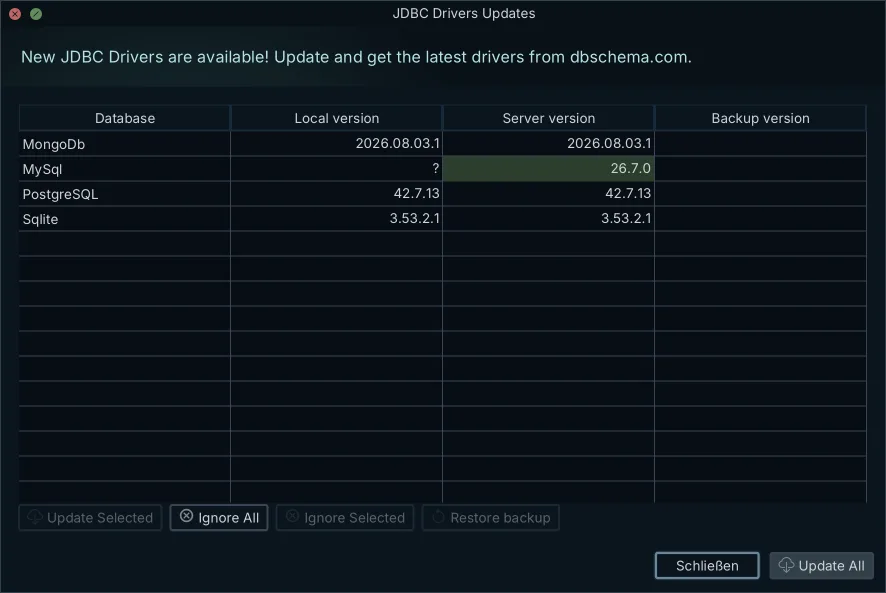
On the Mac used for this article, the app's MySQL drivers folder in the user's home folder held exactly two files on 11 October 2026, mysql-connector-j-26.7.0.jar and protobuf-java-4.31.1.jar, outside any project's classpath.
How to upload your own Connector/J jar in the JDBC Drivers Manager
You upload your own Connector/J jar when the automatic download cannot reach dbschema.com, for example on a computer without internet access, or when your team standardises on a specific driver build. The DbSchema JDBC Drivers Manager is where that happens, the same place that lists JDBC drivers for 100+ databases.
- Open Database → Manage → JDBC Drivers Manager. Before any model is open, the same entry sits under Help → JDBC Drivers Manager, and the wrench button next to JDBC Driver in the connection dialog opens it too.
- Pick the database in the Database list at the top. The table lists each driver file, the driver classes it holds, and their URL patterns.
- Press Upload Driver Jar(s) and choose the .jar file or files. A database can hold more than one driver file, each with its own URL patterns, and the connection dialog offers them all. Download from dbschema.com brings back the driver hosted on dbschema.com.
Two details matter for a team that manages drivers deliberately. When an update replaces a driver version, the replaced one is kept in the drivers-old folder next to the drivers folder in the app's home folder, and Restore backup puts it back. And when your jar needs a URL shape the default pattern does not produce, select the pattern and choose More → Edit the Selected URL Pattern. The app then replaces the HOST, PORT and DB placeholders with the values you type in the connection dialog.
Download the free DbSchema Community Edition; it fetches MySQL Connector/J on first connect, or uses the jar your team standardised on.
Frequently asked questions
What is the Maven dependency for MySQL Connector/J?
The Maven dependency is com.mysql:mysql-connector-j, used since Connector/J 8.0.31. The old mysql:mysql-connector-java coordinates are relocation POMs and stop at 8.0.33.
What is the latest MySQL connector?
Check the versions tab of com.mysql:mysql-connector-j on Maven Central, because Connector/J has one release line that takes the latest version number. Release 26.7.0 of 29 July 2026 superseded 9.7.
What does the MySQL Connector J do?
MySQL Connector/J is a JDBC Type 4 driver: a pure Java implementation of the MySQL protocol that lets Java applications and tools such as DbSchema connect to MySQL without the MySQL client libraries.
How do I check if I have a MySQL Connector?
Look for com.mysql:mysql-connector-j in your Maven or Gradle dependency tree, read Implementation-Version in the jar manifest, or call DatabaseMetaData.getDriverVersion() on an open connection.
Is MySQL Connector/J backward compatible?
Each release states its own server range. Connector/J 26.7 supports MySQL 8.4 and higher, while the release notes of 9.7.0, 9.0.0 and 8.4.0 say those releases can be used against MySQL Server 8.0 and later.
Sources
- central.sonatype.com
- Changes in MySQL Connector/J 8.0.31
- Changes in MySQL Connector/J 26.7.0
- MySQL Releases: Innovation and LTS
- Upgrading to MySQL Connector/J 26.7 from Connector/J 5.1
- dev.mysql.com
- Changes in MySQL Connector/J 9.7.0
- dev.mysql.com
- central.sonatype.com
- MySQL JDBC Driver: Download, Configure and See Your Database as an ER Diagram
Connect to MySQL without managing the driver
DbSchema downloads MySQL Connector/J on your first connection, takes your team's own jar in the JDBC Drivers Manager, and reverse-engineers the schema into diagrams in the free Community Edition.









