MySQL JDBC: com.mysql.cj.jdbc.Driver vs com.mysql.jdbc.Driver
Use com.mysql.cj.jdbc.Driver for MySQL Connector/J, fix the deprecation warning, and trace ClassNotFoundException and No suitable driver errors fast.
On this page
For enterprise integration engineers connecting Java applications to MySQL through JDBC: the driver class is com.mysql.cj.jdbc.Driver in Connector/J 8.0 and later, while com.mysql.jdbc.Driver still loads but prints a deprecation warning. This guide gives the correct MySQL driver class, explains the deprecation warning, and fixes the two class-loading errors; DbSchema Community Edition handles the class for you.
com.mysql.cj.jdbc.Driver vs com.mysql.jdbc.Driver: which MySQL driver class to use
Use com.mysql.cj.jdbc.Driver: it is the driver class of MySQL Connector/J 8.0 and later, and the class the Connector/J source[1] names as the new driver class. com.mysql.jdbc.Driver is the 5.1-era name. It still loads in current releases and prints a deprecation warning when the class loads. If your log shows that warning, a ClassNotFoundException, or a "No suitable driver" SQLException, the connection failed before it reached the database, and the sections below trace each case.
| What you need | Value |
|---|---|
| Driver class, Connector/J 8.0 and later | com.mysql.cj.jdbc.Driver |
| Legacy class, Connector/J 5.1 | com.mysql.jdbc.Driver |
| URL prefix | jdbc:mysql:// |
| Default port | 3306 |
MySQL Connector/J is, in the words of its Connector/J README[2], a JDBC Type 4 driver: a pure Java implementation of the MySQL protocol that does not rely on the MySQL client libraries, so the jar is all you need on the classpath.
The MySQL JDBC driver page lists the class, the jar and the URL format in one place. In DbSchema 10.5.2 the MySql Standard URL preset reads jdbc:mysql://[:][/{DB}]?connectionTimeZone=UTC&useUnicode=true&characterEncoding=UTF-8&zeroDateTimeBehavior=convertToNull&useOldAliasMetadataBehavior=true, with port 3306 and user root as the defaults.
What "Loading class com.mysql.jdbc.Driver. This is deprecated" means
The deprecation warning means your code or configuration still names com.mysql.jdbc.Driver; the connection still succeeds. Load the old class from a current Connector/J jar and the JVM prints this on stderr:
Loading class `com.mysql.jdbc.Driver'. This is deprecated. The new driver class is `com.mysql.cj.jdbc.Driver'. The driver is automatically registered via the SPI and manual loading of the driver class is generally unnecessary.
The warning comes from the legacy class itself. In the Connector/J source[1], com.mysql.jdbc.Driver extends com.mysql.cj.jdbc.Driver and adds only a static initializer that prints this message. SPI in the warning is Java's service-provider interface, the mechanism the next section explains. Because it extends the current class, registration and connections still work. The message is noise, not a failure.
We reproduced the warning on 11 October 2026 with Connector/J 26.7.0, Java 25 and MySQL 8.4.11, which we ran in Docker. Class.forName("com.mysql.jdbc.Driver") printed the line above once per JVM, even when loaded twice, and the connection succeeded. DriverManager then held one driver, com.mysql.cj.jdbc.Driver 26.7, and javap on the jar shows public class com.mysql.jdbc.Driver extends com.mysql.cj.jdbc.Driver.
The fix is to delete the Class.forName("com.mysql.jdbc.Driver") line and update any configuration property that names the old class to com.mysql.cj.jdbc.Driver. Nothing else in the connection changes; the next section explains why the explicit load is unnecessary in the first place.
Do you need Class.forName for the MySQL JDBC driver?
The Java DriverManager documentation[3] describes how DriverManager initialization loads every available provider of the java.sql.Driver interface through the service-provider mechanism, plus any class named in the jdbc.drivers system property. The Java 8 DriverManager page[4] dates this to JDBC 4.0: drivers include the file META-INF/services/java.sql.Driver, and applications no longer need to load them with Class.forName(). Connector/J ships the service file, so with the jar on the classpath the driver registers itself and Class.forName() adds nothing:
import java.sql.Connection;
import java.sql.DriverManager;

public class Connect {
    public static void main(String[] args) throws Exception {
        try (Connection conn = DriverManager.getConnection(
                "jdbc:mysql://localhost:3306/shopdb", "root", "password")) {
            System.out.println(conn.getCatalog() + " is up");
        }
    }
}
In mysql-connector-j-26.7.0.jar, unzip -l lists both com/mysql/cj/jdbc/Driver.class and com/mysql/jdbc/Driver.class, and META-INF/services/java.sql.Driver contains a single line, com.mysql.cj.jdbc.Driver. In our run, a program with no Class.forName call connected through that class as soon as the jar was on the classpath.
There is one case where naming the class explicitly still earns its place. DriverManager looks up service providers lazily, using the thread context class loader of the thread that triggers initialization, and, as Tomcat's JNDI Datasource How-To[5] notes, it scans only once. In a servlet container that scan happens at startup. Tomcat runs it during container startup and scans only libraries visible to the common class loader, such as $CATALINA_HOME/lib. Jars packaged in a web application's WEB-INF/lib are not part of that scan. The same Tomcat page states directly that web applications with drivers in WEB-INF/lib cannot rely on the service-provider mechanism and should register the drivers explicitly.[5] If your integration runs in a container and the jar stays in WEB-INF/lib, an explicit Class.forName("com.mysql.cj.jdbc.Driver") is the documented workaround, not a leftover from old tutorials. The other fix the same page points to is moving the jar to $CATALINA_HOME/lib, where the startup scan finds it.
How to fix ClassNotFoundException: com.mysql.cj.jdbc.Driver
ClassNotFoundException: com.mysql.cj.jdbc.Driver means the JVM looked for the class and the jar was not on the classpath it used. The class name is correct; the packaging is the problem. Three causes cover nearly every case:
- The jar is not on the runtime classpath at all: the build has it, the process that runs does not.
- The Maven dependency is in test or provided scope, so it is on the compile and test classpaths but not the runtime classpath.
- The application runs in a container that is expected to supply the jar from its own lib folder, and the jar is not there.[5]
We removed the jar from the classpath to see both errors side by side. Class.forName("com.mysql.cj.jdbc.Driver") then failed with java.lang.ClassNotFoundException: com.mysql.cj.jdbc.Driver. The same missing jar, with no Class.forName call, failed later at getConnection with "No suitable driver" and SQLState 08001. Without Class.forName, a missing jar shows up as the second error.
Scope is the cause that surprises people, because the code compiles and the tests pass. The Maven dependency scopes[6] guide says provided scope expects the JDK or a container to supply the dependency at runtime, and test scope limits the dependency to the test phases; neither lands on the runtime classpath. Run the dependency tree and read the scope of the connector entry:
mvn dependency:tree -Dincludes=com.mysql:mysql-connector-j
If the tree entry ends in :test or :provided, that is your cause, and moving the dependency to compile or runtime scope fixes it. Provided scope is right only when the container really supplies the jar, for example from $CATALINA_HOME/lib. If the entry is missing from the tree entirely, the module that opens the connection does not declare the dependency, and the jar never reaches the runtime classpath of that module.
How to fix No suitable driver found for jdbc:mysql
SQLException: No suitable driver found for jdbc:mysql://localhost:3306/shopdb is a different failure. DriverManager looked for a suitable driver among the drivers it had loaded, and none of them accepted the URL.[3] Two causes cover it.
The first cause is a misspelled URL prefix. The prefix must be jdbc:mysql:// exactly: a missing colon (jdbc:mysql//), a typo such as jdbc:mysq://, or a leading space all fail, because each registered driver accepts only the URL prefixes it matches. This is the cause when you know the jar is on the classpath. The MySQL JDBC URL guide covers the full URL syntax and its parameters.
The second cause is a driver that never registered in the classloader that made the call, the container case from the previous section: the jar is present, but DriverManager never saw it in that classloader. The distinction gives you a diagnostic order: fix the classpath for a ClassNotFoundException, and for No suitable driver check the URL prefix first and the registration second. Once the class loads and the URL is accepted, the remaining errors come from the server, such as Public Key Retrieval is not allowed.
Six variants we ran against the same server:
| What we changed | Result |
|---|---|
| jar not on the classpath, no Class.forName | No suitable driver, SQLState 08001 |
| jdbc:mysql//127.0.0.1:3306/taskapp (colon missing) | No suitable driver, SQLState 08001 |
| jdbc:mysq://… (typo) | No suitable driver, SQLState 08001 |
| a leading space before jdbc:mysql:// | No suitable driver, SQLState 08001 |
| jdbc:MySQL://… (upper case) | connected: the prefix check ignores case |
| jar loaded only in a separate child class loader | No suitable driver, SQLState 08001; DriverManager.getDrivers() listed no driver for the calling code |
Four different mistakes produced the same message. To check registration, call DriverManager.getDrivers() from the code that fails: if com.mysql.cj.jdbc.Driver is not in that list, the driver is not registered for that class loader.
| Error | What it tells you | Check first |
|---|---|---|
| ClassNotFoundException: com.mysql.cj.jdbc.Driver | The jar is not on the classpath that loaded your code | Runtime classpath, dependency scope, container lib folder |
| No suitable driver found for jdbc:mysql | Drivers are registered but none accepted the URL | URL prefix, driver registration in that classloader |
How DbSchema loads the MySQL driver class
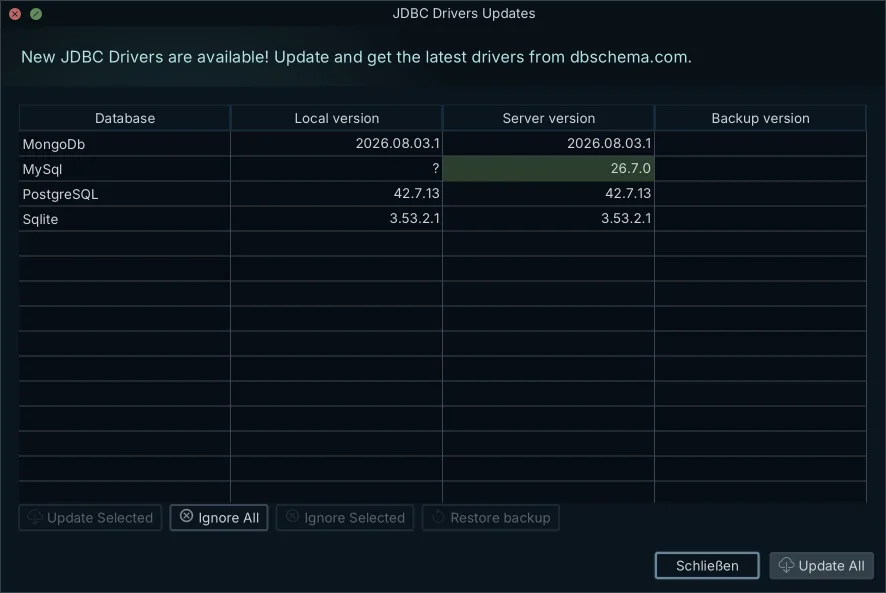
The MySql driver definition in DbSchema 10.5.2 takes the class name out of your hands. It lists four class names in order, and the matching Connector/J jar is downloaded from dbschema.com the first time you connect; the installer does not ship it.
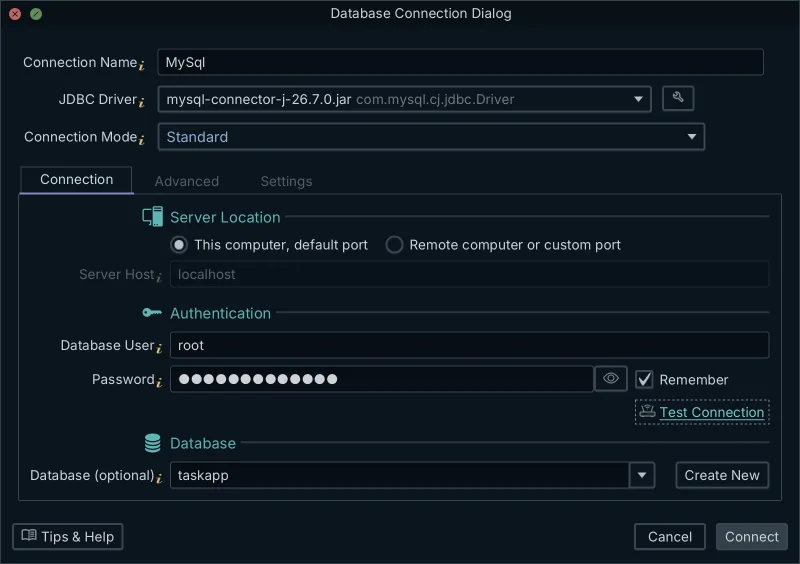
- com.mysql.cj.jdbc.Driver, the current Connector/J class, listed first
- com.mysql.jdbc.Driver, the 5.1-era name that prints the deprecation warning
- com.mysql.cj.jdbc.NonRegisteringDriver, the base class that com.mysql.cj.jdbc.Driver extends
- org.gjt.mm.mysql.Driver, an older class name that Connector/J 26.7.0 no longer contains: Class.forName on it threw ClassNotFoundException in our run
You can see and manage all of this in the JDBC Drivers Manager: choose Database → Manage → JDBC Drivers Manager, or Help → JDBC Drivers Manager before a model is open. The table lists each driver file, the driver classes it holds, and their URL patterns. When the driver cannot be downloaded, for example on a server without internet access, press Upload Driver Jar(s) and pick your own jar; a database can hold more than one driver file, each with its own URL patterns. Replaced versions are kept in the drivers-old folder, and More → Edit the Selected URL Pattern changes the template the connection dialog builds addresses from.
Checked on 11 October 2026 in version 10.5.2, whose MySql driver folder held the downloaded mysql-connector-j-26.7.0.jar.
The video MySQL JDBC Driver: Download, Configure and See Your Database as an ER Diagram[7] shows the whole path in three minutes: the driver download at 0:33, the connection settings at 0:58, the test connection at 1:45, and the reverse-engineered diagram at 2:02. After the test connection, reverse-engineering the MySQL database turns the schema into a diagram you can read.
Connect to MySQL and see the schema
The next step is DbSchema Community Edition from the download page: connect to MySQL without configuring a driver class, reverse-engineer the schema you did not build, and start from a picture of what is actually there instead of from an error message.
Frequently asked questions
What is the driver name for MySQL Connector/J?
The class name is com.mysql.cj.jdbc.Driver. Connector/J 8.0 introduced it, and every later release uses it. The driver is a pure-Java Type 4 implementation of the MySQL protocol.
What is the JDBC driver name for MySQL?
For current Connector/J versions the driver class is com.mysql.cj.jdbc.Driver. The older name com.mysql.jdbc.Driver from the 5.1 line still loads because it extends the new class, but it prints a deprecation warning telling you to use the new name.
What is the name of the JDBC driver for MySQL databases?
MySQL publishes the driver as MySQL Connector/J, and the class you load or configure is com.mysql.cj.jdbc.Driver with a URL that starts with jdbc:mysql://. Tools such as DbSchema Community Edition hold this class in their MySQL driver definition and download the matching jar for you.
Sources
Connect to MySQL without naming a driver class
DbSchema downloads MySQL Connector/J the first time you connect, resolves the driver class from its own driver definition, and reverse-engineers the schema into diagrams in the free Community Edition.









