A Visual Query Builder for MySQL: The Data Analyst Guide
For data analysts who read MySQL data every day and would rather click a join together than work out which column keys to which table.
On this page
What a visual query builder is
Someone hands you a MySQL reporting task on a schema you did not design, and the numbers you need sit in four tables whose key columns are not named alike. A visual query builder answers that by putting the schema on screen: you pick the tables, tick the columns you want, and it writes the SELECT statement underneath, with the join conditions taken from the foreign keys that are already in the database.
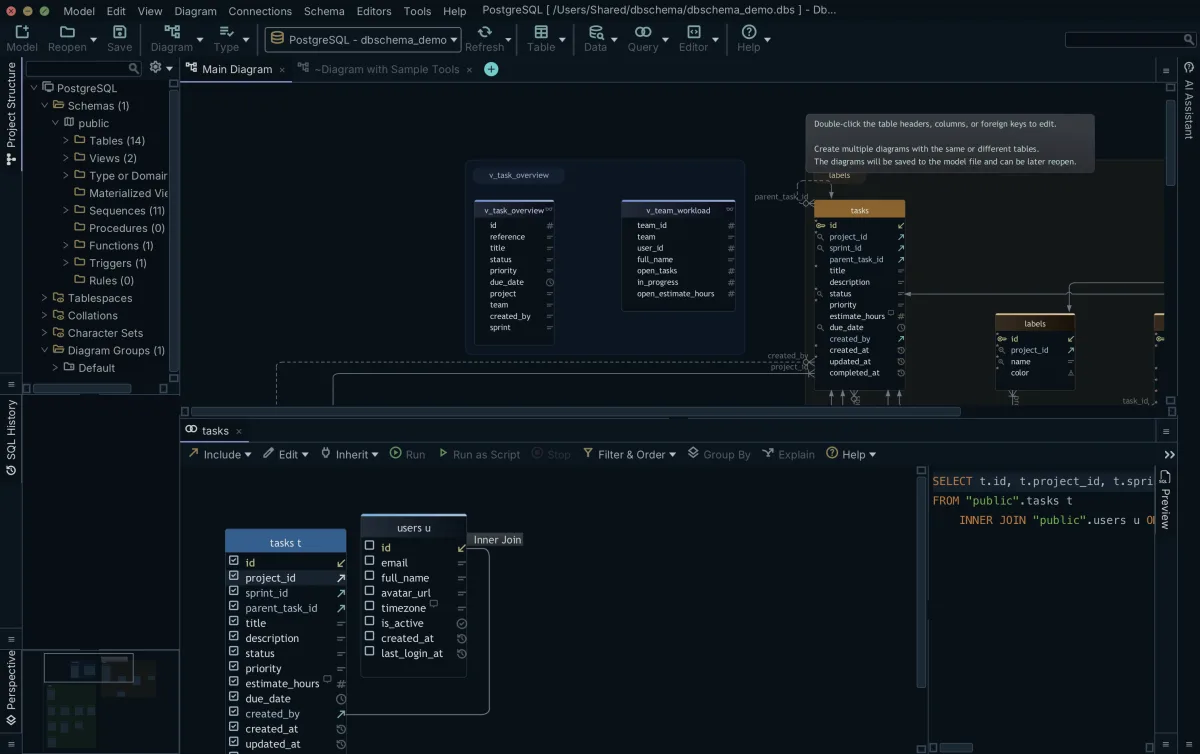
In DbSchema the Query Builder opens from the Editors menu with New Query Builder, or by clicking a table header in the diagram, which starts it with that table already loaded. Ticking the checkbox next to a column puts the column in the SELECT list, and unticking it takes the column out. The generated SQL sits at the bottom of the builder and changes as you click, so you can read the statement you are assembling before you run it. The same approach applied to a wider schema is described in building a query across joined tables visually.
How can I visualize a SQL query?
The examples below run on MySQL 8.4 against two tables:
CREATE TABLE customers (
  customer_id int NOT NULL,
  company_name varchar(100) NOT NULL,
  country char(2) NOT NULL,
  PRIMARY KEY (customer_id)
) ENGINE=InnoDB;

CREATE TABLE orders (
  order_id int NOT NULL,
  customer_id int NOT NULL,
  placed_on date NOT NULL,
  total decimal(10,2) NOT NULL,
  PRIMARY KEY (order_id),
  CONSTRAINT fk_orders_customer FOREIGN KEY (customer_id) REFERENCES customers (customer_id)
) ENGINE=InnoDB;

INSERT INTO customers VALUES (1,'Northwind','DE'), (2,'Acme','FR'), (3,'Contoso','DE');
INSERT INTO orders VALUES
  (10,1,'2026-03-01',40.00),
  (11,1,'2026-03-05',12.50),
  (12,2,'2026-03-02',99.90);
Click the header of the customers table in the DbSchema diagram and the Query Builder opens with customers in it. Click the small arrow icon next to customer_id to follow the foreign key, and orders joins the canvas with the connector line drawn between the two key columns. Tick company_name, order_id and total, then right-click total and choose Filter to set a comparison operator and a value. DbSchema writes this:
SELECT customers.company_name, orders.order_id, orders.total
FROM customers
INNER JOIN orders ON customers.customer_id = orders.customer_id
WHERE orders.total > 20;
| company_name | order_id | total |
|---|---|---|
| Northwind | 10 | 40.00 |
| Acme | 12 | 99.90 |
Clicking the join type label on the connector line switches the join between INNER JOIN, LEFT JOIN and EXISTS, and the SQL at the bottom of the builder follows the change. For a count rather than a list, switch on Group By mode with the toggle button in the Query Builder toolbar: ticked columns without an aggregate become the GROUP BY list, and right-clicking a column and choosing Aggregate applies MIN, MAX, SUM, AVG or COUNT.
SELECT customers.country, COUNT(orders.order_id) AS orders
FROM customers
INNER JOIN orders ON customers.customer_id = orders.customer_id
GROUP BY customers.country;
| country | orders |
|---|---|
| DE | 2 |
| FR | 1 |
Contoso has no rows in orders, so the inner join drops it and Germany counts two orders rather than three customers. When the result is larger than the screen, click Save in the result pane and DbSchema re-runs the query and writes every row to a file.
What the DbSchema Query Builder does
A Query Builder opens inside the diagram and is stored in the .dbs design model file, which is plain XML on your own disk. Reopen the model and the builder comes back with the same tables, joins and ticked columns, and DbSchema asks when you close one whether to keep it in the model or drop it. SQL Editors are saved in that same file, which is what makes the file worth keeping in Git next to the application code.
Assembling the query changes the model file and nothing else. Running it is the step that reaches MySQL, and it only reads, because the Query Builder constructs SELECT statements. Everything that writes is a separate, deliberate action: INSERT, UPDATE and DELETE in the SQL Editor and edits in the Relational Data Editor stay in an open transaction until you click Commit, and Rollback throws them away, while pushing a structural change to the server is its own menu item under Schema. The reasoning behind that separation is set out in whether visual query builders are safe on production.
Why use a query builder on a schema you did not design
A reporting schema with a few hundred tables and abbreviated table names costs you more time in lookups than in SQL. Every join you type by hand needs the child column, the parent column and the direction confirmed somewhere else, and a wrong guess produces a cartesian product that still returns rows, so the mistake reaches the report rather than the error log.
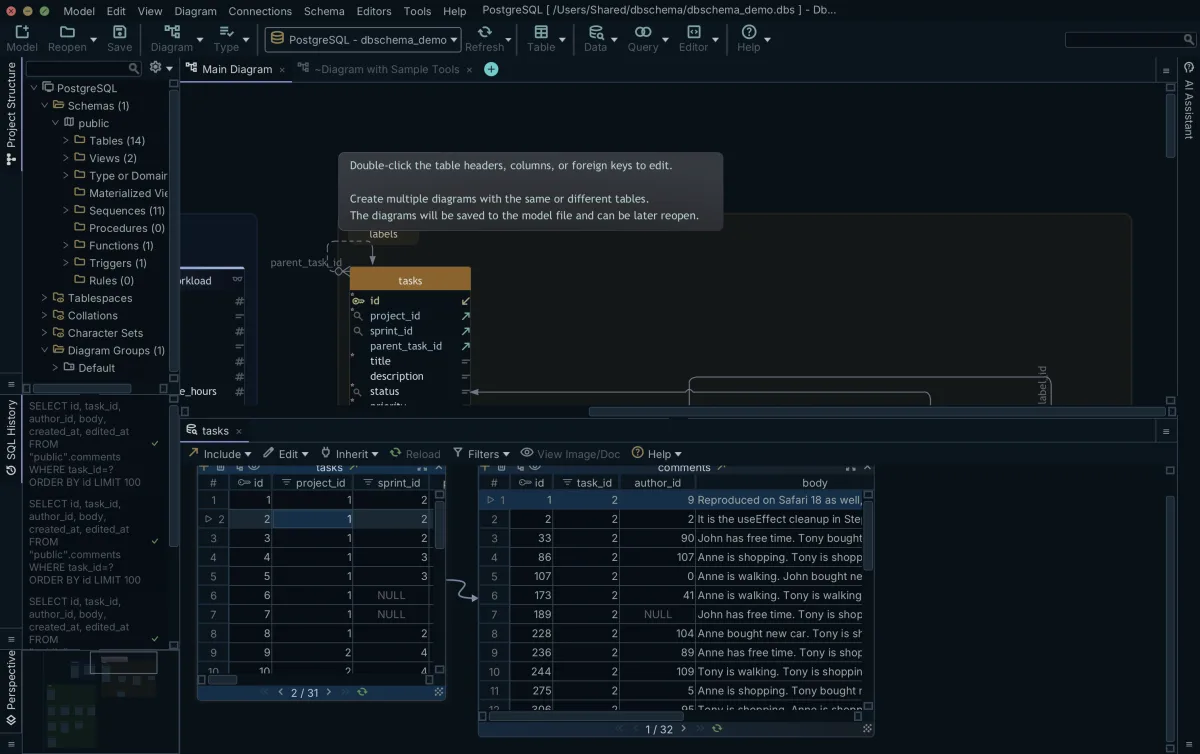
The Relational Data Editor turns those same foreign keys into browsing. Open it from the Editors menu with New Relational Data Editor, or right-click a table header in the diagram and choose Open in Relational Data Editor. Click the foreign key button on a table header panel and the child table appears as another pane, filtered to the row selected above it, cascading as many levels deep as the schema goes. Clicking a column header opens the filter dialog for that column, so a date range narrows a pane without a rewritten query. Where MySQL declares no foreign key, drag one column onto another in the DbSchema diagram: the virtual foreign key is saved in the model file, leaves the database untouched, and the editor cascades over it the same way. Relational data browsing covers the wider workflow.
Does anyone use MySQL anymore?
MySQL ships on two release tracks that Oracle maintains in parallel. The 8.4 reference manual documents MySQL 8.4 through 8.4.11[1]. Oracle describes 8.4 as an LTS series, kept on the same minor version and fed bug fixes, next to an innovation series such as 26.7 that carries new features first[2].
What that means for you is which SQL the server in front of you accepts. MySQL 8.4 has window functions, which perform a calculation for each row of a query using rows related to that row[3], and common table expressions, named temporary result sets that one statement can refer to more than once[4]. Both are typed into the DbSchema SQL Editor, saved in the same model file as the Query Builder, so a ranking query and the point-and-click query that feeds it travel together in one MySQL database project.
Is MariaDB or MySQL better?
Which one is better is rarely the question your report depends on. The MariaDB documentation covers window functions the way the MySQL manual does[5], so a ranking query written for MySQL 8.4 runs on either, and the differences you meet in a reporting job sit in the connection details rather than in the SELECT statement.
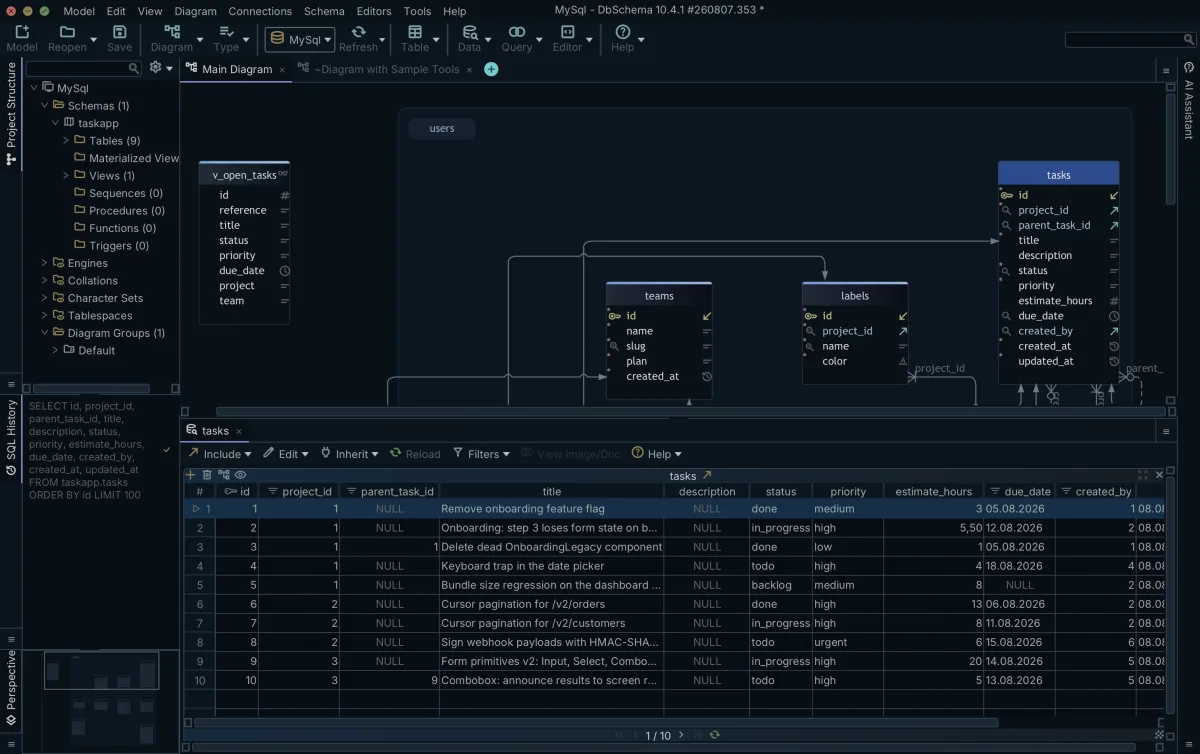
For the question that decides your afternoon, the engine is not where the difference lies. DbSchema connects to both over JDBC and downloads the driver for you, so the diagram, the Query Builder and the data grids behave the same whichever of the two the target environment runs, and a MariaDB database opens from the same Connection Dialog as a MySQL one. With its Standard method DbSchema composes the JDBC URL from the host, the port and the database you type, and Test Connection checks that the server answers before you connect, on either engine. Pick the one your operations team already runs, and keep the reporting workflow where it is.
Is SQLite or MySQL faster?
Speed here is a question about architecture rather than a single number. The SQLite documentation states that the process that wants to access the database reads and writes directly from the database files on disk, with no intermediary server process, which removes both the network round trip and the setup a server needs[6]. A single-user script over a local file has very little between it and the data.
| Property | SQLite | MySQL 8.4 |
|---|---|---|
| Server process | None | Required |
| Setup before first use | None | Install and configure the server |
| Access control between clients | Client processes coordinate over the file | The server controls access |
The same SQLite page names what a server buys in return: it protects the database from a stray pointer in a client, and because it is one persistent process it controls access with finer-grained locking and better concurrency. Shared reporting data that a dozen analysts and an application write to at the same time is the case MySQL is built for, and the case SQLite's own documentation points away from.
Download DbSchema at https://dbschema.com/download.html, connect to your MySQL database, click a table header in the diagram, and follow the foreign keys until the builder holds the columns your report needs. The Query Builder, the Relational Data Editor and saving the design to a .dbs file are in the Pro edition; the free Community edition covers connecting, the diagrams and the SQL editor.
Frequently asked questions
How does the DbSchema Relational Data Editor work?
Cascading from a parent row into its child tables is described under why use a query builder on a schema you did not design. The Relational Data Editor also edits: the Insert, Edit and Delete buttons sit in the table footer, and double-clicking a cell changes the record in place. Right-click a cell in a BLOB column, choose View Data and give a file extension, and DbSchema writes the value to a temporary file and opens it in the application your system registers for that extension.
Can I save my query builder state?
Where the builder lives, and what comes back when you reopen the model, is covered under what the DbSchema Query Builder does. To remove one, right-click the builder in the DbSchema structure tree under Diagrams and choose Drop.
Are visual query builders safe on production?
Tick Read Only Connection on the Settings tab of the Connection Dialog and DbSchema blocks every schema and data change made through that connection. The Highlight setting on the same tab colors the connection as Production, so you can tell at a glance which server a window is pointed at. Which step changes the model file and which one reaches MySQL is set out under what the DbSchema Query Builder does.
Sources
Build the query on the canvas, then read the SQL
DbSchema draws your MySQL schema as an ER diagram, builds joins from the foreign keys already in it, and saves the Query Builder and the SQL Editor inside the model file. The Community Edition is free; the Query Builder and the Relational Data Editor are Pro.









