MongoDB $lookup – Join Collections with Examples, Pipelines, and $unwind | DbSchema
- Introduction to MongoDB
- Installation & Database Creation
- CRUD Operations
- Embedded Documents and Arrays
- Validation Rules - Enforcing Structure in MongoDB
- Visualize MongoDB Relationships (Embedded vs Referenced)
- What Is an Index in MongoDB?
- Aggregation Pipeline Explained.
- $lookup Explained - How to Join Collections (You are here).
Table of Contents
- What
$lookupis - Basic structure
- When to use
$lookupvs embedding - Join examples with
$unwindand pipelines - Performance tips
- Build
$lookuppipelines in DbSchema - FAQ
- Summary
What Is $lookup?
The $lookup stage in MongoDB lets you join data from another collection.
If you’ve worked with SQL, think of it as the MongoDB version of a LEFT OUTER JOIN.
Use it when you need to bring related data together, like combining movies with their reviews or users with their orders.
You use the .aggregate() method in MongoDB and add $lookup as one of the stages.
Basic Structure
Here’s the basic $lookup syntax:
db.collection.aggregate([
  {
    $lookup: {
      from: "<otherCollection>",
      localField: "<field_in_current>",
      foreignField: "<field_in_other>",
      as: "<output_array_field>"
    }
  }
]);
-
from- the collection you want to join -
localField- the field in the current collection -
foreignField- the field in the other collection -
as- the name of the new array field that stores the results
When to use $lookup vs embedding
MongoDB does not force you into joins the way relational databases do, so an important design question is whether you should join collections with $lookup or embed related data in the same document.
Use $lookup when... | Use embedding when... |
|---|---|
| related data changes independently | related data is usually read together |
| documents would become too large if embedded | the child data stays small and bounded |
you need a reusable shared entity, such as users or products | the embedded array is part of the parent's natural shape |
| you want to avoid duplicating frequently changing values | you want fewer reads and simpler application code |
If you need a broader design guide, read Visualize MongoDB Relationships and MongoDB Schema Design 2026.
Join examples with $unwind and pipelines
Example 1: Join Movies with Reviews
We have two collections:
-
movie
-
reviews
Each review stores the movie_id it belongs to.
db.movie.aggregate([
  {
    $lookup: {
      from: "reviews",
      localField: "_id",
      foreignField: "movie_id",
      as: "movie_reviews"
    }
  }
]);
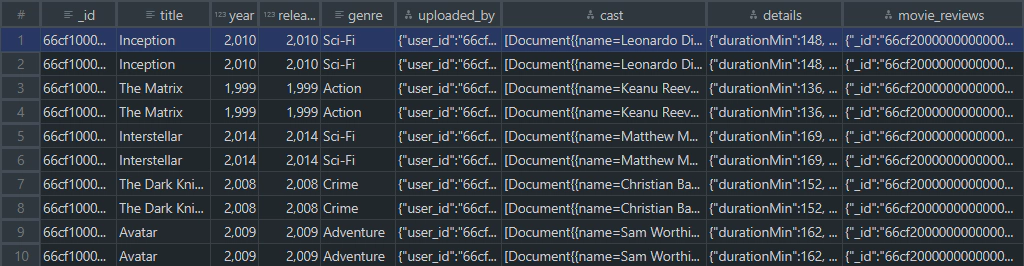
This query adds a movie_reviews array to each movie document containing all matching reviews.

Example 2: Flatten the Result with $unwind
By default, $lookup puts the results in an array.
If you want one document per review, use $unwind:
db.movie.aggregate([
  {
    $lookup: {
      from: "reviews",
      localField: "_id",
      foreignField: "movie_id",
      as: "movie_reviews"
    }
  },
  { $unwind: "$movie_reviews" }
]);
Now each review appears as its own document linked to the movie.
Why use $unwind after $lookup?
By default, $lookup adds the matching documents as an array field.
For example, movie_reviews will contain a list of all reviews for each movie.
Sometimes this is exactly what you want.
Example 3: Join Across Multiple Levels
You can also chain $lookup stages to bring in more collections.
For example, join movie → reviews → users (to see who wrote each review):
db.movie.aggregate([
  {
    $lookup: {
      from: "reviews",
      localField: "_id",
      foreignField: "movie_id",
      as: "movie_reviews"
    }
  },
  { $unwind: "$movie_reviews" },
  {
    $lookup: {
      from: "users",
      localField: "movie_reviews.user_id",
      foreignField: "_id",
      as: "review_user"
    }
  },
  { $unwind: "$review_user" }
]);
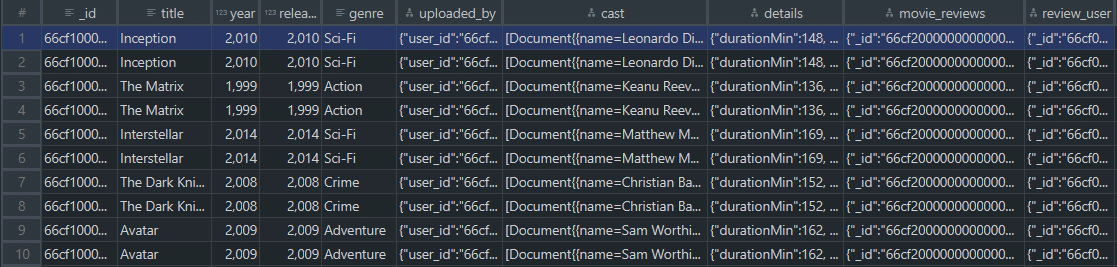
This produces one document per movie-review-user combination.
Example 4: Using a Pipeline in $lookup
Since MongoDB 3.6, $lookup can include a pipeline.
This gives you more control, such as filtering the joined documents.
db.movie.aggregate([
  {
    $lookup: {
      from: "reviews",
      let: { movieId: "$_id" },
      pipeline: [
        { $match: { $expr: { $eq: ["$movie_id", "$$movieId"] } } },
        { $project: { user_id: 1, rating: 1, _id: 0 } }
      ],
      as: "filtered_reviews"
    }
  }
]);
Here, only selected fields (user_id, rating) are kept in filtered_reviews.
Performance tips
Competitive $lookup guides almost always add performance guidance because joins can get expensive quickly.
- Index the join field on the foreign collection whenever possible.
- Project only needed fields in pipeline-based lookups.
- Filter early with
$matchbefore large joins. - Be careful with
$unwindbecause it can multiply result rows.
For example, indexing reviews.movie_id helps this join perform much better:
db.reviews.createIndex({ movie_id: 1 })
If your aggregation starts getting large, run explain() and inspect how much data is scanned before and after the join.
Build $lookup pipelines in DbSchema
DbSchema is useful here because $lookup pipelines are easier to understand when you can see the collections and relationships side by side.
- Open MongoDB through the MongoDB tool page or connect with the MongoDB JDBC page.
- Inspect your collections visually in the diagram before writing the pipeline.
- Build and test the aggregation in the query interface.
- Compare the pipeline output with the modeled relationships in your schema diagram.
That workflow is especially helpful when you are translating SQL-style joins into MongoDB or debugging multi-stage pipelines with $lookup, $unwind, and $project.
FAQ
Is $lookup the same as a SQL JOIN?
It is closest to a left outer join. MongoDB adds the matches as an array field on each source document.
What happens if $lookup finds no match?
MongoDB returns an empty array in the as field. If you later use $unwind, you may also need preserveNullAndEmptyArrays.
Can I join on fields other than _id?
Yes. $lookup can join on any matching fields, and pipeline-based lookups can express more advanced conditions.
When should I avoid $lookup?
Avoid it for very large, frequently repeated joins when embedding would be simpler or when the join field is not indexed and performance is critical.
Summary
The $lookup stage lets you combine collections in MongoDB - just like a join in SQL.
You’ve learned how to:
- Use
$lookupfor simple joins - Flatten results with
$unwind - Chain multiple
$lookupstages - Use pipelines inside
$lookupfor advanced filtering
This is especially useful when visualized in DbSchema, where you can see relationships as diagrams and keep the pipeline logic aligned with the data model.






