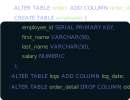
DbSchema lets you design, manage, and document Daffodil DB databases. Create ER diagrams, define tables and columns, and generate SQL scripts - with or without a live database connection.
Use Git to share the design, compare it with the Daffodil DB database, and deploy changes. DbSchema also includes a data editor, query builder, and HTML5 documentation - everything you need in one tool.
Download DbSchema Download Daffodil DB JDBC Driver
Daffodil DB is a pure-Java SQL database that supports both an embedded mode — running inside the same JVM as the host application — and a network server mode accessible via JDBC from remote clients. It was designed for Java environments requiring a portable, dependency-light relational store. DbSchema connects to Daffodil DB in either mode, renders the schema visually, and provides SQL editing and documentation tools for teams maintaining Daffodil DB applications.
DbSchema uses the Daffodil DB JDBC driver and supports both deployment modes through their respective connection URLs. Once connected, tables, views, and their column definitions appear in the diagram canvas, providing a visual overview of the database structure.
DbSchema's SQL editor accepts Daffodil DB's SQL dialect, executes queries against the connected instance, and presents results in an inline table. Use it to validate query logic, investigate data anomalies, and test DDL changes before applying them to a production Daffodil DB instance.
For Daffodil DB applications that have grown organically without formal documentation, DbSchema's documentation generator produces a structured HTML report with table listings, column types, constraints, and embedded relationship diagrams — useful for audits, developer onboarding, and migration planning.
For the Daffodil DB network server, use jdbc:daffodilDB_net://host:3456/dbname,
where 3456 is the default server port. For embedded access, use
jdbc:daffodilDB_embedded:dbname. Download the Daffodil DB JDBC driver from the
Daffodil Software website and register it in DbSchema's driver manager. In embedded mode,
only one JVM can hold an exclusive lock on the database at a time — stop the host application
before connecting from DbSchema to avoid a file lock conflict.