What Is a Foreign Key in SQL? – Referential Integrity, Rules, and Examples | DbSchema
Table of Contents
- What a foreign key is
- Why foreign keys matter
- Foreign key syntax
- Referential integrity: what it enforces
- ON DELETE and ON UPDATE actions
- Composite and self-referencing foreign keys
- Add a foreign key to an existing table
- Drop a foreign key
- Foreign keys vs primary keys vs unique keys
- Common mistakes and performance tips
- Create foreign keys visually in DbSchema
- Virtual foreign keys for NoSQL and legacy databases
- FAQ
- Conclusion
A foreign key in SQL is a column, or group of columns, in one table that references a key in another table. It enforces referential integrity, meaning every child row must point to a valid parent row.
Without a foreign key, an application can create orders for customers that do not exist, payments that point to deleted invoices, or comments attached to posts that were removed long ago. With a foreign key, the database enforces the rule for you.
If you want a database-specific walkthrough after this generic guide, read PostgreSQL Foreign Keys.
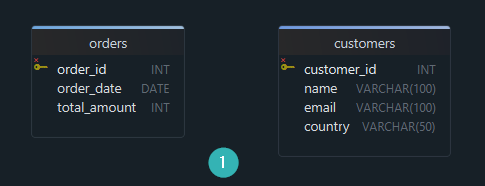
What a foreign key is
A foreign key creates a parent-child relationship between two tables:
- Parent table — stores the referenced key, usually a primary key
- Child table — stores the foreign key column that points to the parent
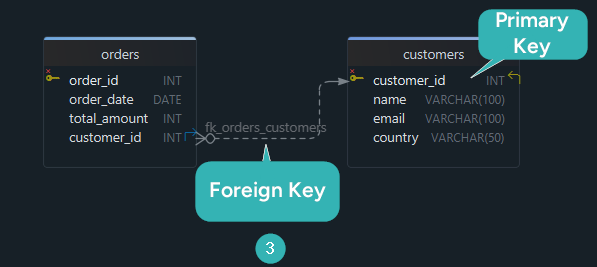
For example:
Customersis the parent table; its primary key iscustomer_idOrdersis the child table; itscustomer_idcolumn is the foreign key
Every value in Orders.customer_id must exist in Customers.customer_id, or the database returns an error.
Why foreign keys matter
Foreign keys do more than stop bad inserts. They make a schema easier to trust and easier to understand.
They help you:
- Prevent orphan rows such as an order that points to a missing customer
- Write safer joins because the relationship is enforced, not implied
- Document the data model so every teammate sees how tables connect
- Control deletes and updates with explicit
CASCADE,RESTRICT, orSET NULLrules
That is why foreign keys are central to relational design, not just to syntax. If you are reviewing query logic at the same time, see SQL Joins Explained and What Is a Primary Key?.
DbSchema is useful here because the relationship is visible in the diagram, not hidden inside DDL. A diagram often reveals missing constraints or optional relationships faster than a long migration file.
Foreign key syntax
Define a foreign key during table creation
CREATE TABLE Customers (
    customer_id INT PRIMARY KEY,
    name        VARCHAR(100),
    email       VARCHAR(100),
    country     VARCHAR(50)
);

CREATE TABLE Orders (
    order_id    INT PRIMARY KEY,
    order_date  DATE,
    customer_id INT,
    CONSTRAINT fk_orders_customers
        FOREIGN KEY (customer_id)
        REFERENCES Customers(customer_id)
);
customer_id in Orders is now a foreign key. It must match an existing customer_id in Customers.
Inline syntax (single column)
CREATE TABLE Orders (
    order_id    INT PRIMARY KEY,
    order_date  DATE,
    customer_id INT REFERENCES Customers(customer_id)
);
The inline form is shorter, but the named-constraint form is better for migrations, maintenance, and documentation.
Referential integrity: what it enforces
A foreign key enforces three rules:
- Insert — you cannot insert a child row with a key value that does not exist in the parent table
- Update — you cannot update a child's foreign key to a value that does not exist in the parent
- Delete — by default, you cannot delete a parent row that is still referenced by child rows
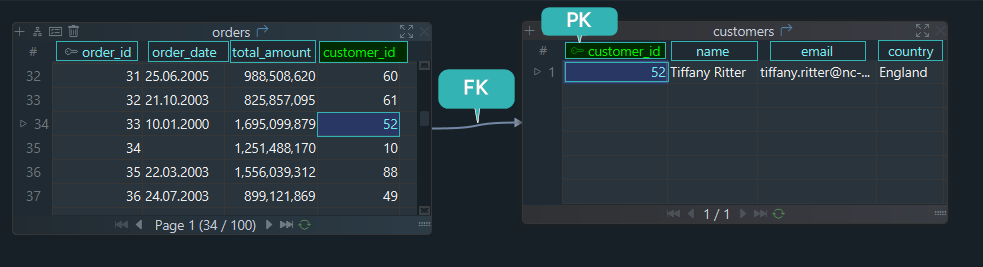
If you try to insert an order with a customer_id that does not exist in the Customers table, the database returns an error:
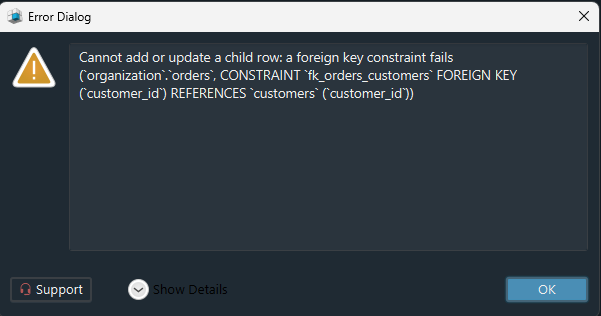
When you add foreign keys to an older database, this is often the first place you discover hidden data-quality problems. DbSchema helps by letting you inspect the linked tables side by side before you apply the constraint.
ON DELETE and ON UPDATE actions
You can control what happens to child rows when a parent row is deleted or updated:
| Action | What happens to child rows | Typical use |
|---|---|---|
RESTRICT | Block the parent change | Preserve history until cleanup is explicit |
NO ACTION | Like RESTRICT, often checked later in the statement or transaction | Similar to RESTRICT, depends on the database |
CASCADE | Automatically delete or update matching child rows | Child row has no meaning without the parent |
SET NULL | Set the foreign key column to NULL | Relationship is optional |
SET DEFAULT | Set the foreign key column to its default value | Rare; used when a fallback row or code exists |
CASCADE example
CREATE TABLE Orders (
    order_id    INT PRIMARY KEY,
    customer_id INT,
    CONSTRAINT fk_orders_customers
        FOREIGN KEY (customer_id)
        REFERENCES Customers(customer_id)
        ON DELETE CASCADE
        ON UPDATE CASCADE
);
When a customer is deleted, all matching orders are deleted too.
Choose actions by business meaning
- Use
CASCADEwhen the child rows should disappear with the parent - Use
SET NULLwhen the child row can survive without the parent - Use
RESTRICTorNO ACTIONwhen your application should decide how cleanup happens - Use
SET DEFAULTonly when the default value is meaningful and documented
Composite and self-referencing foreign keys
A foreign key can reference more than one column when the parent identity is composite:
CREATE TABLE Registrations (
    country_code CHAR(2),
    plate_number VARCHAR(10),
    PRIMARY KEY (country_code, plate_number)
);

CREATE TABLE Violations (
    violation_id INT PRIMARY KEY,
    country_code CHAR(2),
    plate_number VARCHAR(10),
    CONSTRAINT fk_violations_registrations
        FOREIGN KEY (country_code, plate_number)
        REFERENCES Registrations(country_code, plate_number)
);
Foreign keys can also reference the same table. That is called a self-referencing foreign key:
CREATE TABLE Employees (
    employee_id INT PRIMARY KEY,
    employee_name VARCHAR(100) NOT NULL,
    manager_id INT,
    CONSTRAINT fk_employees_manager
        FOREIGN KEY (manager_id)
        REFERENCES Employees(employee_id)
);
This pattern is common for managers, category trees, comment threads, and bill-of-material structures.
Add a foreign key to an existing table
ALTER TABLE Orders
ADD CONSTRAINT fk_orders_customers
    FOREIGN KEY (customer_id)
    REFERENCES Customers(customer_id);
Before adding the constraint, verify:
- all existing
customer_idvalues inOrdersalready exist inCustomers - the child and parent data types match
- the relationship should allow
NULLor be enforced withNOT NULL - the child column is indexed if the table is large or frequently joined
If the data is not clean yet, find the orphan rows first:
SELECT o.order_id, o.customer_id
FROM Orders o
LEFT JOIN Customers c
  ON c.customer_id = o.customer_id
WHERE o.customer_id IS NOT NULL
  AND c.customer_id IS NULL;
Drop a foreign key
MySQL
ALTER TABLE Orders
DROP FOREIGN KEY fk_orders_customers;
PostgreSQL and SQL Server
ALTER TABLE Orders
DROP CONSTRAINT fk_orders_customers;
Named constraints make dropping and recreating foreign keys much easier than relying on system-generated names.
Foreign keys vs primary keys vs unique keys
| Constraint | Purpose | Allows NULL? | References another table? |
|---|---|---|---|
| Primary key | Unique row identity | No | Usually referenced by FKs |
| Unique key | Prevent duplicate values | Usually yes | Can be referenced by FKs |
| Foreign key | Link child rows to parent rows | Usually yes | Yes |
A foreign key usually references a primary key, but in many databases it can also reference a UNIQUE constraint. Nullable foreign keys are valid when the relationship is optional. If you want a deeper review of NULL behavior, read SQL NULL Values.
Common mistakes and performance tips
Common mistakes
- Forgetting to index the child column in databases that do not create the index automatically
- Using
CASCADEwithout thinking through delete paths - Referencing mismatched data types or collations
- Adding a foreign key before cleaning old data
- Leaving the relationship undocumented for the rest of the team
Practical tips
- Keep foreign key names descriptive, such as
fk_orders_customers - Review delete rules together with the business workflow, not in isolation
- Pair foreign keys with clear join and indexing strategy; Indexes and Foreign Keys is a good next read
- Use DbSchema to keep the diagram, SQL, and schema documentation synchronized
Create foreign keys visually in DbSchema
In DbSchema, you can define and review foreign keys visually instead of editing DDL first.
- Connect using the PostgreSQL JDBC driver, MySQL JDBC driver, or SQL Server JDBC driver
- Reverse-engineer an existing schema or start a new design from scratch
- Drag a line from the child column to the parent column in the diagram
- Set
ON DELETEandON UPDATEactions in the relationship editor - Generate SQL and publish team-facing documentation from the same model

This workflow is especially helpful when a schema has many relationships and you want to see the effect of a new foreign key before applying it. See the foreign keys documentation and schema documentation guide for more detail.
Virtual foreign keys for NoSQL and legacy databases
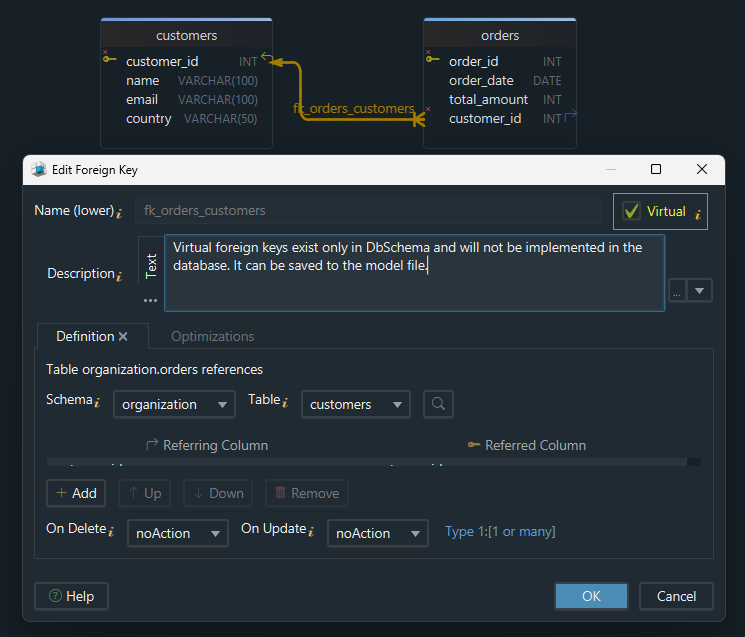
Some databases and legacy systems do not support actual foreign key constraints, or the team may not be ready to enforce them yet. DbSchema addresses this with virtual foreign keys: relationships that exist in the model and documentation without changing the live database.
This is useful for:
- documenting legacy schemas before cleanup
- visualizing relationships in MongoDB or imported CSV data
- planning a migration from implicit joins to explicit constraints
- sharing the data model with analysts and developers before enforcing rules
Learn more in the diagram documentation and DbSchema foreign keys documentation.
FAQ
Can a foreign key reference a column that is not a primary key?
Yes. In most databases, a foreign key can reference any column or column set protected by a UNIQUE constraint.
Can a table have multiple foreign keys?
Yes. A table can reference several parent tables, or even the same parent table more than once.
Can a foreign key reference the same table?
Yes. That is a self-referencing foreign key and it is common for employee-manager or category-parent hierarchies.
Do foreign keys improve query performance?
The constraint itself does not make a join faster. Performance usually comes from good indexing and query design, while the foreign key adds data integrity and clearer schema structure.
Can a foreign key column be NULL?
Yes, unless the column is also declared NOT NULL. A NULL foreign key means the row currently has no parent.
Should every relationship be implemented as a real foreign key?
For transactional systems, usually yes when the database should enforce the rule. For legacy, analytical, or NoSQL workflows, you may document the relationship first with a virtual foreign key in DbSchema.
Conclusion
A foreign key in SQL protects relationships between tables and prevents broken references that are hard to detect later. Once you understand the syntax, delete and update rules, and the difference between foreign, primary, and unique keys, you can design much safer schemas.
Use DbSchema to create, visualize, and document those relationships across your schema, then generate the SQL with confidence.






