SQL NULL Values: IS NULL, COALESCE, NULLIF, and Common Pitfalls
For SQL users who write SELECT queries and get back fewer rows than the table holds.
On this page
NULL marks a value that is missing from a row. For example, a student whose age is unknown has NULL in the age column, not 0.
A filter such as age = NULL or age <> 20 skips the rows with NULL without a warning. A comparison with NULL is neither true nor false.
IS NULL finds those rows. COALESCE replaces a NULL with a value, and NULLIF turns a value such as an empty string into NULL.
These are the four forms:
column IS NULL
column IS NOT NULL
COALESCE(value1, value2, ...)
NULLIF(value1, value2)
IS NULLis true for a row whose column holds NULL.IS NOT NULLis true for a row that holds a value.COALESCEreturns the first of its arguments that is not NULL.NULLIFreturns NULL when its two arguments are equal. Otherwise, NULLIF returns the first argument.
Create a students table and fill it with four students:
CREATE TABLE students (
  student_id int PRIMARY KEY,
  name       varchar(20) NOT NULL,
  nickname   varchar(20),
  age        int,
  advisor_id int
);

INSERT INTO students VALUES
  (1, 'John',  'Johnny', 20,   10),
  (2, 'Jane',  NULL,     NULL, 20),
  (3, 'Sam',   NULL,     25,   NULL),
  (4, 'Alice', '',       NULL, 10);
Jane and Alice have no age, and Sam has no advisor. Jane and Sam have no nickname. Alice's nickname is an empty string, which is a value and not NULL.
Every statement in this article was run on PostgreSQL 18.6, MySQL 9.1, MariaDB 12.3 and SQLite 3.50. All four returned the same rows unless an engine is named.
IS NULL and IS NOT NULL
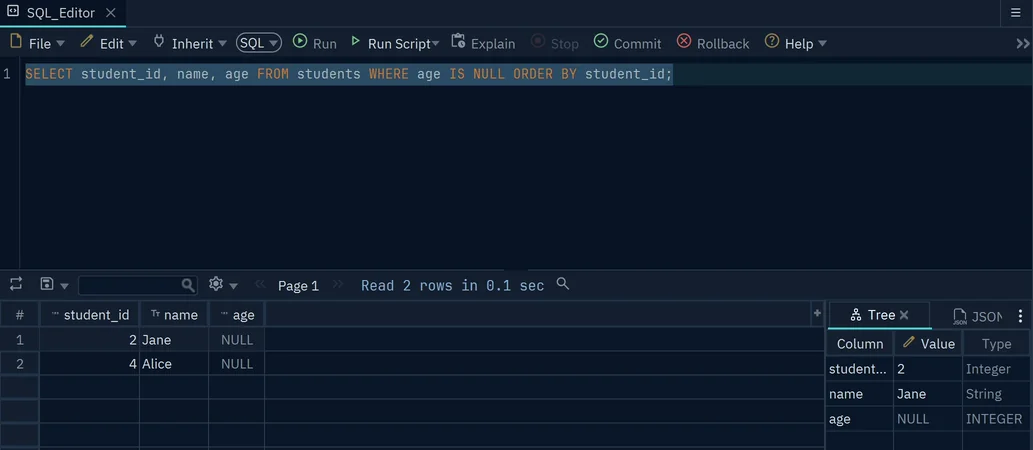
IS NULL keeps the rows whose column holds NULL. For example, you can find the students with no age.
SELECT student_id, name, age
FROM students
WHERE age IS NULL
ORDER BY student_id;
| student_id | name | age |
|---|---|---|
| 2 | Jane | NULL |
| 4 | Alice | NULL |
The query returns Jane and Alice, who have no age. With IS NOT NULL in place of IS NULL, the query returns the other two students, John and Sam.
Comparisons with NULL
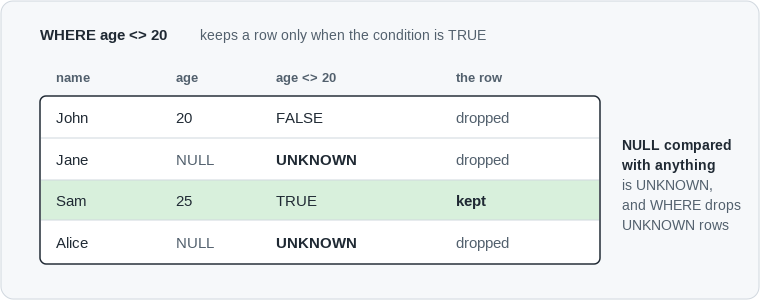
A comparison with NULL returns UNKNOWN, a third value beside TRUE and FALSE. WHERE keeps only the rows where the condition is TRUE. For example, WHERE age <> 20 drops the students with no age.
SELECT student_id, name, age
FROM students
WHERE age <> 20
ORDER BY student_id;
| student_id | name | age |
|---|---|---|
| 3 | Sam | 25 |
Only Sam comes back. John is 20, so the condition is FALSE for him. For Jane and Alice, the condition is UNKNOWN, so WHERE drops them too.
To keep the students with no age as well, ask for them with IS NULL:
SELECT student_id, name, age
FROM students
WHERE age <> 20 OR age IS NULL
ORDER BY student_id;
| student_id | name | age |
|---|---|---|
| 2 | Jane | NULL |
| 3 | Sam | 25 |
| 4 | Alice | NULL |
Jane and Alice come back through age IS NULL, which is TRUE for them.
WHERE age = NULL returns no rows at all, because age = NULL is UNKNOWN for every row. HAVING, which filters the groups of a GROUP BY, also drops a group whose condition is UNKNOWN.
COALESCE
COALESCE returns the first of its arguments that is not NULL. For example, you can show a student's name where the nickname is missing.
SELECT name, COALESCE(nickname, name) AS display_name
FROM students
ORDER BY student_id;
| name | display_name |
|---|---|
| John | Johnny |
| Jane | Jane |
| Sam | Sam |
| Alice | '' |
Jane and Sam have no nickname, so COALESCE returns their name. COALESCE tries a third argument only when the first two are both NULL. Alice's empty nickname is not NULL, so COALESCE returns the empty string as her display name.
Some engines also have a two-argument function that does the same:
| Function | Engines |
|---|---|
IFNULL(a, b) | MySQL, MariaDB, SQLite |
NVL(a, b) | Oracle, MariaDB |
ISNULL(a, b) | SQL Server |
In SQL that may move between engines, write COALESCE. COALESCE works on every engine and takes any number of arguments.
MySQL and MariaDB have a different ISNULL, which takes one argument and returns 1 or 0. On MySQL and MariaDB, ISNULL(nickname, name) fails with "Incorrect parameter count in the call to native function 'ISNULL'".
Practice this in Lesson 4 of the SQL tutorial: you run IS NULL and COALESCE on a shop database in your browser, and each exercise is checked.
NULLIF
NULLIF returns NULL when its two arguments are equal. For example, you can turn an empty nickname into NULL.
SELECT name, COALESCE(NULLIF(nickname, ''), name) AS display_name
FROM students
ORDER BY student_id;
| name | display_name |
|---|---|
| John | Johnny |
| Jane | Jane |
| Sam | Sam |
| Alice | Alice |
NULLIF turns Alice's empty nickname into NULL, so COALESCE falls back to her name. John's nickname is not empty, so NULLIF returns it unchanged.
NULLIF also prevents a division by zero: x / NULLIF(y, 0) returns NULL where y is 0. Without NULLIF, PostgreSQL stops a division by zero with the error "division by zero". MySQL, MariaDB and SQLite return NULL.
COUNT and AVG
An aggregate function, such as COUNT or AVG, computes one value from many rows and skips NULL. COUNT(*) is the exception, because it counts rows rather than values.
SELECT COUNT(*) AS all_rows, COUNT(age) AS with_age, AVG(age) AS average_age
FROM students;
| all_rows | with_age | average_age |
|---|---|---|
| 4 | 2 | 22.5 |
COUNT(age) counts the two students who have an age. AVG(age) divides 20 + 25 by 2, not by 4. PostgreSQL prints the average as 22.5000000000000000, and MySQL and MariaDB as 22.5000.
AVG(COALESCE(age, 0)) returns 11.25 instead, because COALESCE turns the two missing ages into 0. SUM returns NULL, not 0, when there are no rows or every value is NULL.
ORDER BY
ORDER BY puts the NULL rows either first or last. The engines disagree on which.
SELECT student_id, name, age
FROM students
ORDER BY age, student_id;
PostgreSQL puts the two students with no age last:
| student_id | name | age |
|---|---|---|
| 1 | John | 20 |
| 3 | Sam | 25 |
| 2 | Jane | NULL |
| 4 | Alice | NULL |
MySQL, MariaDB and SQLite return Jane and Alice first, because these engines sort NULL before every value. With ORDER BY age DESC, each engine moves the NULL rows to the opposite end:
| Engine | NULL in ascending order | NULL in descending order |
|---|---|---|
| PostgreSQL | last | first |
| Oracle | last | first |
| MySQL and MariaDB | first | last |
| SQLite | first | last |
| SQL Server | first | last |
PostgreSQL, Oracle and SQLite accept NULLS FIRST or NULLS LAST after the column, as in ORDER BY age NULLS FIRST. MySQL, MariaDB and SQL Server reject both keywords.
In MySQL and MariaDB, ORDER BY age IS NULL, age puts the NULL rows last. age IS NULL is 0 for a row with an age and 1 for a NULL age, and 0 sorts first.
GROUP BY
Unlike a comparison, GROUP BY treats every NULL as equal and puts them in one group. For example, the students with no advisor form one group.
SELECT advisor_id, COUNT(*) AS students
FROM students
GROUP BY advisor_id
ORDER BY advisor_id;
PostgreSQL lists the NULL group last, as its ORDER BY does:
| advisor_id | students |
|---|---|
| 10 | 2 |
| 20 | 1 |
| NULL | 1 |
Sam is the only student with no advisor, so the NULL group holds only Sam. John and Alice share advisor 10. MySQL, MariaDB and SQLite list the NULL group first.
SELECT DISTINCT also treats every NULL as equal, and returns one NULL.
INNER JOIN and LEFT JOIN
A join condition is a comparison, so a row with NULL in the join column matches no row of the other table. Create a second table, advisors, for the joins and for NOT IN:
CREATE TABLE advisors (
  advisor_id   int PRIMARY KEY,
  advisor_name varchar(20) NOT NULL
);

INSERT INTO advisors VALUES
  (10, 'Turing'),
  (20, 'Hopper'),
  (30, 'Lovelace');
SELECT s.name, a.advisor_name
FROM students s
JOIN advisors a ON a.advisor_id = s.advisor_id
ORDER BY s.student_id;
| name | advisor_name |
|---|---|
| John | Turing |
| Jane | Hopper |
| Alice | Turing |
Sam has no advisor, so the join condition is UNKNOWN for each row of advisors, and the join drops Sam. LEFT JOIN keeps him:
SELECT s.name, a.advisor_name
FROM students s
LEFT JOIN advisors a ON a.advisor_id = s.advisor_id
ORDER BY s.student_id;
| name | advisor_name |
|---|---|
| John | Turing |
| Jane | Hopper |
| Sam | NULL |
| Alice | Turing |
LEFT JOIN keeps every student, and fills advisor_name with NULL where no advisor matched. Add WHERE a.advisor_id IS NULL to this query, and the query returns only Sam, who has no matching advisor.
NOT IN and NOT EXISTS
NOT IN keeps a row when its value is not in a list. If the list holds a NULL, NOT IN keeps no row. For example, Lovelace has no students, so this query should return her:
SELECT advisor_name
FROM advisors
WHERE advisor_id NOT IN (SELECT advisor_id FROM students);
The query returns no rows. NOT IN compares Lovelace's advisor_id, 30, with each value of the list, and the comparison with Sam's NULL is UNKNOWN. A row passes NOT IN only when every comparison is TRUE, so NOT IN drops Lovelace.
NOT EXISTS asks the same question and returns Lovelace:
SELECT advisor_name
FROM advisors a
WHERE NOT EXISTS (SELECT 1 FROM students s WHERE s.advisor_id = a.advisor_id);
| advisor_name |
|---|
| Lovelace |
NOT EXISTS checks only whether the subquery, the inner SELECT, returns a row. NOT EXISTS is always TRUE or FALSE, never UNKNOWN.
If the subquery reads a column that can hold NULL, use NOT EXISTS. Another fix is WHERE advisor_id IS NOT NULL in the NOT IN subquery. Then NOT IN returns Lovelace too.
NOT NULL
NOT NULL makes a column refuse NULL. For example, the students table declares name NOT NULL, so this insert fails:
INSERT INTO students (student_id, name) VALUES (5, NULL);
| Engine | Error |
|---|---|
| PostgreSQL | null value in column "name" of relation "students" violates not-null constraint |
| MySQL and MariaDB | Column 'name' cannot be null |
| SQLite | NOT NULL constraint failed: students.name |
Each engine names the column and rejects the whole row.
If a column must always hold a value, such as a name or the date the row was created, declare that column NOT NULL. If the value is optional, such as a nickname, leave the column nullable, so that it accepts NULL. Each query that reads a nullable column has to handle the NULLs of that column, as shown above.
What goes wrong
UNIQUE allows more than one NULL
A unique index refuses two rows with the same value in its column. You can still create a unique index on nickname, although Jane and Sam both have NULL as nickname:
CREATE UNIQUE INDEX students_nickname ON students (nickname);
PostgreSQL, MySQL, MariaDB and SQLite create the index, because two NULLs are not equal. Oracle 23 accepts the index too, because "a null always satisfies a unique key constraint". SQL Server counts NULLs as duplicates, and refuses a second NULL in a unique column.
With NULLS NOT DISTINCT, PostgreSQL 18 counts NULLs as duplicates, as SQL Server does:
CREATE UNIQUE INDEX students_nickname_nn ON students (nickname) NULLS NOT DISTINCT;
PostgreSQL refuses the index with "could not create unique index "students_nickname_nn"" and the detail "Key (nickname)=(null) is duplicated."
CONCAT returns NULL in MySQL
CONCAT joins strings into one. The engines disagree on what CONCAT does with a NULL argument:
SELECT name, CONCAT(name, ' ', nickname) AS label
FROM students
ORDER BY student_id;
| name | label in PostgreSQL and SQLite | label in MySQL and MariaDB |
|---|---|---|
| John | John Johnny | John Johnny |
| Jane | Jane | NULL |
| Sam | Sam | NULL |
| Alice | Alice | Alice |
MySQL and MariaDB return NULL when one argument is NULL. PostgreSQL and SQLite skip NULL arguments, and SQL Server turns NULL arguments into empty strings. Write COALESCE(nickname, '') in place of nickname, and every engine returns the same string.
Oracle stores an empty string as NULL
Oracle 23 "treats a character value with a length of zero as null". On Oracle, Alice's empty nickname would be NULL, so nickname IS NULL would return Alice with Jane and Sam.
SQLite accepts NULL in a primary key
A primary key implies NOT NULL in PostgreSQL, MySQL and MariaDB. This insert gives no student_id. SQLite stores the row with NULL as its student_id:
INSERT INTO students (name) VALUES ('Omar');
PostgreSQL refuses the row with "null value in column "student_id" of relation "students" violates not-null constraint". MySQL and MariaDB refuse it with "Field 'student_id' doesn't have a default value".
SQLite allows NULL in a PRIMARY KEY column, except in an INTEGER PRIMARY KEY column, a column declared NOT NULL, and a STRICT or WITHOUT ROWID table. Declare the key column NOT NULL, and SQLite refuses the row too.
Find nullable columns in DbSchema
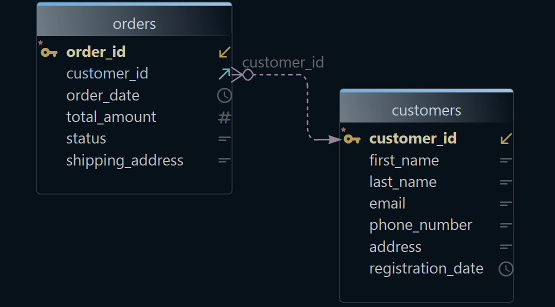
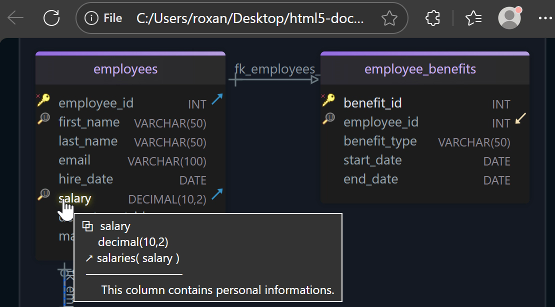
DbSchema shows which columns of a database accept NULL before you write a query. Connect to your database through File → New Model, and DbSchema reads the tables and draws them on a diagram. A red asterisk marks each NOT NULL column, so a column without one accepts NULL.

DbSchema reads the database to draw the diagram, and changes nothing in it. To find the rows with NULL, press Editor in the toolbar and choose SQL Editor. Paste the IS NULL query from above and press Run.
Download DbSchema at https://dbschema.com/download.html and connect it to PostgreSQL, MySQL, MariaDB or SQLite. Run this article's CREATE TABLE and INSERT statements in the SQL Editor, then change the queries and watch where the NULL rows go. The free Community Edition includes the database connection, the diagram and the SQL Editor.