SQL AND, OR, NOT Operators Explained with Examples
For someone writing WHERE clauses with more than one condition; three-valued logic is explained where NULL first breaks a filter.
On this page
A filter with two conditions hands back rows that satisfy only one of them, and the WHERE clause reads correctly at a glance. Three operators combine conditions: AND keeps a row when every condition is true, OR keeps it when at least one is true, and NOT inverts the condition that follows it. What breaks such a query is the order they are applied in. SQL resolves NOT first, then AND, then OR, and parentheses are the only way to override that.
How a WHERE clause picks the rows
A WHERE clause is evaluated once per row. The database substitutes that row's values into the condition and keeps the row only if the condition returns true[1]. False and unknown both drop the row, which is the detail that makes NOT and NULL behave the way they do further down this page. Read this section alongside the WHERE clause tutorial and the basic SQL syntax these operators sit inside.
Every query below is a SELECT statement against one table of five students:
CREATE TABLE Students (
    StudentID INTEGER PRIMARY KEY,
    FirstName TEXT,
    Age       INTEGER,
    Grade     TEXT
);

INSERT INTO Students VALUES (1, 'Alice',   20, 'A');
INSERT INTO Students VALUES (2, 'Bob',     22, 'B');
INSERT INTO Students VALUES (3, 'Charlie', 21, 'A');
INSERT INTO Students VALUES (4, 'David',   20, 'C');
INSERT INTO Students VALUES (5, 'Eve',     23, 'B');
| StudentID | FirstName | Age | Grade |
|---|---|---|---|
| 1 | Alice | 20 | A |
| 2 | Bob | 22 | B |
| 3 | Charlie | 21 | A |
| 4 | David | 20 | C |
| 5 | Eve | 23 | B |
The AND operator
AND returns a row only when every condition it joins is true. One false condition is enough to drop the row.
SELECT column1, column2, ...
FROM table_name
WHERE condition1 AND condition2 ...;
Students who are 20 and hold an A grade:
SELECT * FROM Students
WHERE Age = 20 AND Grade = 'A';
| StudentID | FirstName | Age | Grade |
|---|---|---|---|
| 1 | Alice | 20 | A |
Alice is the only student who is both 20 and holds an A. Charlie holds an A but is 21, and David is 20 but holds a C, so AND rejects both.
The OR operator
OR returns a row when at least one of its conditions is true. It drops a row only when every condition is false.
SELECT column1, column2, ...
FROM table_name
WHERE condition1 OR condition2 ...;
Students who are 20, hold an A, or both:
SELECT * FROM Students
WHERE Age = 20 OR Grade = 'A';
| StudentID | FirstName | Age | Grade |
|---|---|---|---|
| 1 | Alice | 20 | A |
| 3 | Charlie | 21 | A |
| 4 | David | 20 | C |
Alice satisfies both conditions. Charlie qualifies on the grade alone and David on the age alone. Bob and Eve satisfy neither, so they are the only two dropped.
The NOT operator
NOT inverts the single condition that follows it. True becomes false and false becomes true. The exception, covered further down, is a condition that returns neither.
SELECT column1, column2, ...
FROM table_name
WHERE NOT condition;
Students who are not 20:
SELECT * FROM Students
WHERE NOT Age = 20;
| StudentID | FirstName | Age | Grade |
|---|---|---|---|
| 2 | Bob | 22 | B |
| 3 | Charlie | 21 | A |
| 5 | Eve | 23 | B |
Alice and David are 20, so NOT turns their true condition into false and drops them.
Operator precedence and parentheses
Precedence is the reason an AND/OR combination returns rows nobody asked for. Comparison operators are resolved first, then NOT, then AND, then OR. PostgreSQL 18[2] and MySQL 8.4[3] publish that same order. MySQL adds XOR between AND and OR; PostgreSQL carries no XOR operator in its precedence table, so treat XOR as a MySQL-only rung rather than a shared one.
| Resolved | Operators |
|---|---|
| 1st | = <> < > <= >= IS LIKE IN BETWEEN and the other comparison operators |
| 2nd | NOT |
| 3rd | AND |
| 4th | OR |
Both engines put every comparison operator above all three logical operators, so a range test with BETWEEN or a set test with IN is fully resolved before AND or OR ever sees its result.
Written without parentheses, this query does not mean what it looks like it means:
SELECT * FROM Students
WHERE Grade = 'A' OR Grade = 'B' AND Age = 20;
AND binds first, so the database reads it as Grade = 'A' OR (Grade = 'B' AND Age = 20). Both A-grade students come back regardless of age, and the age test only ever applied to the B grades:
| StudentID | FirstName | Age | Grade |
|---|---|---|---|
| 1 | Alice | 20 | A |
| 3 | Charlie | 21 | A |
Parentheses force the other reading, and the result set changes:
SELECT * FROM Students
WHERE (Grade = 'A' OR Grade = 'B') AND Age = 20;
| StudentID | FirstName | Age | Grade |
|---|---|---|---|
| 1 | Alice | 20 | A |
NOT binds tighter than AND for the same reason:
SELECT * FROM Students
WHERE NOT Grade = 'A' AND Age = 20;
NOT negates the grade test alone rather than the pair, so this reads (NOT Grade = 'A') AND Age = 20 and returns one row instead of the three that NOT Age = 20 returned above:
| StudentID | FirstName | Age | Grade |
|---|---|---|---|
| 4 | David | 20 | C |
Precedence is hard-wired into the parser[2], and both vendors give the same remedy: parentheses override it. Write them whenever AND and OR appear in the same WHERE clause, even where the default order already gives the right answer. The next person to read the query should not have to know the table above.
Practice this: Lesson 3 of the SQL tutorial runs WHERE, AND, OR, IN, BETWEEN and LIKE on a shop database in your browser, with checked exercises.
Combining AND, OR and NOT in one filter
With precedence understood, a combined filter is written with the grouping stated rather than inferred. Put each condition block in its own parentheses and join the blocks with OR. Students who are 20 with an A grade, plus everyone aged 22:
SELECT * FROM Students
WHERE (Age = 20 AND Grade = 'A') OR Age = 22;
| StudentID | FirstName | Age | Grade |
|---|---|---|---|
| 1 | Alice | 20 | A |
| 2 | Bob | 22 | B |
Alice satisfies the first block and Bob the second. The parentheses here match the default precedence exactly, so they change nothing about the result. What they change is what the query says to the person reading it.
NOT with NULL and three-valued logic
SQL is not two-valued. A condition can return true, false, or null, which stands for unknown, and NOT of an unknown is still unknown[4] rather than true. Because a WHERE clause keeps only the rows whose condition returned true, a row that evaluates to unknown is dropped exactly as if it had been false. That is how a NOT query quietly loses rows nobody expected it to lose.
Add one student whose grade was never recorded:
INSERT INTO Students VALUES (6, 'Frank', 21, NULL);
Now ask for every student who does not hold an A:
SELECT * FROM Students
WHERE NOT Grade = 'A';
Frank is missing:
| StudentID | FirstName | Age | Grade |
|---|---|---|---|
| 2 | Bob | 22 | B |
| 4 | David | 20 | C |
| 5 | Eve | 23 | B |
Grade = 'A' does not return false for Frank. Comparing anything to NULL returns NULL[5], NOT of NULL is NULL[6], and the WHERE clause keeps only true, so Frank is dropped. The same thing happens to a set test written with the IN operator:
SELECT * FROM Students
WHERE Grade NOT IN ('A', 'B');
One row, not the two a reader would expect:
| StudentID | FirstName | Age | Grade |
|---|---|---|---|
| 4 | David | 20 | C |
PostgreSQL states the rule outright: if the left-hand expression yields null, or if no right-hand value matches and one of them is null, NOT IN returns null rather than true[7]. MySQL documents the same behavior by composition, since NOT IN() is NOT (expr IN (...)) and IN() itself returns NULL when the left side is NULL[8].
The fix is to say what should happen to the unknown rows instead of hoping NOT will decide. Test for NULL explicitly with IS NULL[5], which returns true or false and never unknown:
SELECT * FROM Students
WHERE Grade <> 'A' OR Grade IS NULL;
Four rows, Frank included:
| StudentID | FirstName | Age | Grade |
|---|---|---|---|
| 2 | Bob | 22 | B |
| 4 | David | 20 | C |
| 5 | Eve | 23 | B |
| 6 | Frank | 21 | NULL |
Work through this before writing NOT against any nullable column. The tutorial on SQL NULL values covers IS NULL, COALESCE and the rest of the three-valued toolkit in more depth.



Validate complex filters in DbSchema
When a query combines AND, OR and NOT, test each condition block on its own before combining them. Run the single predicate in DbSchema's SQL Editor and read the row count DbSchema reports with the result, then add the next condition and check that the count moves the way you predicted. The SQL Editor is part of the free Community Edition.

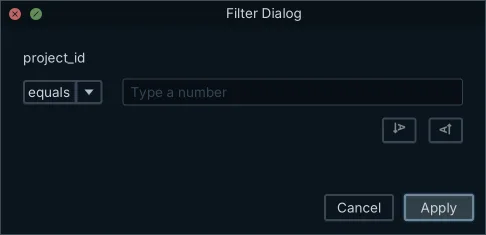
The Relational Data Editor gives you the same check without typing SQL. Click a column header in any pane and DbSchema opens a filter dialog for that column, where you set the condition and the value. That single predicate becomes the WHERE clause of the query DbSchema generates and runs against the database, so you see one condition's row set before it becomes part of a larger expression. Relational data browse comes with the Pro Edition. Neither of the two steps edits the design model file, because the SQL Editor and the Relational Data Editor both read the live database.
Common mistakes
Two of these you have already met: the default precedence, which resolves AND before OR and NOT before AND, and NOT against a nullable column, which turns a row into unknown and drops it. Parentheses fix the first and an explicit IS NULL branch fixes the second.
The other two go wrong before the logical operators are reached. Writing = NULL or <> NULL returns NULL on every row, never true, because NULL is not a value that can be compared to; IS NULL and IS NOT NULL are the tests that answer. Dropping the quotes around a string literal changes what the condition means rather than breaking it: Grade = 'A' compares the column against the letter A, while Grade = A asks the database for a column named A and fails only because no such column exists.
Practice questions
- Identify students aged 21 or 23.
- List students without an A grade.
- Find students aged 20 not holding an A grade.
- Show students graded B or C, but exclude those aged 23.
- List every student who does not hold an A, including the one whose grade was never recorded.
Get the precedence order right, parenthesize anything that mixes AND with OR, and give NULL an explicit branch whenever NOT touches a nullable column.
Download DbSchema at https://dbschema.com/download.html and run the five questions above against a schema of your own. The SQL Editor and the interactive diagrams are in the free Community Edition, and relational data browse comes with the Pro Edition.
Frequently asked questions
Is there a limit to how many AND and OR operators a query can use?
No practical one. Readability is the constraint rather than the parser: past three or four conditions, parenthesize the blocks and consider splitting the query.
How do != and NOT differ?
The != operator compares two values and returns true when they differ, while NOT takes a whole condition and inverts its result. NOT Grade = 'A' and Grade != 'A' agree on every row where Grade is known, and both drop the row where Grade is NULL.
Do AND and OR short-circuit?
Not in a way you can rely on. PostgreSQL documents AND and OR as commutative and does not guarantee that the left operand is evaluated before the right one[4], so write conditions that are safe in either order.
Sources
- PostgreSQL 18: SELECT and the WHERE Clause
- PostgreSQL 18: Operator Precedence (Table 4.2)
- MySQL 8.4: Operator Precedence
- PostgreSQL 18: Logical Operators
- MySQL 8.4: Working with NULL Values
- MySQL 8.4: Logical Operators
- PostgreSQL 18: Row and Array Comparisons
- MySQL 8.4: Comparison Functions and Operators
Test your filters against a real schema
DbSchema reverse-engineers your database, runs your SQL in a built-in editor and reports the rows each statement returned. The free Community Edition covers all of it.









