How to Create Custom Data Types in DbSchema
For someone designing a database in DbSchema Logical Design who wants one definition of an amount or a code used by every entity.
On this page
Four entities in the same model carry a money column, and the four were typed by hand: two of them DECIMAL(19,2), one DECIMAL(19,4), one DOUBLE. A custom data type in Logical Design settles that once. You define the type under a name that says what the value means, put that name on every attribute that holds money, and write down separately what each target database should make of it. The database still receives a native type; the name stays in the model, where the decision belongs.
Where custom data types are defined
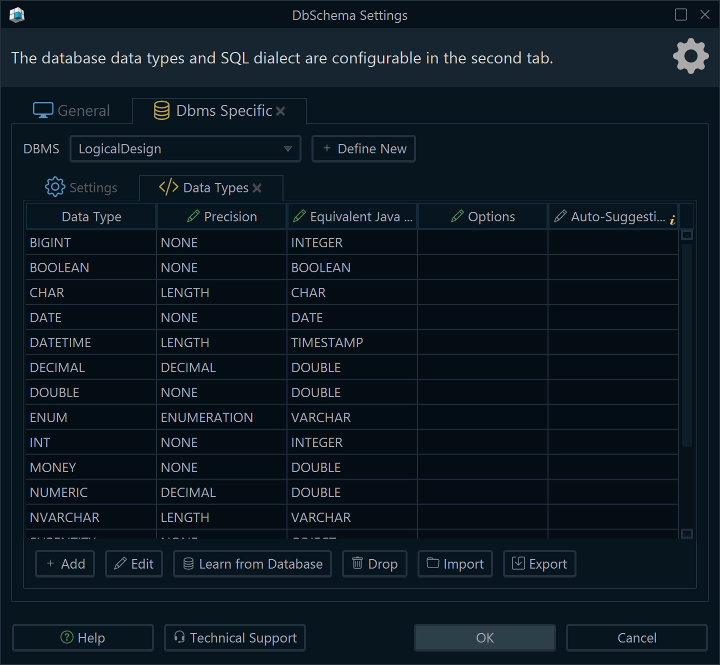
Open the Settings dialog in DbSchema from Edit → Settings and go to the DBMS Specific tab. DbSchema keeps a data type list per database there, and the logical design model has a list of its own, separate from MySQL, PostgreSQL and the rest. You can edit, add or remove the types in any of these lists.
Select Scope
Choose Logical Design to define model-level types.New type
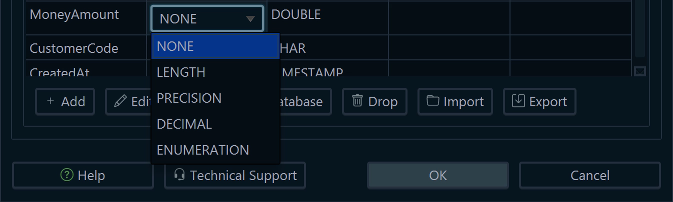
Create a reusable custom data type.A new type carries three things. Its name is what you will see on the attribute. Its equivalent Java type is how DbSchema finds the best matching type when a model is converted from one database to another. Its precision setting says how the type takes its size, and the choices are the same five DbSchema offers for a built-in type: LENGTH for a maximum length, PRECISION for a numeric precision, DECIMAL for precision and scale together, ENUMERATION for a list of allowed values, and NONE for a type that needs no size at all.
Choosing NONE here is worth a moment. A type left without a size takes its precision from the mapping in the next step, which is what you want when the same logical type has to become DECIMAL(19,4) on one engine and something else on another. Nothing in this step touches a database or the design model file: the type list belongs to DbSchema's settings.
Mapping each type to a native type per database
A logical type means nothing to MySQL, so DbSchema keeps the translation in the Conversion Dictionary, which maps logical data types to physical data types for each target database. Three custom types and their MySQL mappings:
| Logical type | MySQL type |
|---|---|
| MoneyAmount | DECIMAL(19,4) |
| CustomerCode | CHAR(10) |
| CreatedAt | TIMESTAMP |
MoneyAmount is the case that pays for the whole exercise. The exact precision and scale live here, in one row, rather than on forty attributes across the model, and changing 19,4 to 19,2 is a single edit that the next generated schema picks up everywhere.
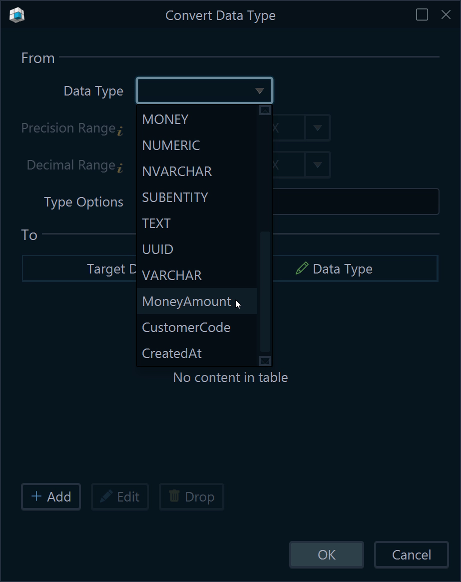
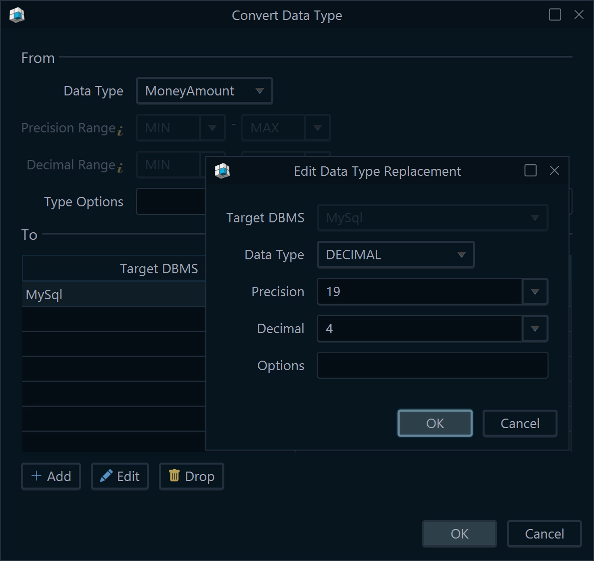
Each target database gets its own column in the dictionary, so one logical type can land differently on each engine. The DbSchema documentation gives the built-in case: the logical type Text converts to VARCHAR(255) for MySQL and NVARCHAR(255) for SQL Server. Your own types behave the same way, and you can customize the mappings per database to match your conventions.
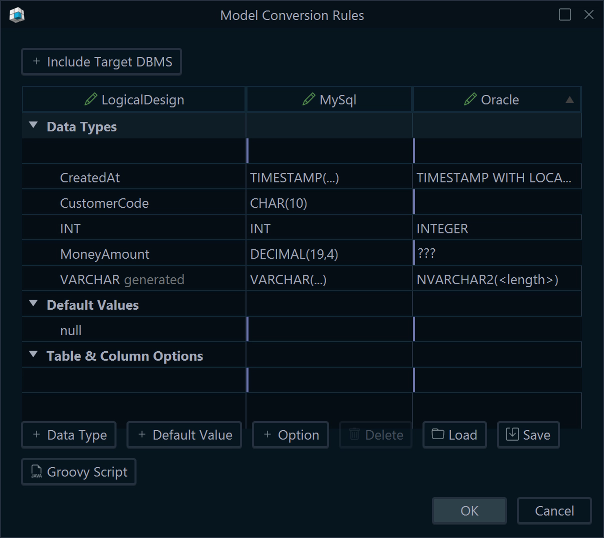

Use the custom type in your model
From here the custom type behaves in DbSchema like any other type in the list. Give an attribute MoneyAmount where you would otherwise have typed a numeric type by hand, and the entity now records what the attribute means rather than how one particular engine stores it. This is the first step that writes to the design model file, and it is the only place the custom name ever appears.
The gain shows up on the second reading rather than the first. An attribute typed MoneyAmount tells the next person that this column is money, which a DECIMAL(19,4) sitting next to a DECIMAL(19,2) does not, and a model validation rule that forbids a retired type has one name to look for instead of a family of numeric spellings.
What happens at deployment
Converting the logical model is where the mappings are spent. Go to Convert Model → Generate Physical Design and DbSchema applies the naming dictionary and the conversion dictionary together, producing an editable physical schema for the database you chose. The logical attribute keeps its meaning and the physical column gets a native type:
| Logical attribute | Logical type | Physical column | MySQL type |
|---|---|---|---|
| OrderTotal | MoneyAmount | order_total | DECIMAL(19,4) |
| CreatedAt | CreatedAt | created_at | TIMESTAMP |
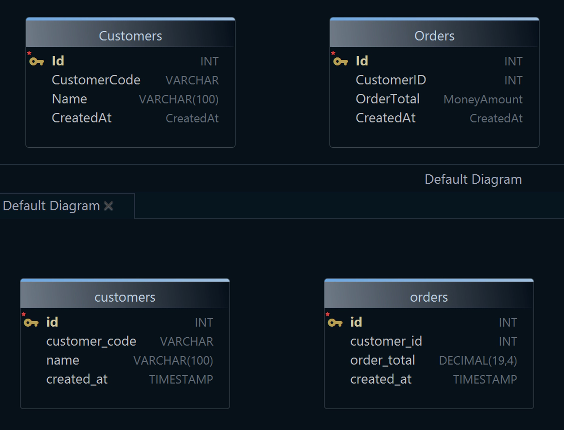
That conversion changes the model, not the database. The database changes one step later, from Schema → Create or Upgrade Schema in Database: DbSchema shows the generated DDL statements, you review them, and Execute runs them. What arrives in the database is DECIMAL(19,4) and TIMESTAMP. A developer reading the deployed schema sees native types and nothing else, which is the intended outcome rather than a loss: the logical names are a modeling decision, and the model file is where DbSchema keeps them.
What to check when the generated type is wrong
Two settings decide the result, and both are worth reading back when a column comes out with a size you did not expect. The precision setting on the type definition says whether the type carries a size of its own, so a type defined with NONE and no mapping has nothing to generate a length from. The mapping is the other half: a target database with no column in the conversion dictionary, or a type with no entry in that column, leaves DbSchema without a native type for the conversion. The custom name missing from the generated column is not a third thing to check: the conversion described above is what replaces it.
Logical design and the conversion dictionary come with the DbSchema Architect edition. Download DbSchema at https://dbschema.com/download.html, start a logical design, and define one type for the value your model repeats most often before you draw the second entity that needs it. From there, designing a relational database schema and logical design for databases cover the rest of the modeling that surrounds these types.









