Azimutt Alternatives for Offline Schema Work
For the database architect who reads an unfamiliar schema in an Azimutt browser tab and now has to design the change, review it in a pull request, and deploy it.
On this page
You opened the schema in a browser tab to understand it, and the next step is to change it. DbSchema is the Azimutt alternative for that second half of the job. It reverse-engineers a live database over JDBC, keeps the whole design in a local .dbs XML file that opens with no connection and no server running, and generates the migration script from the difference between that file and the database.
Azimutt, Liquibase, drawDB and Lucidchart come up on the same shortlist, and each of them keeps the schema somewhere else: a hosted Azimutt project, a changelog file, the browser's own storage, a drawing canvas. The comparison below is on where the design lives, what it costs, and what happens when the database moves.
What is the alternative to Liquibase?
DbSchema is the alternative when the change starts as a diagram instead of as a file you type. You edit the table on the DbSchema diagram, and that edit lands in the .dbs model file and nowhere else. The live database changes at one point: you open Schema → Synchronize Model with Database, read the SQL DbSchema generated from the difference, and click Execute. Saving the design to a file and schema synchronization are Pro features.
How DbSchema generates the migration script
Liquibase works from the other end. You write the changesets by hand, in XML, YAML, JSON or SQL[1], and Liquibase replays them across environments from the pipeline. Its plans are scoped the same way: Starter covers up to 5 applications and 1 database type, Growth up to 10 applications and up to 3 database types, Business up to 25 mission-critical applications and up to 4 database types, and only Enterprise is unlimited on both. Every tier is quoted rather than listed, and Starter and Growth are sold to companies under $1B in annual revenue[2].
A DbSchema licence is per developer, so pointing it at more applications and more engines does not change the price. The script itself comes out of the comparison rather than out of a file you maintain: DbSchema diffs the .dbs model against the target database, lists the added, removed and modified objects, and writes the DDL for the ones you accept. You can read that SQL, edit it in the dialog, and commit it next to the model file, which is the pattern the visual schema migration tools follow.
| Capability | DbSchema | Liquibase |
|---|---|---|
| Change definition | Diagram editing | Hand-written changesets |
| Change format | .dbs XML model file | XML, YAML, JSON or SQL |
| Deployment | Synchronization Dialog | Command-line pipeline |
| Licence scale | Per developer | Per application and database type |
What is the alternative to Lucidchart?
Lucidchart draws the entities on a shared canvas, and its import is a copy-and-paste round trip rather than a connection. You open the Entity Relationship shape library, pick your DBMS in the import menu, copy the query Lucidchart gives you, run it on your database yourself, then paste the results back or upload a .CSV, .TSV or .TXT file. Export runs the other way through an "Export to SQL" dialog, which covers the page "with the exception of connections between tables"[3]. The diagram is accurate on the day you run that query and stays that way until someone runs it again.
DbSchema reads the schema itself. Point it at the database over JDBC and the tables, columns, data types, primary keys and foreign keys come from the catalog, so the diagram is drawn from what is actually there. Connecting, reverse-engineering, interactive diagrams and the SQL editor are in the free Community Edition.
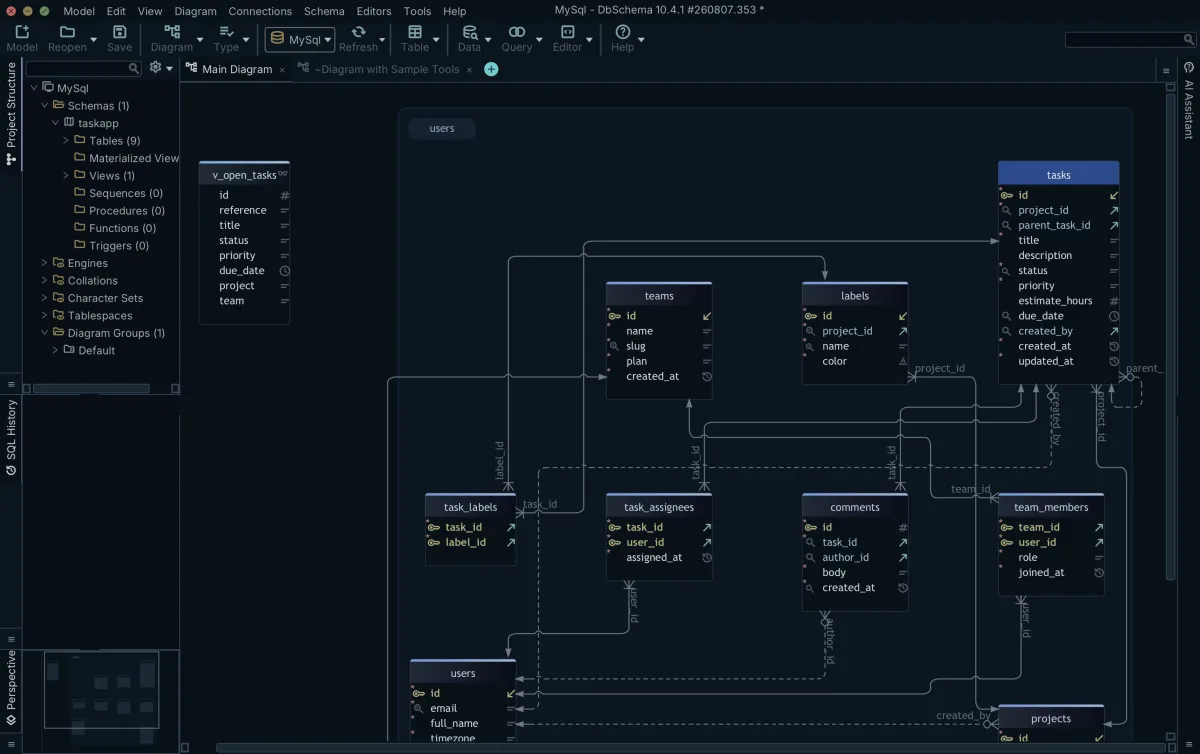
When the database moves ahead of the design, Schema → Compare Model with Database lists what differs object by object, and you choose per difference whether to update the model file or push the change to the database. For the wider question of where a data model belongs, see browser diagramming against desktop tooling.
The Azimutt alternatives shortlist
Three tools cover the visual design work, and they divide it by where the model is stored. DbSchema stores it in a .dbs XML file on your disk. Azimutt stores it in a project on its hosted service, or on an instance you host yourself: the code is open source, the schema is parsed in the browser, and you can keep a project local so Azimutt's servers never see it[4]. drawDB's free editor stores diagrams in the browser's own IndexedDB, which its documentation warns you to back up before clearing the browser[5].
Azimutt's design side is written in AML, the Azimutt Markup Language, a text DSL for declaring entities, attributes and relations that Azimutt describes as database-agnostic and convertible to other dialects[6]. Its browser interface is built for tracing relation paths across a schema you did not write.
| Tool | Where the model lives | Design input |
|---|---|---|
| DbSchema | Local .dbs XML file | Diagram editing |
| Azimutt | Hosted or self-hosted project | AML text, browser canvas |
| drawDB | Browser storage or drawDB cloud | Browser canvas, SQL import |
How each tool handles offline schema work
DbSchema treats the disconnected state as a mode rather than an exception. Switch the connection to Disconnected and every schema change is written to the .dbs file and no statement is sent to the database[7]. You can create tables, edit foreign keys, and spread the schema across several diagrams in the same file; the layout, the column descriptions and the virtual foreign keys all live in that XML.
That file is what makes Git work. DbSchema's Git — Collaborative Design dialog clones the repository, stages the model file, commits it and pushes it, so a schema change travels through a pull request the way a code change does[8]. A colleague pulls the file, opens it in DbSchema, and runs the synchronization against their own database.
Azimutt's offline route is to run it yourself: an instance you host, with the schema parsing done in the browser and the project kept local[4]. drawDB's free editor also runs with no account, keeping the diagrams in browser storage on that one machine[5]. Both of those put the model behind a runtime you have to keep up; DbSchema's model is a file in a folder, which is why it works on a machine with no network at all. Designing offline and saving to a file are Pro features, and the offline design mode page walks through the round trip.
Pricing and licensing compared
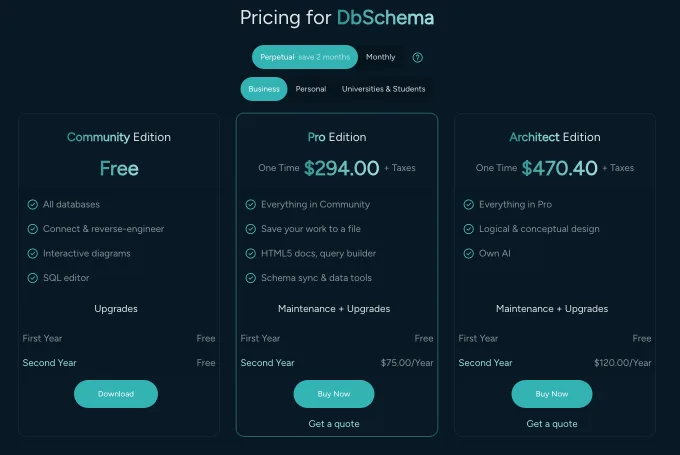
DbSchema Community Edition is free forever and covers all supported engines, connecting and reverse-engineering, interactive diagrams, creating tables and columns, and the SQL editor. Pro Edition is 294.00 USD one time plus taxes, with the first year of maintenance and upgrades included and an optional 75.00 USD a year afterwards; it adds saving the design to a file, HTML5, PDF and Markdown documentation, the visual query builder, schema synchronization, relational data browse, the data generator and the data importer. Architect Edition is 470.40 USD one time plus taxes with an optional 120.00 USD a year, and adds database-independent logical and conceptual design. A monthly subscription is 29.40 USD a month for Pro. For a team that shares seats rather than buying one each, the floating licence is 1,168.00 USD one time plus taxes with an optional 280.00 USD a year, and the number of people working at the same time is the number of seats you bought[9].
Every DbSchema figure in this section, in the paragraph above and in the table below, is a Business tab price in US dollars. The pricing page shows the same amount in your own currency, and it publishes separate Personal and Universities & Students tabs that price the same editions differently.
| Product | Entry price | Licensing |
|---|---|---|
| DbSchema Community | Free | Free forever, all engines |
| DbSchema Pro | 294.00 USD one time | Perpetual, or 29.40 USD monthly |
| DbSchema Architect | 470.40 USD one time | Perpetual, or monthly |
| Azimutt Solo | 7 EUR per month | Billed annually |
| Azimutt Team | 35 EUR per user per month | Billed annually |
| drawDB | Free | Open source, paid cloud plans |
| Liquibase | Quoted | Per application and database type |
Azimutt's free plan is scoped to exploration: no long-term save, no project slot, and a design limit of 10. Solo raises the design limit to unlimited and adds custom colors and schema export. Team adds analysis, collaboration and AI features[4]. Because a DbSchema perpetual licence is bought once rather than rented, the renewal is optional: the version you bought keeps working if you stop renewing.
Who each tool is actually for
DbSchema is for the architect, DBA or backend engineer whose design has to exist as an artifact: a file that opens offline, goes through Git, generates the documentation the rest of the team reads, and produces the migration script for the next release, across the SQL and NoSQL engines DbSchema supports. That is the case this article is about, and it is the case DbSchema is built for.
Azimutt is aimed at reading rather than shipping: developers, analysts and product managers tracing relations through a large monolith or across microservice schemas in a browser[4]. drawDB fits a quick sketch on a machine where nothing is installed[5]. Lucidchart fits a diagram that goes into a slide for people who do not open a database client[3]. Liquibase fits the deployment step, running changesets from the pipeline[2].
Download DbSchema at https://dbschema.com/download.html, connect it to the database you have been reading in Azimutt, and let it reverse-engineer the schema into a diagram. Connecting, reverse-engineering, the diagrams and the SQL editor are in the free Community Edition; the offline model file, schema synchronization and the HTML5 documentation are Pro; logical and conceptual design is Architect.
Frequently asked questions
What is the main difference between Azimutt and DbSchema?
Azimutt keeps the schema in a project and writes its design in AML text; DbSchema keeps it in a local .dbs XML file you edit on a diagram. That file is not tied to one engine: open Model → Model Properties, pick another database under RDBMS, and DbSchema previews how every data type converts before you save the model[7].
Can I use Azimutt offline?
Azimutt's offline route is an instance you host yourself, which the section on offline work above sets against DbSchema's file. DbSchema also opens two .dbs files at once and synchronizes between them, so you can compare the schema on two Git branches with no database connected[7]. The same comparison writes the migration script between those two files.
Is Lucidchart a good alternative for database design?
Lucidchart's ERD import is the copy-and-paste round trip described above, while DbSchema reads the catalog over JDBC. Where all you have is a DDL script rather than a running database, Model → Import from External Format opens that file in an SQL Editor and parses its CREATE TABLE statements straight into the model, with no column mapping step.
Does Liquibase offer visual schema modeling?
Liquibase applies changesets you author by hand, so there is no diagram to design against. DbSchema draws one from the scripts you already have: in Model → Import from External Format, set Source to "Folder with migration scripts" and DbSchema reads every .sql file in the order a database would have applied them. Nothing is executed, and no connection is needed.
How does drawDB compare for offline schema work?
drawDB's free diagrams live in the browser on one machine, and DbSchema's live in a file, which is the difference the offline section above turns on. Because the .dbs file is plain XML, any version control system tracks it, Mercurial and SVN as much as Git[7].
Sources
Design your schema offline, then sync it
DbSchema reverse-engineers your database over JDBC, keeps the design in a local XML model file you can commit to Git, and generates the migration script from a visual diff.









