TablePlus Alternatives with Visual Schema Design
What the TablePlus diagram does, where a design can live instead, and what one seat of each tool costs.
On this page
TablePlus now has a diagram you can edit. The schema is the structure of a database: its tables, their columns and the links between them.
Visual schema design means you shape it on a diagram instead of typing SQL, the language databases understand. With editable diagrams in several tools, the real choice is where your design lives:
- On the connected database. TablePlus edits the database it is connected to. Diagram changes wait until you press ⌘ + S, and then run in that database.
- In a model file kept in Git. Git is a version control system: it records every version of a file. DbSchema Pro saves the design in a model file, a file that holds your whole design. It compares that file with each database and shows the SQL before it runs.
- In a subscription tool. An edition is a level of a product with its own features and price. DBeaver lets you edit diagrams from its Enterprise edition, sold by yearly subscription. DataGrip draws diagrams from a connected database.
If your team reviews schema changes before they reach production, DbSchema is the alternative to try. Every download starts with a 15-day trial of all features, with no registration. DbSchema comes as the free Community Edition and the paid Pro and Architect editions.
What DbSchema adds to visual schema design
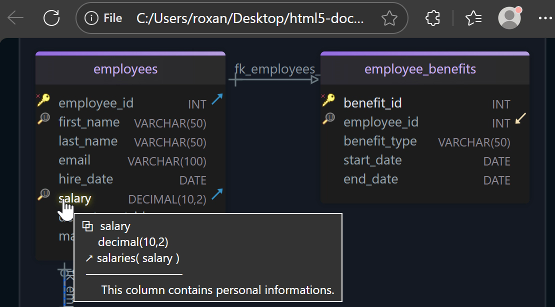
A SQL client is a program that runs queries and shows their results, so it shows you the database. DbSchema also gives you the model, your own copy of the design. You change it, review it and then deploy it.
- Design without touching the database. In DbSchema you can work offline, which means without a connection. Your changes stay in the model, and the database stays as it is. Saving the model to a file needs DbSchema Pro.
- Schema changes reviewed like code. DbSchema Pro saves the design in one model file, with the extension
.dbs. Git Collaboration commits that file to Git. Git shows who made each change, and teammates review it there. - The SQL before it runs. Schema synchronization compares the model with a database you connect to and lists every difference. For each one, you choose whether the model or the database wins. DbSchema shows the SQL first. Synchronization needs DbSchema Pro.
- One reviewed change for every database. Many teams run several copies of a database. Development is where they build, test is where they check, and production serves the users. DbSchema Pro compares the same model with each copy, so each gets the same reviewed change.
- A free start on the database you have. The DbSchema Community Edition connects to your database and draws it as an interactive diagram. It is free for any use.
The steps are under Change a schema offline and deploy it in DbSchema.
What the TablePlus diagram does
TablePlus is a SQL client with native apps, built for each system, on macOS, Windows and Linux. TablePlus for macOS added a diagram in version 7.1.8, released on 10 June 2026.
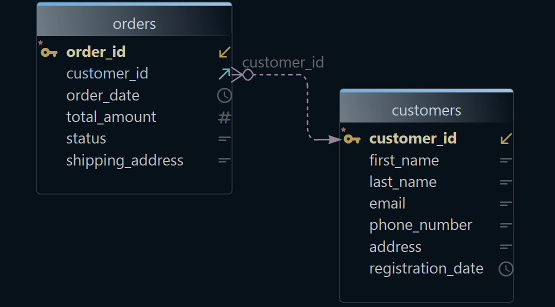
Its ER Diagram page describes the diagram. An ER diagram, short for entity-relationship diagram, shows each table as a box. A line links each foreign key, a column that points to a row in another table, to the column it references.
In TablePlus, the diagram shows one schema at a time. You can rename tables, edit columns and indexes, and create or remove foreign keys. An index is a lookup structure that makes searches in a table faster.
The changes wait until you press ⌘ + S. Then they run in the connected database. A later macOS release, version 27.2.0 from 28 October 2026, added Sync Database in place of Backup and Restore.
Where the design lives in DbSchema
DbSchema keeps a design model next to the database. The model is DbSchema's own copy of the schema, saved in a .dbs file. You change the model, and the database changes only when you decide.
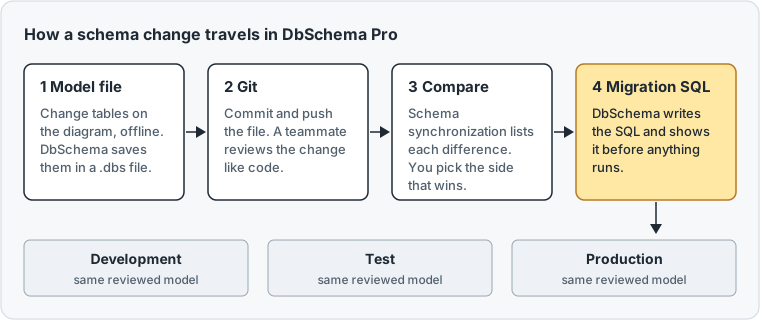
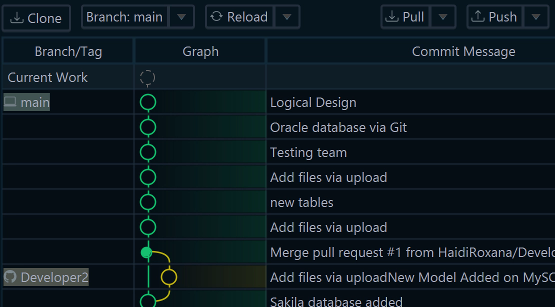
A commit is a saved version of a file in Git, with a message. A push sends your commits to the team's shared copy. On that shared copy, a teammate reads the change before it reaches any database.
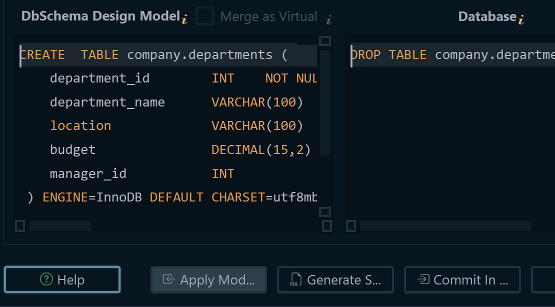
Schema synchronization then lists every difference between the model and a database. For each one, you choose the side that wins. DbSchema writes a migration script, the SQL that turns one version of a schema into the next.
DbSchema runs on Windows, macOS and Linux, and connects to more than 100 SQL and NoSQL databases. NoSQL databases, such as MongoDB, store data without fixed tables.
Other alternatives with a diagram
DBeaver draws ER diagrams that are read-only by default. Its edition comparison puts ERD Edit mode, which lets you change tables on the diagram, in Enterprise and Ultimate. Those are DBeaver's higher editions, sold by yearly subscription.
DataGrip draws diagrams from a connected database. Data modeling means designing the schema before you build it. A JetBrains team member wrote in 2022 that "DataGrip is not the tool for data modeling" (DBE-14740).
DBeaver alternatives for visual database design and DataGrip alternatives for schema design go deeper on each tool.
Change a schema offline and deploy it in DbSchema
The first step works in the free Community Edition. The others need DbSchema Pro, and the 15-day trial includes them.
- Connect to the database you use today. DbSchema reverse-engineers it, which means it reads the existing tables and draws them as a diagram.
- Click the connection button in the toolbar and choose Offline (connect later). You are now offline, and the model stays open.
- Edit tables, columns and keys on the diagram. Save the model with File → Save Model to File.
- Choose File → Git Collaboration. Tick the model file, type a Commit message, press Commit, then Push.
- Click the connection button again and choose your connection. When DbSchema asks how to bring the model and the database together, choose Compare.
- In the Synchronize Model and Database dialog, click the side that wins on each row.
- Press Generate SQL script to write the migration script, or Commit in the database to run it.
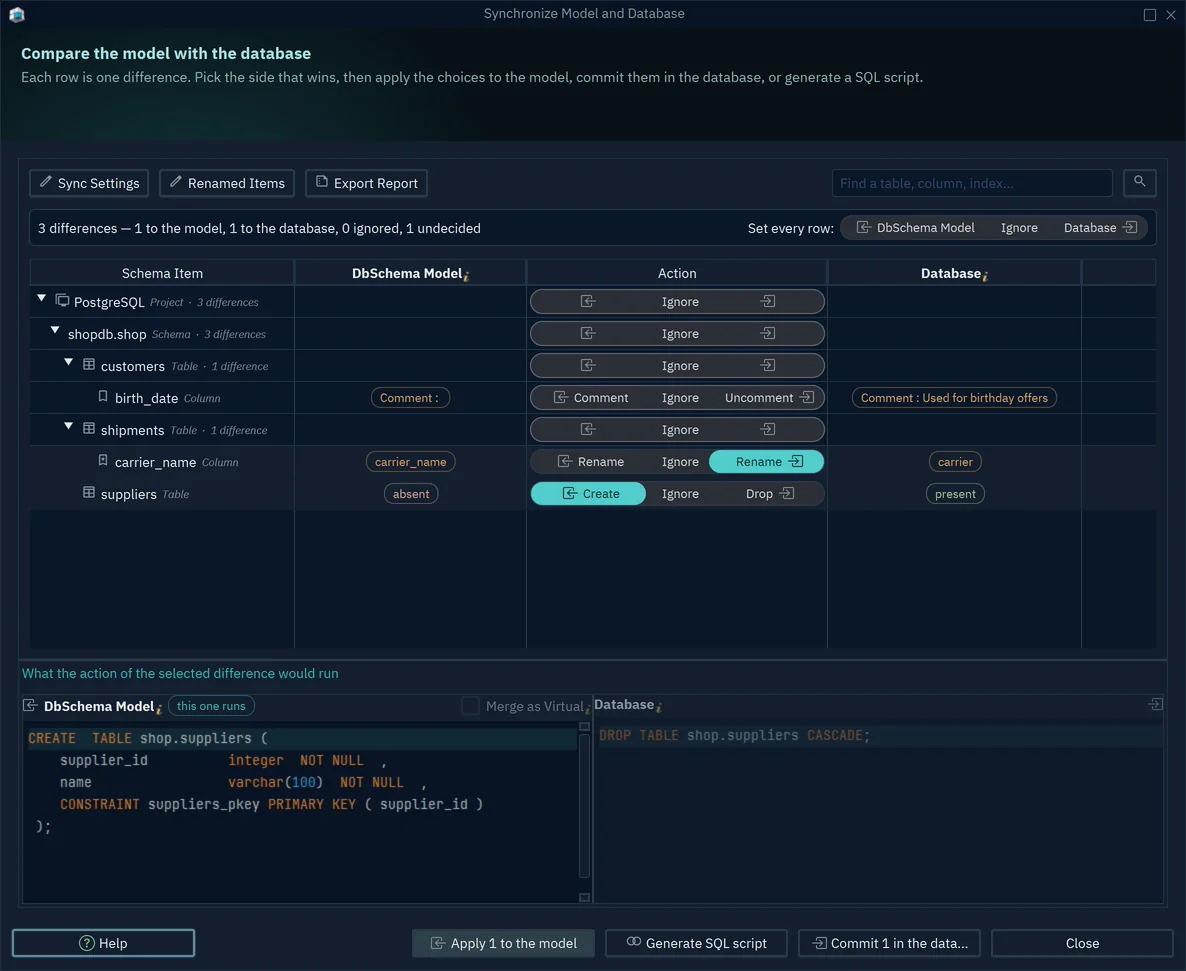
In the dialog above, select a row to see its SQL in the lower pane. The label "this one runs" marks the side you chose.
For the test and production databases, repeat steps 5 to 7 with their connections. The model stays the same, so each database gets the change your team reviewed.
What one seat costs over three years
A seat is one licence for one user. Each price is for commercial use, before tax, from the vendor's own page on 15 November 2026. The three-year figure includes updates for all three years.
| Tool and edition | How you pay | Year one | Three years |
|---|---|---|---|
| DbSchema Pro, business licence | Once, updates 75 USD a year from year two | 294 USD | 444 USD |
| TablePlus Basic, one device | Once, renewal 59 USD a year | 99 USD | 217 USD |
| DBeaver Enterprise | Yearly subscription | 255 USD | 765 USD |
| DataGrip, organization | Yearly subscription | 259 EUR | 777 EUR |
TablePlus Basic and DbSchema Pro are both perpetual licences: you buy them once and keep using them. A subscription works only while you pay. Against the two subscription tools, DbSchema Pro costs 444 USD over three years, where DBeaver Enterprise costs 765 USD and DataGrip 777 EUR.
DbSchema Pro keeps working when you stop paying for updates. A seat that skips the two renewals costs 294 USD in total, not 444 USD.
A DbSchema licence is per developer. You can install it on two computers and use one at a time.
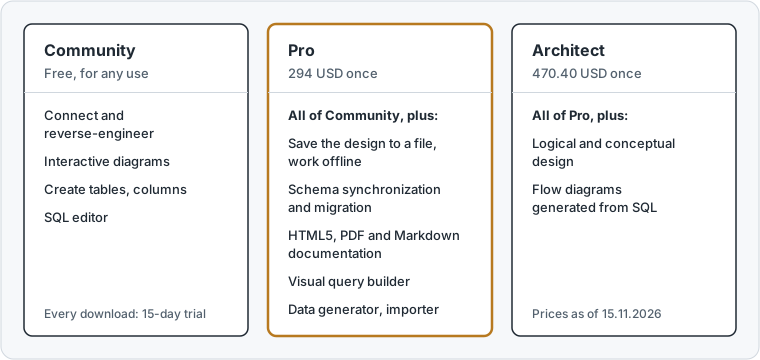
DbSchema Architect costs 470.40 USD. It adds logical and conceptual design, which means designing tables and their meaning before you pick a database.
DbSchema Pro covers the model file, Git and synchronization. After the trial, the Community Edition stays free for any use, and the purchase page lists every edition.
Download DbSchema and try every feature free for 15 days. Connect to your database, change a table offline, and compare the model with the database.
Frequently asked questions
Does DbSchema need a cloud account?
No, DbSchema is a desktop program that connects to your database directly. The download needs no registration, and the model file stays on your computer or your Git server.
Sources
Design the schema before it reaches the database
Connecting, reverse-engineering and diagrams are free in the DbSchema Community Edition. Saving the model, keeping it in Git and schema synchronization are in DbSchema Pro.