DBeaver Alternatives for Visual Database Design
For the backend developer who runs DBeaver every day and now has to design a schema, keep it in Git, and produce the migration script.
On this page
The release needs three tables nobody has created yet. DBeaver is open on the second screen. The diagram from the last design review is a PNG in a wiki. DbSchema is the alternative that covers that side of the work. It reverse-engineers the database into a diagram you edit, keeps the design in a local model file you commit next to the application code, and generates the migration DDL from the difference between that file and the live database.
Four other products come up on the same shortlist and divide the job differently: pgAdmin, DbVisualizer, Navicat Premium and dbForge Studio. For the head-to-head criterion by criterion, see DBeaver alternative: why DbSchema fits database design better.
The shortlist and why each is on it
DbSchema is a desktop database design tool covering 70+ SQL and NoSQL databases. It reverse-engineers a live schema over JDBC into interactive diagrams, holds the design in a local .dbs model file, and writes the migration DDL from the difference between that file and a database. Editing the diagram changes the model file and nothing else; the database changes at one point only, when you open Schema → Synchronize Model with Database and click Execute. Connecting, reverse-engineering, the diagrams and the SQL editor are in the free Community Edition. Saving the model to a file, schema synchronization, the documentation export, the Query Builder and the Relational Data Editor are Pro. DbSchema is licensed per user, and the purchase page prices in your own currency, on separate tabs for Business, Personal, and Universities & Students[5].
DBeaver is a SQL client and administration platform, and its free Community edition sits outside the paid line-up. On the PRO side, DBeaver prices Lite, Enterprise and Ultimate at 113, 255 and 510 USD per year, and its own comparison table puts database schema development in ERD Edit mode, schema compare and migration, and syncing projects to a Git repository in Enterprise and Ultimate[1]. The Visual Query Builder is available from Lite upward.
pgAdmin 4 is the open-source management tool for Postgres, documented at version 9.17 as a graphical interface that covers creating, maintaining and using database objects[2]. It is PostgreSQL only, and it runs both as a desktop application and as a deployed web application.
DbVisualizer is a cross-platform SQL client over JDBC. A free version carries the standard feature set, and the full feature set is a Pro subscription at 199 USD per user for the first year and 89 USD per year afterwards, both excluding VAT; every subscription includes a perpetual usage licence for the versions released during the term[3].
Navicat Premium is a commercial GUI client that holds connections to several engines at once and adds data modeling and data sync. Navicat sells it per user, as a perpetual licence or a subscription, with volume discounts from five seats and a separate non-commercial programme for educational and non-profit use[6].
dbForge Studio is an engine-specific IDE, sold as one product for SQL Server and another for MySQL. The SQL Server editions page lists a free Express edition that activates when the trial expires[4]. The paid editions are priced on two switches on the ordering page. With Purchase Type on Subscription and the duration on 1 year, Standard, Professional and Enterprise are 299.95, 479.95 and 659.95 USD, premium support included and tax excluded. Move Purchase Type to Perpetual, with the same one year of support and upgrades, and the three read 599.95, 959.95 and 1319.95 USD[7]. The Studio runs on Windows.
Is DBeaver still good?
DBeaver answers what a running database is doing right now, which is the question a SQL client is built for. The search for an alternative starts when the task changes from reading a database to producing one, because that work needs three things a live connection cannot hold.
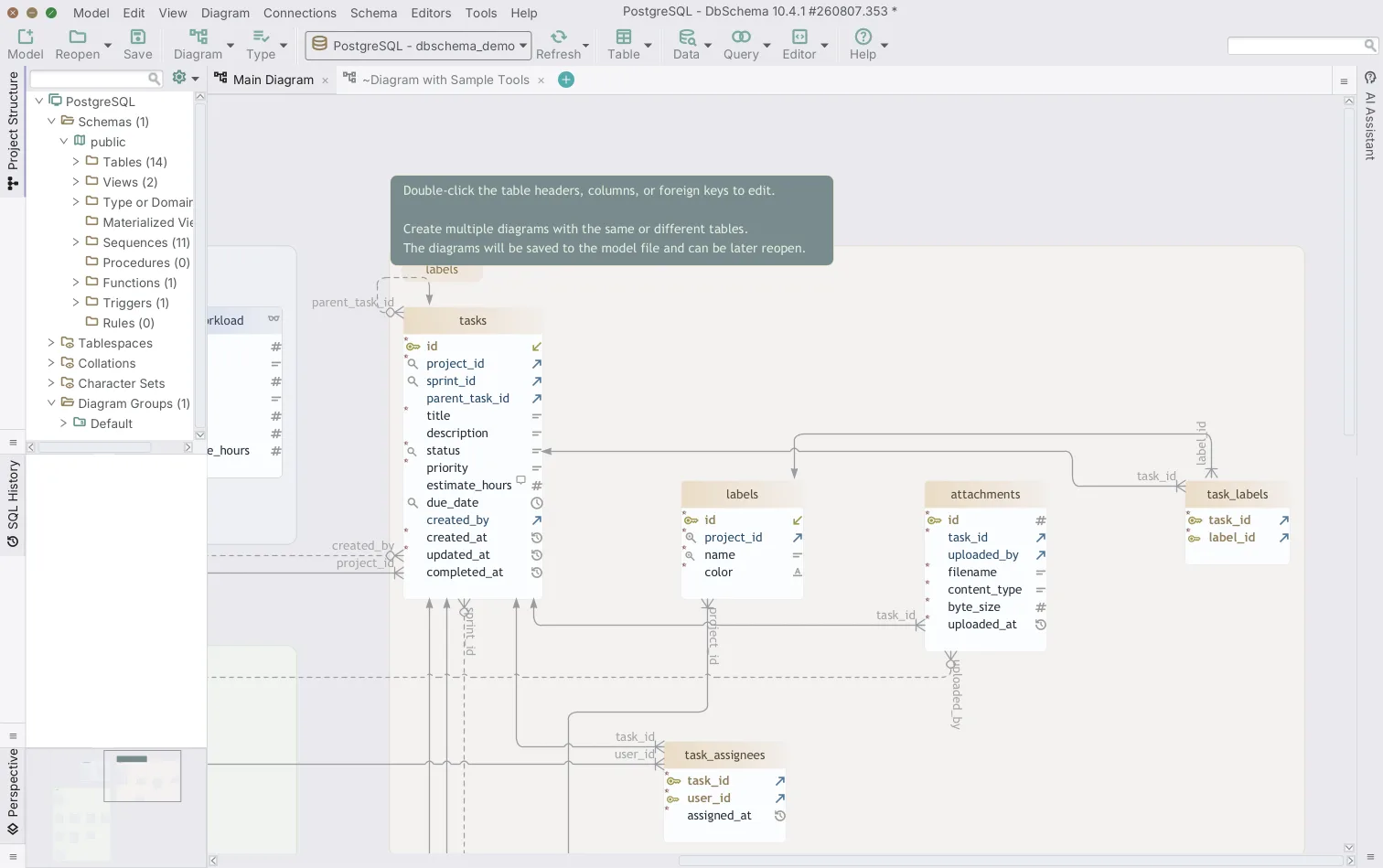
The first is a design that exists before the database does. DbSchema creates tables, columns, keys and indexes on the canvas with no connection open, and every one of those edits lands in the .dbs model file rather than on a server. The second is a layout that survives being closed. A diagram redrawn from live metadata each time it opens is not the arrangement the next reviewer sees, while DbSchema saves table positions, groups and notes in the model file, so the diagram behaves like a document: run Diagram → Auto Arrange once on a freshly reverse-engineered schema, move what you care about, and the arrangement stays.
The third is a change script somebody can read before it runs. DbSchema compares the model against the target database, lists the differences object by object, and generates the SQL from what you select. Sharing the result is the same file again, since Diagram → Export HTML5 or PDF Documentation writes an interactive page with a searchable table list and column descriptions as mouse-over tooltips, which a colleague opens in a browser with no server behind it.
What each tool covers at a glance
The row that decides most shortlists is the design file: whether there is a schema artifact that lives outside the database and travels through a pull request.
| Tool | Platforms | Engines | Design file | Free tier | Licence |
|---|---|---|---|---|---|
| DbSchema | Windows, macOS, Linux | 70+ SQL and NoSQL | .dbs model file, offline | Community, no time limit | Per user, perpetual or monthly |
| DBeaver | Windows, macOS, Linux | SQL and NoSQL | Live connection | Community, open source | Per year, Lite to Ultimate |
| pgAdmin 4 | Windows, macOS, Linux, web | PostgreSQL | Live connection | Open source | Free |
| DbVisualizer | Windows, macOS, Linux | JDBC databases | Live connection | Standard feature set | Per user, per year |
| Navicat Premium | Windows, macOS, Linux | MySQL, PostgreSQL, Oracle, MongoDB and more | Model files and live | Trial | Per user, perpetual or subscription |
| dbForge Studio | Windows | One engine per product | Live connection | Express edition | Per user, per engine |
Two columns in that grid move together. A product whose only schema is the live connection tends to bill per year, because access to a running installation is what the money buys. DbSchema Pro is one payment per user, with a year of updates included and the yearly renewal marked optional on the purchase page, so the version you bought keeps working whether or not you renew[5]. The engine column then matters more for DbSchema than for the rest, because one DbSchema licence covers every engine it supports: a team that adds a MongoDB cluster next quarter adds a diagram to the same model rather than a second product. dbForge Studio sits at the other end of that axis, with a separate licence for SQL Server and for MySQL.
Which is better, DBeaver or DbVisualizer?
The two answer the same question, so the split is licensing and support rather than capability. DbVisualizer's paid tier is a subscription that carries a perpetual usage licence for the versions released during the term, at 199 USD per user for the first year and 89 USD per year afterwards, and the first 60 days include support from the development team[3]. DBeaver charges per year per edition, and what you get for the money is tiered: the visual query builder from Lite upward, schema compare and Git project sync from Enterprise[1].
Both draw their diagrams from live metadata, so in each case the diagram is a view of a connection rather than a file you can branch, review and merge. DbSchema adds that layer, and its SQL editor, in the free Community Edition, covers the day-to-day queries either of the other two would have handled.
Is pgAdmin better than DBeaver?
pgAdmin 4 goes deeper on one engine, and DBeaver goes wider across many. The pgAdmin documentation describes a graphical interface for creating, maintaining and using Postgres objects, with a query tool, and it ships both as a desktop application and as a web application you deploy for a team[2]. If every database you own is PostgreSQL and the job is server administration, that is the shape you want.
Once a second engine appears, the question changes. DbSchema connects to 70+ SQL and NoSQL databases from the same installation and draws them all as diagrams in one model, so a schema that spans PostgreSQL and MongoDB is documented in one place. For MongoDB, DbSchema shows the collections and their inferred structure as interactive diagrams, and where a collection carries a validation rule it reverse-engineers that rule into the model as the authoritative structure.
DbSchema, Navicat and dbForge Studio compared
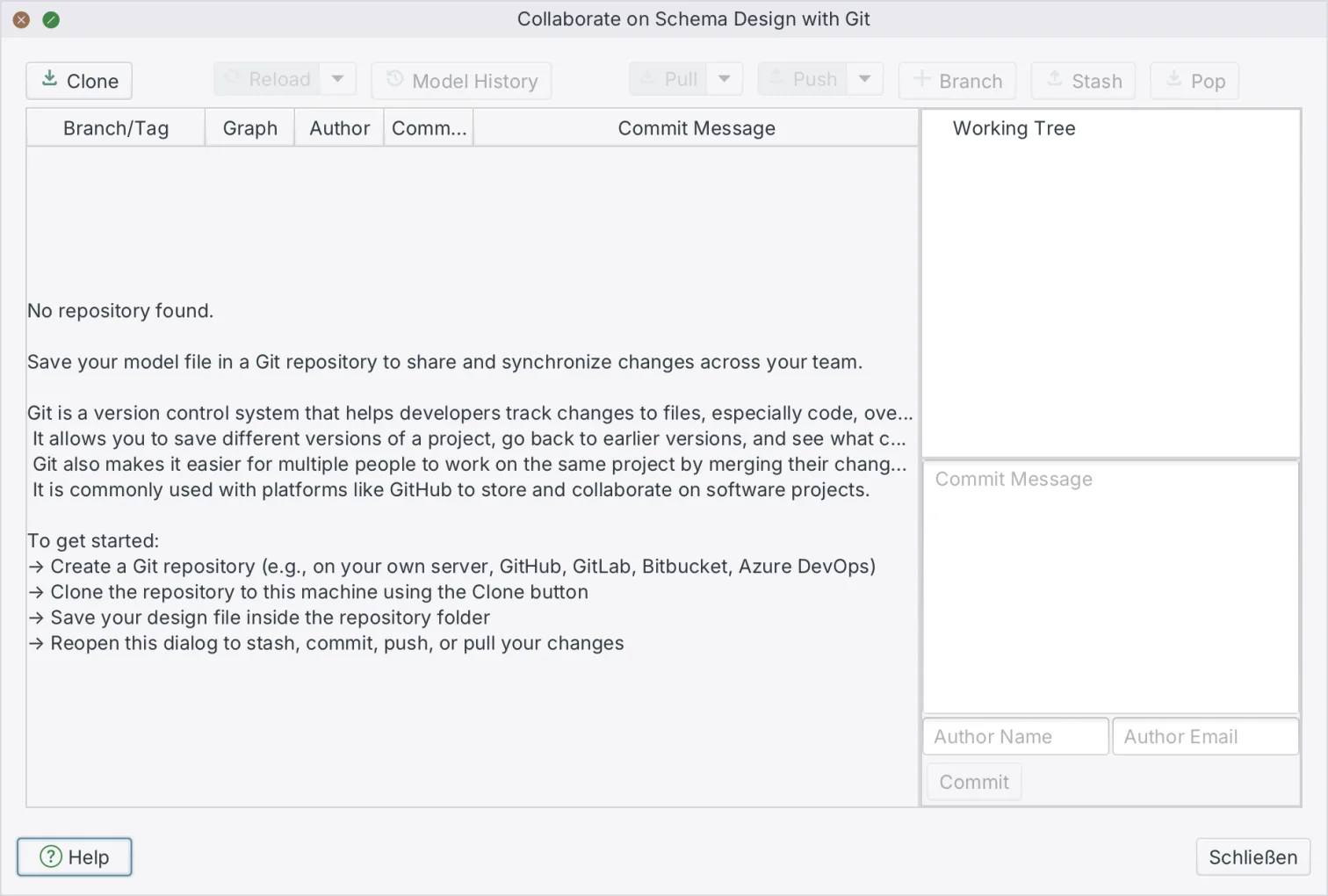
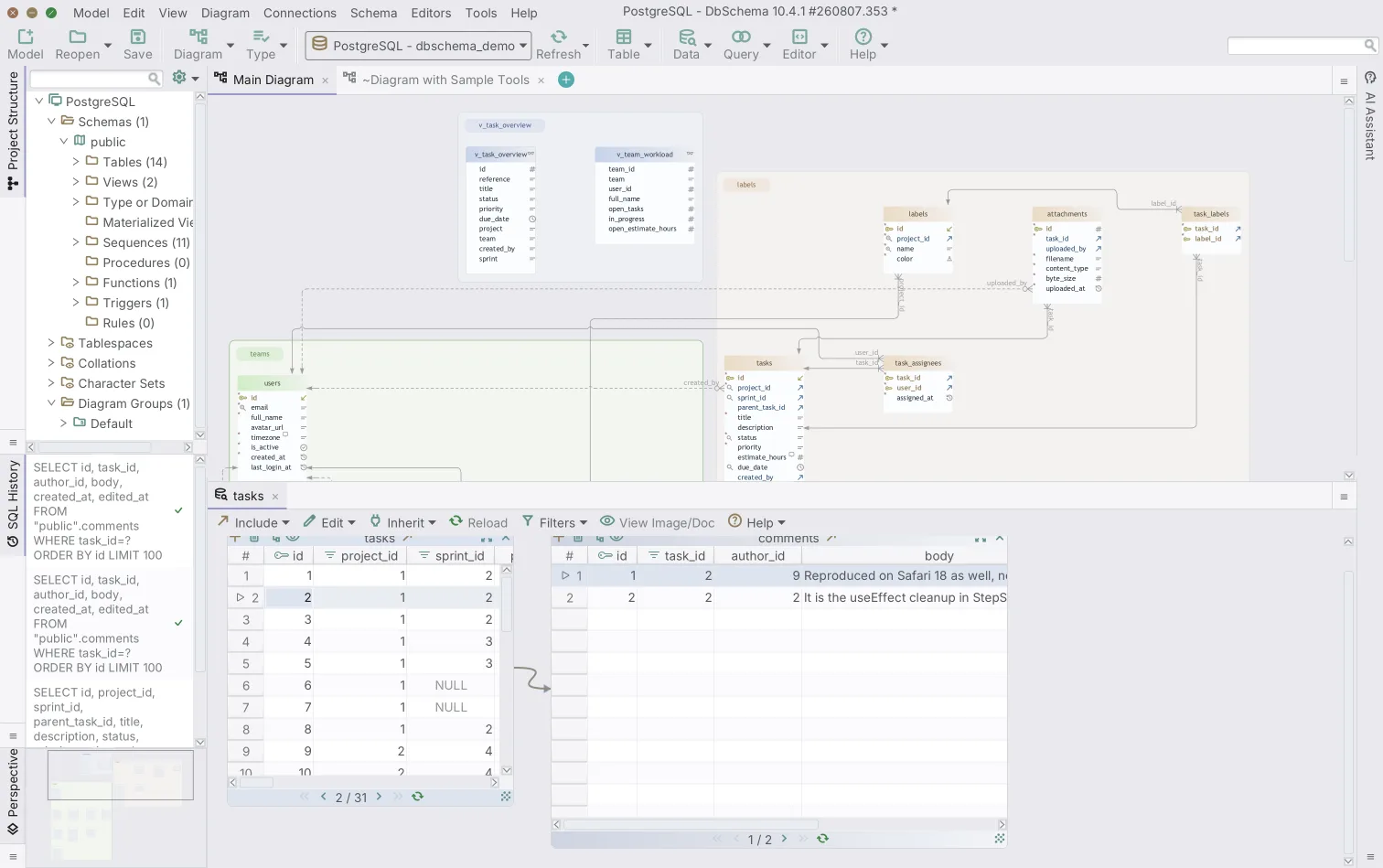
DbSchema designs schemas while Navicat Premium and dbForge Studio administer servers, so the comparison is about which artifact you end up owning. DbSchema hands you a model file: plain XML holding the schema plus every diagram, layout, group and virtual foreign key. From the Model menu you open the Git dialog, clone a repository, stage, commit and push, so a schema change reads as added and removed lines in a pull request. Committing changes the repository; the database changes only when you synchronize. The Relational Data Editor then opens parent and child tables side by side over the foreign keys, and a virtual foreign key you drag between two columns links tables the database never constrained. The model file, the Git dialog, schema synchronization, the HTML5 documentation and the Relational Data Editor are Pro.
Navicat Premium spreads across engines, with concurrent connections, data modeling and data sync, priced per user as a perpetual licence or a subscription and discounted from five seats[6]. dbForge Studio goes the other way, one engine per product, with code completion and automation written for SQL Server or for MySQL specifically, in a free Express edition and three paid editions sold either as a subscription or as a perpetual licence[7]. If your week mixes schema work with server administration, DbSchema owns the schema and one admin client covers the servers.
Switching from DBeaver and what carries over
The database itself carries over untouched, because both products reach it over JDBC drivers. Host names, ports, credentials and driver parameters mean the same thing in DbSchema, and saved .sql scripts open and run in the DbSchema SQL editor, which is in Community. DbSchema reverse-engineers the whole schema in one pass, with every foreign key drawn, so nothing about the existing structure has to be retyped.
Two things you build once. Connections are entered again, since each product keeps its own store, and diagram layouts are arranged again, because a DBeaver diagram exported as an image is not a schema any modeling tool reads back. That second one is a one-time cost: after Diagram → Auto Arrange and a pass of grouping tables into the diagrams your team wants, the layout is saved in the model file from then on.
Test it on a schema you already understand. Download DbSchema at https://dbschema.com/download.html, point it at the database DBeaver is already connected to, and let it reverse-engineer the schema into a diagram. Connecting, reverse-engineering, the diagrams and the SQL editor are in the free Community Edition; the model file, Git versioning, schema synchronization and the HTML5 documentation are Pro, and logical and conceptual design is Architect.
FAQ
What is the best DBeaver alternative for visual database design?
DbSchema, when the job is designing rather than querying. One .dbs model file holds several diagrams of the same schema, each with its own layout and focus, so billing and authentication get a readable picture each instead of sharing one crowded canvas. That same file is what DbSchema compares against a live database to generate the migration DDL.
Can I keep using DBeaver alongside DbSchema?
Neither product locks the other out, because both reach the database over JDBC drivers. DbSchema downloads the driver for the database you pick from its own public repository, and the Driver Manager under Connections → Manage JDBC Drivers accepts an uploaded .jar where a machine has no internet access.
Does DBeaver support offline schema design?
DBeaver draws its diagrams from a live connection, and the shortlist above says which editions carry its ERD editing. DbSchema has a disconnected mode you switch to from the connection menu in the toolbar: you design tables, columns and keys with no database attached, and you review and selectively apply the accumulated differences when you reconnect. Saving that design to a model file is Pro.
Does DbSchema support Git versioning?
DbSchema saves the design as a local XML file and versions it from inside the application: choose Git — Collaborative Design from the Model menu to open the Git dialog, then clone, stage, commit and push. Saving the model to a file is a Pro feature.
Is DBeaver free for commercial use?
DBeaver Community is free and open source, and the PRO tiers priced in the shortlist above are the paid line. DbSchema Community Edition is free with no time limit and covers commercial work as well. When a team does buy, a DbSchema commercial licence can be reassigned to another person, and a floating licence is a shared pool that a larger team draws seats from.









