DBeaver vs DataGrip vs DbSchema: Features and Cost per Seat
Which of the three builds queries from foreign keys, which keeps the design in a file you can review, and what one seat costs over three years.
On this page
DbSchema, DBeaver and DataGrip all connect to a database and draw its schema. The schema is the structure of a database: its tables, their columns and the links between them. The three tools differ in three ways: building queries with the mouse, keeping the design in a file, and the price of one seat.
A seat is one licence for one developer. Each tool comes in editions, levels of the product with their own features and price.
Here is the short answer, from the vendors' own pages on 15 November 2026:
- DataGrip has no visual query builder in any licence. A visual query builder writes a query while you click tables and columns. A query is a request for data, written in SQL, the language databases understand.
- DBeaver builds queries visually from its Lite edition. Schema compare lists the differences between two versions of a schema. DBeaver includes schema compare only from its Enterprise edition up, at 255 USD a year.
- DbSchema Pro does both and keeps the design in a model file. The model file is DbSchema's own copy of your tables, columns and keys, saved on your computer. One seat of DbSchema Pro costs 444 USD over three years, with every update.
If you build queries across several tables and also change the schema, DbSchema covers both in one window. Every download starts with a 15-day trial of all features, with no registration.
What DbSchema adds to visual queries and schema design
A SQL client is a program that runs queries and shows their results, so it shows you the database. DbSchema also gives you the model, your own copy of the design. You change it, review it and then deploy it.
- Joins without typing them. A join combines the rows of two tables, such as each customer with their orders. The Query Builder writes the join from the foreign key, a column that points to a row in another table. It shows the SQL as you click, in DbSchema Pro.
- Related rows in one click. The Data Explorer opens a customer, then that customer's orders, joined by an arrow. It is part of DbSchema Pro.
- Schema changes reviewed like code. DbSchema Pro saves the design in one model file with the extension
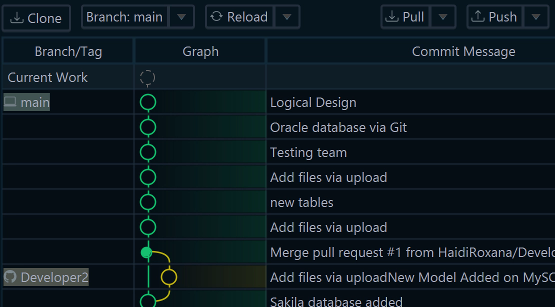
.dbs. Git Collaboration commits that file to Git. Git is a version control system: it records every version of a file and who made each change. - The SQL before anything runs. Schema synchronization compares the model with a database you connect to and lists every difference. You choose which side wins, and DbSchema shows the SQL first. Synchronization needs DbSchema Pro.
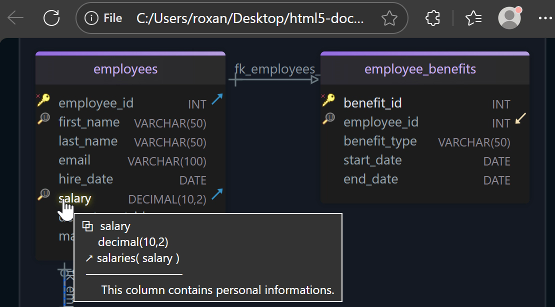
- Documentation for people without DbSchema. Schema Documentation writes the diagram and every table as an HTML5 web page, a PDF or Markdown. Markdown is a plain-text format that Git servers display as a page. Documentation is part of DbSchema Pro.
The steps are under Build a query from the foreign keys in DbSchema.
How the three tools differ
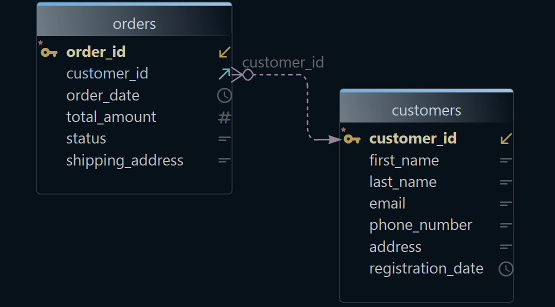
All three draw an ER diagram, short for entity-relationship diagram. It shows each table as a box and each foreign key as a line.
They differ in what you can do from the diagram. They also differ in which edition includes each feature.
A migration script is the SQL that turns one version of a schema into the next. A perpetual licence is one you buy once and keep using.
A subscription works only while you pay. The table lists the editions that include each feature, as the vendors' pages showed them on 15 November 2026.
| Feature | DbSchema | DBeaver | DataGrip |
|---|---|---|---|
| Visual query builder | Pro, Architect | Lite, Enterprise, Ultimate | None |
| Schema compare with a migration script | Pro, Architect | Enterprise, Ultimate | Commercial licence |
| Schema documentation | HTML5, PDF, Markdown (Pro) | No generator | Diagram export only |
| Free edition | Community, for any use | Community | Non-commercial use only |
| Licence | Perpetual or monthly | Monthly or yearly subscription | Monthly or yearly subscription |
DBeaver lists its Visual Query Builder for Lite, Enterprise and Ultimate only. So DBeaver Community has none. DBeaver's ER diagrams are read-only by default.
The DBeaver edition comparison puts ERD Edit mode, schema compare and mock data generation in Enterprise and Ultimate. ERD Edit mode lets you change tables on the diagram.
Mock data means generated test rows. A documentation generator has been an open DBeaver request since 2019.
DataGrip draws diagrams and exports them as graph files and PNG images. Its request for a visual query builder has been open since 2016. In 2026, a JetBrains team member wrote that "the future of this feature seems to be a bit uncertain".
Where the design lives
A SQL client works on the database itself. When you edit a table there, the change runs in that database. For the test and production databases, you make the same change again.
DbSchema keeps a design model next to the database. You can change the model offline, which means without a connection, and the database stays as it is. Then you commit the model file to Git, and a teammate reviews the change like code.
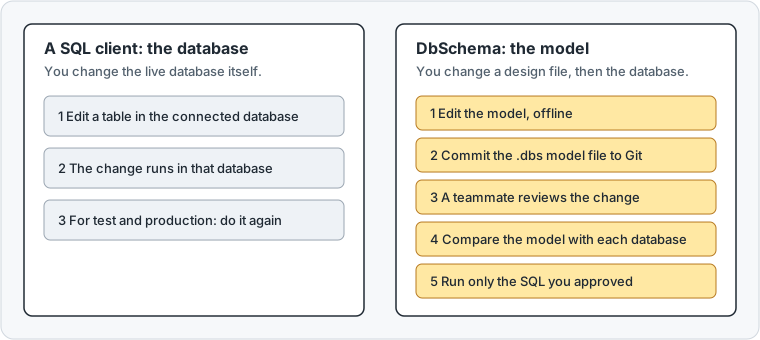
Schema synchronization then compares the model with each database and writes the SQL. So the same reviewed change moves from development to test to production.
Data modeling means designing the schema before you build it. JetBrains told a DataGrip user in 2022 that "DataGrip is not the tool for data modeling" (DBE-14740).
DataGrip alternatives for schema design and DBeaver alternatives for visual database design go deeper on the design side.
Build a query from the foreign keys in DbSchema
The menus call the Query Builder the Query Editor. It needs DbSchema Pro, and the 15-day trial includes it.
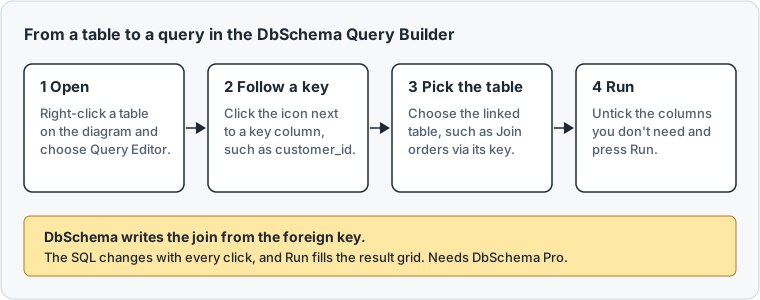
- Right-click a table on the diagram, such as
customers, and choose Query Editor. Ctrl+B does the same. - The builder opens under the diagram. Double-click its tab to give it the whole diagram area.
- Click the icon at the right of a key column, such as
customer_id. DbSchema lists the tables linked to it. - Choose a table, such as Join orders via orders_customer_id_fkey.
- Untick the columns you don't want, and press Run.
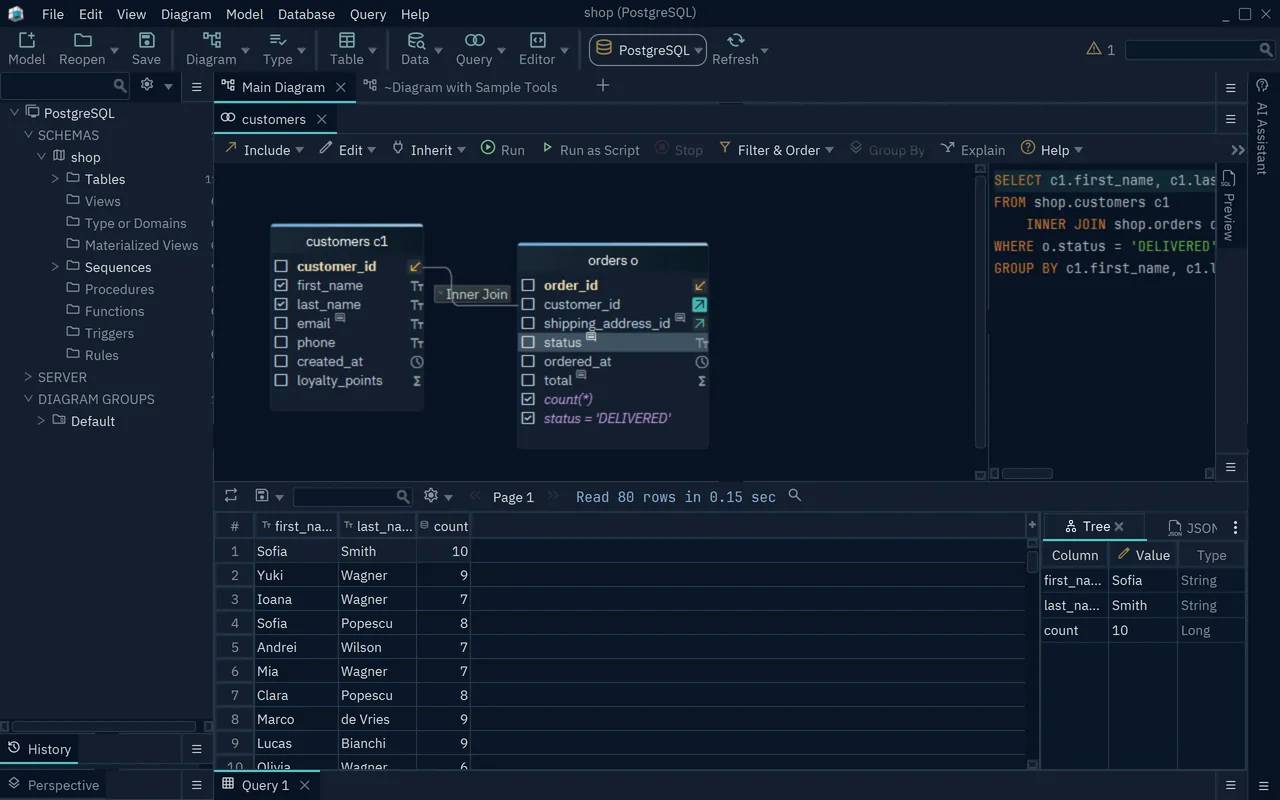
- 1The join comes from the foreign key
- 2The SQL, updated with every click
- 3The result after Run
The join is an inner join: it keeps only the customers that have orders. Click the join label on the line between the tables to pick another join.
Left Join, for example, also keeps the customers without orders. Right-click a column to filter, sort or count the rows.
Some databases declare no foreign keys. Then the builder follows virtual foreign keys, which exist only in the DbSchema model and never change the database.
To browse rows instead of writing a query, right-click the table and choose Data Explorer. Click a customer, click the arrow button next to the table name, and pick orders.
Keep the design in Git
Saving the model to a file needs DbSchema Pro. A repository is a folder that Git tracks, with its whole history. A commit is a saved version with a message, and a push sends it to your team's shared copy.
- Save the model into a folder of the repository with File → Save Model to File, or press Ctrl+S.
- Choose File → Git Collaboration. Uncommitted changes lists the files that changed.
- Tick the model file, such as
shop.dbs, and type a Commit message. - Press Commit, then Push.

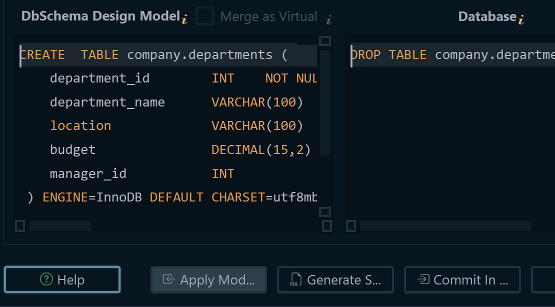
To bring the change into a database, connect and choose Compare. In the Synchronize Model and Database dialog, click the side that wins on each row. Generate SQL script writes the migration script without running it.
What one seat costs over three years
Each price is for commercial use, before tax, from the vendor's own page on 15 November 2026. Three years means updates for all three years.
| Edition | How you pay | Year one | Three years |
|---|---|---|---|
| DbSchema Pro, business licence | Once, updates 75 USD a year from year two | 294 USD | 444 USD |
| DBeaver Lite | Yearly subscription | 113 USD | 339 USD |
| DBeaver Enterprise | Yearly subscription | 255 USD | 765 USD |
| DBeaver Ultimate | Yearly subscription | 510 USD | 1,530 USD |
| DataGrip, organization | Yearly subscription | 259 EUR | 777 EUR |
DBeaver Lite costs less than DbSchema Pro. Of the features in the feature table above, Lite has only the Visual Query Builder. With schema compare, the cheapest DBeaver edition is Enterprise: 765 USD against 444 USD for DbSchema Pro.
DataGrip showed euro prices on its pricing page. At 777 EUR, it still has no visual query builder. Among the editions that build queries visually and compare schemas, DbSchema Pro costs the least over three years.
The licence also decides what you keep. DBeaver blocks access when a subscription ends. It has sold no new perpetual licences since its version 23.3.
DbSchema Pro is perpetual and keeps working when you stop paying for updates. A seat that skips the two renewals costs 294 USD in total, not 444 USD.
After the trial, the Community Edition stays free for any use. It connects to your database and reverse-engineers it, which means it reads the existing tables and draws them as a diagram.
Download DbSchema and try every feature free for 15 days, with no registration. Build a join in the Query Builder, commit the model to Git, and compare it with your database. DbSchema Pro covers all of it, and the purchase page lists every edition.
Frequently asked questions
Can a team share DbSchema seats?
Yes, with a Floating License, which the whole team shares. A seat is taken when someone starts DbSchema and freed when they close it. Other DbSchema licences are per developer: install one on two computers and use one at a time.
Sources
- DbSchema: Query Builder
- DbSchema: Data Explorer
- DbSchema: Git Collaboration
- DbSchema: Schema Synchronization
- DbSchema: Schema Documentation
- DBeaver: Visual Query Builder
- DBeaver: Compare products
- DBeaver GitHub: Integrated documentation tool, issue 5158
- JetBrains: DataGrip database diagrams
- JetBrains YouTrack: DBE-2638, Add a Visual Query Builder feature
- JetBrains YouTrack: DBE-14740, DataGrip tool for data modeling
- DbSchema: Foreign Keys
- JetBrains: Buy DataGrip
- DBeaver: License types
- DbSchema: Pricing
Build queries from your foreign keys
Connecting, reverse-engineering and diagrams are free in the DbSchema Community Edition. The Query Builder, the Data Explorer, the model file in Git, schema synchronization and documentation are in DbSchema Pro.