SQLite Views Explained with Examples
For a developer whose SQLite queries repeat the same filter or join in three places, and who wants the database to hold that query instead.
On this page
The same filter written in the application, in a report and in a maintenance script drifts apart the first time the rule behind it changes. In SQLite, CREATE VIEW stores that query in the database under a name, and every program reads the view as if it were a table, so the rule lives in one place. The statement, and the one that removes a view:
CREATE [TEMP] VIEW [IF NOT EXISTS] view_name [(column_name, ...)] AS
select_statement;

DROP VIEW [IF EXISTS] view_name;
You need basic SQL and the sqlite3 shell, which SQLite: create a database shows how to get. Every result and error message below comes from SQLite 3.50.4.
Create a view in sqlite3, step by step
-
Open a database file. The shell creates
TestDB.dbwhen it does not exist yet.sqlite3 TestDB.db -
Create a table of employees and their roles.
CREATE TABLE Employees(id INTEGER PRIMARY KEY, name TEXT, role TEXT); -
Insert five rows.
INSERT INTO Employees(name, role) VALUES
    ('John Doe', 'Manager'),
    ('Jane Smith', 'Developer'),
    ('David Gray', 'Developer'),
    ('Mia Brown', 'Sales'),
    ('Max Green', 'Developer');
id name role 1 John Doe Manager 2 Jane Smith Developer 3 David Gray Developer 4 Mia Brown Sales 5 Max Green Developer -
Store the query that picks out the developers as a view.
CREATE VIEW Developers AS SELECT name FROM Employees WHERE role = 'Developer'; -
Read the view exactly as you would read a table.
SELECT * FROM Developers;name Jane Smith David Gray Max Green
The view returns one column because its SELECT asks for one. You can filter it with a WHERE of its own, join it to a table, or build another view on top of it.
What a view is, and where SQLite keeps it
A view is a named SELECT. It holds no rows of its own: SQLite keeps the statement as text in the schema table, sqlite_schema, and runs it against the base table every time the view is read.
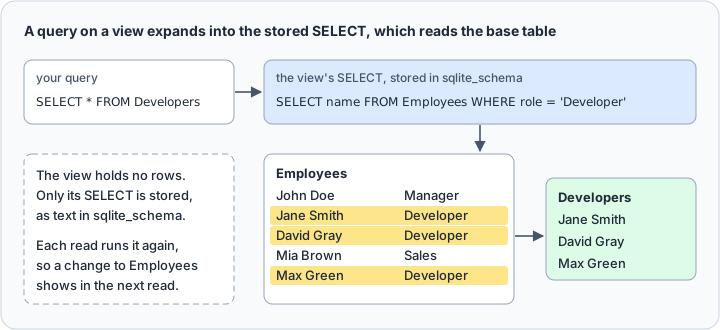
Because nothing is copied, a change to Employees shows up in the next read. Move Mia Brown to development and read the view again:
UPDATE Employees SET role = 'Developer' WHERE name = 'Mia Brown';
SELECT * FROM Developers;
| name |
|---|
| Jane Smith |
| David Gray |
| Mia Brown |
| Max Green |
To see which views a file holds, and the text each one was created with, query the schema table, whose type column reads view for a view:
SELECT name, sql FROM sqlite_schema WHERE type = 'view';
| name | sql |
|---|---|
| Developers | CREATE VIEW Developers AS SELECT name FROM Employees WHERE role = 'Developer' |
Run that query before a deployment and compare the sql column with the definition in your repository. The file holds whatever CREATE VIEW last ran against it, from whichever script ran it. How views work across engines is covered in SQL views explained; the rest of this article is what SQLite does with them.
What views are used for
A view hides a query, not data. The first use is a join that several programs need. Add a table of project assignments, then store the join:
CREATE TABLE Projects(employee_id INTEGER REFERENCES Employees(id), project TEXT);
INSERT INTO Projects VALUES (2, 'Billing'), (3, 'Billing'), (5, 'Mobile app');

CREATE VIEW DeveloperProjects AS
SELECT p.employee_id, e.name, p.project
FROM Employees e
JOIN Projects p ON p.employee_id = e.id
WHERE e.role = 'Developer';
The application now selects from one name, and the join stays in the database, where you fix it once:
SELECT name, project FROM DeveloperProjects WHERE project = 'Billing';
| name | project |
|---|---|
| Jane Smith | Billing |
| David Gray | Billing |
The second use is a total or a calculated column. Give the view's columns their names in a list after the view name:
CREATE VIEW RoleCounts(role, headcount) AS
SELECT role, count(*) FROM Employees GROUP BY role;

SELECT * FROM RoleCounts;
| role | headcount |
|---|---|
| Developer | 4 |
| Manager | 1 |
Without the list, SQLite takes the names from the SELECT, and the second column is called count(*). The CREATE VIEW page recommends the list, because the rules that generate such names may change in a later release. The list needs one name per column: RoleCounts(role) alone is accepted by CREATE VIEW and fails at the first read with expected 1 columns for 'RoleCounts' but got 2.
The third use is a narrower set of columns: a view that leaves out a column such as a password hash gives the application the columns it needs and no others. That is not access control. SQLite has no GRANT or REVOKE, and the only permissions on a database are the file permissions of the operating system, so a program that can open the file can read the base table as well as the view.
What a view cannot do in SQLite
Views are read-only in SQLite. An INSERT, UPDATE or DELETE on a view is rejected, and a view over one table with plain columns is no exception:
INSERT INTO Developers(name) VALUES ('Nina Patel');
cannot modify Developers because it is a view
The way around it is an INSTEAD OF trigger on the view. It catches the write and runs statements of your own against the base table instead:
CREATE TRIGGER Developers_insert
INSTEAD OF INSERT ON Developers
BEGIN
    INSERT INTO Employees(name, role) VALUES (NEW.name, 'Developer');
END;

INSERT INTO Developers(name) VALUES ('Nina Patel');
SELECT * FROM Developers;
| name |
|---|
| Jane Smith |
| David Gray |
| Mia Brown |
| Max Green |
| Nina Patel |
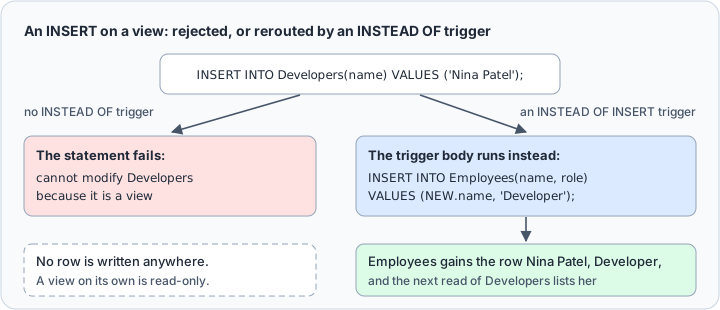
INSTEAD OF is the only kind of trigger a view accepts, since INSTEAD OF triggers work only on views and BEFORE and AFTER triggers only on tables. An AFTER trigger on Developers fails with cannot create AFTER trigger on view: Developers. SQLite CREATE TRIGGER covers triggers in full.
A view cannot be indexed: CREATE INDEX on a view fails with views may not be indexed. Index the base table instead, because the view's query uses that index when it runs:
CREATE INDEX idx_role ON Employees(role);
EXPLAIN QUERY PLAN SELECT * FROM Developers;
The plan reads SEARCH Employees USING INDEX idx_role (role=?): the read of the view goes through the index on Employees.
A view saved in the file cannot read a temporary table. If the view names the table with its temp. prefix, SQLite refuses to create it; if it uses the bare name, SQLite creates it, and every read fails with no such table: main. followed by the table name. Create a view over a temporary table with CREATE TEMP VIEW instead. Such a view is visible only to the connection that created it, and SQLite deletes it when that connection closes.
Last, the query still runs. A view over an expensive join costs exactly as much as the join, at every read, since nothing is stored. Where the same total is read far more often than the table changes, a summary table kept current by a trigger is the cheaper answer.
Change or drop a view
SQLite has no ALTER VIEW and no CREATE OR REPLACE VIEW: neither is among the statements SQLite understands, and both fail as syntax errors. CREATE VIEW IF NOT EXISTS does not help either, because on a name that exists it keeps the old definition and reports nothing. To change a view, drop it and create it again. Do both in one transaction, so that a ROLLBACK after a mistake in the new definition brings the old one back. This new definition adds the id column, which ties each developer to a row of Employees:
BEGIN;
DROP VIEW Developers;
CREATE VIEW Developers AS SELECT id, name FROM Employees WHERE role = 'Developer';
COMMIT;
On SQLite 3.50.4, DROP VIEW also removes the view's triggers. After this script Developers_insert is gone, and an insert into Developers fails again until the trigger is created anew, so keep a view and its triggers in the same script.
DROP VIEW removes the definition from the schema and modifies no data in the base tables. On a name that does not exist it fails with no such view, unless you add IF EXISTS, which makes it a no-op. DROP TABLE refuses a view with use DROP VIEW to delete view Developers.
Dropping a base table is the case to watch, because the views over it stay behind:
DROP TABLE Projects;
SELECT * FROM DeveloperProjects;
no such table: main.Projects
The definition is still in sqlite_schema, so the failure waits for the next read. Before you drop a view or a table on a production file, make sure its definition is in your repository, because the file may hold the only copy.
Create a view in DbSchema



CREATE VIEW is SQL, so DbSchema runs it the way the shell does:
- Choose Connect to Database, pick SQLite, and give the Connection Dialog the path of your
.dbfile. DbSchema downloads the JDBC driver for SQLite by itself. - Open the SQL Editor from the Editors menu.
- Paste the
CREATE VIEWstatement and click Run Script, which executes the whole editor content against the SQLite file.
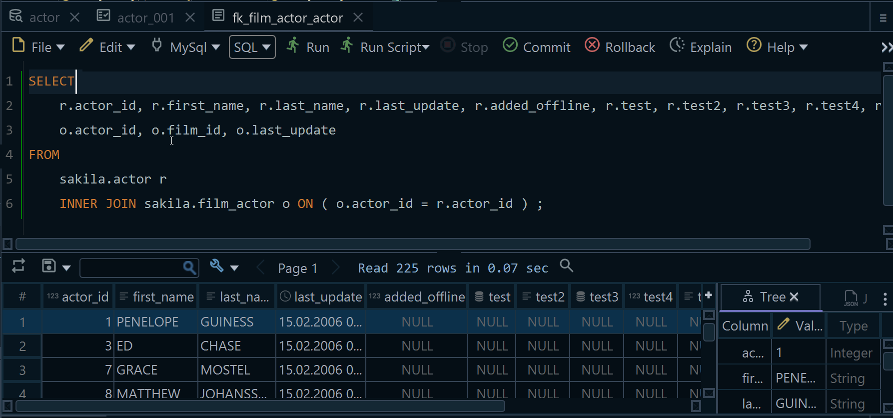
DbSchema reverse-engineers the views in the file along with the tables, and the Project Structure panel lists them in the schema's Views folder, where a right-click opens a view's data or adds it to a diagram. A view you create after connecting joins them once you choose Schema, then Refresh Schema from Database.
A view on the diagram is where DbSchema adds something the file does not have. SQLite declares no foreign key between a view and the tables it reads, so nothing links Developers to Employees. A virtual foreign key is a relationship that exists only in the DbSchema model, and the diagram documentation names linking views as one of its uses. Drag id of Developers onto id of Employees and choose a virtual foreign key. The line then works like a regular foreign key for data browsing and query building, and changes nothing in the SQLite file.
Write the query once, store it as a view, and let the read side of your application forget the filter. Download DbSchema, connect to your SQLite file, and put the view and its base table on one diagram with a virtual foreign key between them. Connecting, reverse-engineering, the interactive diagrams and the SQL Editor are in the free Community Edition; saving the model to a file, which is where the virtual foreign key is kept, browsing data across relations and the visual query builder are in Pro.









