SQL Views Explained with Practical Examples
For SQL users who write SELECT queries and have not yet created a view; updatability and the syntax are explained from the beginning.
On this page
A report query gets pasted into a fourth place in the application, and one of the four copies falls behind the other three. A view fixes that by storing the query in the database under a name: the four callers select from the name, and the definition lives in one place. Nothing is copied, and the rows come from the base tables every time the view is read.
The examples run on MySQL 9.7 against these two tables:
CREATE TABLE employee_details (
  employee_id INT PRIMARY KEY,
  name        VARCHAR(50) NOT NULL,
  address     VARCHAR(50) NOT NULL
);

CREATE TABLE salary (
  id     INT PRIMARY KEY,
  name   VARCHAR(50) NOT NULL,
  salary INT NOT NULL
);

INSERT INTO employee_details VALUES
  (1, 'Robin',  'Vienna'),
  (2, 'Cindy',  'Amsterdam'),
  (3, 'Lauren', 'Los Angeles'),
  (4, 'Tino',   'Bucharest'),
  (5, 'Jack',   'Frankfurt');

INSERT INTO salary VALUES
  (1, 'Robin',  10000),
  (2, 'Cindy',  15000),
  (3, 'Lauren', 12000),
  (4, 'Tino',   13000),
  (5, 'Jack',   15000);
What a SQL view is
A view is a stored SELECT that behaves like a table: it has columns, you query it with SELECT, and the rows it returns are computed when you read it. The view holds no rows of its own, so a change to employee_details is visible through the view on the next read.
The second reason to create one is that you can hand out access to a view without handing out access to the table behind it. Grant SELECT on a view that carries the name and the address, and the caller reads exactly those two columns of the rows the view's WHERE clause keeps, and nothing else about the other rows or columns.
Storing the query rather than the rows has a price on the reading side: the query runs again on every read, so a view over an expensive join is as expensive as the join. MySQL has no way to keep the rows around, and a view whose cost matters has to be replaced by a table you refresh yourself. PostgreSQL gives you that second form directly, through CREATE MATERIALIZED VIEW, which stores the result and recomputes it when you run REFRESH MATERIALIZED VIEW.
How to create views in SQL
The syntax names the view and gives it a query:
CREATE VIEW view_name AS
SELECT column
FROM table_name
WHERE condition;
A view over one table selects the columns and the rows you want to expose. This one keeps the name and the address of the employees whose id is under 4:
CREATE VIEW employee_sm AS
SELECT name, address
FROM employee_details
WHERE employee_id < 4;

SELECT * FROM employee_sm;
| name | address |
|---|---|
| Robin | Vienna |
| Cindy | Amsterdam |
| Lauren | Los Angeles |
The view's columns take their names from the SELECT list, so a column built from an expression needs a name of its own: alias it in the query, or list the names after the view name as in CREATE VIEW employee_sm (person, city) AS SELECT .... A query that reads the view adds its conditions to the ones already inside it:
SELECT * FROM employee_sm WHERE address = 'Vienna';
| name | address |
|---|---|
| Robin | Vienna |
A view over more than one table is where the repetition usually lives, because that is the query nobody wants to write twice. Joining employee_details to salary gives a view with the address and the pay side by side:
CREATE VIEW employee_salary AS
SELECT employee_details.name, employee_details.address, salary.salary
FROM employee_details
JOIN salary ON employee_details.name = salary.name;

SELECT * FROM employee_salary;
| name | address | salary |
|---|---|---|
| Robin | Vienna | 10000 |
| Cindy | Amsterdam | 15000 |
| Lauren | Los Angeles | 12000 |
| Tino | Bucharest | 13000 |
| Jack | Frankfurt | 15000 |
When a view can be updated
Some views accept INSERT, UPDATE and DELETE, and the statement then runs against the base table. MySQL calls such a view updatable, and the MySQL manual lists the constructs that disqualify one. Start with these six:
- an aggregate or window function, such as
SUM(),MIN(),MAX()orCOUNT() DISTINCTGROUP BYorHAVINGUNIONorUNION ALL- a reference to a nonupdatable view in the
FROMclause - only literal values, so there is no base table to write to
The same list also carries a subquery in the select list, certain joins, a subquery in the WHERE clause that refers to a table in the FROM clause, ALGORITHM = TEMPTABLE, and more than one reference to the same base table column.
Accepting INSERT takes three more conditions, listed on the same page: no duplicate column names in the view, every base table column that has no default value present in the view, and view columns that are plain column references rather than expressions such as col1 + 3 or UPPER(col2).
The second condition is the one that catches people out. employee_sm leaves out employee_id, which is the primary key of employee_details and has no default, so the insert below is rejected:
INSERT INTO employee_sm VALUES ('Nora', 'Prague');
Redefine the view with the key column and the same insert goes through. CREATE OR REPLACE VIEW replaces the definition of an existing view in place, so nothing has to be dropped first:
CREATE OR REPLACE VIEW employee_sm AS
SELECT employee_id, name, address
FROM employee_details
WHERE employee_id < 4;

INSERT INTO employee_sm VALUES (6, 'Nora', 'Prague');
SELECT * FROM employee_sm;
| employee_id | name | address |
|---|---|---|
| 1 | Robin | Vienna |
| 2 | Cindy | Amsterdam |
| 3 | Lauren | Los Angeles |
Nora is missing from the result, and she is not missing from employee_details: the row was written with id 6, and the view keeps only ids under 4. To have MySQL refuse an insert whose row the view could not show, add WITH CHECK OPTION to the definition, which "prevents inserts or updates to rows except those for which the WHERE clause in the select_statement is true".
DELETE through a view removes the row from the base table:
DELETE FROM employee_sm WHERE name = 'Lauren';
SELECT employee_id, name, address FROM employee_details;
| employee_id | name | address |
|---|---|---|
| 1 | Robin | Vienna |
| 2 | Cindy | Amsterdam |
| 4 | Tino | Bucharest |
| 5 | Jack | Frankfurt |
| 6 | Nora | Prague |
Lauren is gone from the table, not only from the view, which is the point worth remembering before granting write access on one.
Create a view from the DbSchema diagram



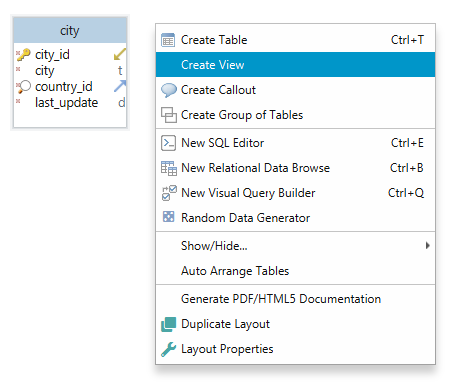
DbSchema creates the view for you from the diagram. Start a view on the canvas, give it a name, and paste or write the SELECT it should store:
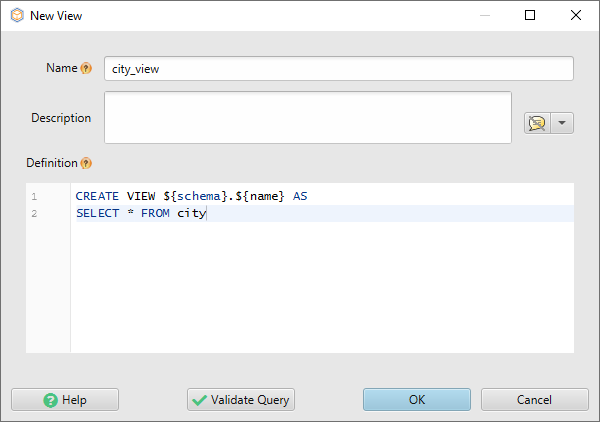
DbSchema checks the query for you before creating anything, so a typo in a column name comes back as a message rather than as a broken view in the database:
The view is then created in the connected database, and DbSchema draws it on the diagram beside the tables it reads:
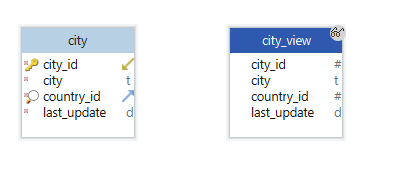
That step is the one that writes to the database, because a view is a schema object and creating it runs CREATE VIEW there. The diagram itself, including where the view sits and the virtual foreign keys you draw from a view to a table, is kept in the DbSchema model file. Once the view exists, it appears in the Project Structure panel on the left alongside the tables, and you can open its rows from there.
For the SELECT that goes inside the view, two editors do the writing. The SQL Editor opens from the Editors menu and runs a statement with Execute Query, which is enough to test the query before it becomes a view. DbSchema's Query Builder assembles the same SELECT with the mouse: click a table header on the diagram, tick the columns you want, follow a foreign key to add a related table, and read the generated SQL at the bottom of the builder.
The SQL Editor and the interactive diagram are in the free Community Edition, and the Query Builder is in Pro. Get DbSchema from https://dbschema.com/download.html, connect to the database that holds the SELECT you keep pasting, and give that query a name.









