SQLite CREATE TRIGGER: BEFORE/AFTER, WHEN Clause, OLD and NEW Examples
For a developer whose SQLite file is written by an application and a script or two, who wants the database itself to keep the history.
On this page
A value in a SQLite table changes, and a week later nobody can say what it was before or when it changed. A trigger keeps that record inside the database file. CREATE TRIGGER stores SQL that SQLite runs for each row an INSERT, UPDATE, or DELETE touches, before or after the change, whichever program sent the statement. The statement has this shape, with optional parts in square brackets and a required choice in braces:
CREATE TRIGGER [IF NOT EXISTS] trigger_name
[ BEFORE | AFTER | INSTEAD OF ]
{ INSERT | UPDATE | UPDATE OF column | DELETE }
ON table_name
[FOR EACH ROW]
[WHEN condition]
BEGIN
    statement;
END;
BEFORE is the default when no timing is written. FOR EACH ROW is optional, because SQLite has only row-level triggers. The body between BEGIN and END holds one or more statements, each ending in its own semicolon. Every example below ran on SQLite 3.50.4.
Create a trigger in sqlite3, step by step
The steps need the sqlite3 shell. SQLite CREATE DATABASE shows how to check that it is installed and where to download it.
1. Open a database file
sqlite3 school.db
The shell opens school.db, and creates it if it does not exist yet.
2. Create the tables
One table to watch, and one to hold the history:
CREATE TABLE students (
    student_id   INTEGER PRIMARY KEY,
    student_name TEXT NOT NULL,
    grade        TEXT NOT NULL
);

CREATE TABLE student_audit (
    audit_id   INTEGER PRIMARY KEY,
    student_id INTEGER NOT NULL,
    old_grade  TEXT,
    new_grade  TEXT,
    changed_at TEXT NOT NULL
);
3. Create the trigger
CREATE TRIGGER log_student_grade_change
AFTER UPDATE OF grade ON students
FOR EACH ROW
WHEN OLD.grade IS NOT NEW.grade
BEGIN
    INSERT INTO student_audit (student_id, old_grade, new_grade, changed_at)
    VALUES (OLD.student_id, OLD.grade, NEW.grade, datetime('now'));
END;
The shell waits for the semicolon after END before it runs anything, so you can paste the whole definition at once.
4. Test it
Add a student, change the grade, and read the audit table:
INSERT INTO students (student_name, grade)
VALUES ('Alice', 'B');

UPDATE students
SET grade = 'A'
WHERE student_name = 'Alice';

SELECT audit_id, student_id, old_grade, new_grade
FROM student_audit;
| audit_id | student_id | old_grade | new_grade |
|---|---|---|---|
| 1 | 1 | B | A |
The INSERT wrote nothing, because the trigger watches only updates of grade. The UPDATE fired it once. The changed_at column, left out of the query, holds the time of the change in UTC, which is what datetime('now') returns. Add the 'localtime' modifier if the history has to read in your time zone.
What a trigger is, and when to use one
A trigger is SQL stored in the database and attached to one event on one table or view. SQLite supports only FOR EACH ROW triggers, so an UPDATE that matches four hundred rows fires the trigger four hundred times. When you drop a table, SQLite drops its triggers with it: DROP TABLE students removes the audit trigger, and student_audit keeps its rows.
For each row, the parts run in a fixed order:
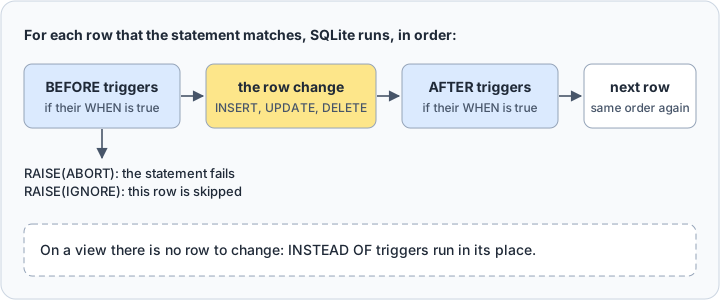
A trigger fits a rule that every writer must follow. Every program that writes the table passes through it, so none of them can skip the audit entry or the check. That makes a trigger the place for a change history, for a summary that has to stay current, and for a check that reads another table, which a CHECK constraint cannot do.
The cost is that a statement does more than it says. Someone reading the UPDATE does not see the extra writes, so a forgotten trigger produces results nobody expects. Each row also pays for the body, and a slow body multiplies over a bulk write. Keep trigger bodies short, and keep their definitions in version control next to the tables.
OLD and NEW references
Inside the body, OLD.column reads the row before the change and NEW.column the row after it. Which of the two exists depends on the event:
| Event | OLD | NEW |
|---|---|---|
INSERT | no | yes |
UPDATE | yes | yes |
DELETE | yes | no |
An UPDATE trigger sees both rows, and the audit trigger copies one value from each:
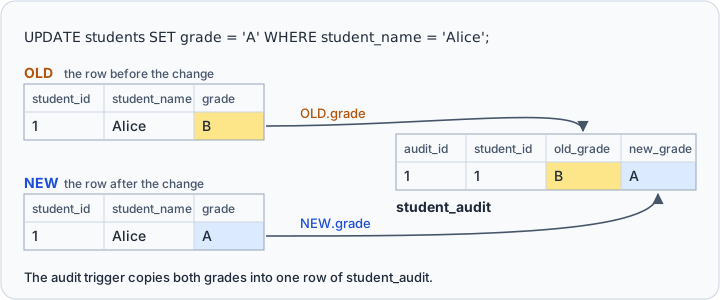
Compare the two with IS NOT rather than <>. They differ only when a value is NULL:
SELECT NULL <> 'A', NULL IS NOT 'A';
| NULL <> 'A' | NULL IS NOT 'A' |
|---|---|
| NULL | 1 |
With <>, a change from NULL to a value gives NULL, the WHEN clause is not true, and the change is never logged. IS NOT never returns NULL. The grade column cannot be NULL in this table, but IS NOT keeps the trigger right if that constraint is ever dropped.
The WHEN clause and UPDATE OF
Two clauses decide when the audit trigger does its work. UPDATE OF grade fires it only when grade is on the left of an = in the SET clause, so an update that sets only student_name never reaches it. WHEN is then checked for each row, and the body runs only where it is true.
The difference matters because a statement also matches rows it does not change. An application that saves a form without edits sends the same grade back:
UPDATE students
SET grade = 'A'
WHERE student_name = 'Alice';

SELECT count(*) AS audit_rows FROM student_audit;
The row matched, OLD.grade IS NOT NEW.grade was false, and the audit table still holds only the row from the test:
| audit_rows |
|---|
| 1 |
Without the WHEN clause, the same statement would log that A became A, and every repeated save would add one more such row.
BEFORE, AFTER, and INSTEAD OF compared
| Timing | Runs | Works on | Use it to |
|---|---|---|---|
BEFORE | before the row changes; the default | tables | refuse a row |
AFTER | after the row changes | tables | log a change, update another table |
INSTEAD OF | in place of the change | views | make a view writable |
Each timing pairs with INSERT, UPDATE, or DELETE, which makes nine kinds of trigger, from BEFORE INSERT to INSTEAD OF DELETE.
Prefer AFTER unless the trigger's job is to refuse the row. The CREATE TRIGGER documentation warns that when a BEFORE UPDATE or BEFORE DELETE trigger changes or deletes the row about to be updated or deleted, the result is undefined, and it encourages AFTER triggers. A BEFORE trigger that only checks NEW and calls RAISE changes nothing, so the warning does not apply to it.
INSTEAD OF exists because SQLite views are read-only. Take a view with the columns a grading screen needs:
CREATE VIEW student_grades AS
SELECT student_name, grade FROM students;
An UPDATE on it fails with cannot modify student_grades because it is a view. An INSTEAD OF trigger catches the write and applies it to the table underneath:
CREATE TRIGGER student_grades_update
INSTEAD OF UPDATE OF grade ON student_grades
BEGIN
    UPDATE students
    SET grade = NEW.grade
    WHERE student_name = OLD.student_name;
END;

UPDATE student_grades
SET grade = 'C'
WHERE student_name = 'Alice';

SELECT audit_id, old_grade, new_grade FROM student_audit;
The update inside the trigger fired the audit trigger in turn:
| audit_id | old_grade | new_grade |
|---|---|---|
| 1 | B | A |
| 2 | A | C |
SELECT changes() returns 0 after the UPDATE on the view, because SQLite does not count INSTEAD OF firings as changes, although the row in students did change. SQLite views covers the view side.
Practical row-level trigger patterns
Reject a row with RAISE(ABORT)
CREATE TRIGGER validate_grade
BEFORE INSERT ON students
WHEN NEW.grade NOT IN ('A', 'B', 'C', 'D', 'F')
BEGIN
    SELECT RAISE(ABORT, 'grade must be A, B, C, D, or F');
END;
An insert with the grade E now fails with that message, and the application receives the error code SQLITE_CONSTRAINT. RAISE(ROLLBACK, ...) and RAISE(FAIL, ...) fail the same way, each with the ON CONFLICT behavior of its name. A CHECK constraint covers a rule this simple more cheaply, as SQLite constraints shows.
Skip a row with RAISE(IGNORE)
RAISE(IGNORE) drops the row without an error. This trigger keeps grades below C out of the table:
CREATE TRIGGER skip_low_grades
BEFORE INSERT ON students
WHEN NEW.grade IN ('D', 'F')
BEGIN
    SELECT RAISE(IGNORE);
END;

INSERT INTO students (student_name, grade)
VALUES ('Bob', 'B'), ('Charlie', 'C'), ('John Doe', 'D');

SELECT student_id, student_name, grade FROM students;
John Doe's row was skipped, and the other two went in:
| student_id | student_name | grade |
|---|---|---|
| 1 | Alice | C |
| 2 | Bob | B |
| 3 | Charlie | C |
Test the row in WHEN, before it is written. Deleting it afterwards with WHERE grade < 'C' would remove the wrong students, because text compares character by character and 'A' and 'B' sort before 'C'.
Keep a summary table in sync
CREATE TABLE order_items (
    item_id          INTEGER PRIMARY KEY,
    order_id         INTEGER NOT NULL,
    line_total_cents INTEGER NOT NULL
);

CREATE TABLE order_totals (
    order_id    INTEGER PRIMARY KEY,
    total_cents INTEGER NOT NULL DEFAULT 0
);

CREATE TRIGGER update_order_total_after_insert
AFTER INSERT ON order_items
BEGIN
    UPDATE order_totals
    SET total_cents = total_cents + NEW.line_total_cents
    WHERE order_id = NEW.order_id;
END;

INSERT INTO order_totals (order_id) VALUES (1);

INSERT INTO order_items (order_id, line_total_cents)
VALUES (1, 2500), (1, 1200);

SELECT order_id, total_cents FROM order_totals;
| order_id | total_cents |
|---|---|
| 1 | 3700 |
The total started at the column default of 0, and the trigger added each line as it arrived, so a report reads the total without summing. The body updates one row through the primary key. Keep it that way: a bulk insert of a thousand items runs the body a thousand times, and a body that scans a table turns one import into a thousand scans. SQLite indexes and SQLite EXPLAIN PLAN show how to check.
Statements a trigger body refuses
The SQL inside a trigger is a restricted subset:
- The table in an
INSERT,UPDATE, orDELETEmust be unqualified:students, notmain.students. INSERT INTO table DEFAULT VALUESis not supported.ORDER BYandLIMITonUPDATEandDELETEare not supported, and neither areINDEXED BYandNOT INDEXED.- A common table expression works only inside a sub-select, not as the statement's own
WITH.
A trigger's writes can fire other triggers, as the view example showed. A trigger does not fire itself again, though, while PRAGMA recursive_triggers is off, which is the default.
List, drop, and re-create triggers
SQLite keeps every trigger in the schema table, whose type column holds table, index, view, or trigger:
SELECT name, tbl_name
FROM sqlite_schema
WHERE type = 'trigger' AND tbl_name = 'students';
| name | tbl_name |
|---|---|
| log_student_grade_change | students |
| validate_grade | students |
| skip_low_grades | students |
The sql column of the same table holds each CREATE TRIGGER statement, the copy to compare against your deployment scripts. The older name sqlite_master still works.
SQLite has no command that disables a trigger. Drop it, and create it again when you need it back:
DROP TRIGGER IF EXISTS validate_grade;
IF EXISTS lets the statement succeed when the trigger is already gone, and CREATE TRIGGER IF NOT EXISTS does the same for a trigger that is already there, so a deployment script can run twice. It keeps the old definition, though, so drop a trigger before you create a changed version of it.
Create a trigger in DbSchema



A trigger definition is SQL, so DbSchema sends it to SQLite the way the shell does:
- In DbSchema, choose Connect to Database and pick SQLite. DbSchema downloads the SQLite JDBC driver by itself.
- Open the SQL Editor from the Editors menu.
- Paste the
CREATE TRIGGERstatement and click Run Script, which executes the entire editor content.
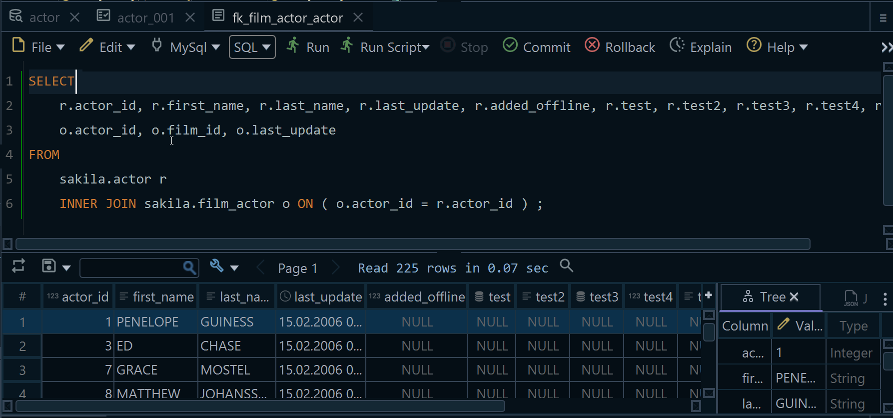
The statement changes the SQLite file at once. When DbSchema reverse-engineers the database, it reads trigger definitions with custom queries, because the JDBC API does not expose triggers, and for SQLite that is the sql column shown above. Keep the two copies apart: what you run in the SQL Editor changes the database, while the diagram and the reverse-engineered trigger source live in the DbSchema model.
Start from the event and the timing, then let WHEN decide which rows are worth a write. Download DbSchema at https://dbschema.com/download.html, connect it to school.db to see the tables the audit trigger works on as a diagram, and run your next trigger from the SQL Editor with Run Script. Connecting, reverse-engineering, the interactive diagrams, and the SQL Editor are in the free Community Edition, and saving the model to a .dbs file is in Pro.









