SQLite EXPLAIN and EXPLAIN QUERY PLAN Guide
For someone who writes SQL against a SQLite file and wants to know whether a query used the index; the plan output and the two EXPLAIN forms are explained where they appear.
On this page
You added an index, yet the query takes as long as before, and nothing in the SQL tells you whether SQLite used the index. Put EXPLAIN QUERY PLAN in front of the statement and SQLite prints one line for each table it reads: SCAN when it reads every row, SEARCH with the index name when an index narrows the rows down. The bare EXPLAIN keyword answers a different question. It returns the bytecode program the statement compiles to, one row per instruction.
| Prefix | What SQLite returns | Read it to learn |
|---|---|---|
EXPLAIN QUERY PLAN | One line per table read or step taken, drawn as a tree | Whether an index is used, and where rows get sorted |
EXPLAIN | One row per bytecode instruction | Every step the statement runs, in order |
Apart from some PRAGMA statements, neither prefix runs the statement. SQLite reports what the statement would have done, so explaining a DELETE deletes nothing.
Setting up the examples in the sqlite3 shell
Start the SQLite shell and open a database file with the .open command. Our article on creating a SQLite database covers installing the shell and creating the file.
sqlite3
.open mydatabase.db
Every example below runs against one small table with three rows:
CREATE TABLE employees (
    id INTEGER PRIMARY KEY,
    name TEXT NOT NULL,
    position TEXT NOT NULL
);

INSERT INTO employees (name, position) VALUES ('John Doe', 'Manager');
INSERT INTO employees (name, position) VALUES ('Jane Smith', 'Developer');
INSERT INTO employees (name, position) VALUES ('Robert Johnson', 'Designer');
SELECT * FROM employees;
| id | name | position |
|---|---|---|
| 1 | John Doe | Manager |
| 2 | Jane Smith | Developer |
| 3 | Robert Johnson | Designer |
A column declared INTEGER PRIMARY KEY becomes an alias for the rowid, the key that SQLite stores each row under (CREATE TABLE documentation), so id is the rowid here. The plans below depend on that. Our article on creating a table covers the rest of the column definitions. Every plan and program in this article was produced by SQLite 3.53.4.
Two shell settings save typing while you read plans. After .eqp on, the shell runs EXPLAIN QUERY PLAN for every statement you enter and prints the plan before the result, until you turn it off with .eqp off. The plans in this article are drawn as the tree the shell prints. .explain off shows the plain table underneath the tree instead, and .explain auto brings the tree back.
.eqp on
What SCAN and SEARCH tell you
Ask for the plan of a query that filters on position:
EXPLAIN QUERY PLAN SELECT * FROM employees WHERE position = 'Developer';
QUERY PLAN
`--SCAN employees
SCAN means SQLite reads every row of the table and tests each one. On three rows that costs nothing, but the work grows with every row the table gains.
Create an index on the column in the WHERE clause, and ask again:
CREATE INDEX idx_employees_position ON employees(position);
EXPLAIN QUERY PLAN SELECT * FROM employees WHERE position = 'Developer';
QUERY PLAN
`--SEARCH employees USING INDEX idx_employees_position (position=?)
SEARCH means SQLite visits only some of the rows. The index keeps the position values in sorted order, each stored with the rowid of its row, so SQLite goes straight to the 'Developer' entries and fetches only those rows from the table. The SQLite page on how indexes work draws the same lookup step by step.
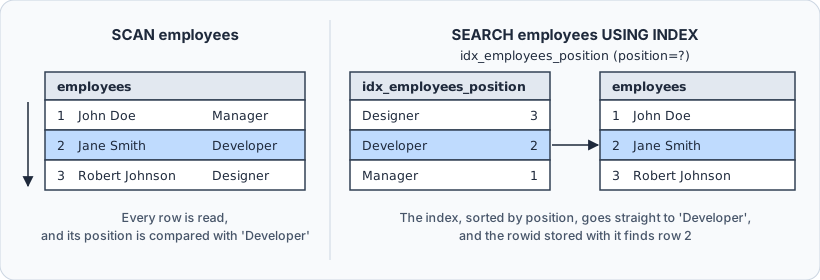
Each SCAN or SEARCH line is built from the same parts, which the SQLite documentation on EXPLAIN QUERY PLAN lists:
- the table, view or subquery it reads
- the index it uses, if any, or AUTOMATIC INDEX when SQLite builds a temporary index for this one statement
- COVERING INDEX when the index holds every column the query needs
- the WHERE terms the index answers, such as
(position=?), where?stands for the value
The covering case appears as soon as a query asks only for columns the index holds. The index on position stores each position with its rowid, and id is the rowid, so this query never reads the table:
EXPLAIN QUERY PLAN SELECT id FROM employees WHERE position = 'Developer';
QUERY PLAN
`--SEARCH employees USING COVERING INDEX idx_employees_position (position=?)
Skipping the table saves one lookup for every row found, which the query optimizer overview says can make many queries run twice as fast. A search by id needs no index of your own, because the table itself is stored in rowid order:
EXPLAIN QUERY PLAN SELECT * FROM employees WHERE id = 2;
QUERY PLAN
`--SEARCH employees USING INTEGER PRIMARY KEY (rowid=?)
Why the plan still says SCAN after you add an index
An index helps only when the WHERE clause compares the indexed column itself. Wrap the column in a function and the plan goes back to SCAN, with idx_employees_position still in place:
EXPLAIN QUERY PLAN SELECT * FROM employees WHERE lower(position) = 'developer';
QUERY PLAN
`--SCAN employees
The index holds position values, not the results of lower(position), so it has nothing to search. Compare the column directly, or index the expression itself:
CREATE INDEX idx_employees_lower_position ON employees(lower(position));
EXPLAIN QUERY PLAN SELECT * FROM employees WHERE lower(position) = 'developer';
QUERY PLAN
`--SEARCH employees USING INDEX idx_employees_lower_position (<expr>=?)
The plan writes the indexed expression as <expr>. SQLite uses an index on an expression only when the query spells the expression the way the CREATE INDEX statement does. The page on indexes on expressions puts it plainly: the query planner "does not do algebra". An index on x+y is no help to a query that filters on y+x.
Which index SQLite picks also depends on what it knows about your data. After the ANALYZE command has gathered statistics about the tables and indexes, the planner uses them to choose between plans. Without them, SQLite guesses that each value in the first column of an index repeats ten times. An empty test copy of a database can therefore get a different plan than the full file, so read plans against a copy of the real data.
Reading a join and a sort in the plan
A join needs a second table. This one records the projects each employee works on:
CREATE TABLE assignments (
    employee_id INTEGER NOT NULL,
    project TEXT NOT NULL
);

INSERT INTO assignments (employee_id, project) VALUES (2, 'Billing');
INSERT INTO assignments (employee_id, project) VALUES (2, 'Website');
INSERT INTO assignments (employee_id, project) VALUES (3, 'Website');
The query below lists the projects of every developer:
SELECT e.name, a.project
FROM employees e
JOIN assignments a ON a.employee_id = e.id
WHERE e.position = 'Developer';
| name | project |
|---|---|
| Jane Smith | Billing |
| Jane Smith | Website |
Put EXPLAIN QUERY PLAN in front of the same query, and the plan has one line per table:
QUERY PLAN
|--SCAN a
`--SEARCH e USING INTEGER PRIMARY KEY (rowid=?)
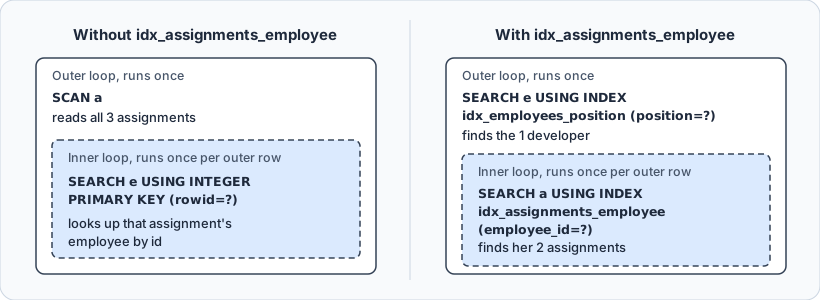
SQLite runs every join as nested loops, and the lines come in nesting order. The first line is the outer loop, and the line below it runs once for every row the outer loop produces. Here SQLite reads every assignment, then looks up the employee of each one by id. It chose that order itself, although the FROM clause names employees first: the plan shows how SQLite evaluates the query, not how you wrote it.
An index on the join column changes the plan:
CREATE INDEX idx_assignments_employee ON assignments(employee_id);
QUERY PLAN
|--SEARCH e USING INDEX idx_employees_position (position=?)
`--SEARCH a USING INDEX idx_assignments_employee (employee_id=?)
Now the outer loop finds the one developer through the position index, and the inner loop finds her two assignments through the new index. Neither table is read in full. Swap the two tables in the FROM clause and the plan comes back line for line the same.
A sort shows up as a line of its own. When SQLite has to sort rows for an ORDER BY, GROUP BY or DISTINCT, it collects them in a temporary b-tree, and the plan says USE TEMP B-TREE FOR followed by the clause:
EXPLAIN QUERY PLAN SELECT * FROM employees ORDER BY name;
QUERY PLAN
|--SCAN employees
`--USE TEMP B-TREE FOR ORDER BY
An index on the sort column lets SQLite read the rows already in order, and the sort line goes away:
CREATE INDEX idx_employees_name ON employees(name);
EXPLAIN QUERY PLAN SELECT * FROM employees ORDER BY name;
QUERY PLAN
`--SCAN employees USING INDEX idx_employees_name
The line still says SCAN, because every row is read, but it reads them in index order and sorts nothing afterwards. The EXPLAIN QUERY PLAN documentation calls an index almost always much more efficient than a sort, so a USE TEMP B-TREE line on a query you run often is a candidate for an index.
How EXPLAIN differs from EXPLAIN QUERY PLAN
EXPLAIN QUERY PLAN summarizes. EXPLAIN on its own returns the whole program that SQLite's virtual machine runs for the statement. Here it is for the first query of this article, with idx_employees_position in place:
EXPLAIN SELECT * FROM employees WHERE position = 'Developer';
| addr | opcode | p1 | p2 | p3 | p4 | p5 |
|---|---|---|---|---|---|---|
| 0 | Init | 0 | 13 | 0 | 0 | |
| 1 | OpenRead | 0 | 2 | 0 | 3 | 0 |
| 2 | OpenRead | 1 | 3 | 0 | k(2,,) | 2 |
| 3 | String8 | 0 | 1 | 0 | Developer | 0 |
| 4 | SeekGE | 1 | 12 | 1 | 1 | 0 |
| 5 | IdxGT | 1 | 12 | 1 | 1 | 0 |
| 6 | DeferredSeek | 1 | 0 | 0 | 0 | |
| 7 | IdxRowid | 1 | 2 | 0 | 0 | |
| 8 | Column | 0 | 1 | 3 | 0 | |
| 9 | Column | 1 | 0 | 4 | 0 | |
| 10 | ResultRow | 2 | 3 | 0 | 0 | |
| 11 | Next | 1 | 5 | 1 | 0 | |
| 12 | Halt | 0 | 0 | 0 | 0 | |
| 13 | Transaction | 0 | 0 | 6 | 0 | 1 |
| 14 | Goto | 0 | 1 | 0 | 0 |
Each row is one instruction. The bytecode engine documentation describes the columns:
| Column | What it holds |
|---|---|
addr | The instruction's address, counting from 0 |
opcode | The instruction's name |
p1, p2, p3 | Integers, often a cursor number, a jump target or a register |
p4 | A string, a number or a key description, depending on the opcode |
p5 | Flags |
comment | A description, only in builds with SQLITE_ENABLE_EXPLAIN_COMMENTS |
The build that produced this output left the comment column empty, so the table above omits it. Some operands, such as the page numbers in p2 of OpenRead, depend on what else the file holds, so your numbers can differ.
The program doesn't run from top to bottom. Init jumps to 13, where Transaction starts a read transaction and Goto jumps back to 1. The two OpenRead instructions open cursor 0 on the table and cursor 1 on the index, and String8 puts 'Developer' in register 1. SeekGE moves the index cursor to the first entry at or after 'Developer', and jumps to Halt if there is none. Instructions 5 to 11 are the loop. IdxGT leaves it once the entry is past 'Developer', DeferredSeek points the table cursor at the matching row, and IdxRowid and the two Column instructions load id, name and position into registers 2 to 4. ResultRow hands those three registers back as one row, and Next moves to the next index entry and jumps back to 5.
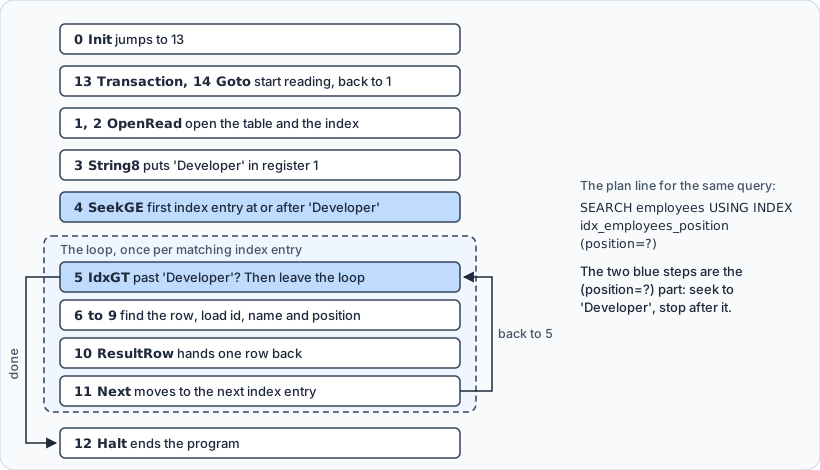
SeekGE and IdxGT are the (position=?) of the plan line, and the loop over index entries is its SEARCH. Before the index existed, the same statement compiled to a loop over the whole table: Rewind moved to the first row, Next walked through every row, and an Ne instruction compared each position with 'Developer'. That loop was the SCAN.
Reading a program like this takes the opcode reference at hand, and that reference warns that opcode names and meanings often change from one release to the next. When the question is whether an index is used, EXPLAIN QUERY PLAN answers it in one line.
Running EXPLAIN on UPDATE, DELETE and INSERT
EXPLAIN QUERY PLAN also works on the statements that read a table before they change it. For an UPDATE or a DELETE, the plan shows how SQLite finds the rows it will change:
EXPLAIN QUERY PLAN DELETE FROM employees WHERE position = 'Designer';
QUERY PLAN
`--SEARCH employees USING INDEX idx_employees_position (position=?)
The DELETE never ran. The table still holds its three rows:
SELECT count(*) FROM employees;
| count(*) |
|---|
| 3 |
So you can check that an UPDATE or a DELETE on a large table will use an index before you let it run. This UPDATE finds its row through the index that the sort example created:
EXPLAIN QUERY PLAN UPDATE employees SET position = 'Lead' WHERE name = 'John Doe';
QUERY PLAN
`--SEARCH employees USING INDEX idx_employees_name (name=?)
An INSERT INTO ... SELECT gets a plan for its SELECT part in the same way. PRAGMA statements are the exception. The EXPLAIN documentation explains that some of them do their work while the statement is prepared, before EXPLAIN has any effect, so they run whether or not EXPLAIN stands in front of them. It advises against using EXPLAIN on a PRAGMA.
What the plan does not promise
The output is not a stable interface. The EXPLAIN documentation says that its details are subject to change from one release to the next, and that applications should not use EXPLAIN or EXPLAIN QUERY PLAN. The EXPLAIN QUERY PLAN format changed substantially in version 3.24.0 and again, more mildly, in 3.36.0. A subquery plan shows how small such a change can be:
EXPLAIN QUERY PLAN
SELECT name FROM employees
WHERE id IN (SELECT employee_id FROM assignments WHERE project = 'Website');
QUERY PLAN
|--SEARCH employees USING INTEGER PRIMARY KEY (rowid=?)
`--LIST SUBQUERY 1
   `--SCAN assignments
SQLite 3.50.4 prints one more line for the same statement, CREATE BLOOM FILTER, under the subquery. Read plans and act on them, but keep them out of your test assertions.
A plan also names the steps but not their cost. It carries no row counts and no timings. To time a statement in the sqlite3 shell, turn on the timer with .timer on before you run it.
EXPLAIN QUERY PLAN in the DbSchema SQL Editor



DbSchema connects to a SQLite file, reverse-engineers it into a diagram, and runs the statements above unchanged in its SQL Editor. Open the editor from the Editors menu or the toolbar, type a statement with the EXPLAIN QUERY PLAN prefix, and press Execute Query. DbSchema shows the result as a table, so the plan arrives as the four columns that SQLite returns rather than as a tree: a node id, the id of the node's parent, a column that the SQLite documentation calls unused, and the text of the node. For the subquery plan of the previous section, the rows are:
| id | parent | notused | detail |
|---|---|---|---|
| 2 | 0 | 91 | SEARCH employees USING INTEGER PRIMARY KEY (rowid=?) |
| 6 | 0 | 0 | LIST SUBQUERY 1 |
| 8 | 6 | 216 | SCAN assignments |
The parent column carries the tree. SCAN assignments has parent 6, so it sits under LIST SUBQUERY 1, while the rows with parent 0 sit at the top level. The values in notused can be ignored. An EXPLAIN arrives the same way, as the instruction table shown earlier.

The SQL History pane records every statement you run in the session, and a click loads one back into the editor, which is how you rerun a plan after adding an index. The statements run against the SQLite file itself, so an index created in the SQL Editor exists in the database at once. The diagram and the editor belong to DbSchema's model of the database, not to the database.
Run EXPLAIN QUERY PLAN before and after every index you add. SEARCH with the index name means the index is used, SCAN means it isn't, and a USE TEMP B-TREE line names a sort that another index could remove. To read those plans beside a diagram of the tables they run against, download DbSchema from https://dbschema.com/download.html, connect to your SQLite file, and open the SQL Editor from the Editors menu. Connecting, the diagram and the SQL Editor are all in the free Community Edition.









