SQL Server User-Defined Functions (UDF) Guide with Examples
For SQL Server developers who write T-SQL daily and want a calculation to live in one place instead of in every query that needs it.
On this page
You work out the same thing, a price with tax or a line total, in a dozen queries, a report and two stored procedures, and when the rule changes you have to find every copy. A user-defined function puts the calculation in the database under a name. You create it once with CREATE FUNCTION, and every query calls it by its schema and name:
CREATE FUNCTION dbo.AddNumbers (@Num1 INT, @Num2 INT)
RETURNS INT
AS
BEGIN
    RETURN @Num1 + @Num2;
END;
GO

SELECT dbo.AddNumbers(5, 10) AS Total;
| Total |
|---|
| 15 |
The statements in this article follow the documentation for SQL Server 2022.
What a user-defined function is for
A user-defined function takes zero or more parameters, runs T-SQL, and returns the result: either one value or a table. It works like a built-in function such as UPPER(), except that you wrote it. You can also write one in .NET when CLR integration is enabled on the instance, but everything below is T-SQL.
You write the logic once, and every statement that needs it calls it. A long expression shrinks to a name, which makes the query around it easier to read. The caller sees what the function returns rather than how it gets there, so you can change the steps without touching the queries that call it.
The CREATE FUNCTION reference lists where a function can be used:
- In T-SQL statements such as
SELECT - In applications that call the function
- In the definition of another user-defined function
- To parameterize a view, or to improve the functionality of an indexed view
- To define a column in a table
- To define a
CHECKconstraint on a column - To replace a stored procedure
- As a filter predicate for a security policy, if it is an inline function
The column and constraint cases keep a rule in one place. A CHECK constraint that calls a function defines once what a valid value is, and SQL Server applies it to every insert and update, whichever application sends them.
Create a scalar function in sqlcmd
The steps need a SQL Server instance, a login that may create functions in the database (the permissions are further down), and the sqlcmd utility. Create a database in SQL Server covers installing and connecting.
1. Connect to the database
sqlcmd -S <server_name> -U <username> -d <database_name>
Leave out -P. Without it, sqlcmd asks for the password at a Password: prompt, and the sqlcmd page calls a password on the command line insecure.
2. Create the function
A scalar function has this shape:
CREATE [ OR ALTER ] FUNCTION [ schema_name. ] function_name
( [ { @parameter_name [ type_schema_name. ] parameter_data_type
    [ = default ] [ READONLY ] }
    [ ,...n ]
  ]
)
RETURNS return_data_type
    [ WITH <function_option> [ ,...n ] ]
    [ AS ]
    BEGIN
        function_body
        RETURN scalar_expression
    END
[ ; ]
Type the dbo.AddNumbers statement from the top of this article at the 1> prompt, and finish it with GO on a line of its own. sqlcmd sends everything typed since the last GO to the server as one batch. CREATE FUNCTION has to be the first statement in its batch; typed after another statement, it fails with error 111, "'CREATE FUNCTION' must be the first statement in a query batch."
3. Call the function
A scalar function has to be called with at least its two-part name, schema.function, the way the SELECT at the top calls it. Without the schema, the call fails:
SELECT AddNumbers(5, 10) AS Total;
'AddNumbers' is not a recognized built-in function name.
A parameter can have a default, but unlike in a stored procedure, leaving the argument out doesn't use it. Pass the keyword DEFAULT in its place:
CREATE FUNCTION dbo.AddTax (@Amount DECIMAL(10, 2), @Rate DECIMAL(4, 2) = 0.19)
RETURNS DECIMAL(10, 2)
AS
BEGIN
    RETURN @Amount * (1 + @Rate);
END;
GO

SELECT dbo.AddTax(100, DEFAULT) AS WithTax;
| WithTax |
|---|
| 119.00 |
SELECT dbo.AddTax(100) fails with error 313, which says that an insufficient number of arguments were supplied. Only EXECUTE fills in a default without the keyword.
The three kinds of user-defined function
Which kind you write depends on what you want back:
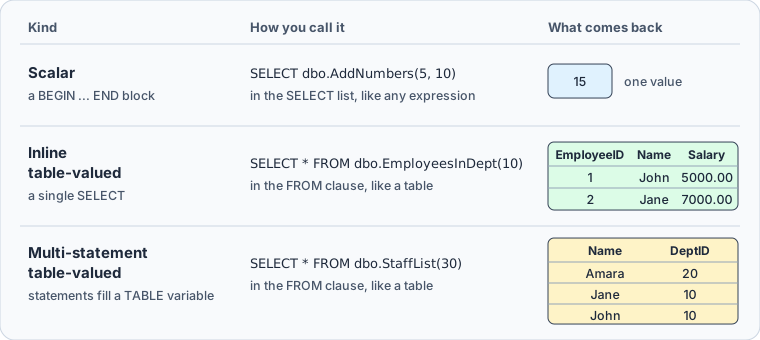
| Kind | Returns | Body |
|---|---|---|
| Scalar | One value of the declared type | A BEGIN ... END block that ends in RETURN |
| Inline table-valued | A table | A single SELECT after RETURN |
| Multi-statement table-valued | A table | Statements that fill a TABLE variable |
System functions such as GETDATE() are a separate group: SQL Server provides them, and they can't be modified.
The table-valued examples read one table:
CREATE TABLE Employees (
    EmployeeID INT PRIMARY KEY,
    Name NVARCHAR(50),
    DeptID INT,
    Salary DECIMAL(10, 2)
);

INSERT INTO Employees VALUES
  (1, 'John', 10, 5000.00),
  (2, 'Jane', 10, 7000.00),
  (3, 'Amara', 20, 6500.00);
An inline function behaves like a view that takes a parameter. Its body is one SELECT:
CREATE FUNCTION dbo.EmployeesInDept (@DeptID INT)
RETURNS TABLE
AS
RETURN (
    SELECT EmployeeID, Name, Salary
    FROM Employees
    WHERE DeptID = @DeptID
);
GO

SELECT * FROM dbo.EmployeesInDept(10);
| EmployeeID | Name | Salary |
|---|---|---|
| 1 | John | 5000.00 |
| 2 | Jane | 7000.00 |
A multi-statement function declares the table it returns, fills it with as many statements as it needs, and ends with a bare RETURN. This one returns a department's employees, or everyone when the department has none:
CREATE FUNCTION dbo.StaffList (@DeptID INT)
RETURNS @Staff TABLE (Name NVARCHAR(50), DeptID INT)
AS
BEGIN
    INSERT INTO @Staff
    SELECT Name, DeptID FROM Employees WHERE DeptID = @DeptID;

    IF NOT EXISTS (SELECT 1 FROM @Staff)
        INSERT INTO @Staff
        SELECT Name, DeptID FROM Employees;

    RETURN;
END;
GO

SELECT * FROM dbo.StaffList(30) ORDER BY Name;
Department 30 has no employees, so the function returns all three:
| Name | DeptID |
|---|---|
| Amara | 20 |
| Jane | 10 |
| John | 10 |
Side by side, a scalar function stands wherever an expression can stand, and a table-valued function stands where a table stands, in the FROM clause:
Prefer the inline kind whenever one SELECT can express the logic. The Create user-defined functions page says SQL Server can't apply all of its optimizations to the statements inside a multi-statement function, and from SQL Server 2014 it estimates such a function at 100 rows, whatever it returns. SQL Server 2017 added interleaved execution, which can give the optimizer the actual row count instead.
Pass a column to a table-valued function with CROSS APPLY
dbo.EmployeesInDept(10) takes a constant, and only constants and local variables can be passed to a table-valued function this way. To call the function once for every row of another table, with a column of that row as the argument, use APPLY. The FROM clause page says that SQL Server evaluates the right side of APPLY against each row of its left side:
CREATE TABLE Departments (
    DeptID INT PRIMARY KEY,
    DeptName NVARCHAR(50)
);

INSERT INTO Departments VALUES
  (10, 'Sales'),
  (20, 'Support'),
  (30, 'Legal');

SELECT d.DeptName, e.Name
FROM Departments AS d
CROSS APPLY dbo.EmployeesInDept(d.DeptID) AS e
ORDER BY d.DeptID, e.EmployeeID;
| DeptName | Name |
|---|---|
| Sales | John |
| Sales | Jane |
| Support | Amara |
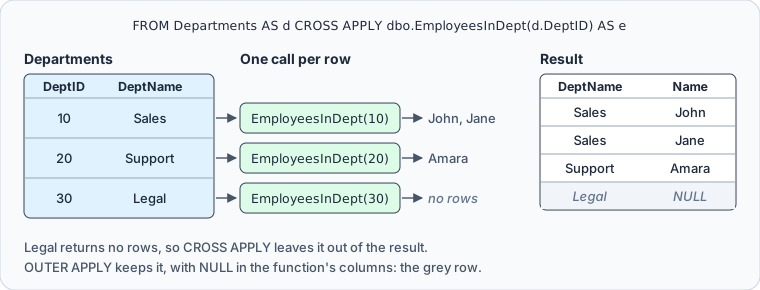
Legal has no employees, so its call returns no rows, and CROSS APPLY leaves the department out. OUTER APPLY keeps every row of the left side and fills the function's columns with NULL:
SELECT d.DeptName, e.Name
FROM Departments AS d
OUTER APPLY dbo.EmployeesInDept(d.DeptID) AS e
WHERE d.DeptID = 30;
| DeptName | Name |
|---|---|
| Legal | NULL |
Permissions and restrictions
Creating a function takes the CREATE FUNCTION permission in the database and ALTER permission on the schema that the function goes into. If the function uses a user-defined type, you also need EXECUTE permission on that type. A caller needs EXECUTE on a scalar function and SELECT on a table-valued one, the permissions that GRANT lists for each:
GRANT EXECUTE ON dbo.AddNumbers TO report_reader;
GRANT SELECT ON dbo.EmployeesInDept TO report_reader;
Here report_reader stands for a database user or role of your own.
A function can read the database but can't change it. The Create user-defined functions page lists what its body can't contain:
INSERT,UPDATEorDELETEagainst a table; a table variable declared in the function is allowed- An
OUTPUT INTOclause that has a table as its target TRY...CATCHorRAISERROR- A call to a stored procedure; an extended stored procedure is allowed
- Dynamic SQL or temporary tables
SETstatements such asSET NOCOUNT ON; assigning a variable withSETis allowed- The
FOR XMLclause
Functions can call each other up to 32 levels deep. Going past that fails the whole chain of calls, not only the innermost one.
ALTER FUNCTION replaces the definition and keeps the permissions granted on the function. It takes ALTER permission on the function or on its schema, and it can't change the kind: a scalar function can't become table-valued, and an inline function can't become multi-statement. To change the kind, drop the function and create it again. CREATE OR ALTER FUNCTION, from SQL Server 2016 SP1, creates the function or alters the existing one in a single statement, so the same rule applies. DROP FUNCTION removes it:
DROP FUNCTION IF EXISTS dbo.AddTax;
Advantages, limitations and performance
A function keeps logic in one place. A rule change is one ALTER FUNCTION, and the queries, constraints and other functions that call it stay as they are. The User-defined functions page adds that T-SQL functions cache their plans the way stored procedures do, so SQL Server doesn't parse and optimize the body again on every use.
The limitation is what a scalar function costs inside a query. SQL Server calls it once for each row, runs the statements in its body one at a time, and runs a query that calls a T-SQL function on a single thread. The cost grows with the number of rows the query passes through the function.
SQL Server 2019 added scalar UDF inlining. At database compatibility level 150 or higher, SQL Server rewrites a qualifying scalar function as an expression or a subquery inside the calling query, so the plan has no function calls left:
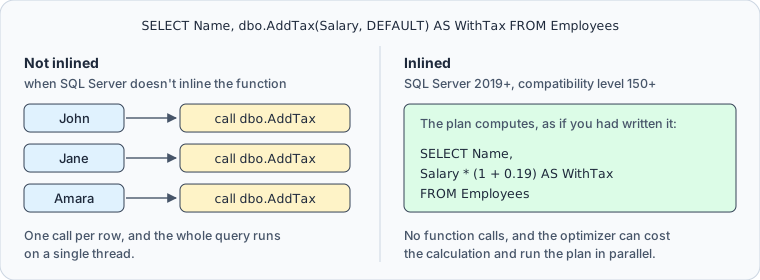
A function qualifies when its body uses only the constructs that the Scalar UDF inlining page lists. Among other things, it has a single RETURN, reads no table variable and calls no time-dependent function such as GETDATE(). The call counts too: a function called from a computed column or a CHECK constraint isn't inlined. sys.sql_modules shows whether a definition qualifies:
SELECT OBJECT_NAME(object_id) AS FunctionName, is_inlineable
FROM sys.sql_modules
WHERE object_id = OBJECT_ID(N'dbo.AddTax');
is_inlineable is 1 when the definition qualifies, and SQL Server still decides for each query whether to inline it. WITH INLINE = OFF on CREATE FUNCTION keeps a function from being inlined, and WITH INLINE = ON makes the statement fail when the function doesn't qualify.
Bind the function to its tables with SCHEMABINDING
Without WITH SCHEMABINDING, someone can change a table that a function reads in a way that breaks the function, and you find out when it's next called. With it, SQL Server refuses to alter or drop the objects that the function references. Where a function was created without it, run sp_refreshsqlmodule after changing an object that the function reads. The Create user-defined functions page recommends one or the other.
Schema binding decides two more things. SQL Server treats a function as deterministic only if it is schema-bound, and a computed column that calls a function can be indexed only when the function is deterministic. For a function that reads no data, such as dbo.AddNumbers, SCHEMABINDING also keeps the optimizer from adding spool operators it doesn't need:
CREATE OR ALTER FUNCTION dbo.AddNumbers (@Num1 INT, @Num2 INT)
RETURNS INT
WITH SCHEMABINDING
AS
BEGIN
    RETURN @Num1 + @Num2;
END;
GO
Create a user-defined function in DbSchema



When DbSchema reads a SQL Server schema, it reads the functions with their source code too, as the database settings page describes. To create a function in DbSchema:
- On the Welcome Screen, choose Connect to Database, then SQL Server in the Choose Your Database list. DbSchema downloads the SQL Server JDBC driver itself.
- Fill in the server, the database user and the password in the Connection Dialog, and connect. DbSchema reverse-engineers the schema and draws its tables on a diagram.
- Open the SQL Editor from the Editors menu, and paste the
CREATE FUNCTIONstatement without itsGO. - Select the whole statement and click Execute Query, which runs the selected text.
- Click Commit to make the change permanent.
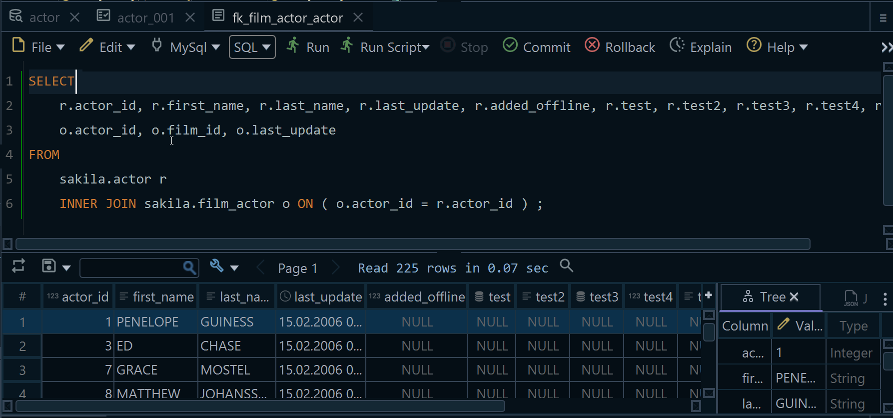
Run SELECT dbo.AddNumbers(5, 10) AS Total; the same way, and Execute Query shows the 15 in a result grid.
The function now lives in the live database, while the DbSchema design model still holds the schema as DbSchema last read it. In DbSchema Pro, the model, which you can save as a .dbs file, picks up the function when you run Schema, Refresh Schema from Database, as the synchronization page describes.
Write the calculation once, call it with its two-part name, pass DEFAULT for a parameter you leave at its default, and add SCHEMABINDING while you're there. To run these statements against your own SQL Server database, download DbSchema at https://dbschema.com/download.html, connect, and create dbo.AddNumbers in the SQL Editor. Connecting, reverse-engineering, the diagrams and the SQL Editor are in the free Community Edition, while saving the model to a file and refreshing it from the database are in Pro.
Sources
- CREATE FUNCTION (Transact-SQL)
- User-defined functions
- Create user-defined functions (Database Engine)
- ALTER FUNCTION (Transact-SQL)
- DROP FUNCTION (Transact-SQL)
- FROM clause plus JOIN, APPLY, PIVOT (Transact-SQL)
- Scalar UDF inlining
- GRANT object permissions (Transact-SQL)
- sqlcmd utility
- DbSchema SQL Editor
- DbSchema Synchronize with the Database









