SQL Server Database Sharding: Strategies, Shard Keys, and Architecture
For the person deciding whether one SQL Server database still carries the workload, and what splitting it across several would cost.
On this page
One SQL Server database holds every customer's orders, and you're weighing whether it can keep carrying the load or whether the data should be split. Sharding splits the rows across several databases with the same schema: the application reads the shard key from each row, works out which database owns it, and connects there. A sharded system comes down to identical schemas, a routing rule, and the discipline to keep both in step.
What SQL Server database sharding means
Each of those databases is a shard. Every shard has the same tables and holds its own share of the rows, and in production each one usually runs on its own server, so the load is spread across machines. The rule that picks the shard reads one value from the row, the shard key: a customer ID, a tenant ID, a region code.
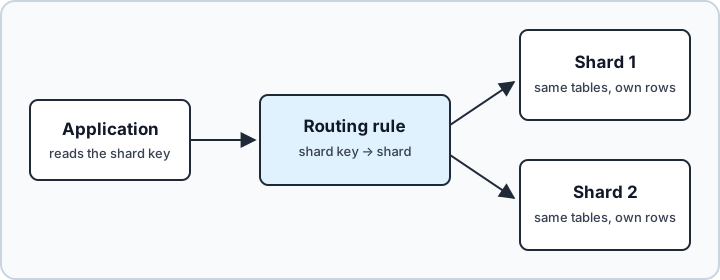
Each shard is an ordinary database that doesn't know it belongs to a set, so the routing rule lives outside the shards, usually in the application. On Azure SQL Database, Microsoft's Elastic Database client library keeps a map of the shards and helps route connections, but sending each request to the right database is still the application's job.
Sharding compared with vertical splits, partitioning and replication
Sharding as described above is horizontal: every shard has all the columns and a share of the rows. Vertical sharding splits the other way. It moves some columns, or whole tables, into another database, and both parts keep the primary key so the rows can be matched up again. Horizontal sharding fits a large volume of rows of the same kind, such as orders. A vertical split fits data that different parts of the application read independently.
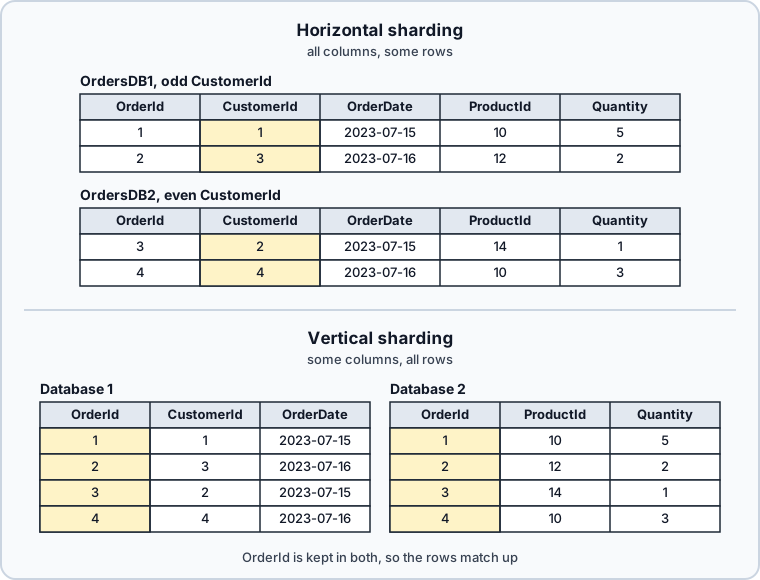
| Pattern | What is split | What it buys |
|---|---|---|
| horizontal sharding | rows across several databases | write throughput, tenant isolation |
| vertical sharding | columns or tables across databases | smaller databases, each read by its own part of the application |
| partitioning | one table inside one database | per-partition maintenance, partition elimination |
| readable secondary replicas | nothing, the data is copied | read capacity, availability |
The line between partitioning and sharding is documented: all partitions of a single table or index must reside in the same database. Partitioning splits a table for easier maintenance and leaves you one database to connect to. Sharding gives you several databases, each carrying part of the load.
Readable secondaries solve a different problem: reads. An Always On availability group can carry readable secondary replicas, and with read-only routing configured, read-intent connections that arrive at the availability group listener go to one of them. Queries there run under snapshot isolation whatever isolation level they ask for, and the data usually trails the primary by a few seconds. If what you need is somewhere to run reports, that's a smaller change than sharding. If the pressure is on maintenance windows rather than on write throughput, start with partitioning or data compression instead.
When sharding makes sense
Four situations justify the work. The first is a multi-tenant system where one tenant's load must not reach another, because a separate database is a harder boundary than a TenantID column. The second is data residency: when customers in different regions have to be stored in different places, the split is a legal requirement rather than a performance decision. The third is a write rate that one instance can't absorb. The fourth is operational isolation, where maintenance on one database has to leave the other customers untouched. In each case every shard holds fewer rows, so its indexes, backups and restores are smaller, and an outage of one shard's server stops only the customers stored on it.
The most concrete cost is in transactions. A transaction that spans two databases on the same instance is still a distributed transaction, which the instance manages internally and commits in two phases. Reach a database on another server through a linked server, and the local transaction is promoted to a distributed transaction that MS DTC coordinates. Savepoints go with it: SAVE TRANSACTION isn't supported in a distributed transaction, whether it began with BEGIN DISTRIBUTED TRANSACTION or was promoted from a local one. Consistency gets weaker as well, because a foreign key can reference only tables in the same database, so a rule that spans shards has to be enforced by triggers or by the application.
Reporting costs more too, because a query that spans shards has to be assembled somewhere else. So does schema change: every migration now runs once per shard, and nothing in the engine tells you when one shard has drifted. Each shard is also one more database to back up, patch and monitor.
How to choose a shard key
| Strategy | Example key | How a row is routed | Weak spot |
|---|---|---|---|
| range | TenantID ranges | lookup in a range table | tenants grow unevenly |
| list | RegionCode or business unit | direct mapping | global customers span regions, reorganizations change the map |
| hash | hash of CustomerId | computed in the application | adding a shard moves rows |
| lookup | any key, one row per value in a map | a query against the map | the map is one more database to keep available |
The key has to appear in almost every important query, because a query that doesn't carry it has no shard to go to and has to ask all of them. It has to spread rows and writes evenly, or one database does the work while the others idle. And it has to be stable: a value that changes moves the row to another database, which is a delete and an insert over two connections rather than an UPDATE.
If your hottest queries don't filter by the key you picked, no routing code will make the design comfortable, and that's the signal to look again at partitioning or at readable secondaries.
Build two shards in sqlcmd
The walk-through below splits one table across two databases on one SQL Server instance, with the customer as the shard key. In production the shards usually sit on separate instances, and only the connection strings change.
1. Connect with sqlcmd
sqlcmd -S localhost -U sa -C
| Option | What it sets |
|---|---|
-S | the server, with an instance name or a port when needed |
-U | the SQL Server login |
-C | trust the server certificate without validating it |
Leave out -P and sqlcmd prompts for the password, which is what the sqlcmd documentation recommends, because a password on the command line is insecure. -C is for a test server with a self-signed certificate. A sqlcmd built on ODBC Driver 18, the mssql-tools18 package, encrypts the connection by default (-Nm) and validates the server's certificate, so a self-signed certificate fails the connection unless -C trusts it. Older builds default to optional encryption (-No), and -C does no harm there. The login needs the CREATE DATABASE, CREATE ANY DATABASE or ALTER ANY DATABASE permission for the next step. If you still have to install SQL Server, creating a database in SQL Server starts from there.
2. Create one database per shard
CREATE DATABASE OrdersDB1;
GO
CREATE DATABASE OrdersDB2;
GO
GO isn't a T-SQL statement. It's a command that sqlcmd recognizes as the end of a batch, and sqlcmd sends the statements above it to the server.
3. Create the same table in every shard
USE OrdersDB1;
GO
CREATE TABLE dbo.Orders (
    OrderId     int  NOT NULL PRIMARY KEY,
    CustomerId  int  NOT NULL,
    OrderDate   date NOT NULL,
    ProductId   int  NOT NULL,
    Quantity    int  NOT NULL
);
GO

USE OrdersDB2;
GO
CREATE TABLE dbo.Orders (
    OrderId     int  NOT NULL PRIMARY KEY,
    CustomerId  int  NOT NULL,
    OrderDate   date NOT NULL,
    ProductId   int  NOT NULL,
    Quantity    int  NOT NULL
);
GO
CustomerId stays in every row even though the shard already tells you half of it. Without it, a shard can't be split again, and no query can check that a row reached the right place. OrderId has no IDENTITY, because an identity column starts from its seed in each table, and both shards would hand out order 1. The application assigns the number instead.
4. Route each row by its shard key
The rule in this example sends an odd CustomerId to OrdersDB1 and an even one to OrdersDB2. That's a hash of the simplest kind, CustomerId % 2, and the application computes it before it opens a connection. The same rule in T-SQL:
DECLARE @CustomerId int = 3;

SELECT CASE @CustomerId % 2
           WHEN 1 THEN 'OrdersDB1'
           ELSE 'OrdersDB2'
       END AS ShardDatabase;
| ShardDatabase |
|---|
| OrdersDB1 |
Each insert then goes to the shard the rule picked. In sqlcmd, USE stands in for the application's connection to that database:
USE OrdersDB1;
GO
INSERT INTO dbo.Orders (OrderId, CustomerId, OrderDate, ProductId, Quantity)
VALUES (1, 1, '2023-07-15', 10, 5),
       (2, 3, '2023-07-16', 12, 2);
GO

USE OrdersDB2;
GO
INSERT INTO dbo.Orders (OrderId, CustomerId, OrderDate, ProductId, Quantity)
VALUES (3, 2, '2023-07-15', 14, 1),
       (4, 4, '2023-07-16', 10, 3);
GO
5. Query each shard
USE OrdersDB1;
GO
SELECT * FROM dbo.Orders ORDER BY OrderId;
GO
| OrderId | CustomerId | OrderDate | ProductId | Quantity |
|---|---|---|---|---|
| 1 | 1 | 2023-07-15 | 10 | 5 |
| 2 | 3 | 2023-07-16 | 12 | 2 |
USE OrdersDB2;
GO
SELECT * FROM dbo.Orders ORDER BY OrderId;
GO
| OrderId | CustomerId | OrderDate | ProductId | Quantity |
|---|---|---|---|---|
| 3 | 2 | 2023-07-15 | 14 | 1 |
| 4 | 4 | 2023-07-16 | 10 | 3 |
A query that names a customer reads one shard. A query that doesn't, such as every order placed on 2023-07-15, has to read both.
Route, rebalance and report across shards
What a third shard does to the rule
Suppose the two shards fill up and you add a third:
CREATE DATABASE OrdersDB3;
GO
The rule becomes CustomerId % 3, with remainder 1 on OrdersDB1, 2 on OrdersDB2 and 0 on OrdersDB3. For the first six customers:
| CustomerId | shard under % 2 | shard under % 3 |
|---|---|---|
| 1 | OrdersDB1 | OrdersDB1 |
| 2 | OrdersDB2 | OrdersDB2 |
| 3 | OrdersDB1 | OrdersDB3 |
| 4 | OrdersDB2 | OrdersDB1 |
| 5 | OrdersDB1 | OrdersDB2 |
| 6 | OrdersDB2 | OrdersDB3 |
Four of the six customers change shard, and every row they own moves with them. Any six consecutive IDs give the same count, so two customers in three move, and each move is a copy and a delete across two databases while that customer's writes wait.
Keep the rule in a shard map
A shard map moves the rule into a table, so moving one customer changes one row of the map. The map lives in a small catalog database of its own:
CREATE DATABASE ShardCatalog;
GO
USE ShardCatalog;
GO
CREATE TABLE dbo.ShardMap (
    CustomerId     int     NOT NULL PRIMARY KEY,
    ShardDatabase  sysname NOT NULL
);
GO
INSERT INTO dbo.ShardMap (CustomerId, ShardDatabase)
VALUES (1, 'OrdersDB1'), (2, 'OrdersDB2'), (3, 'OrdersDB1'), (4, 'OrdersDB2');
GO
The application reads the map before it connects:
DECLARE @CustomerId int = 4;

SELECT ShardDatabase
FROM ShardCatalog.dbo.ShardMap
WHERE CustomerId = @CustomerId;
| ShardDatabase |
|---|
| OrdersDB2 |
To move customer 4 to OrdersDB3, copy its rows there, update its row in the map, and delete the old rows. Every other customer stays where it is. A customer with no row in the map returns no rows at all, which the routing code has to handle before it builds a connection string. A map with one row per customer grows with the customer list. A map of ID ranges stays small: each row holds a start and an end, a CHECK constraint rejects a range that ends before it starts, and the lookup uses BETWEEN.
Query across shards
A report over every customer has to read every shard. While the shards share an instance, a view in a separate reporting database can combine them with three-part names:
CREATE DATABASE OrdersReporting;
GO
USE OrdersReporting;
GO
CREATE VIEW dbo.AllOrders
AS
SELECT OrderId, CustomerId, OrderDate, ProductId, Quantity FROM OrdersDB1.dbo.Orders
UNION ALL
SELECT OrderId, CustomerId, OrderDate, ProductId, Quantity FROM OrdersDB2.dbo.Orders;
GO
SELECT OrderDate, SUM(Quantity) AS Units
FROM dbo.AllOrders
GROUP BY OrderDate
ORDER BY OrderDate;
GO
| OrderDate | Units |
|---|---|
| 2023-07-15 | 6 |
| 2023-07-16 | 5 |
The CREATE VIEW documentation calls a UNION ALL view over tables of the same structure a partitioned view. Such a view can also route rows by itself. For that, each member table needs one CHECK constraint on the same column, limiting it to a range or a list of values. That column has to be part of the primary key, and no two tables' constraints may overlap. An INSERT through the view then lands in the member table whose constraint the row satisfies. The Orders tables here have no CHECK constraint, so this view only combines the shards.
Once the shards sit on separate servers, each branch needs a linked server and a four-part name, and a report with no shard key in its WHERE clause reads every shard's server each time it runs. Keep the transactional path inside one shard, and feed the reporting database from the shards on a schedule instead. That reporting store is also where a query with no shard key belongs.
Two more pieces of the operating model belong next to this one: failover clustering for what happens when a shard's instance goes down, and concurrency and deadlock management for what happens inside each one.
Keep every shard on the same schema in DbSchema



The routing stays in the application. What decides whether sharding stays maintainable is proving, before each release, that every shard still has the schema the others have, and that comparison is what DbSchema does.
- Connect DbSchema to
OrdersDB1through the SQL Server JDBC driver and reverse-engineer it. The tables, columns and foreign keys arrive in a DbSchema model and on a diagram, and nothing in the database changes. - Save the model as a
.dbsfile. The file is XML, so it lives in Git next to the application, and the schema every shard should have is reviewed in a pull request like the rest of the release, as the Git integration page describes. - With the model open, connect DbSchema to
OrdersDB2and chooseSchema → Compare Model with Database. DbSchema lists every table, column, index and foreign key that differs, and for each difference you choose whether to update the model or push the change to that shard.
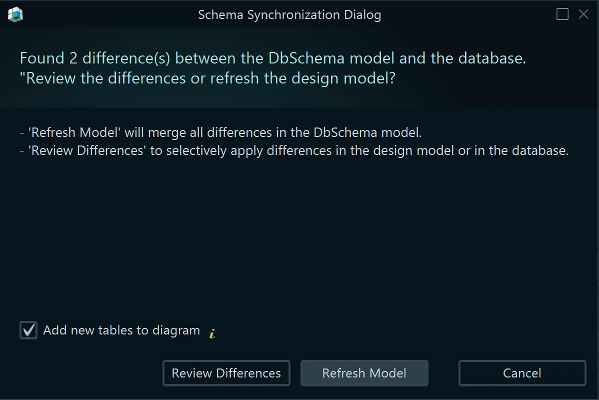

Schema → Synchronize Model with Databasegenerates the migration statements, and you can edit them before DbSchema executes them. Only that execution writes to the shard; editing the diagram and saving the model change the file alone.- To compare the data rather than the structure, connect DbSchema to each shard in turn and run the same query in the SQL Editor.
For a wider walkthrough, see Design SQL Server Schemas Visually with DbSchema.
Shard when a second database buys you isolation or write capacity that nothing smaller can, pick the key your hot queries already carry, and treat the routing rule and the reporting path as part of the design. Then keep every shard on the same schema: download DbSchema, reverse-engineer one shard, and compare the others against it. Connecting, reverse-engineering, the diagram and the SQL Editor are in the free Community Edition; saving the model to a file and synchronizing it with each shard are Pro edition features.
FAQ
How do I keep shard schemas aligned?
Deploy one source-controlled schema to every shard, then check afterwards that nothing drifted. DbSchema does the check by comparing each live shard against the model file and listing the differences.









