Drop Table in PostgreSQL: Syntax, IF EXISTS, CASCADE, and Safety Tips
For anyone about to remove a table from a PostgreSQL database where other objects may still be pointing at it.
On this page
You want a table gone, and something else in the database may still use it. The statement is DROP TABLE, and PostgreSQL runs it the moment you press Enter, with no confirmation. By default it refuses to drop a table that a view or another table's foreign key depends on. CASCADE removes those dependents too, and IF EXISTS turns a missing table into a notice.
DROP TABLE [ IF EXISTS ] name [, ...] [ CASCADE | RESTRICT ];
What DROP TABLE removes
The statement deletes the table and everything that belongs to it, in one step, as the PostgreSQL 18 documentation for DROP TABLE lists:
- the table definition and every row in it
- its indexes, rules, triggers and constraints
- any sequence that belongs to one of its columns, such as the one behind an identity column
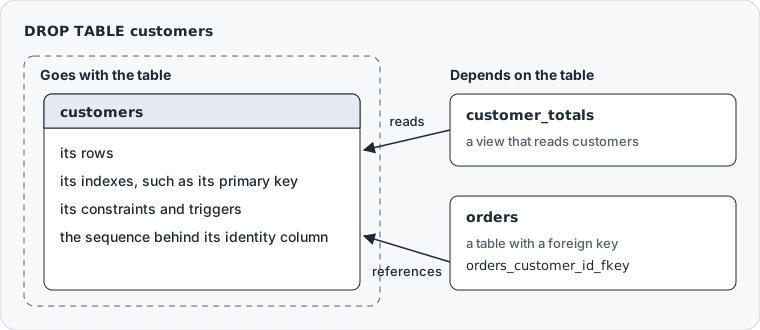
What it leaves alone are the objects outside the table that were built on it: a view that reads it, or a foreign key in another table that points at it. Those are the table's dependents.
Only the table's owner, the schema's owner and a superuser can drop a table. Any other role gets ERROR: must be owner of table, even with every privilege granted on the table. If you only want the rows gone, TRUNCATE or DELETE keeps the table, as the comparison further down shows.
DROP TABLE syntax in PostgreSQL
Each part of the statement above changes what happens:
IF EXISTSturns a missing table from an error into a noticenamecan be schema-qualified, asschema.table, which drops the table you meant whatever the search path says- a comma-separated list drops several tables in one statement
CASCADEdrops the objects that depend on the tableRESTRICTrefuses the drop while any object depends on it
You never have to write RESTRICT. The documentation describes it as "refuse to drop the table if any objects depend on it. This is the default". The same page notes that the SQL standard allows only one table per command, and that IF EXISTS is a PostgreSQL extension.
DROP TABLE is also transactional. After a BEGIN, it waits for your COMMIT or ROLLBACK like any other statement.
Drop a table step by step in psql
The examples run in a database of their own, with three tables and a view. They were run on PostgreSQL 17.9; the version 18 documentation linked here describes every behavior they show the same way.
createdb -U postgres shop
In shop, create the tables and the view:
CREATE TABLE public.customers (
    customer_id bigint GENERATED ALWAYS AS IDENTITY PRIMARY KEY,
    name text NOT NULL
);

CREATE TABLE public.orders (
    order_id bigint GENERATED ALWAYS AS IDENTITY PRIMARY KEY,
    customer_id bigint NOT NULL REFERENCES public.customers,
    total numeric(12,2) NOT NULL
);

CREATE TABLE public.order_items (
    order_item_id bigint GENERATED ALWAYS AS IDENTITY PRIMARY KEY,
    order_id bigint NOT NULL REFERENCES public.orders,
    product text NOT NULL
);

CREATE VIEW public.customer_totals AS
SELECT c.customer_id, c.name, SUM(o.total) AS total
FROM public.customers c
JOIN public.orders o ON o.customer_id = c.customer_id
GROUP BY c.customer_id, c.name;
customers has two dependents: the view reads it, and the foreign key on orders points at it. Nothing points at order_items.
Connect with psql, then find the table before you drop it. \l lists the databases if you do not remember the name, \c connects to one, and \dt lists its tables:
psql -U postgres
postgres=# \c shop
You are now connected to database "shop" as user "postgres".
shop=# \dt
            List of relations
 Schema |    Name     | Type  |  Owner
--------+-------------+-------+----------
 public | customers   | table | postgres
 public | order_items | table | postgres
 public | orders      | table | postgres
(3 rows)
Drop one table
DROP TABLE public.order_items;
psql answers with the command tag DROP TABLE. Nothing depended on order_items, so the default RESTRICT had nothing to refuse.
Drop a table only if it exists
DROP TABLE IF EXISTS public.order_items;
NOTICE:  table "order_items" does not exist, skipping
DROP TABLE
The table is already gone, and IF EXISTS makes that a notice rather than an error, so a teardown script carries on to its next line.
Drop a table other objects depend on
DROP TABLE public.customers;
ERROR:  cannot drop table customers because other objects depend on it
DETAIL:  constraint orders_customer_id_fkey on table orders depends on table customers
view customer_totals depends on table customers
HINT:  Use DROP ... CASCADE to drop the dependent objects too.
The refusal changes nothing, and its DETAIL lines name the objects in the way.
CASCADE vs RESTRICT
| Option | What it does | When to use it |
|---|---|---|
RESTRICT | Refuses the drop while dependents exist | The default, and the right one on production |
CASCADE | Drops the dependents too | Development resets, and drops whose dependents you have read |
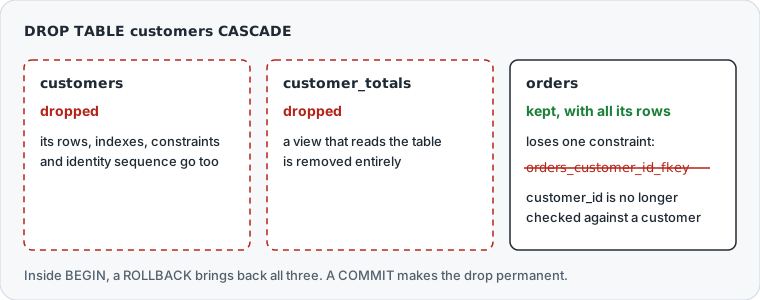
CASCADE treats the two kinds of dependent differently. The documentation says it in one sentence: "CASCADE will remove a dependent view entirely, but in the foreign-key case it will only remove the foreign-key constraint, not the other table entirely." It also repeats itself, dropping "objects that depend on the table (such as views), and in turn all objects that depend on those objects".
Rehearse the drop inside a transaction
BEGIN;
DROP TABLE public.customers CASCADE;
NOTICE:  drop cascades to 2 other objects
DETAIL:  drop cascades to constraint orders_customer_id_fkey on table orders
drop cascades to view customer_totals
DROP TABLE
Until the transaction ends, your session sees the database as it will be after the drop, so you can run the queries that worry you. \dt now lists orders alone, and \d orders shows it without its foreign key.
Then end the rehearsal:
ROLLBACK;
The ROLLBACK brings back the table, the view and the constraint. Write COMMIT instead once you are sure.
List the dependents before you drop
The foreign keys that point at a table are in pg_constraint:
SELECT conname AS foreign_key_name,
       conrelid::regclass AS referencing_table
FROM pg_constraint
WHERE contype = 'f'
  AND confrelid = 'public.customers'::regclass;
| foreign_key_name | referencing_table |
|---|---|
| orders_customer_id_fkey | orders |
The views that read it are in information_schema.view_table_usage. Its documentation says: "A table is only included if that table is owned by a currently enabled role." So run the query as the table's owner:
SELECT view_schema, view_name
FROM information_schema.view_table_usage
WHERE table_schema = 'public'
  AND table_name = 'customers';
| view_schema | view_name |
|---|---|
| public | customer_totals |
This query lists only the views that read the table directly. A view built on customer_totals is missing, although CASCADE would drop it too, so the refused drop's DETAIL is the fuller list. It names what CASCADE would remove, up to 100 objects, then adds a count such as and 20 other objects (see server log for list).
A function whose body queries the table is on neither list. The dependency tracking documentation says PostgreSQL does not track "dependencies that could only be known by examining the function body", unless an SQL function is written with BEGIN ATOMIC. The drop goes through, and the function fails at its next call with relation "public.customers" does not exist.
With fifteen rows in these results, drop the dependents one at a time, so each removal is a decision.
Drop several tables in one statement
DROP TABLE IF EXISTS public.order_items, public.orders, public.customers CASCADE;
NOTICE:  table "order_items" does not exist, skipping
NOTICE:  drop cascades to view customer_totals
DROP TABLE
IF EXISTS applies to each name, so order_items, dropped earlier, costs a notice. The foreign key goes with orders, which is in the list, so CASCADE is there for the view alone. The schema is empty afterwards. To empty a whole schema without naming every table, see Drop All Tables in PostgreSQL.
DROP TABLE, TRUNCATE or DELETE
If the table should stay and only its rows should go, DROP TABLE is the wrong statement:
DROP TABLE | TRUNCATE | DELETE | |
|---|---|---|---|
| Removes the table | yes | no | no |
| Removes rows | all | all | those the WHERE clause selects |
| Privilege needed | owner of the table or schema, or superuser | TRUNCATE | DELETE |
| Lock on the table | ACCESS EXCLUSIVE | ACCESS EXCLUSIVE | ROW EXCLUSIVE |
Undone by ROLLBACK before COMMIT | yes | yes | yes |
TRUNCATE is the fast way to empty a table. It does not scan the table, and "it reclaims disk space immediately, rather than requiring a subsequent VACUUM operation". Its documentation also says when to prefer DELETE: "If concurrent access to a table is required, then the DELETE command should be used instead."
All three roll back with a transaction that has not committed. After the COMMIT, none of them can be undone.
Safety checklist before dropping a table
Before a drop on a database that matters, work through these checks in order:
- Confirm the connection. The psql prompt names the database, and
SELECT current_database(), current_user;confirms both. - List the dependents, with the two queries above or the
DETAILof a refused drop. - Back up the table if anyone might want it back, because a committed
DROP TABLEleaves nothing else to recover from. - Rehearse the drop inside a transaction, and commit only when the results look right.
The backup is one command. pg_dump with -t dumps "only tables with names matching" the pattern, definition and rows:
pg_dump -U postgres -d shop -t public.customers -f customers.sql
DROP TABLE takes an ACCESS EXCLUSIVE lock, which the locking documentation says "guarantees that the holder is the only transaction accessing the table in any way". A report still reading the table makes the drop wait, and queries that arrive after the drop wait behind it. Here are the locks on customers while a report holds its read lock, a DROP TABLE waits, and a new SELECT has arrived:
SELECT pid, mode, granted
FROM pg_locks
WHERE relation = 'public.customers'::regclass
ORDER BY granted DESC, pid;
| pid | mode | granted |
|---|---|---|
| 257 | AccessShareLock | t |
| 265 | AccessExclusiveLock | f |
| 272 | AccessShareLock | f |
Process 272 only wants to read, and its lock would not conflict with the report's, yet it waits because the drop is queued ahead of it. Set a lock timeout first, so the drop gives up instead of holding everyone up:
SET lock_timeout = '3s';
DROP TABLE public.customers CASCADE;
ERROR: canceling statement due to lock timeout
Nothing was dropped.
Drop tables visually in DbSchema



A DbSchema diagram shows the same foreign keys as lines, so you can see what points at a table before you remove it:
- Click Connect to Database, pick PostgreSQL in Choose Your Database, and fill in the Connection Dialog. On its Settings tab, set Highlight to Production for a live database, so DbSchema colors that connection.
- Let DbSchema reverse-engineer the schema, then read the foreign key lines that arrive at the table on the diagram.
- Right-click the table in the structure tree, or its header on the diagram, and choose Drop.
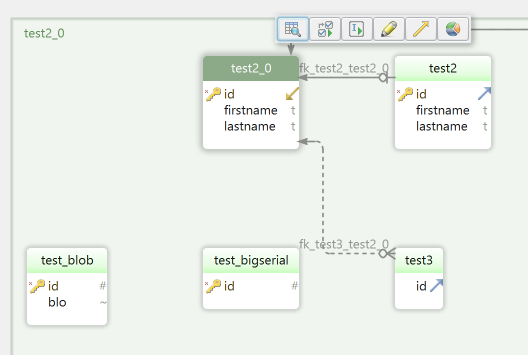
Connected to the database, DbSchema asks you to confirm and then runs the drop on PostgreSQL at once. The statement DbSchema sends is DROP TABLE ... CASCADE, so the dependents go with the table, as in the rehearsal above: views are dropped, and foreign keys lose their constraint.


Disconnected, DbSchema's Drop changes only the design model: the table leaves the diagram and the model, and the database keeps it. Schema → Synchronize Model with Database then lists the missing table as a difference. DbSchema shows the SQL it generated, and you can edit it, for example to take out the CASCADE, before you click Execute.
On a database where nobody should drop anything, tick Read Only Connection on the same Settings tab, and DbSchema refuses a Drop from the diagram or the structure tree on that connection. To type the statement yourself, the DbSchema SQL Editor runs it against the connected database, and its Commit and Rollback buttons end the rehearsal above.
Check what depends on the table, then drop it. Download DbSchema at https://dbschema.com/download.html, connect to the PostgreSQL database you are cleaning up, and read the lines that arrive at the table before you choose Drop. Connecting, reverse-engineering, the diagram with its Drop and the SQL Editor are in the free Community Edition. Synchronize Model with Database, where you review the generated DROP TABLE before it runs, is in Pro.









