How to Rename a MySQL Database Using mysqldump
For a developer or DBA renaming a MySQL database that other things point at; the commands, the privileges and the checks are given in full.
On this page
MySQL has no RENAME DATABASE statement[1]. To rename a database, you copy it under the new name and drop the old one: dump it with mysqldump, create the new database, restore the dump into it, check the copy, then drop the original.
mysqldump -u root -p --single-transaction --routines --events --triggers old_dbname > old_dbname.sql
# use the character set and collation that SHOW CREATE DATABASE old_dbname prints
mysql -u root -p -e "CREATE DATABASE new_dbname CHARACTER SET utf8mb4 COLLATE utf8mb4_0900_ai_ci"
mysql -u root -p new_dbname < old_dbname.sql
# compare the two databases (step 3), then:
mysql -u root -p -e "DROP DATABASE old_dbname"
Then grant your users their privileges on the new name, because grants stay with the old one.
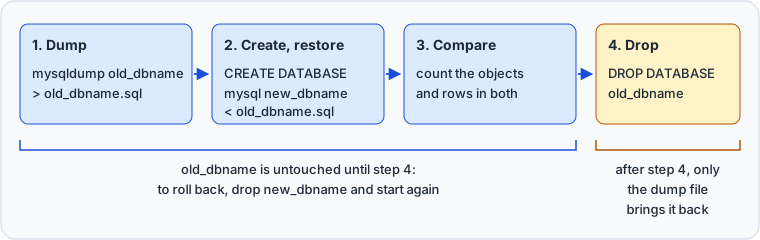
The output in each step comes from MySQL 9.1, run on this example database:
CREATE DATABASE old_dbname;
USE old_dbname;
CREATE TABLE customers (id INT PRIMARY KEY, name VARCHAR(100) NOT NULL);
CREATE TABLE orders (id INT PRIMARY KEY, customer_id INT NOT NULL, total DECIMAL(10,2) NOT NULL,
  FOREIGN KEY (customer_id) REFERENCES customers(id));
INSERT INTO customers VALUES (1,'Ada'),(2,'Linus');
INSERT INTO orders VALUES (10,1,25.00),(11,1,40.00),(12,2,15.50);
CREATE VIEW order_totals AS SELECT c.name, SUM(o.total) AS total
  FROM customers c JOIN orders o ON o.customer_id = c.id GROUP BY c.name;
CREATE VIEW qualified_customers AS SELECT id, name FROM old_dbname.customers;
CREATE TRIGGER orders_round BEFORE INSERT ON orders
  FOR EACH ROW SET NEW.total = ROUND(NEW.total, 2);
CREATE PROCEDURE count_orders() SELECT COUNT(*) AS orders FROM old_dbname.orders;
CREATE EVENT nightly_check ON SCHEDULE EVERY 1 DAY DO SELECT COUNT(*) FROM orders;
CREATE USER app@'%' IDENTIFIED BY 'apppass';
GRANT SELECT, INSERT, UPDATE, DELETE ON old_dbname.* TO app@'%';
Step 1: Dump the database with mysqldump
Run mysqldump from your operating system's shell, not from inside the mysql client. It writes SQL to standard output, so redirect it to a file:
mysqldump -u root -p --single-transaction --routines --events --triggers \
  old_dbname > old_dbname.sql
| option | what it adds to the dump |
|---|---|
--single-transaction | a BEGIN before the data, so no LOCK TABLES |
--routines or -R | stored procedures and functions, left out by default |
--events | scheduled events, left out by default |
--triggers | the triggers of each table, included by default |
Name the database without --databases: that option writes CREATE DATABASE and USE old_dbname into the file, and step 2 shows what those two lines do to the restore.
If the server has GTIDs enabled, add --set-gtid-purged=OFF. Without it, the dump carries a SET @@GLOBAL.gtid_purged statement by default[2], and restoring that on the same server failed with ERROR 3546.
A missing privilege leaves objects out without an error
mysqldump requires at least the SELECT privilege for dumped tables, SHOW VIEW for views, TRIGGER for triggers, LOCK TABLES unless you use --single-transaction, and PROCESS unless you use --no-tablespaces[2]. Stored routines need SHOW_ROUTINE[9]. A dumping account without one of them gave these results:
| privilege missing | what mysqldump did | exit status |
|---|---|---|
| TRIGGER | left the trigger out, with no message | 0 |
| SHOW_ROUTINE | left the procedure out, with no message | 0 |
| PROCESS | printed an Access denied error for tablespaces, then dumped the rest | 0 |
So the exit status proves nothing. Dump as root, or grant what is missing, and count what the file holds.
Count what the dump holds
mysqldump wraps triggers and events in version comments, as in /*!50003 CREATE*/ ... /*!50003 TRIGGER, and writes a DEFINER clause into every trigger, routine and event, so a search for CREATE TRIGGER finds nothing in a dump that holds a trigger. Search for the forms that mysqldump writes instead:
grep -c  '^CREATE TABLE'                            old_dbname.sql  # tables
grep -c  '^/\*!50001 VIEW'                          old_dbname.sql  # views
grep -c  '!50003 TRIGGER'                           old_dbname.sql  # triggers
grep -cE '^CREATE DEFINER=.* (PROCEDURE|FUNCTION) ' old_dbname.sql  # routines
grep -c  '!50106 EVENT'                             old_dbname.sql  # events
On the example these print 2, 2, 1, 1 and 1. Each count must match what step 3's query reports for old_dbname, and a 0 where the source has triggers is the silent omission above.
Step 2: Create the new database and restore the dump



Check first that the name is free. SHOW DATABASES LIKE returns an empty set when no database has that name:
SHOW DATABASES LIKE 'new_dbname';
Then read the source's character set and collation. A new database otherwise gets the server's defaults, and every table created in it later inherits them.
SHOW CREATE DATABASE old_dbname;
CREATE DATABASE `old_dbname` /*!40100 DEFAULT CHARACTER SET utf8mb4 COLLATE utf8mb4_0900_ai_ci */ /*!80016 DEFAULT ENCRYPTION='N' */
Create the new database with the same values. CREATE DATABASE takes CHARACTER SET and COLLATE options[3]:
CREATE DATABASE new_dbname
  CHARACTER SET utf8mb4
  COLLATE utf8mb4_0900_ai_ci;
The shorter mysqladmin -u root -p create new_dbname takes neither option, so the database gets the server's character_set_server and collation_server.
Restore the dump by naming the new database on the mysql command line:
mysql -u root -p new_dbname < old_dbname.sql
A dump taken with --databases restores into the old name
A file dumped with --databases carries its own USE old_dbname, which overrides the database named on the command line. Restored with the command above, such a file left the named database empty and rebuilt the four tables and views of old_dbname in place. The dump drops each table before it creates it again, so anything written to old_dbname since the dump is gone. If a file like that is the one you have, delete both lines before you restore it:
sed -e '/^CREATE DATABASE /d' -e '/^USE `old_dbname`;/d' old_dbname.sql > new_dbname.sql
Restore as root
The dump sets a DEFINER on every view, trigger, routine and event, and binary logging adds a rule for creating triggers and stored functions[7]. An account with every privilege on new_dbname stopped at the first trigger with ERROR 1419, "You do not have the SUPER privilege and binary logging is enabled". Granted SET_ANY_DEFINER, with log_bin_trust_function_creators ON on the server, it stopped with ERROR 1227 asking for SYSTEM_USER, which a DEFINER of root@localhost requires[10]. So restore as root, and if an error leaves new_dbname half built, drop it and start step 2 again.
Step 3: Compare the two databases
Before anything is deleted, compare the copy with the source. Run this query against new_dbname, then again with old_dbname in its place:
SELECT 'tables'     AS kind, COUNT(*) AS n FROM information_schema.tables
  WHERE table_schema = 'new_dbname' AND table_type = 'BASE TABLE'
UNION ALL SELECT 'views',     COUNT(*) FROM information_schema.views
  WHERE table_schema = 'new_dbname'
UNION ALL SELECT 'triggers',  COUNT(*) FROM information_schema.triggers
  WHERE trigger_schema = 'new_dbname'
UNION ALL SELECT 'routines',  COUNT(*) FROM information_schema.routines
  WHERE routine_schema = 'new_dbname'
UNION ALL SELECT 'events',    COUNT(*) FROM information_schema.events
  WHERE event_schema = 'new_dbname'
UNION ALL SELECT 'foreign keys', COUNT(*) FROM information_schema.table_constraints
  WHERE table_schema = 'new_dbname' AND constraint_type = 'FOREIGN KEY'
UNION ALL SELECT 'indexes',   COUNT(DISTINCT table_name, index_name)
  FROM information_schema.statistics WHERE table_schema = 'new_dbname';
On the example both runs printed the same result:
| kind | n |
|---|---|
| tables | 2 |
| views | 2 |
| triggers | 1 |
| routines | 1 |
| events | 1 |
| foreign keys | 1 |
| indexes | 3 |
For rows, the TABLE_ROWS column of information_schema.tables is no check: for InnoDB it is an approximation, and may vary from the actual value by as much as 40% to 50%[6]. Run SELECT COUNT(*) on each table in both databases instead; orders held 3 rows in each.
Counts prove only that the objects and rows arrived. Before step 4, point the application at new_dbname in staging and run it.
Step 4: Drop the old database
DROP DATABASE drops all tables in the database and deletes the database, and needs the DROP privilege on it[4]. Run it only after step 3 has passed:
DROP DATABASE old_dbname;
Query OK, 4 rows affected (0.09 sec)
The statement returns the number of tables that were removed[4], and views count: the example's 2 tables and 2 views make 4.
From the shell, mysqladmin drop does the same, and asks for confirmation unless you pass --force[5]:
mysqladmin -u root -p drop old_dbname
Keep old_dbname.sql until you trust the new name in production.
Rolling back a failed rename
The order of the steps is the rollback plan. Until step 4, old_dbname is untouched: drop new_dbname, fix the cause and start again, or point the connection strings back at old_dbname if traffic has moved. After step 4, create old_dbname again, restore old_dbname.sql into it and reissue the grants; every write made to new_dbname since the dump is lost. So freeze writes to old_dbname while you copy it, or treat the rename as a migration with a cutover, as in our note on turning a schema diff into a safe migration script.
Grant the privileges on the new name
Grants are stored against the database name, in the Db column of mysql.db, tables_priv, columns_priv and procs_priv[8]. DROP DATABASE leaves those rows in place[4], and mysqldump copies objects, not accounts, so every grant still names old_dbname. List the accounts that have one:
SELECT user, host FROM mysql.db WHERE db = 'old_dbname';
| user | host |
|---|---|
| app | % |
SHOW GRANTS FOR 'app'@'%' prints that account's grants as statements you can copy. Grant the same on the new name and revoke the old grant, which works after the drop too:
GRANT SELECT, INSERT, UPDATE, DELETE ON new_dbname.* TO 'app'@'%';
REVOKE ALL ON old_dbname.* FROM 'app'@'%';
Our guide to creating a MySQL user has the syntax.
Find what still names the old database
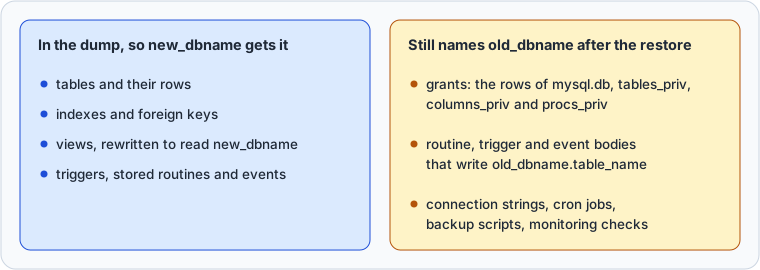
The restore rewrites views and nothing else. MySQL stores a view's query with the database name filled in, and mysqldump writes it without the name, so qualified_customers, created with FROM old_dbname.customers, reads new_dbname.customers after the restore.
A procedure, trigger or event keeps its body as written. The restore copies count_orders into new_dbname with old_dbname.orders still in it, and once step 4 has run, calling it fails:
CALL new_dbname.count_orders();
ERROR 1049 (42000) at line 1: Unknown database 'old_dbname'
Find these bodies before the drop, in the dump file:
grep -nE '`?old_dbname`?\.' old_dbname.sql
149:SELECT COUNT(*) AS orders FROM old_dbname.orders ;;
The pattern needs a dot after the name, so it skips the dump's comment lines. Create each body it finds again in new_dbname with the new name.
The dump holds only old_dbname's own objects. A view or routine in another database that names old_dbname breaks once old_dbname is dropped, and a foreign key in another database that references it makes step 4 fail with ERROR 3730. Search information_schema across every database for the name. Then search the places outside MySQL that name the database: connection strings, ORM configuration, cron jobs, backup scripts, replication filters and monitoring checks.
Other ways to rename a database
Move the tables with RENAME TABLE
RENAME TABLE moves a table to another database, and moving all tables this way in effect renames the database, except that the original continues to exist, albeit with no tables[1]. It needs ALTER and DROP on each old table, and CREATE and INSERT on the new one.
CREATE DATABASE new_dbname
  CHARACTER SET utf8mb4 COLLATE utf8mb4_0900_ai_ci;

RENAME TABLE old_dbname.customers TO new_dbname.customers,
             old_dbname.orders    TO new_dbname.orders;
List every table in one statement. The rename operation is done atomically[1], and when one pair in the list failed, no table moved. Foreign keys move with their tables: after the statement above, the foreign key of orders pointed at new_dbname.customers.
RENAME TABLE moves tables and nothing else, so these stop it or stay behind:
- A table with a trigger fails with
ERROR 1435 (HY000): Trigger in wrong schema[1]. Drop the trigger, move the table, then create the trigger again in new_dbname. - A view fails with
ERROR 1450 (HY000): Changing schema from 'old_dbname' to 'new_dbname' is not allowed.Create it again in new_dbname; the copy left in old_dbname fails with ERROR 1356 once its tables have moved. - Stored routines and events stay in old_dbname. Dump them with the command below before the move, because afterwards the broken view stops mysqldump with ERROR 1356, then restore the file into new_dbname.
- Privileges granted for a renamed table or view are not migrated to the new name[1], and the database's own grants stay behind.
mysqldump -u root -p --routines --events --no-create-info --no-data --skip-triggers \
  old_dbname > routines_and_events.sql
When new_dbname holds everything, drop old_dbname as in step 4.
Rename in cPanel or phpMyAdmin
cPanel's Manage My Databases page has a Rename action, which cPanel's documentation says creates a new database, moves the data, recreates the grants and stored code, deletes the old database and its grants, and terminates active connections to it.
phpMyAdmin puts "Rename database to" on the database's Operations tab. Its source creates the new database, brings over the routines, tables, views, constraints and events, moves the privileges only when "Adjust privileges" is ticked, then drops the old database. Both drop it in the same operation, so take a dump first, and update configuration files and applications yourself.
Check the renamed schema in DbSchema
DbSchema reverse-engineers the renamed database into a design model and draws it, so you see which foreign keys arrived, not only how many. Click Connect to Database, choose MySQL, and fill in the host, port, user and the new database name in the Connection Dialog. In the schema selection step, tick tables, views, procedures, functions and triggers, and skip information_schema, mysql, performance_schema and sys. Reading the schema fills the design model on your computer and changes nothing in the MySQL database you renamed.
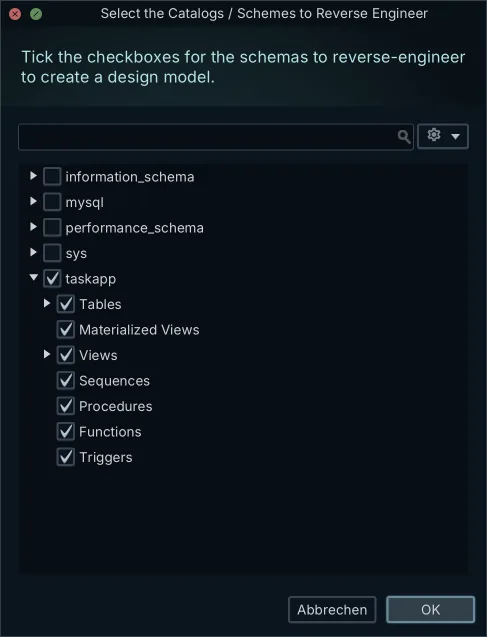
DbSchema draws every foreign key as a line, solid for a mandatory relationship and dashed for an optional one, so a constraint that the restore did not recreate is a line that is not there. Double-click a table header to open the Table Dialog, where you manage the table's columns, indexes and foreign keys.
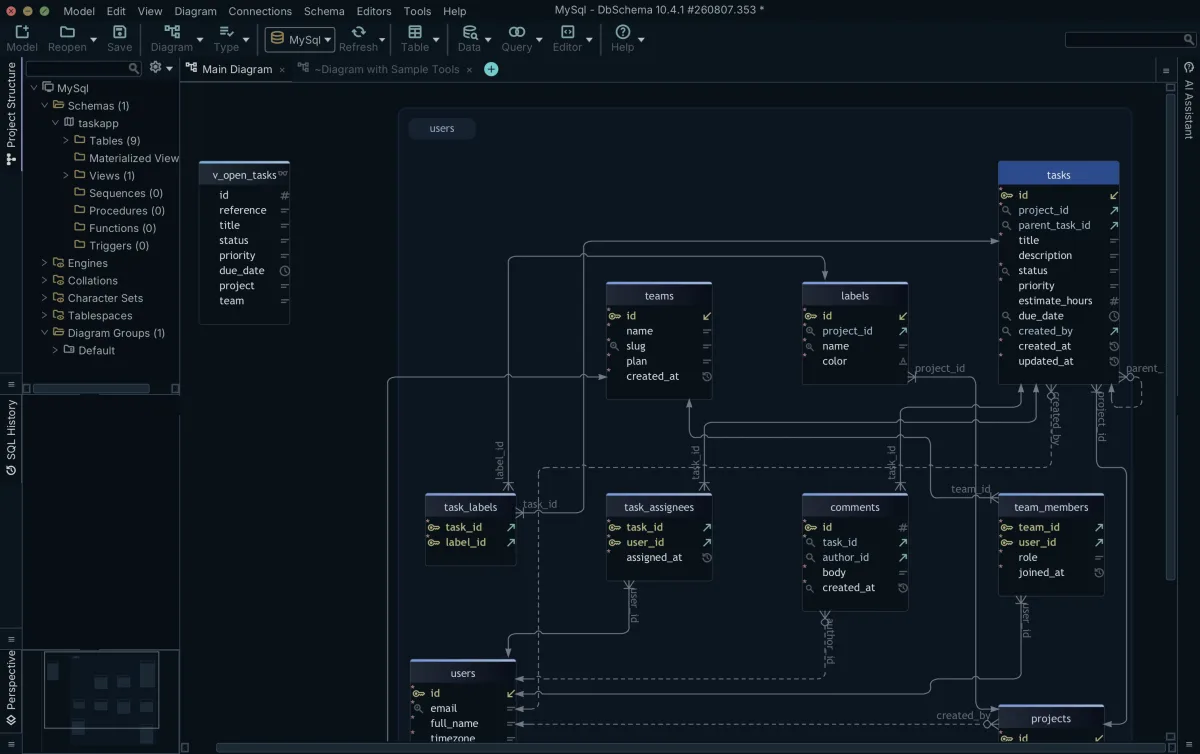
A diagram catches a missing foreign key, not a column whose type drifted. Before you drop the source, reverse-engineer each database into its own .dbs model file, then open the two files together and synchronize between them, as the design model page describes. The Synchronization Dialog lists every object that differs, with an action for each; our guide to comparing two database schemas has the full method.

Download DbSchema at https://dbschema.com/download.html and connect it to the renamed database to confirm that the foreign keys and indexes arrived. Connecting, reverse-engineering and the interactive diagrams are in the free Community Edition; saving the model to a .dbs file and the Synchronization Dialog are in the Pro edition.
Sources
- MySQL 8.4: RENAME TABLE Statement
- MySQL 8.4: mysqldump
- MySQL 8.4: CREATE DATABASE Statement
- MySQL 8.4: DROP DATABASE Statement
- MySQL 8.4: mysqladmin
- MySQL 8.4: The INFORMATION_SCHEMA TABLES Table
- MySQL 8.4: Stored Program Binary Logging
- MySQL 8.4: Grant Tables
- MySQL 8.4: Privileges Provided by MySQL
- MySQL 8.4: Stored Object Access Control
See the renamed schema as a diagram
DbSchema connects to MySQL, reverse-engineers the renamed database and draws every foreign key, so you can check the copy before you drop the original. The Community Edition is free.









