Best MySQL Database Design Tools in 2026: Buyer's Comparison
For the person choosing what to buy for MySQL schema design, who will keep the design after the first diagram and hand it to colleagues.
On this page
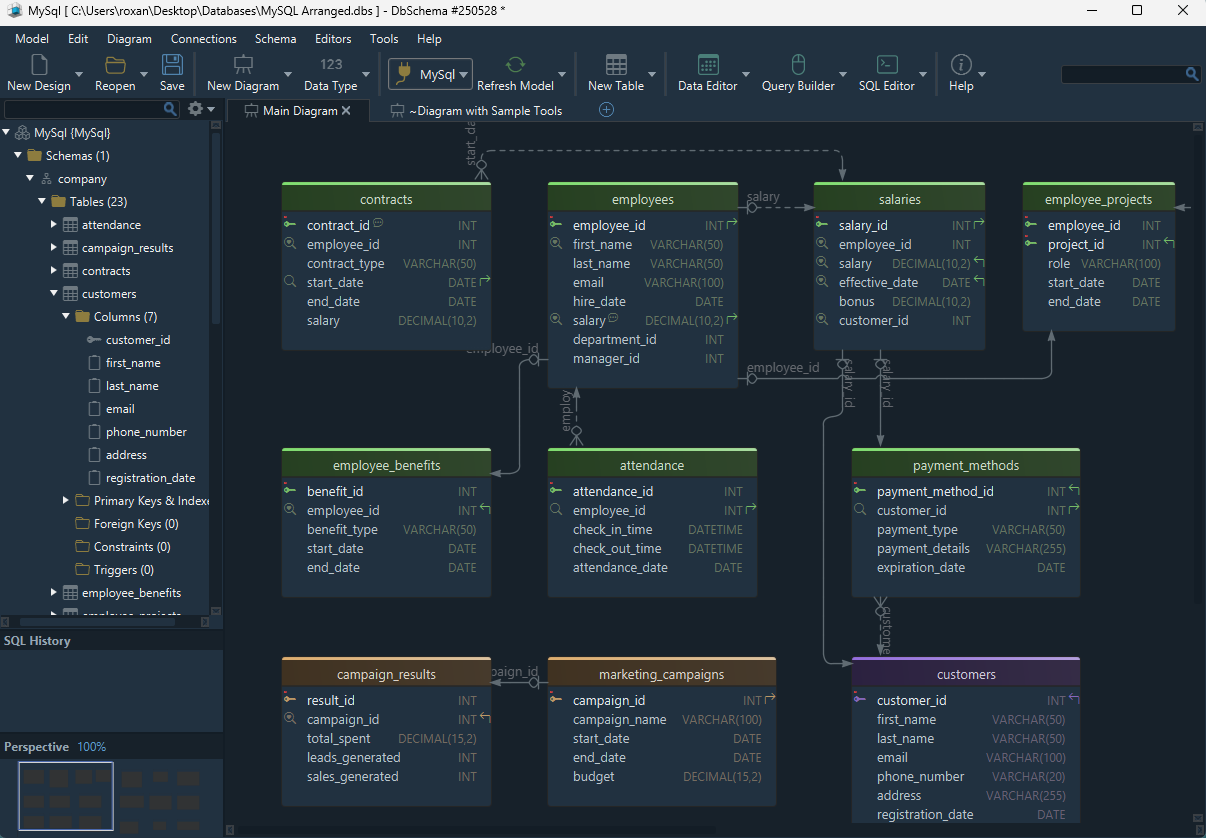
Buy DbSchema if you design a MySQL schema before the database exists and other people have to read it afterwards. The design lives in a model file you can commit, the diagram is the working surface rather than a picture of a connection, and the same model produces the HTML5, PDF and Markdown documentation. The free Community Edition already connects to MySQL, reverse-engineers it and draws the diagram, so you can start without paying. The six tools after it are described by what each one is built for.
Every price in this article was read in US dollars on the vendor's own pricing page on 5 September 2026. Two of the pages move the amount after you read it. Lucidchart's shows its figures in the visitor's own currency, so only its free tier is described here, and the DbSchema purchase page does the same and prices separately on its Business, Personal and Universities & Students tabs, so the DbSchema editions below are linked rather than quoted.
Which tool for which MySQL job
- DbSchema is the design-first choice, for a schema you draw before the database exists and keep afterwards; its Community Edition reverse-engineers and diagrams MySQL for free, and Pro adds the model file, schema synchronization and documentation
- MySQL Workbench is the official MySQL tool, GPL-licensed, focused on MySQL, with its documentation features in the paid Standard and Enterprise editions
- dbForge Studio is the MySQL and MariaDB IDE built around comparison and deployment, starting at a free Express edition
- Navicat is an administration suite whose Data Dictionary mails documentation out as PDF
- DbVisualizer and DBeaver are JDBC clients that reach any database with a driver, and both explore existing schemas rather than design new ones
- Lucidchart is a browser diagramming tool for agreeing on a shape with people who will never install a database client
If you are designing the schema rather than shopping for a tool, start with the step-by-step design procedure and the round-up of free database design tools. If you are mainly after an ERD workflow, read the guide to creating ER diagrams for MySQL and the broader introduction to entity relationship diagrams.
The seven criteria and the comparison table
A MySQL design tool is judged on what it does after the first diagram, and seven questions separate these seven tools:
- which engines it models, beyond MySQL
- whether it builds the diagram from a live database
- whether it runs on the desktop and saves the design to a file you own
- whether it can publish the schema for people who will not open it
- what the free tier stops at, and what the paid tier costs
- whether two people can work on the same design under version control
- what job it is built for, because no single tool covers all seven the same way
| Tool | Engines | Reverse engineering | Desktop and model file | Documentation output | Version control listed | Price and free tier |
|---|---|---|---|---|---|---|
| DbSchema | All SQL and NoSQL via JDBC | All editions | Win, Mac, Linux; model file in Pro | HTML5, PDF, Markdown; Pro | Git client, model file is XML | Community free; Pro perpetual |
| MySQL Workbench | MySQL; migration from Access, SQL Server, PostgreSQL | Script and live database | Desktop; model file free | DBDoc; Standard and Enterprise | Not listed | Free, GPL |
| dbForge Studio for MySQL | MySQL, MariaDB, Percona | Yes | Win, Mac, Linux | Documenter; Enterprise | Source control; Enterprise | Express free; Standard $99.95/yr |
| Navicat for MySQL | MySQL and MariaDB | Yes | Win, Mac, Linux, one key | Data Dictionary, PDF by email | Not listed | Lite free; Standard $299 perpetual |
| DbVisualizer | Any database with a JDBC driver | Yes | Desktop | Grid export; no schema doc | Git for scripts; Pro | Free tier; Pro $199 first year |
| DBeaver | Any database with a JDBC driver | Yes | Desktop | Diagram export; no schema doc | Not listed | Community free; Lite $113 a year |
| Lucidchart | Not listed | Import from the DBMS | Browser only | Diagram export; no schema doc | Real-time co-editing | Free plan, 3 documents; paid plans |
Two columns are worth pausing on. Schema documentation is a paid tier in every tool here that offers it at all, including DbSchema, where it is in Pro. And three of the seven publish no schema document of any kind, only a picture of the diagram.
DbSchema
DbSchema is a design-first modeling tool. The model lives in its own project file, an XML .dbs you can read in a text editor and commit, and the connection to a live database is optional rather than assumed. That is what lets you design a schema that does not exist yet, and then deploy it.
The free Community Edition covers:
- connecting to every supported engine and reverse-engineering any of them
- the interactive diagrams
- creating tables and columns visually
- the SQL editor
The Pro edition adds:
- the saved model file and offline design
- HTML5, PDF and Markdown documentation
- the visual query builder
- schema synchronization
- relational data browsing
- the data generator
Pro is a one-time license[1] with the first year of new versions included and an optional yearly renewal after that, which is the only recurring cost. Logical and conceptual design sit one tier higher, in Architect[1], sold on the same terms.
Version control is built in rather than bolted on: Model → Git — Collaborative Design clones a repository, stages the model, commits and pushes it, and Compare with Current opens the Synchronization Dialog on a teammate's version so you read their schema change as a list of differences before any of it reaches your database.
Where it fits: you design a schema before it exists, keep the diagram as the source of truth, and hand documentation to people who will never open a database tool. The MySQL page covers the engine, and the MySQL JDBC driver page covers driver setup. Start with creating the database if the server is still empty.
MySQL Workbench
MySQL Workbench is the official MySQL tool, free under the GPL[2], with a free Community edition and paid Standard and Enterprise editions.
That edition includes EER diagramming, modeling of tables, indexes, views, routines and user security, reverse engineering from a SQL script and from a live database, forward engineering to both, and schema diff and synchronization. It saves the model to a file at no cost. The Migration Wizard[3] carries dedicated guides for Microsoft Access, Microsoft SQL Server, PostgreSQL and MySQL itself, and a generic ODBC path for anything else, so an existing schema on another engine can become a MySQL model.
What it is built for: MySQL-only modeling from the vendor itself. What stops at the Community edition is the documentation. Schema validation, model validation and the whole DBDoc set are marked Standard and Enterprise, not Community[2], so the free edition publishes no schema document, and the modeling is aimed at MySQL rather than at a mixed estate.
dbForge Studio for MySQL
dbForge Studio is a MySQL, MariaDB and Percona IDE built around comparison and deployment, and it also connects to the managed MySQL services on AWS, Azure, Google Cloud and DigitalOcean. Devart publishes a free Express edition[4] alongside three paid tiers, and it runs on Windows, macOS and Linux[5].
With the "Yearly billing" option selected, the product page[5] prices Standard at $99.95 a year. The widget opens on a lower set of figures under the same per-year label, so set that option before you compare. Standard covers SQL completion and formatting, visual query building, the Query Profiler, database diagrams and data import and export. Professional at $179.95 adds schema and data comparison and synchronization, database projects and refactoring. Enterprise at $229.95 adds the Source Control Manager, test data generation with more than two hundred generators, CLI automation and the Documenter.
What it is built for: MySQL and MariaDB development on one IDE. The Query Profiler shows execution plans next to the editor, and the CLI runs comparison, synchronization and backup unattended. Note where the tiers fall before you buy: a reader who takes Standard for the diagrams gets no schema compare and no documentation, both of which sit two tiers up.
Navicat for MySQL
Navicat is a commercial administration suite with modeling and documentation attached. Licenses are perpetual, one key works on Windows, macOS and Linux[6], and volume discounts start at five seats. Navicat Premium Lite and Navicat Data Modeler Lite are free, so there is a no-cost entry point. On the store page[6] Navicat for MySQL is $299 for Standard, $449 for Enterprise and $199 for the non-commercial license.
What it is built for: administration, plus the Data Dictionary. It builds a document for every database element from pre-designed templates, and the export to PDF and the mail to stakeholders can run as an automated process[7]. DbSchema Pro generates HTML5, PDF and Markdown on demand from the model, and a Groovy script can regenerate them on a schedule through the CI pipeline or DbSchemaCLI, so recurring documentation comes from the repository.
Where it stops: Navicat is an administration tool first, its modeling covers MySQL and MariaDB, and the design workflow starts from a database rather than from a model file.
DbVisualizer
DbVisualizer is a JDBC SQL client with a free tier and a Pro subscription. Pro is $199 for the first year and $89 a year after[8], or $229 and $119 with premium support, falling to $144 and $65 at fifty seats. The Pro trial runs 21 days.
What it is built for: running SQL, with Git version control for database scripts[9], with branches, push and history, in the Pro edition. DbSchema's Git integration versions the design model itself and shows a teammate's change as a list of schema differences.
Where it stops: the visual query builder, Git and editing table data in the form editor are Pro, and the free tier exports the grid to CSV and HTML only. It explores databases that exist and produces no schema documentation.
DBeaver
DBeaver Community is free and open source under Apache License 2[10]: it supports any database with a JDBC driver and lists more than eighty of them by name, plus external data sources that have no JDBC driver at all. Its plugin set covers ER diagrams, data transfer, compare, data export and import, and mock data generation.
What it is built for: querying and exploring databases that already exist. The ERD is generated from a live connection, so it draws a database that already exists rather than one you are still designing, and the diagram leaves DBeaver as an image rather than as a schema document. Commercial editions[11] add NoSQL and cloud databases and the visual query builder. They are annual subscriptions: Lite $113, Enterprise $255 and Ultimate $510.
Lucidchart
Lucidchart is a general diagramming tool in the browser, on this list because teams use it to agree on a schema before anyone builds one.
What it is built for: several people edit the same diagram at once, from any browser and any operating system, with comments in the editor. It also imports database tables and schemas[12] and exports the finished ERD to the DBMS you choose.
Where it stops: it is a diagram, not a schema. There is no model file on your disk, no schema documentation output, and the page describes no ongoing synchronization once the import is done, so the picture and the database drift apart from the day you draw it. The free plan[13] allows three editable documents, up to 75 shapes per document, and 100 professional templates.
Best tool by MySQL use case
| If you need to... | Best fit | Why |
|---|---|---|
| Design a MySQL schema before the database exists | DbSchema Pro | The model file is the source of truth and works offline |
| Publish the schema to people who never open a tool | DbSchema Pro | HTML5, PDF and Markdown from the same model |
| Reverse-engineer and diagram MySQL at no cost | DbSchema Community | Connection, reverse engineering and interactive diagrams are free |
| Compare and deploy schema changes | DbSchema Pro | Schema synchronization compares model and database and generates the migration script |
| Regenerate documentation on a schedule | DbSchema Pro | A Groovy script runs it through the CI pipeline or DbSchemaCLI |
| Keep the schema design under Git | DbSchema | Git integration with version comparison in the Synchronization Dialog |
| Model MySQL alongside other engines | DbSchema | One model tool for MySQL, other SQL engines and NoSQL such as MongoDB |
| Share the diagram with non-technical colleagues | DbSchema Pro | Interactive HTML5 documentation opens in any browser |
DbSchema is the one to buy for MySQL schema design when the schema is designed before it is built, when the design has to survive as a file rather than as a connection, and when the documentation has to come out of that same file. Download it at https://dbschema.com/download.html, reverse-engineer your MySQL database with the free Community Edition, and move to Pro when you want to save the model and publish the documentation.
FAQ
Can I reverse-engineer an existing MySQL database into a diagram?
Every tool on this list does it. DbSchema does it in the free Community Edition, and Lucidchart imports the schema through a connection to the DBMS rather than from a desktop client.
Which of these tools publishes documentation a colleague can read without installing anything?
DbSchema Pro exports interactive HTML5, PDF and Markdown from the model you designed in. Workbench has DBDoc in Standard and Enterprise, dbForge has the Documenter in Enterprise, and Navicat has the Data Dictionary. DbVisualizer, DBeaver and Lucidchart export the diagram as an image only.
What if my team uses more than MySQL?
DbSchema, DBeaver and DbVisualizer reach any database with a JDBC driver, and DbSchema also models NoSQL engines such as MongoDB. Workbench models MySQL, and its Migration Wizard imports from Microsoft Access, Microsoft SQL Server and PostgreSQL. dbForge Studio covers MySQL, MariaDB and Percona.
Where can I start without paying anything?
DbSchema Community Edition, MySQL Workbench, DBeaver Community and dbForge Express all cost nothing. DbSchema Community connects, reverse-engineers and diagrams your MySQL schema, which is enough to judge the diagram before you decide about the model file and the documentation in Pro.
Sources
- DbSchema editions and pricing
- MySQL Workbench feature comparison
- MySQL Workbench Migration Wizard
- dbForge Studio for MySQL editions
- dbForge Studio for MySQL
- Navicat for MySQL pricing
- Navicat for MySQL features
- DbVisualizer pricing
- DbVisualizer feature list
- DBeaver, about
- DBeaver commercial editions
- Lucidchart ER diagram tool
- Lucidchart pricing
Model your MySQL schema visually
DbSchema connects to MySQL, reverse-engineers the schema, and turns it into an interactive diagram you can rearrange and share. Community Edition is free.









