MongoDB Virtual Foreign Keys Explained
For the developer or architect who knows relational foreign keys and now has a MongoDB database to document; virtual relations and the Relational Data Editor are explained where they appear.
On this page
A field in one MongoDB collection holds an id that points into another collection, and MongoDB knows nothing about the link. It stores no constraint, checks no value and cascades no delete. A virtual foreign key records the link in DbSchema instead. You drag one field onto the field it points at, DbSchema draws a connector line between the two collections and saves it in its model file, and the database stays exactly as it was.
What a foreign key does in a relational database
In a relational database, a foreign key is a column, or a group of columns, whose values must match the key of another table. The table that holds the key is the parent, and the table that points at it is the child. Here is the smallest example, two tables and one key:
CREATE TABLE country (
  country_id int PRIMARY KEY,
  country    text NOT NULL
);

CREATE TABLE city (
  city_id    int PRIMARY KEY,
  city       text NOT NULL,
  country_id int REFERENCES country
);
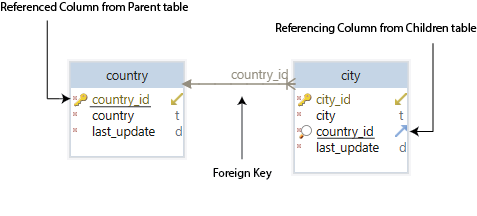
Every city row now carries the id of its country, so one query returns all the cities of one country. The key also works as a check. Insert a country and two cities, then a city whose country does not exist:
INSERT INTO country VALUES (1, 'USA');
INSERT INTO city VALUES (1, 'Miami', 1), (2, 'Los Angeles', 1);
INSERT INTO city VALUES (3, 'Lyon', 7);
PostgreSQL 17 accepts the first two statements and rejects the third:
ERROR:  insert or update on table "city" violates foreign key constraint "city_country_id_fkey"
DETAIL:  Key (country_id)=(7) is not present in table "country".
The key also decides what happens to the cities when their country is deleted. You choose the action when you declare the key:
| Declared as | Deleting country 1 |
|---|---|
REFERENCES country (NO ACTION, the default) | fails while Miami and Los Angeles still reference it |
REFERENCES country ON DELETE CASCADE | deletes Miami and Los Angeles as well |
REFERENCES country ON DELETE SET NULL | keeps both cities, with country_id set to NULL |
SET NULL needs a column that accepts NULL. Declare country_id as NOT NULL, and PostgreSQL refuses the delete with a not-null violation instead. DbSchema offers the same actions in its Foreign Key Editor.
Because the key is stored in the database, anything that reads the database catalog can draw the relationship without being told about it. A reverse-engineered relational diagram shows its foreign key lines with no work from you.
How MongoDB keeps related data
MongoDB has no FOREIGN KEY constraint and no delete actions. It stores documents in collections, and it gives you two ways of keeping related data together.
Embedding keeps the related data inside the parent document:
db.person.insertOne({
  name: "Mark Kornfield",
  addresses: [
    { street: "123 Church St", city: "Miami" },
    { street: "123 Mary Av", city: "Los Angeles" }
  ]
})
One db.person.findOne() returns the person with both addresses, and there is nothing to link. Referencing stores the related documents in a collection of their own, and only their _id in the parent:
db.parts.insertMany([
  { _id: ObjectId("000000000000000000000aaa"), partno: "1224-dsdf-2215", name: "bearing", price: 2.63 },
  { _id: ObjectId("000000000000000000000bbb"), partno: "9981-kkfa-1102", name: "rim", price: 12.4 }
])

db.products.insertOne({
  name: "wheel",
  catalog_number: 2234,
  parts: [ ObjectId("000000000000000000000aaa"), ObjectId("000000000000000000000bbb") ]
})
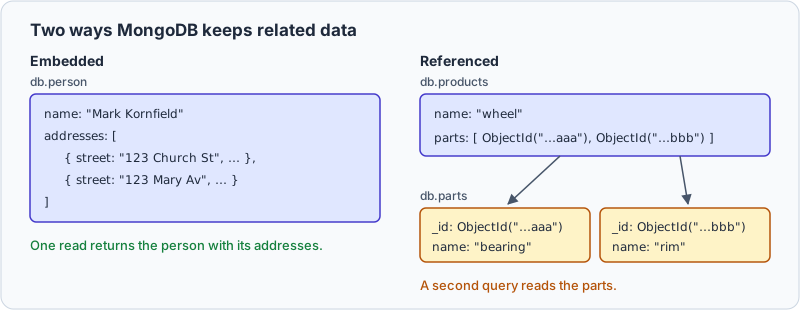
Reading the parts of the wheel takes two queries. The first fetches the product by its catalog number. The second fetches the parts whose _id is in the product's parts array:
const product = db.products.findOne({ catalog_number: 2234 })
db.parts.find({ _id: { $in: product.parts } })
| _id | partno | name | price |
|---|---|---|---|
| ObjectId('000000000000000000000aaa') | 1224-dsdf-2215 | bearing | 2.63 |
| ObjectId('000000000000000000000bbb') | 9981-kkfa-1102 | rim | 12.4 |
A stored _id like this is what the MongoDB manual calls a manual reference, and the manual leaves the second query to the application. The $lookup aggregation stage runs both steps in one query and puts the parts inside the product, in no fixed order:
db.products.aggregate([
  { $match: { catalog_number: 2234 } },
  { $lookup: { from: "parts", localField: "parts", foreignField: "_id", as: "part_docs" } },
  { $project: { _id: 0, name: 1, "part_docs.name": 1, "part_docs.price": 1 } }
])
[ { name: 'wheel', part_docs: [ { name: 'bearing', price: 2.63 }, { name: 'rim', price: 12.4 } ] } ]
The manual also describes DBRefs, which store the collection name in $ref beside the id in $id, and advises manual references unless you have a compelling reason to use DBRefs. MongoDB checks neither kind. Our $lookup guide covers the stage in depth.
What MongoDB does not check
A reference is only a value that happens to match another document. Take two collections that share a field:
db.countries.insertOne({ country_id: 1, country_name: "USA" })

db.cities.insertMany([
  { country_id: 1, city_name: "Miami" },
  { country_id: 1, city_name: "Los Angeles" }
])
Nothing tells MongoDB that cities.country_id means a country, so it accepts a city whose country does not exist, where PostgreSQL raised an error:
db.cities.insertOne({ country_id: 7, city_name: "Lyon" })
{ acknowledged: true, insertedId: ObjectId('6aa35071fa76021597c15de4') }
Deleting the country removes one document and leaves both of its cities in place, still carrying country_id: 1:
db.countries.deleteOne({ country_id: 1 })
db.cities.countDocuments({ country_id: 1 })
{ acknowledged: true, deletedCount: 1 }
2
To find the cities that point at nothing, join them to countries with $lookup and keep the ones that found no match. Run before the delete, the pipeline returns Lyon alone:
db.cities.aggregate([
  { $lookup: { from: "countries", localField: "country_id", foreignField: "country_id", as: "country" } },
  { $match: { country: { $size: 0 } } },
  { $project: { _id: 0, city_name: 1, country_id: 1 } }
])
| country_id | city_name |
|---|---|
| 7 | Lyon |
After the delete, it returns Miami and Los Angeles too. The pipeline makes the check that a foreign key makes on every write, but only when someone runs it, and only for fields that someone knows hold references. Writing that knowledge down is the job of a virtual foreign key.
Create a virtual foreign key in DbSchema
A virtual foreign key is a foreign key that exists only in DbSchema's model file. MongoDB neither declares nor enforces it, so no constraint is created in the database, and your application sees the same database as before.
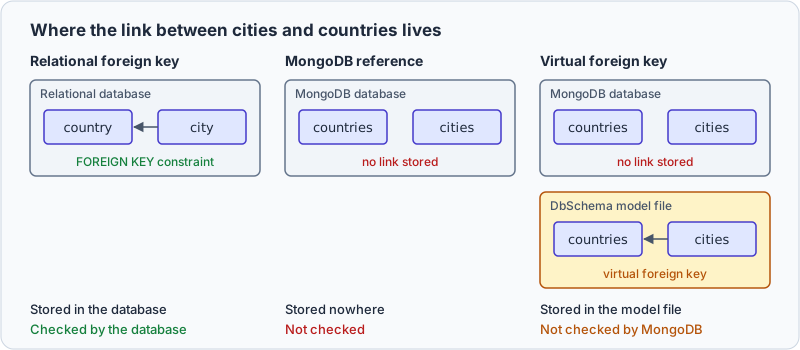
DbSchema keeps its own copy of the structure in a design model, a local XML file that holds the diagrams, the comments and the virtual foreign keys. You can work on the model with no connection open, then reconnect and compare it with the database from Schema → Compare Model with Database.
DbSchema fills the model when it connects to MongoDB. It reads a sample of documents from each collection, whose size you can configure, and infers the field names, the BSON types, the nested objects and the arrays that it finds. The result approximates what those documents contain, and MongoDB enforces none of it. Where a collection has a validation rule, DbSchema reverse-engineers the rule instead and treats it as the authoritative structure.
With the countries and cities collections on the diagram:
- Hover over
country_idincities. A connector handle appears on the right edge of the field. - Drag from the handle onto
country_idincountries. - When DbSchema asks whether the foreign key is real or virtual, choose virtual.
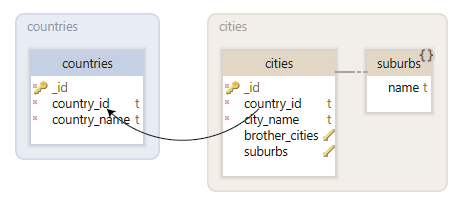
Double-click the line to open the Foreign Key Editor, where you can add a description or map more fields into the same relation.
Drawing the relation changes only the model file. Creating or editing a collection is what changes both sides, because DbSchema writes the collection's validation rule to the database and to the model file together. MongoDB's own Relational Migrator has a similar idea under the name synthetic foreign key, but it draws those on the relational tables it migrates from, not on MongoDB collections.
| Relational foreign key | MongoDB reference | Virtual foreign key | |
|---|---|---|---|
| Acts when the parent is deleted | yes | no | no |
| Drawn on the DbSchema diagram | yes | no | yes |
| Used by the Relational Data Editor | yes | no | yes |
Browse cities by country in the Relational Data Editor
The DbSchema Relational Data Editor uses foreign keys, real or virtual, to show several collections side by side. Open it from the Editors menu with New Relational Data Editor, or right-click a collection header on the diagram and choose Open in Relational Data Editor. Click the foreign key button on a pane's header to add the child collection as another pane.
Select a country in the countries pane, and the cities pane shows only the documents whose country_id matches. The filtering cascades: a relation from a third collection into cities adds a pane that follows the city you select, as many levels deep as the relations go. You write no query: DbSchema filters each pane from the relations that you drew.
The relations and your comments also reach the documentation. Double-click a collection or a field on the diagram to add a comment, then export from Diagram → Export HTML5 or PDF Documentation. The HTML5 documentation opens in any browser with no server behind it. It shows the diagram as a vector image, and the collection and field comments as mouse-over tooltips.
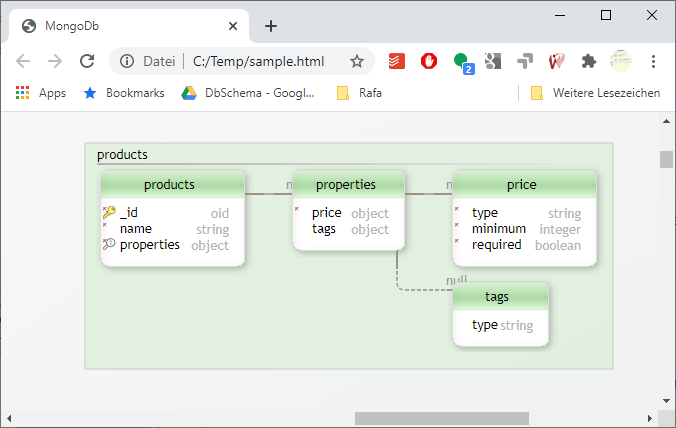
Together these steps turn a MongoDB database into something you can hand to a colleague: DbSchema infers the structure from the documents, takes the validation rule where one exists, records the virtual relations between collections, browses the data across them, and exports it all as interactive HTML5 documentation. Other tools cover some of these steps, and DbSchema covers them in one model.
Download DbSchema, connect to your MongoDB database, and draw a virtual foreign key for the first reference field that nobody has documented yet. Then open both collections in the Relational Data Editor and read a document next to the documents it points at. Connecting, reverse-engineering and the interactive diagrams are in the free Community Edition. Saving the model to a file, which is where virtual foreign keys are kept, the Relational Data Editor and the HTML5 documentation are in Pro.









