Seeing the Structure of a Schemaless Database
Connect DbSchema to an undocumented MongoDB database and reverse-engineer a diagram of what the documents contain, sampled and inferred, not enforced.
On this page
For backend and full-stack developers holding a connection string to a MongoDB database nobody documented: MongoDB never declared a shape for the data, so the structure has to be read out of the documents themselves. What comes back is an inference from a sample of documents, not a declaration the database enforces, and this guide covers both how to produce that picture and how to read it accurately.
Why a MongoDB collection has no declared shape
MongoDB has a flexible data model. Documents within a single collection are not required to have the same set of fields, and a field's data type can differ between documents.[1] Nothing in the database states which fields a collection contains or what types they hold. Two documents in the same collection make the point:
db.customers.insertMany([
    { _id: 1, name: "Ada", loyalty_points: 120 },
    { _id: 2, name: "Ben", loyalty_points: "gold", company: "Fielding Ltd" }
])
Both documents sit in the same collection. The company field exists in one and not the other, and loyalty_points holds an int in the first document and a string in the second. MongoDB accepts both without complaint.
The reason is the document model itself. A document is a set of field-and-value pairs, and a value can be any BSON type, including another document or an array.[2] The structure lives in the data, not in a declaration. In PostgreSQL or MySQL the system catalog declares every column and type, and a tool reads the declaration. In MongoDB there is nothing to read except the documents, which is why a tool has to look at the data.
What MongoDB does enforce on a standard collection is short:
- Every document needs a unique _id value, which acts as the primary key; if an inserted document omits it, the driver generates an ObjectId.[3]
- Field names are strings, and each field name must be unique within a document.[2]
- Everything else, which fields exist, what types they hold, how deeply they nest, is decided per document.
So, in plain words: the schema is optional, not absent. The database happily holds unstructured data, but most collections end up with de facto conventions that the application code maintains by hand. The rest of this article is about reading those conventions out of the data.
What you need before you connect
You need three things, and the third one is free:
- A reachable MongoDB deployment, local or remote, and an account that can read the collections you want to see.
- The connection string, in the standard mongodb:// or mongodb+srv:// form.
- DbSchema, which connects to MongoDB and reverse-engineers it; the free Community Edition used here covers connecting and reverse-engineering, interactive diagrams and the SQL editor at no cost.
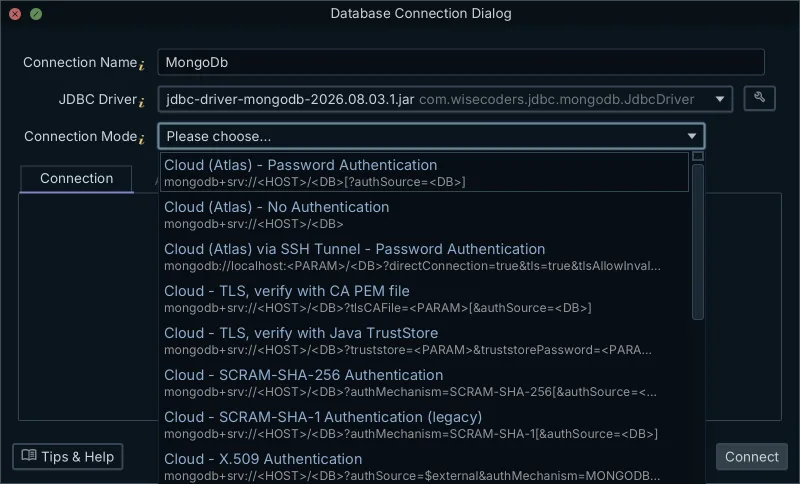
One distinction carries through the whole article, so it is worth stating before you connect. The design model belongs to DbSchema. The collections are MongoDB's, on the server. Reverse-engineering reads the database into the model and changes neither side: MongoDB gains no schema, and the model holds no data.
If your database runs on MongoDB Atlas and you still need the cluster, user and network-access setup, the MongoDB Atlas ER Diagram Designer article walks through that side. This article starts where that one ends, at a working connection.
The type names you will see on the diagram come from BSON, the binary format MongoDB stores documents in. BSON has more types than JSON: alongside string and array you will meet int, long, double, date, objectId, and object for embedded documents.[3] Those aliases are what the next sections read off the diagram.
Sampling the documents to infer the fields
DbSchema introspects a configurable sample of documents per collection and infers field names, BSON types, nested objects and arrays from that sample. The sample, not the whole collection: reading every document in a large collection would take too long, so it reads a configurable number of documents per collection and builds the visual schema from what it saw.
That makes the result an approximation of what the sampled documents contain. It is not a schema MongoDB enforces, because MongoDB enforces no schema unless the collection carries a validation rule. The diagram shows what the sample revealed, and the sample is a subset of the data.
Sampling is the standard approach, not a shortcut specific to one tool. MongoDB Compass's Schema tab is also based on sampling the documents in a collection, and for query result sets larger than 1000 documents Compass shows a subset of the results.[4] Any tool that promises a schema for a schemaless database is inferring it from something short of the full data.
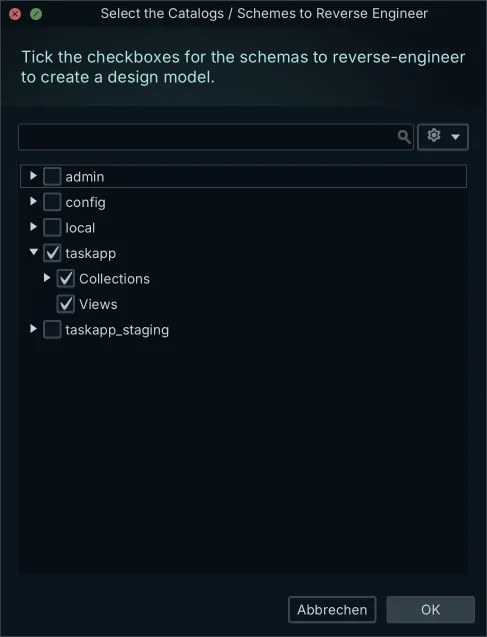
What you do: connect DbSchema to the database, choose the database, and reverse-engineer it. What comes back: each collection laid out as a box on the diagram, with the fields the sample revealed, their BSON types, and the nested structures drawn inside the box. From there you can drag the boxes into a layout that matches how you think about the domain.
Reading nested documents and arrays on the diagram
Nested structures are what make a document diagram look different from a relational one. Take this document from a products collection:
{
  _id: ObjectId("aef0c1d9e5b3a2c7d8f0abcd"),
  name: "Desk Lamp",
  weight: Double(1.4),
  tags: [ "lighting", "office" ],
  supplier: {
    name: "Bright Co",
    country: "DE"
  }
}
On the diagram, supplier appears as a field of type object with name and country indented inside it, and tags appears as an array of strings. An embedded document is drawn as fields inside the collection box, an array as a repeated structure, and you can expand and collapse both. A relational diagram would need two extra tables and two foreign keys to say the same thing; here the nesting is the structure.
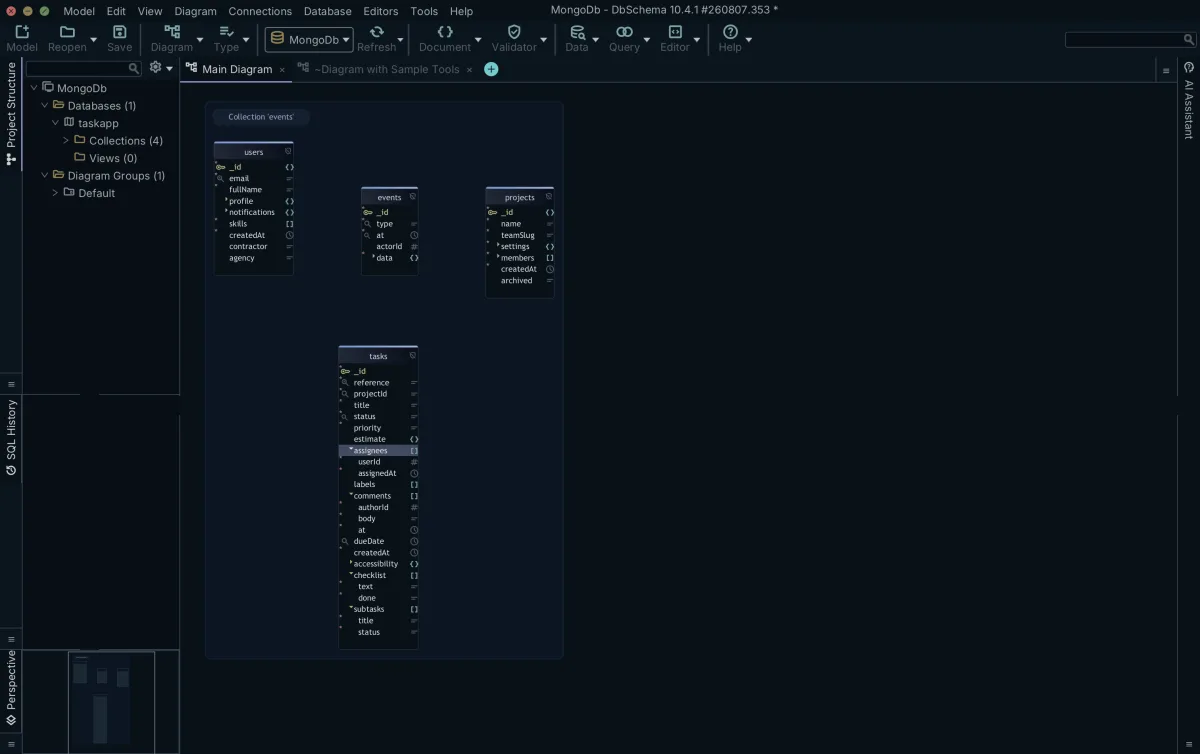
The type names next to each field are BSON aliases. _id shows objectId, the default _id type: an ObjectId is 12 bytes long, made up of a 4-byte timestamp, a 5-byte random value generated once per client-side process, and a 3-byte incrementing counter.[3] weight shows double, tags shows an array of string, supplier shows object.
Dot notation is how you reach into what the diagram shows when you query. The supplier's country is addressed as "supplier.country", and the first element of tags as "tags.0".[2] Reading the diagram and writing the query use the same paths, which is the practical reason to get the nesting drawn correctly.
When a collection declares a validation rule
A collection can carry a validation rule, written with the $jsonSchema operator. MongoDB supports draft 4 of the JSON Schema standard, with the bsonType keyword added so the rule can name BSON types such as int or objectId.[5][6] Once rules exist, all document inserts must match them, and MongoDB by default rejects any insert or update that would produce an invalid document.[7] A minimal rule for the products collection looks like this:
db.createCollection("products", {
    validator: {
      $jsonSchema: {
        required: [ "name", "weight" ],
        properties: {
          name: { bsonType: "string" },
          weight: { bsonType: "double" }
        }
      }
    }
})
A declared rule changes what DbSchema shows you. Where a validation rule exists, DbSchema reverse-engineers that rule as the authoritative structure rather than guessing from the sample. The reason is the difference in origin: the rule is declared, the sample is only observed. A declared rule tells you what the collection is supposed to contain; a sample tells you what a subset of documents happened to contain.
Creating or editing a collection in DbSchema writes the validation rule back to both the database and the model file, so the two stay in step, as the MongoDB features reference describes. That is the write-side workflow, and this article only reads rules. If you want to go the other way, from a finished design to generated validation rules, see Generating MongoDB Validation Rules From a Design.
| Inferred from sample | Read from validation rule | |
|---|---|---|
| Source | The documents DbSchema sampled | The collection's declared validator |
| Authority | An approximation of what the sampled documents contain | What MongoDB enforces on inserts and updates |
| Blind spot | A field absent from the sample | Only what lies outside the rule; fields the rule does not mention still come from the sample |
What the sample can miss
The direct consequence of sampling: a rare field can be missed entirely if it appears in no sampled document. A field present in a minority of documents can also look rarer than it is, or show a type that most of its documents do not use. None of that is a defect in DbSchema; it is what inferring from a subset produces.
- A field absent from every sampled document does not appear on the diagram, even if other documents in the collection carry it.
- A field holding strings in some documents and numbers in others shows whichever type the sample weighted more heavily.
- A type shown for a field is the type the sampled documents used, not a constraint on future inserts.
Raising the sample size trades time for completeness. The more documents DbSchema reads per collection, the more likely the diagram includes every field, and the longer the reverse-engineering takes. On a large collection, reading every document is exactly what tools avoid: Compass analyzes a sample for the same reason, and its schema analysis of a very large collection can time out even so.[4]
Heterogeneous fields are common enough that Compass documents the behavior: a field named address may contain strings and integers in some documents, objects in others, or some combination of all three, and in that case the Schema tab shows a percentage breakdown of the types in that field.[4] Expect the same underlying data to produce a mixed picture in any inferred schema.
Checking the inferred structure against the data
The diagram is a hypothesis, and you can test it with queries instead of trusting it. Two operators do most of the work. The $type operator matches documents where a field holds a given BSON type, using the same aliases the diagram shows.[3] The $jsonSchema operator, the same one validation rules are written with, works as a query predicate to find documents that match or violate a structure.[6]
Say the diagram shows weight as a double, inferred from the sample. To check whether any document in the whole collection holds weight as a string, query for exactly that:
db.products.find(
  { weight: { $type: "string" } },
  { name: 1, weight: 1 }
)
The query returns the documents the sample missed:
| name | weight |
|---|---|
| Floor Lamp | "2.6" |
One row back means one document carries weight as a string, and the inferred type was a summary of the sample, not a rule. An empty result is the useful outcome too: it confirms the diagram against every document, not just the sampled ones.
On a large collection, give the verification queries the same courtesy the analysis tools give themselves. Compass exposes a MAX TIME MS option for schema analysis, defaulting to 60000 milliseconds, because analysis of very large collections can be slow.[4] A full-collection $type scan is the same kind of work, so add a limit or an index-backed filter when the collection is big.
Close the loop and the workflow is complete: the diagram is a hypothesis, the query is the test, and a field the query finds that the diagram lacks goes back into your picture of the data.
The diagram answers what one collection contains. The next question is how collections relate, and MongoDB gives you nothing declared to read there either. Exploring Data Across MongoDB Collections picks up there: it covers the virtual relations DbSchema holds in the model and how to read documents across collections through them. If the question is the design rather than the reading, MongoDB Relationships: Embed vs Reference covers that decision.
What you are holding at the end is a diagram of what the sampled documents contain, refreshable as the data drifts. Re-run the reverse-engineering after the application ships a new field and the diagram catches up; the database itself never changed. Connecting, reverse-engineering and interactive diagrams are all covered by the DbSchema Community Edition, available as a free download, which is where the whole workflow above comes from: it connects to your own MongoDB database and reverse-engineers the collections.
Frequently asked questions
Is MongoDB schemaless?
Not in the strict sense. MongoDB uses a flexible data model: documents in one collection are not required to have the same set of fields, and a field's data type can differ between documents. Nothing forces a uniform shape, but collections often settle into one in practice, and you can attach validation rules to enforce parts of it. Read "schemaless" as "schema optional".
How do I see the structure of a MongoDB collection?
By sampling it. Tools that show a collection's structure read a sample of documents and infer the field names, BSON types, nested objects and arrays from what they see. MongoDB Compass's Schema tab works this way, and DbSchema does the same and draws the result as an interactive diagram you can rearrange and expand.
Can you get an ER diagram from MongoDB?
Yes, as an inferred diagram. DbSchema connects to the database, samples each collection, and draws the fields, nested objects and arrays as diagram boxes. It is a picture of what the sampled documents contain, not of constraints MongoDB declares, because apart from validation rules MongoDB declares none.
What happens if documents in a collection have different fields?
Nothing at the database level. MongoDB accepts documents with different fields and different types for the same field name. The differences show up in tooling: an inferred diagram lists every field seen in the sample, and a field present in only a few documents can look rarer than it is or be missed entirely if no sampled document carries it.
Does DbSchema read all my documents?
No. It reads a configurable sample of documents per collection and infers the structure from it, because reading every document would take too long on large collections. Sampling is the standard approach: Compass also analyzes a subset, and for query result sets larger than 1000 documents it shows a subset of the results. Raise the sample size when completeness matters more than speed.
What is a MongoDB validation rule?
A declared constraint attached to a collection, written with the $jsonSchema operator (MongoDB supports draft 4 of JSON Schema) or with query operators. Once rules exist, all inserts must match them, and by default MongoDB rejects any insert or update that would produce an invalid document. When a collection has one, the rule is reverse-engineered as the authoritative structure instead of guessing from the sample.
Sources
See what your MongoDB documents actually contain
DbSchema connects to MongoDB, samples the documents per collection and draws the inferred structure as an interactive diagram — free Community Edition included.









