Open-Source Schema Migration Tools
For the backend developer who wants schema changes reviewed in Git and a migration script they can read before it runs.
On this page
Schema changes travel badly when the only record of one lives in somebody's console history. DbSchema closes that gap first: it keeps the whole design in a plain XML file that Git diffs like source code, compares that file against the live database, and writes the migration script from what differs. Liquibase and Flyway come at the same problem from the other end, replaying files you author yourself, and they are the two open-source runners worth knowing.
What is a migration script?
Say a table of user accounts has been in production for a year, and the application now has to record whether an address was verified. The change is one column, and the script that carries it has to reach every environment in the same form.
CREATE TABLE users (
  id SERIAL PRIMARY KEY,
  username VARCHAR(50) NOT NULL,
  created_at TIMESTAMP DEFAULT CURRENT_TIMESTAMP
);
That is the table as production has it. The target adds one column, so the script is a single statement:
ALTER TABLE users ADD COLUMN email_verified BOOLEAN DEFAULT FALSE NOT NULL;
A migration script is that statement plus the rules around it: it goes into version control, it runs in a fixed position in a sequence, and it runs once per database. Flyway states the contract plainly for its versioned migrations, which carry a version, a description and a checksum and are applied to a target database in order, exactly once[1]. Reading the statement before it runs is the part that matters most on a large table, because an ALTER TABLE on a table nobody expected to be touched is easier to catch on screen than in a rollback.
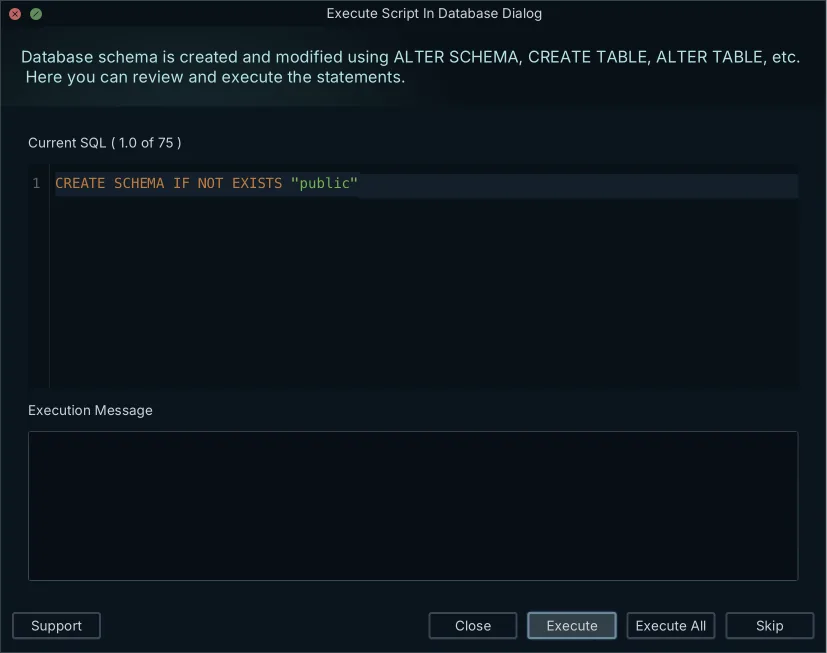
A version-controlled database migration tool exists so that every developer and every CI runner applies the same statements in the same order.
How to generate a migration file?
There are three ways to end up with the file, and they differ in what you have to write by hand.
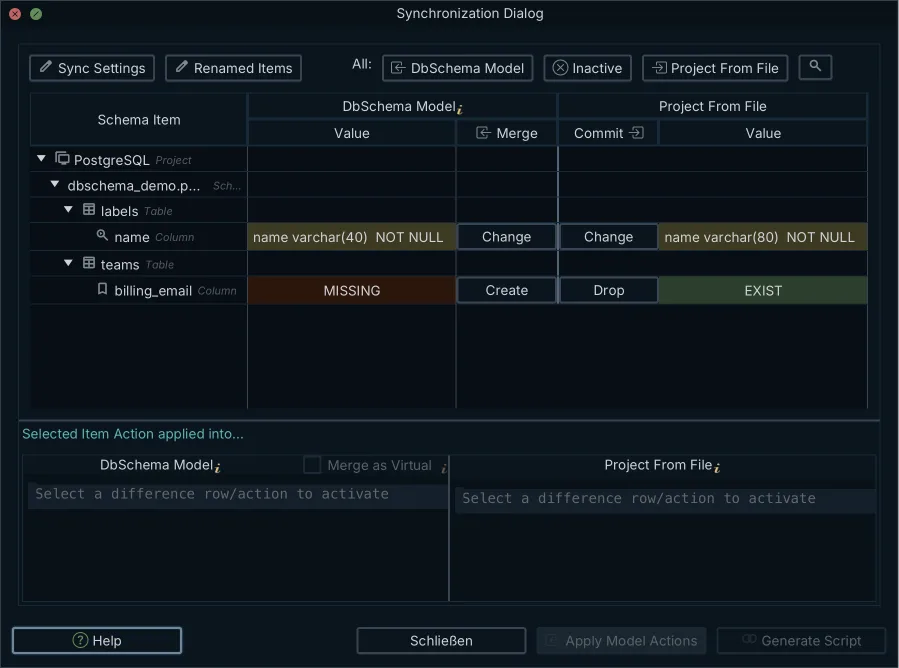
In DbSchema you generate it from a difference. The design model is saved locally as a portable .dbs project file in plain XML, so it commits and branches inside Git next to the application source. DbSchema then compares two schema states, either two revisions of the .dbs file or the model against a live target database, detects added tables, changed data types, changed foreign keys and changed indexes, and writes the DDL that reconciles them. Editing the diagram changes the model file only; the database changes when you execute the generated script.
Liquibase generates it from a database. The generate-changelog command creates a changelog file whose changesets re-create the current state of the database, and the extension you give the filename decides whether that changelog comes out as XML, YAML, JSON or SQL[2]. With Flyway you write the file yourself: a new SQL file, prefixed with a version number one higher than the last, saved into the migrations directory.
How to run a migration script?
Running one means executing the DDL against a target engine and recording that it ran, in a history table that acts as the audit trail of every change performed against the schema[3]. In a pipeline the runner does four things in this order.
- Compare each migration file's checksum against the history table.
- Take the lock, so two runners cannot deploy at the same time.
- Execute the pending statements, inside a transaction where the engine supports one.
- Write a history row with the version, the timestamp, the checksum and the outcome.
A command-line runner does all four without showing you anything except its log, which is fine until a database has drifted and the log is the only place you can look.
DbSchema replaces that log with a screen. You open the design model, connect to the target database, and read the differences side by side. For each one you choose whether to push the change to the database, pull it into the model, or leave it alone, which turns the diff into a safe migration script. Nothing reaches the database until you click Execute in the Sync Dialog, and the statements can be edited in place before you do[4].
What are the three data migration tools available?
Three shapes of tool cover database change: a visual modeler that diffs a design against a database, a changelog orchestrator, and a SQL-first runner.
| Tool | Change is defined in | Deployed from | Engines |
|---|---|---|---|
| DbSchema | An ER diagram and a .dbs XML model | The Sync Dialog, after review | 70+ SQL and NoSQL |
| Liquibase | A changelog in XML, YAML, JSON or SQL | The command line | 60+ |
| Flyway | Numbered plain SQL files | The command line | Relational and NoSQL drivers |
What DbSchema does with the model file
DbSchema starts offline. You design on interactive ER diagrams, keep the XML model in Git, and run the comparison in either direction against a live database to produce the migration script. The design and the deployment are the same artifact, so the diagram in the pull request is the diagram that was deployed.
How Liquibase orchestrates changelogs
Liquibase reads a changelog that sequentially lists all changes made to the database and works out which changesets are still undeployed[5]. The XML, YAML and JSON forms use Liquibase change types rather than engine-specific DDL, so one changelog can target more than one engine, and Liquibase states that it works with 60+ databases, including relational, NoSQL and graph databases[6].
How Flyway runs plain SQL files
Flyway keeps the change in the file name. A versioned migration carries its version, description and checksum in the filename, runs in version order, and runs exactly once against each target database[1]. There is no abstraction layer to learn and no format to choose. There is also nothing that writes the file for you.
Is Liquibase a database migration tool?
Liquibase is a database migration tool, and it is the changelog-driven one of the pair. Liquibase Community is released and licensed under the FSL, while Liquibase Secure is released under a commercial EULA and runs only when a license key is provided[7]. Liquibase 5.0 and later need Java 17[8].
What it applied is recorded in the target database. Liquibase creates the DATABASECHANGELOG table automatically if it does not exist, identifies each row by the combination of id, author and filename rather than by a primary key, and stores an MD5SUM per row that it uses to detect a changeset edited after deployment[11].
The line between the two distributions matters when you point generate-changelog at an existing database. Tables, columns, indexes, views, foreign keys, sequences and unique constraints come out in the open-source edition; check constraints, functions, stored procedures, triggers, packages and composite types require Liquibase Secure[2]. A schema with triggers therefore starts life in Liquibase as a changelog with holes in it, which is worth knowing before the first import rather than after.
What is the best tool for data migration?
For a backend developer who wants the schema reviewed in Git and the script read before it runs, DbSchema Pro Edition is the answer: it combines visual ER modeling, an offline model file that merges in pull requests, and live schema synchronization in one desktop application. Writing DDL by hand for a table alteration stops being part of the job, and the generated script is still yours to edit before it runs. A wider view of the field is in schema migration tools compared.
Two other tools come up on the same shortlist, and they divide the work differently.
| Tool | Design surface | Migration output |
|---|---|---|
| DbSchema | Interactive ER diagram, .dbs XML model | SQL generated from a model-to-database diff |
| DBeaver | Database catalog browsing | Schema compare in the paid editions |
| dbdiagram.io | DBML text in the browser | SQL DDL generated from the DBML |
DBeaver is a universal client whose day job is querying and browsing data; its edition comparison lists schema compare among the features of the Enterprise, Ultimate and Team editions[9]. dbdiagram.io draws from DBML, a domain-specific language for defining database structure that maps directly to SQL output[10], which makes it a documentation format rather than a deployment path.
The workflow DbSchema puts end to end runs in five steps.
- Design or edit the schema on the diagram with no connection open, which writes to the
.dbsfile alone. - Commit that file, so the change reaches the pull request as readable XML.
- Connect to development, staging or production and compare the model against it.
- Read the generated ALTER, CREATE and DROP statements.
- Click Execute, which is the first moment the live database changes.
Download DbSchema at https://dbschema.com/download.html, connect it to your database, and reverse-engineer the schema into a diagram before you compare it against staging. Reverse-engineering, the diagrams and the SQL editor are in the free Community Edition; the .dbs model file and schema synchronization are Pro, and the download runs as a 15-day Architect trial.
Frequently asked questions
Which tool is best for data migration?
For designing visually and versioning the result in Git, DbSchema Pro Edition is the one to use: it compares the offline XML model against the live database and generates the migration script from the differences. The generated script is plain SQL, so a team that deploys through Flyway or Liquibase can commit it as the next migration file.
Is Liquibase a database migration tool?
Liquibase applies the changes a changelog lists and records what it applied. A changeset can also carry preconditions, tags that test the state of the database before an update runs, and Liquibase deploys no changeset whose precondition fails[12].
What are the three data migration tools available?
DbSchema generates the script from a diff between a design model and a database, Liquibase replays changelogs, and Flyway replays numbered SQL files. The section above sets the three side by side.
How to generate a migration file?
In DbSchema the file comes out of a comparison: you compare the Git-versioned XML model against the target database, and the SQL follows from what differs. Liquibase's generate-changelog and the file you write by hand for Flyway are the other two routes, set side by side in the section on generating a migration file above.
What is a migration script?
A migration script is the DDL that moves a database from one structure to the next, kept in version control so every environment gets the same statements. Not every script runs once. A Flyway repeatable migration carries no version, and Flyway re-applies it on migrate whenever its checksum changes[13].
How to run a migration script?
A script runs from a command-line runner, a CI job, or a desktop client that connects and executes it. In DbSchema, Schema → Create or Upgrade Schema in Database covers the case where the target database does not have the schema yet, and generates the DDL for you to review before executing[4].
Sources
Turn a schema diff into a migration script
DbSchema compares your offline .dbs model against a live database, lists every difference side by side, and generates the DDL for you to review before it runs. Schema synchronization is a Pro Edition feature; the free Community Edition covers reverse-engineering, interactive diagrams and the SQL editor.









